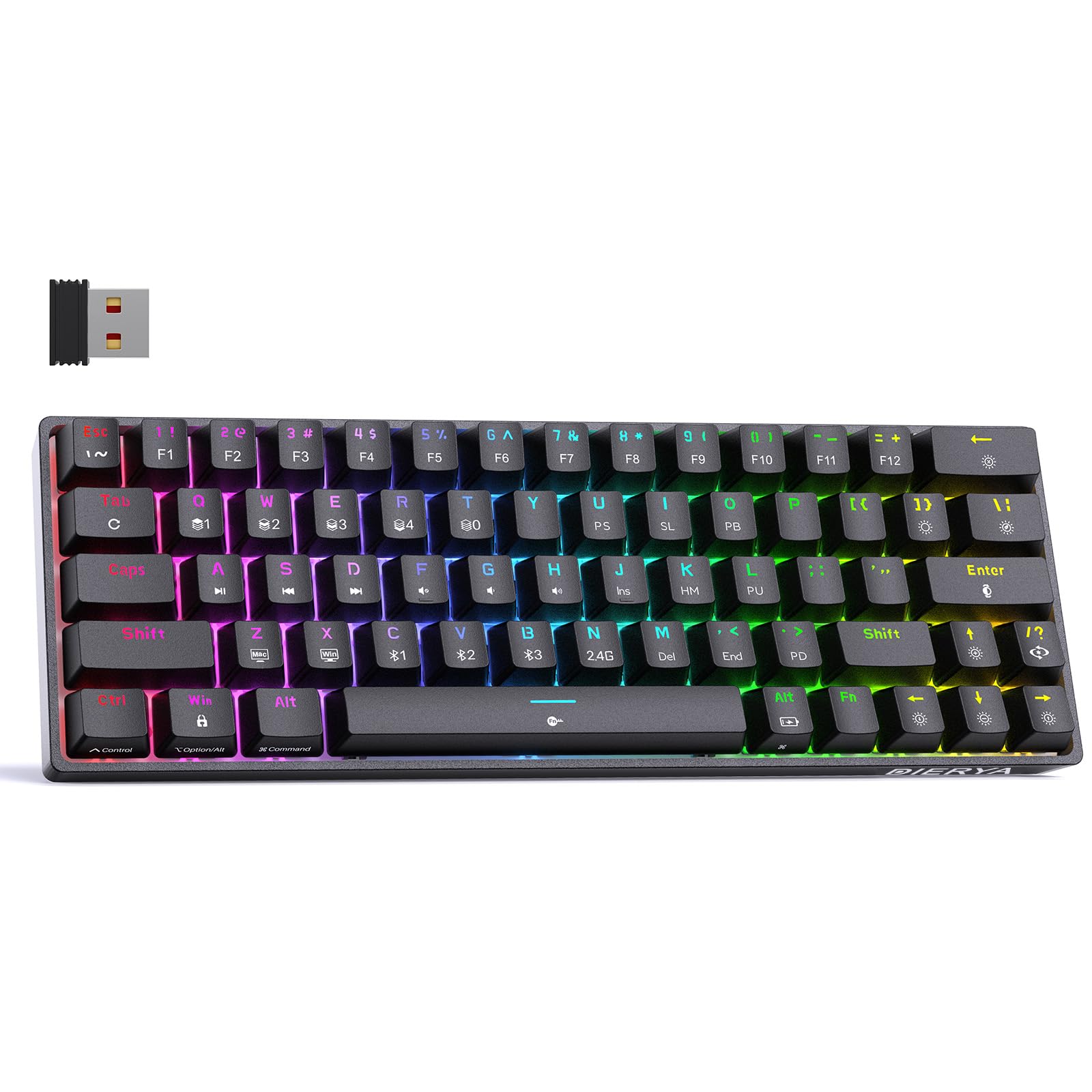
Thank you for choosing the DIERYA DK63 60% Wireless Mechanical Gaming Keyboard. This compact 63-key keyboard offers versatile connectivity options, vibrant RGB backlighting, and durable mechanical switches for an enhanced typing and gaming experience. This manual provides detailed instructions to help you set up, operate, and maintain your keyboard.
Contenido del paquete
DIERYA DK63 Wireless Mechanical Keyboard (1)
2.4G Receiver (hidden in the fuselage) (1)
Extractor de teclas (1)
Cable USB (1)
Manual de usuario (1)
Producto terminadoview
The DIERYA DK63 is a compact 60% mechanical keyboard designed for efficiency and performance. It features 63 keys, including directional keys, and utilizes an "FN" key for full functionality, maximizing desktop space. The keyboard is equipped with Blue Switches, providing tactile feedback and a distinct click sound, ideal for typists. It supports three connection modes: 2.4G wireless, Bluetooth 5.0, and wired USB-C, allowing seamless switching between various devices. A high-capacity 3000mAh battery ensures extended usage, and the rich RGB dynamic lighting system offers 18 modes and 16.8 million customizable colors.
Image: The DIERYA DK63 keyboard showcasing su diseño compacto del 60% y su vibrante retroiluminación RGB.
Instrucciones de instalación
1. Conexión por cable
Connect the provided USB-C cable to the keyboard's USB-C port and the other end to your computer's USB port. The keyboard will automatically connect and begin charging.
Image: Close-up of the keyboard's USB-C port and the included Type-C data cable for wired connection and charging.
2. Conexión inalámbrica 2.4G
Localice el receptor USB 2.4G, normalmente guardado en un compartimento en la parte inferior del teclado.
Conecte el receptor 2.4G a un puerto USB disponible en su computadora.
Flip the connection switch on the keyboard to the "2.4G" position.
Prensa FN+N. The 2.4G indicator light will illuminate, indicating a successful connection.
Image: The underside of the keyboard showing the 2.4G dongle storage area and the connection mode switch.
Video: DIERYA DK63 Operation Guide, demonstrating 2.4G and Bluetooth connection steps, FN key usage, and RGB lighting adjustments.
3. Conexión Bluetooth
Flip the connection switch on the keyboard to the "Bluetooth" position.
En su dispositivo (computadora, tableta, teléfono inteligente), habilite Bluetooth y busque los dispositivos disponibles.
The keyboard will appear as "DIERYA DK63-1", "DIERYA DK63-2", or "DIERYA DK63-3". Select one to pair.
To switch between Bluetooth channels (BT1, BT2, BT3), press FN+C, FN+V, o FN + B respectivamente.
Instrucciones de funcionamiento
FN Key Usage
El FN key is essential for accessing secondary functions on the compact DK63 keyboard. Hold down the FN tecla y presione la tecla deseada para activar su función secundaria.
FN + Z/X: Switch between Mac OS and Windows system layouts.
FN + barra espaciadora: Lock/Unlock the keyboard. The FN key will flash red when locked.
FN + Tabulador: Hold to reset the keyboard to factory settings (keyboard will flash to indicate reset).
Control de retroiluminación RGB
The DK63 keyboard features 18 dynamic RGB lighting modes and 16.8 million colors. Use the following key combinations to adjust the lighting:
FN + Retroceso: Turn RGB lights On/Off.
FN + [ ]: Switch custom lighting effects (requires driver software for full customization).
FN + Entrar: Change lighting color.
FN + /?:Cambia entre diferentes modos de iluminación.
FN + flecha arriba: Aumenta el brillo de la luz de fondo.
FN + flecha hacia abajo:Disminuye el brillo de la luz de fondo.
FN + Flecha derecha: Speed up lighting effect.
FN + Flecha izquierda: Slow down lighting effect.
Image: The keyboard displaying various RGB lighting effects and key combinations for adjusting them.
Video: DIERYA DK63 Operation Guide, demonstrating 2.4G and Bluetooth connection steps, FN key usage, and RGB lighting adjustments.
Mantenimiento
Para garantizar la longevidad y el rendimiento óptimo de su teclado DIERYA DK63, siga estas pautas de mantenimiento:
Limpieza: Utilice un paño suave y sin pelusa ligeramente seco.ampened with water or a mild cleaning solution to wipe the keycaps and keyboard surface. Avoid excessive moisture. For deeper cleaning, use the provided keycap puller to remove keycaps and clean underneath with compressed air.
Almacenamiento: Guarde el teclado en un lugar fresco y seco, alejado de la luz solar directa y de temperaturas extremas.
Cuidado de la batería: To prolong battery life, avoid fully discharging the keyboard frequently. Charge it when the battery reminder indicates low power.
Image: The DIERYA DK63 keyboard with a keycap puller, illustrating how to remove keycaps for cleaning or switch replacement.
Solución de problemas
Asunto
Posible solución
El teclado no se conecta a través de 2.4G.
Ensure the 2.4G receiver is securely plugged into a USB port and the keyboard switch is set to "2.4G". Press FN+N para restablecer la conexión.
Problemas de conexión Bluetooth.
Ensure the keyboard switch is set to "Bluetooth". On your device, forget the keyboard and attempt to re-pair. Try switching Bluetooth channels using FN + C/V/B. Ensure the keyboard is charged.
Las luces RGB no funcionan o están atascadas.
Prensa FN + Retroceso to toggle lights. Try switching lighting modes with FN + /?. If issues persist, perform a factory reset by holding FN + Tabulador.
Las teclas no responden.
Check if the keyboard is locked (FN + barra espaciadora). Ensure the correct system layout (Windows/Mac) is selected (FN + Z/X). Recharge the battery if in wireless mode. Try a wired connection.
Presupuesto
Número de modelo: T63
Disposición: 60% (63-keys)
Tipo de interruptor: Blue Switch (Tactile & Clicky)
Conectividad: 2.4 GHz inalámbrico, Bluetooth 5.0, cable USB-C
Capacidad de la batería: 3000 mAh
Retroiluminación RGB: 18 modes, 16.8 million colors
Compatibilidad: Windows 11/10/8/7/XP, Mac OS, Vista, Linux
Dimensiones del producto: 11.53" de largo x 3.98" de ancho x 1.65" de alto
Peso del artículo: 1.41 libras
Image: Visual representation of the DIERYA DK63's ultra-compact 63-key layout and dimensions.
Video: DIERYA DK63 Switch Sound Comparison, demonstrating the sound profiles of Red (linear) and Blue (clicky) switches.
Garantía y soporte
DIERYA is committed to your satisfaction. If you encounter any issues with your DK63 keyboard, please do not hesitate to contact us. Our customer support team is available to assist you with troubleshooting, warranty claims, and any product-related inquiries.
Para obtener ayuda, visite el sitio Tienda DIERYA en Amazon o consulte la información de contacto proporcionada con su compra.
Manual de usuario del teclado mecánico inalámbrico para juegos DIERYA DK63 Manual de usuario completo del teclado mecánico inalámbrico para juegos DIERYA DK63. Esta guía cubre las especificaciones del producto, la conectividad Bluetooth y 2.4G, y...file Gestión, controles multimedia, personalización de iluminación RGB y operaciones con interruptores de palanca.
Guía del usuario del teclado mecánico DIERYA DK63 Guía completa del teclado mecánico DIERYA DK63, que abarca los modos de conexión, la iluminación RGB, las teclas multimedia, los atajos y el modo de juego. Aprende a personalizar tu experiencia con el teclado.
Guía de funciones del teclado mecánico Dierya DK 61SE Una guía completa de las teclas de función y características especiales del teclado mecánico Dierya DK 61SE, incluidos efectos de iluminación y controles multimedia.
Guía de funciones del teclado mecánico DIERYA DK 61SE Explora toda la funcionalidad de tu teclado mecánico DIERYA DK 61SE con este completo manual. Aprende todas las combinaciones de teclas FN para multimedia, controles del sistema, ajustes de iluminación y funciones especiales. Incluye especificaciones del producto y contacto de soporte.