1. Introducción
This manual provides detailed instructions for the installation, configuration, and operation of your Rebel KOM1031 Dual-Band Wireless Network Repeater. This device is designed to extend the coverage of your existing Wi-Fi network, providing a stronger and more reliable signal in areas with weak or no coverage. It supports both 2.4 GHz and 5 GHz wireless bands, offering flexible connectivity options and high data transfer rates.
2. Contenido del paquete
Por favor verifique que todos los artículos estén presentes en su paquete:
- Rebel KOM1031 Wireless Network Repeater
- Manual de usuario (este documento)
- Ethernet Cable (may be included, check packaging)

Figura 2.1: The Rebel KOM1031 Repeater packaging, showing the device and its key features.
3. Producto terminadoview
Familiarize yourself with the physical components and indicators of the Rebel KOM1031 Repeater.
3.1. Disposición del dispositivo

Figura 3.1: Frente view of the Rebel KOM1031 Repeater, highlighting the LED indicators and Ethernet ports.

Figura 3.2: Lado view of the Rebel KOM1031 Repeater, showing the four external antennas in an extended position.

Figura 3.3: Abajo view of the Rebel KOM1031 Repeater, illustrating the integrated power plug and two RJ45 Ethernet ports.
3.2. Indicadores LED
| Indicador | Estado | Descripción |
|---|---|---|
| SISTEMA/ENERGÍA | Encendido fijo | El dispositivo está encendido y funciona normalmente. |
| 2.4G | Encendido fijo | 2.4 GHz Wi-Fi band is active. |
| 5.8G | Encendido fijo | 5 GHz Wi-Fi band is active. |
| LAN3 / LAN4 | Solid On/Flashing | Indicates an active Ethernet connection and data transfer on the respective LAN port. |
4. Guía de configuración
Follow these steps to set up your Rebel KOM1031 Repeater.
4.1. Colocación inicial y encendido
- Elija una ubicación: Plug the repeater into an electrical outlet in an area between your main router and the location where you need improved Wi-Fi coverage. Ensure it is within the range of your existing Wi-Fi signal.
- Encendido: Plug the device directly into a standard wall socket. The SYS/POWER LED should illuminate. Wait approximately 30-60 seconds for the device to boot up.
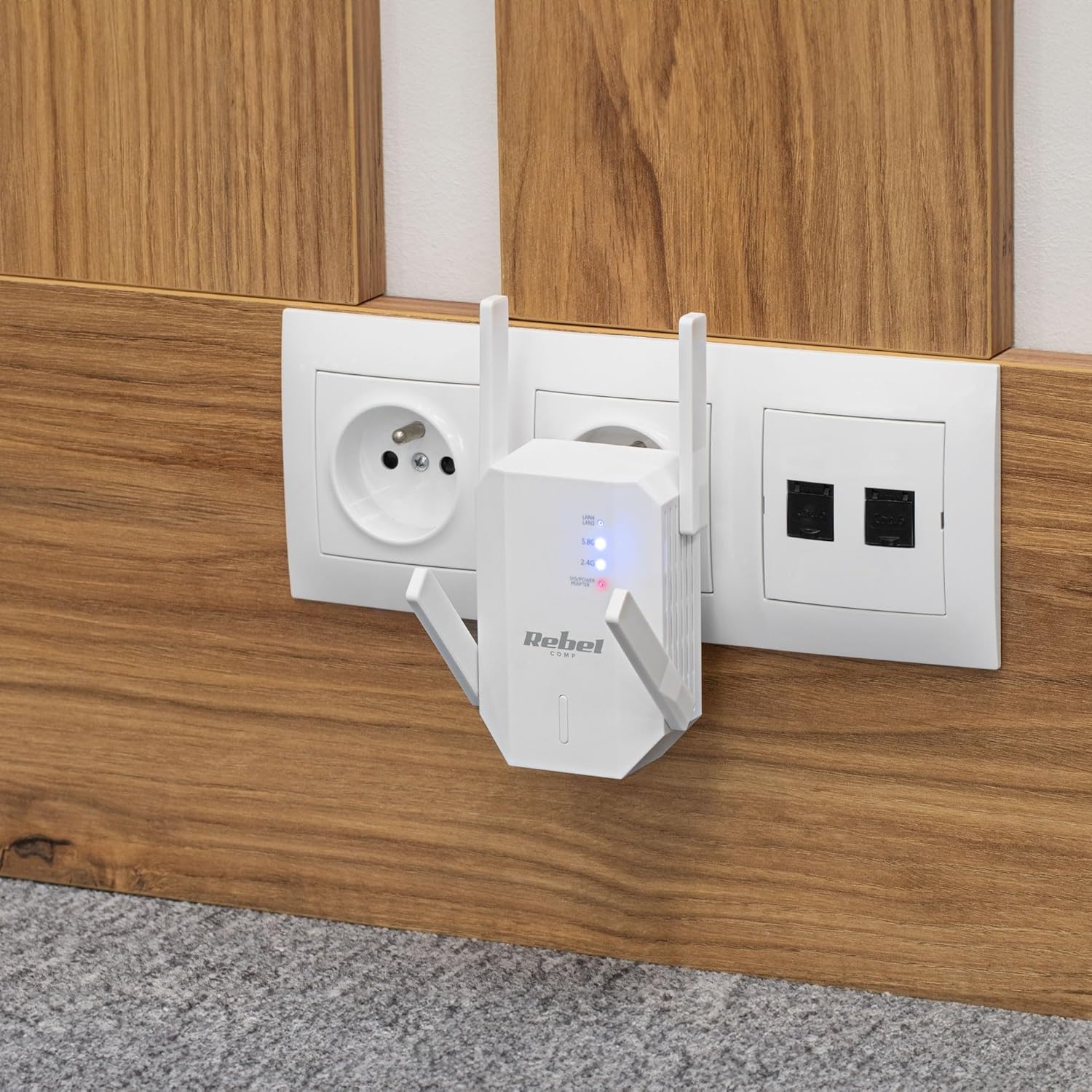
Figura 4.1: The Rebel KOM1031 Repeater plugged into a wall outlet, ready for configuration.
4.2. Conexión al repetidor
- Conectarse de forma inalámbrica: On your computer or mobile device, search for available Wi-Fi networks. Connect to the network named "Rebel_XXXX" or similar (check the label on the device for the default SSID). No password is required for the initial connection.
- Acceso Web Interfaz: Abrir una web browser (e.g., Chrome, Firefox, Edge) and enter the default IP address or domain name (usually 192.168.10.1 or rebelrepeater.net) en la barra de direcciones. Presione Enter.
- Acceso: When prompted, enter the default username and password (usually administración para ambos).
4.3. Configuration Wizard (Repeater Mode)
Most users will configure the device in Repeater Mode to extend an existing Wi-Fi network.
- Seleccionar modo repetidor: En el web interface, select "Repeater Mode" or "Wi-Fi Repeater" from the available options.
- Buscar redes: The device will scan for available Wi-Fi networks. Select your main Wi-Fi network (SSID) from the list.
- Introducir contraseña: Enter the Wi-Fi password (security key) of your main router.
- Configure Repeater SSID (Optional): You can choose to keep the same SSID as your main network or create a new one (e.g., "MyHome_EXT"). It is recommended to use a different SSID to easily distinguish between networks.
- Aplicar configuración: Click "Apply" or "Save" to confirm your settings. The repeater will restart. This process may take a few minutes.
- Vuelva a conectar: After the repeater restarts, disconnect from the repeater's default Wi-Fi network and connect to your newly configured extended network (e.g., "MyHome_EXT") using the password you entered.
Your Rebel KOM1031 Repeater should now be extending your Wi-Fi network. Check the signal strength in previously weak areas.
5. Modos de funcionamiento
The Rebel KOM1031 supports multiple operating modes to suit various networking needs.
5.1. Modo repetidor (predeterminado)
In Repeater Mode, the device extends the coverage of an existing wireless network. It receives the wireless signal from your main router and re-transmits it, effectively expanding the Wi-Fi range. This is the most common mode for eliminating Wi-Fi dead zones.
5.2. Modo de punto de acceso (AP)
In AP Mode, the device connects to a wired network (via an Ethernet cable) and broadcasts a new wireless network. This is useful for adding Wi-Fi capability to a wired-only network or creating a new Wi-Fi hotspot from a wired internet connection.
- Conectar Ethernet: Connect an Ethernet cable from your router or modem to one of the RJ45 ports on the KOM1031.
- Acceso Web Interfaz: Follow steps 4.2 to access the web interfaz.
- Seleccione Modo AP: Choose "AP Mode" or "Access Point" from the configuration options.
- Configurar los ajustes de Wi-Fi: Establezca un nuevo SSID (nombre de red) y una contraseña segura para su nueva red inalámbrica.
- Aplicar configuración: Save the configuration. The device will restart and operate as an Access Point.
6. Mantenimiento
Un mantenimiento adecuado garantiza la longevidad y el rendimiento óptimo de su dispositivo.
- Limpieza: Utilice un paño suave y seco para limpiar el dispositivo. No utilice limpiadores líquidos ni aerosoles.
- Ventilación: Asegúrese de que el dispositivo esté ubicado en un área bien ventilada. No obstruya las ranuras de ventilación.
- Actualizaciones de firmware: Revise periódicamente las instrucciones del fabricante. website for firmware updates. Updating firmware can improve performance and security.
- Restableciendo: If the device malfunctions or you forget the login credentials, you can perform a factory reset. Locate the reset button (usually a small pinhole) and press it with a paperclip for 5-10 seconds while the device is powered on. The device will revert to factory default settings.
7. Solución de problemas
Si encuentra problemas, consulte los siguientes problemas y soluciones comunes.
7.1. Sin acceso a Internet después de la configuración
- Comprobar el enrutador principal: Asegúrese de que su enrutador principal tenga una conexión a Internet activa.
- Verificar contraseña: Verifique nuevamente que haya ingresado la contraseña de Wi-Fi correcta para su enrutador principal durante la configuración.
- Reubicar repetidor: The repeater might be too far from your main router. Move it closer to ensure it receives a strong signal.
- Reiniciar dispositivos: Reinicie su enrutador principal, el repetidor y sus dispositivos cliente.
7.2. No se puede acceder Web Página de administración
- Verifica la conexión: Ensure your device is connected to the repeater's Wi-Fi network (either the default "Rebel_XXXX" or your configured extended network).
- Verificar dirección IP: Confirm you are using the correct IP address (e.g., 192.168.10.1) or domain name (rebelrepeater.net).
- Borrar la caché del navegador: Intente limpiar su web caché del navegador o usar un navegador diferente.
- Restablecimiento de fábrica: If all else fails, perform a factory reset (see Section 6. Maintenance) and try setting up again.
7.3. Señal débil o velocidad lenta
- Colocación óptima: Ensure the repeater is placed optimally, roughly halfway between your router and the dead zone. Avoid physical obstructions like thick walls or metal objects.
- Interferencia: Other electronic devices (microwaves, cordless phones) can cause interference. Try moving the repeater away from such devices.
- Ajuste de la antena: Adjust the external antennas for better signal reception and transmission.
8. Especificaciones técnicas
| Característica | Detalle |
|---|---|
| Modelo | KOM1031 |
| Marca | Rebelde |
| Conjunto de chips | MTK7612 |
| Estándares inalámbricos | IEEE 802.11 a/b/g/n/ac |
| Bandas de frecuencia | 2.4 GHz / 5 GHz (Dual-Band) |
| Velocidad de transmisión de datos | Hasta 300 Mbps (2.4 GHz), hasta 867 Mbps (5 GHz) |
| Antenas | 4 External (2 dBi each) |
| Protocolos de seguridad | WEP, WPA/WPA2, WPS (64/128 bit) |
| Puertos Ethernet | 2x RJ45 (10/100 Mbps) |
| alcance inalámbrico | Hasta 100 metros (dependiendo del entorno) |
| Fuente de alimentación | 110-240 V; 50/60 Hz; 2 A |
| Dimensiones | 87 x 63 x 55 mm |
| Peso | 76 gramos |
| Usuarios simultáneos | Admite hasta 10 usuarios simultáneamente |
9. Información de seguridad
Lea y siga estas pautas de seguridad para evitar dañar el dispositivo o lesionarse usted mismo.
- No exponga el dispositivo al agua, la humedad o temperaturas extremas.
- No intente desmontar ni reparar el dispositivo usted mismo. Encargue cualquier servicio técnico a personal cualificado.
- Ensure the power outlet used is easily accessible and provides the correct voltagmi (110-240V).
- Evite colocar el dispositivo cerca de fuentes de calor o bajo la luz solar directa.
- Mantenga el dispositivo fuera del alcance de los niños y las mascotas.
10. Garantía y soporte
For warranty information, technical support, or further assistance, please refer to the official Rebel website or contact your retailer. Please have your product model number (KOM1031) and purchase details ready when seeking support.


