1. Producto terminadoview
This manual provides essential information for the operation and maintenance of your GHUST MR23GA Replacement Magic Voice Remote Control. This remote is designed as a replacement for various LG Smart TV models, offering convenient control without complex setup.

Image 1.1: The GHUST MR23GA Replacement Magic Voice Remote Control.
Características principales:
- Reemplazo directo: Functions as a direct replacement for original LG Magic Remote models.
- No se requiere programación: Ready to use out of the box after battery insertion.
- Construcción duradera: Made of high-quality ABS material for enhanced durability.
- Diseño compacto: Small and ergonomic for comfortable grip.
- Capacidad de búsqueda por voz: Supports voice commands for easier navigation (functionality may vary based on TV model and original remote features).
- Botones de acceso directo dedicados: Acceso rápido a servicios de transmisión populares como Netflix y Prime Video.
2. Configuración e instalación
The MR23GA remote control is designed for immediate use with compatible LG Smart TVs. No complex programming or pairing procedures are required.
2.1. Instalación de la batería
- Ubique la tapa del compartimiento de la batería en la parte posterior del control remoto.
- Deslice la cubierta hacia abajo o presione el pestillo para abrir el compartimiento.
- Insert two (2) AAA batteries (not included) into the compartment, ensuring the positive (+) and negative (-) terminals align correctly with the indicators inside.
- Cierre la tapa del compartimiento de la batería deslizándola hacia su lugar hasta que encaje firmemente.

Image 2.1: The remote control is designed for ease of use with no setup or programming required after battery installation.
Once batteries are installed, the remote is ready to operate your compatible LG Smart TV.
3. Instrucciones de funcionamiento
This section details the basic functions and operation of your MR23GA remote control.
3.1. Funciones básicas
- Botón de encendido (●): Presione para encender o apagar el televisor.
- Botones numéricos (0-9): Úselo para ingresar directamente números de canal.
- Subir/bajar volumen (+/-): Ajuste el nivel de volumen del televisor.
- Canal arriba/abajo (▲/▼): Cambiar canales de televisión.
- Botón de silencio (🔇): Silenciar o activar el audio del televisor.
- Panel de navegación (Arriba, Abajo, Izquierda, Derecha, OK): Navegue por los menús y seleccione opciones.
- Botón Atrás (↶): Regresar a la pantalla o menú anterior.
- Home Button (🏠): Access the TV's Smart Home dashboard.

Image 3.1: The compact size and ergonomic design make the remote easy to hold and operate.
3.2. Control por voz
Mantenga pulsado el Botón de micrófono to activate voice control. Speak clearly into the remote to issue commands or search for content. Release the button when finished speaking. Note that voice control functionality may depend on your specific LG TV model and its original features.
3.3. Botones de acceso directo dedicados
El control remoto cuenta con botones dedicados para acceder rápidamente a las aplicaciones de transmisión más populares:
- Botón Netflix: Inicie directamente la aplicación Netflix.
- Botón Prime Video: Inicie directamente la aplicación Amazon Prime Video.
- Botón Disney+: Inicie directamente la aplicación Disney+.
- LG Channels Button: Directly launch the LG Channels application.
- Sling Button: Directly launch the Sling TV application.
- Botón de Alexa: Activate Alexa voice assistant (functionality depends on TV model).

Image 3.2: Dedicated shortcut buttons provide quick access to your favorite applications.
3.4. Compatibilidad
This replacement remote control is compatible with a wide range of LG Smart TV models, including but not limited to:
- LG OLED Series: OLED42C3AUA, OLED42C3PUA, OLED48C3PUA, OLED55C3PUA, OLED65C3AUA, OLED77C3PUA, OLED83C3PUA, OLED55G3PUA, OLED65G3PUA, OLED77G3PUA, OLED83G3PUA, OLED55B3PUA, OLED65B3PUA, OLED77B3PUA
- LG QNED Series: 43QNED75URA, 50QNED75URA, 55QNED75URA, 65QNED75URA, 75QNED75URA, 50QNED80URA, 55QNED80URA, 65QNED80URA, 75QNED80URA, 86QNED80URA
- LG UR9000 Series: 43UR9000PUA, 50UR9000PUA, 55UR9000PUA, 65UR9000PUA, 75UR9000PUA
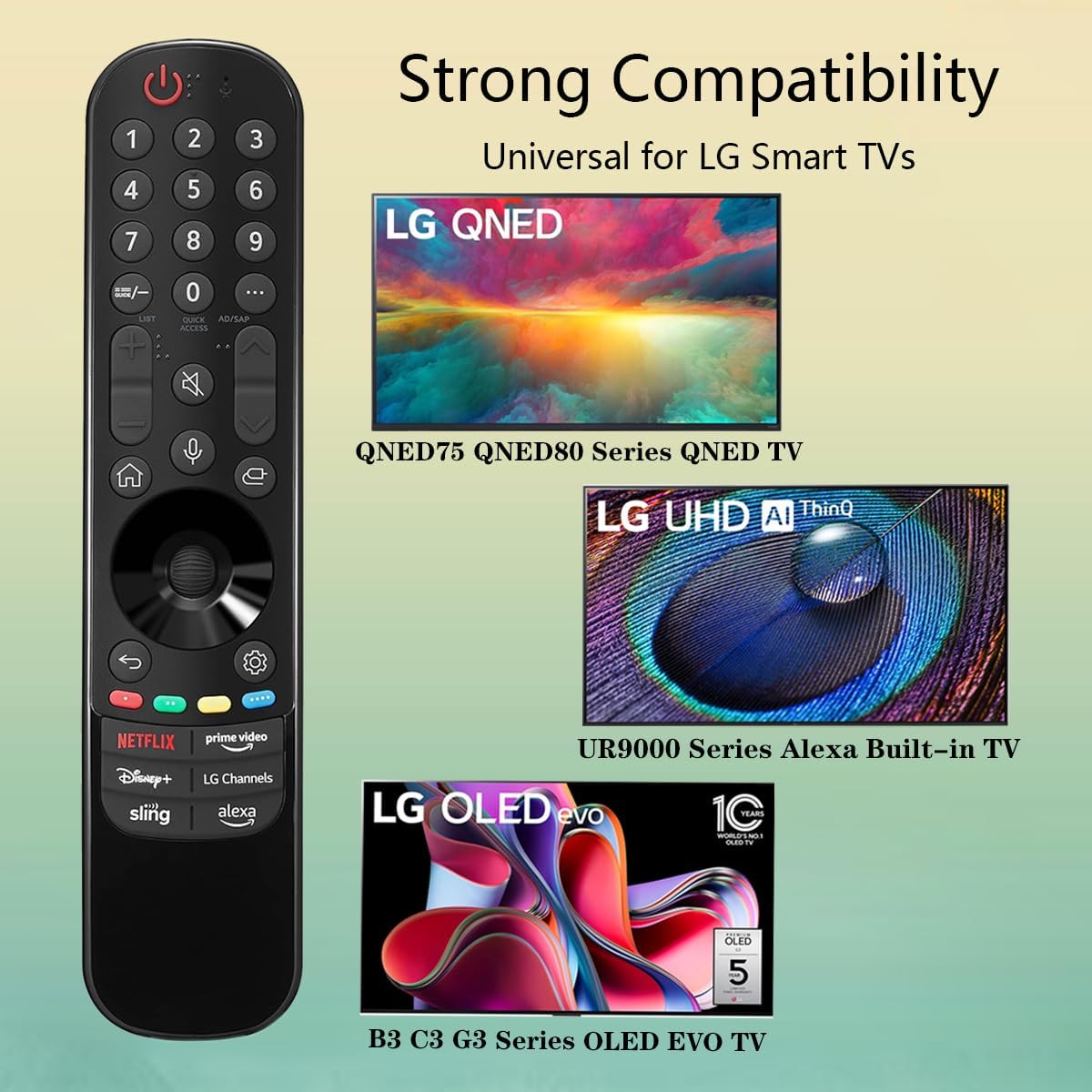
Image 3.3: The remote offers strong compatibility with various LG Smart TV series.
4. Mantenimiento
El cuidado y mantenimiento adecuados prolongarán la vida útil de su control remoto.
4.1. Limpieza
- Utilice un paño suave y seco para limpiar la superficie del mando a distancia.
- Para suciedad difícil, ligeramente dampEnjuague el paño con agua o un limpiador suave no abrasivo. No rocíe el limpiador directamente sobre el control remoto.
- Evite utilizar productos químicos agresivos, solventes o materiales de limpieza abrasivos, ya que pueden dañar el acabado del control remoto o los componentes internos.
4.2. Cuidado de la batería
- Reemplace las baterías cuando la capacidad de respuesta del control remoto disminuya o deje de funcionar.
- Reemplace siempre ambas baterías al mismo tiempo por otras nuevas del mismo tipo (AAA).
- Si el control remoto no se utilizará durante un período prolongado (por ejemplo, un mes o más), retire las baterías para evitar fugas y posibles daños al control remoto.
- Deseche las baterías usadas de acuerdo con las normas locales.
5. Solución de problemas
Si tiene problemas con su control remoto, consulte los siguientes problemas y soluciones comunes:
| Problema | Posible causa | Solución |
|---|---|---|
| El control remoto no responde. | Pilas muertas o insertadas incorrectamente. | Reemplace las baterías con baterías AAA nuevas, asegurándose de la polaridad correcta (+/-). |
| El control remoto funciona de forma intermitente. | Low battery power; obstruction between remote and TV; infrared sensor blocked on TV. | Cambie las pilas. Asegúrese de que haya una línea de visión despejada hacia el sensor infrarrojo del televisor. Retire cualquier obstrucción. |
| Voice control or pointer not working. | This replacement remote may not support all advanced features of the original LG Magic Remote, or your TV model does not fully support these features with a replacement remote. | Verify your TV model's compatibility with replacement remotes for advanced features. Basic functions should still operate. |
| Dedicated app buttons (e.g., Alexa, LG Channels) not working. | Functionality depends on TV model and specific app integration. | Some app buttons may not be universally compatible or require specific TV software versions. Verify if other buttons work. |
Si el problema persiste después de probar estas soluciones, comuníquese con el servicio de atención al cliente.
6. Especificaciones
- Número de modelo: MR23GA
- Marca: FANTASMA
- Dimensiones del producto: 7.3 x 1.6 x 1.2 pulgadas
- Peso del artículo: 2.29 onzas
- Fuente de energía: 2 pilas AAA (no incluidas)
- Color: Negro
- Material: ABS de alta calidad
- Dispositivos compatibles: LG Smart Televisions (specific models listed in Section 3.4)
- Característica especial: Voice Search (functionality may vary)
7. Garantía y soporte
GHUST is committed to providing high-quality products and excellent customer service.
7.1. Servicio posventa
If you have any questions regarding the quality or functionality of your GHUST MR23GA remote control, please do not hesitate to contact our customer support team. We are dedicated to resolving any issues promptly and ensuring your satisfaction.
For support, please refer to the contact information provided with your purchase or on the official GHUST product page.


