Introducción
Gracias por la compraasing the ThermoPro TP60-2 Digital Wireless Indoor Outdoor Thermometer and Hygrometer. This device is designed to provide accurate temperature and humidity readings for both indoor and outdoor environments. It features a wireless remote sensor with a long transmission range, allowing you to monitor conditions in various locations from a central display unit. Please read this manual thoroughly before using the device to ensure proper operation and to maximize its lifespan.
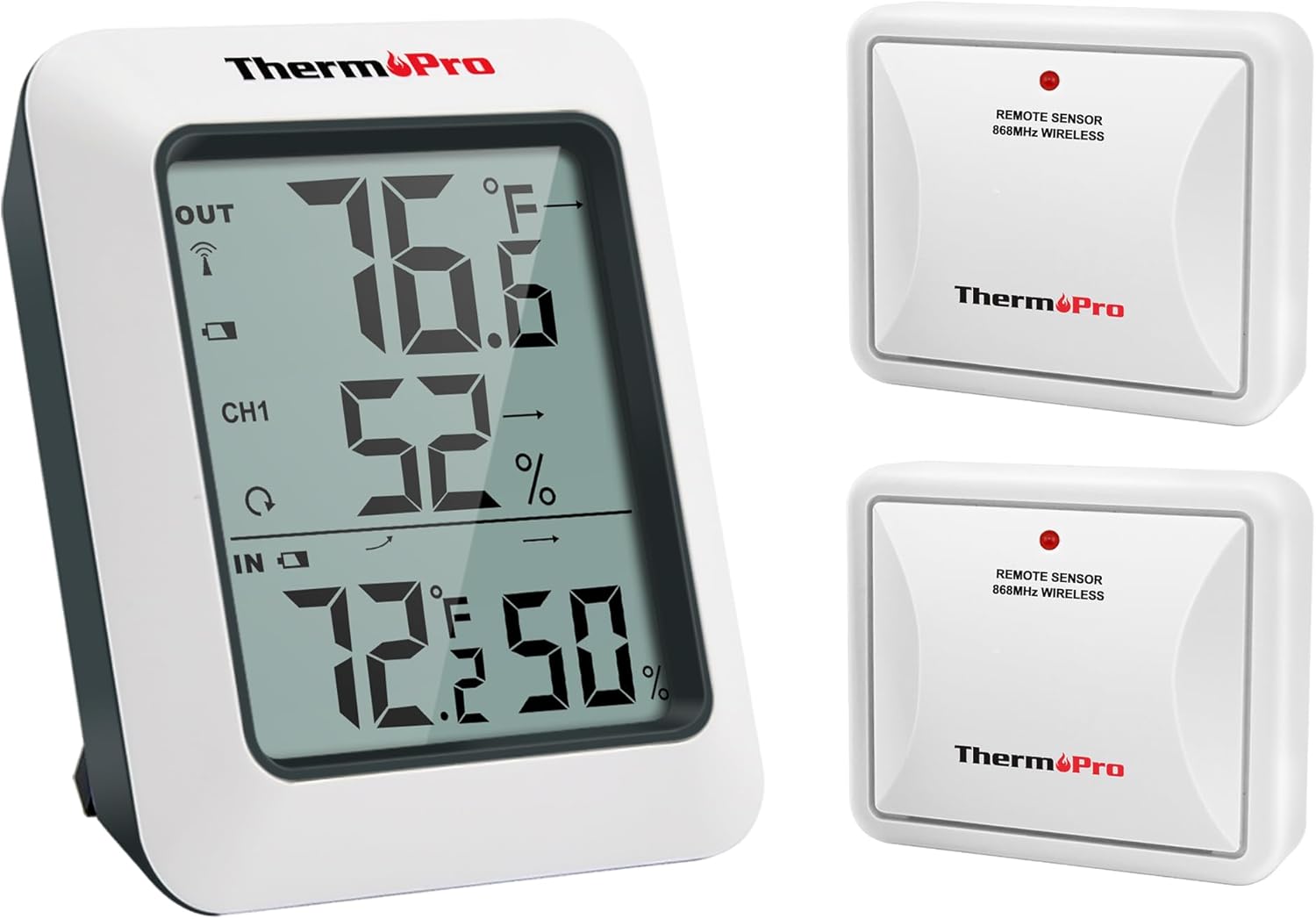
The image displays the ThermoPro TP60-2 main display unit alongside two wireless remote sensors, illustrating the complete product package.
Contenido del paquete
- 1 x Base Station (Receiver)
- 2 x Remote Sensors (Transmitters)
- 6 x AAA Size Batteries (included)
- 1 x Manual de usuario
Características principales
- Simultaneous display of indoor and outdoor temperature and humidity.
- Wireless transmission range of up to 500ft (150m) in open areas.
- Records all-time and 24-hour maximum and minimum temperature and humidity readings.
- Temperature trend arrows indicate whether conditions are rising, falling, or stable.
- Supports up to 3 remote sensors (two included, additional sensors sold separately).
- Gran pantalla LCD para fácil lectura.
- Unidades de temperatura conmutables (°F/°C).
- Low battery indicator for both main unit and remote sensors.

This diagram shows the wireless remote sensor transmitting data to the main unit over a distance of up to 500 feet (150 meters), highlighting its long-range capability.

The image demonstrates the main unit's ability to connect with and display readings from up to three remote sensors, allowing monitoring of multiple areas simultaneously.
Configuración
1. Instalación de la batería
- Open the battery compartment on the back of the main unit and each remote sensor.
- Insert the provided AAA batteries, ensuring correct polarity (+ and -).
- Cierre los compartimentos de la batería de forma segura.
2. Emparejamiento de sensores remotos
The main unit and remote sensors are pre-paired at the factory. If they do not connect automatically, follow these steps:
- Place the main unit and remote sensor(s) close to each other.
- Ensure batteries are correctly installed in all units.
- On the main unit, press and hold the 'CHANNEL' button for 3 seconds to initiate pairing. The 'OUT' section on the display will flash.
- On each remote sensor, press the 'TX' button once. The sensor's LED indicator will flash.
- The main unit should receive signals from the sensor(s) within a few minutes. Once connected, the outdoor temperature and humidity will appear on the display, and the flashing will stop.
- If pairing fails, remove batteries from both units, wait a few seconds, and repeat the steps.
Operación
1. Main Display Overview

Un detallado view of the main display unit, clearly showing current indoor and outdoor temperature and humidity, channel information, and trend arrows indicating changes.
- EN: Temperatura y humedad interior.
- AFUERA: Outdoor temperature and humidity from the selected channel.
- CH1/CH2/CH3: Indicates the active remote sensor channel.
- Flechas de tendencia: Indicates temperature/humidity trends (rising, falling, stable).
- MÁXIMO MINIMO: Displays maximum/minimum recorded values.
2. Selección de la unidad de temperatura (°F/°C)
Press the '°F/°C' button on the back of the main unit to switch between Fahrenheit and Celsius temperature display.
3. ViewRegistros máximos y mínimos
Press the 'MAX/MIN' button once to display the maximum temperature and humidity recorded since the last reset. Press it again to display the minimum values. Press a third time to return to current readings.
4. Resetting Max/Min Records
Mientras viewing MAX or MIN records, press and hold the 'MAX/MIN' button for 3 seconds to clear the recorded data. The display will show current readings, and new MAX/MIN values will begin recording.
5. Trend Indicators

This graphic explains how the temperature and humidity trend indicators on the display show whether conditions are rising, falling, or remaining stable.
- Flecha hacia arriba (↑): La temperatura/humedad está aumentando.
- Flecha hacia abajo (↓): Temperature/humidity is falling.
- Flecha horizontal (→): Temperature/humidity is stable.
Pautas de colocación
1. Ubicación de la unidad principal
The main unit can be placed on a tabletop using its integrated stand or mounted on a wall using the keyhole slot on its back. Choose a location indoors that is easily visible and away from direct sunlight, heat sources, or drafts that could affect indoor readings.
2. Ubicación del sensor remoto
The remote sensor is designed for outdoor use but should be protected from direct precipitation and prolonged direct sunlight for accurate readings and extended lifespan. Ideal locations include under an eaves, beneath a porch, or inside a sheltered area. Ensure the sensor is within the 500ft (150m) wireless range of the main unit and that there are minimal obstructions (thick walls, large metal objects) between the units for optimal signal strength.

This image illustrates the versatile placement options for the main unit and remote sensor, including a built-in tabletop stand and a keyhole for wall mounting.
Mantenimiento
1. Reemplazo de la batería
When the low battery indicator appears on the display for either the main unit or a remote sensor, replace the batteries promptly. Use new AAA batteries and ensure correct polarity. After replacing batteries in a remote sensor, you may need to re-pair it with the main unit by following the 'Pairing Sensors' steps.
2. Limpieza
Limpie el dispositivo con un paño suave y seco.amp cloth. Do not use abrasive cleaners or solvents, as these may damage the plastic components or the display. Avoid submerging the units in water.
Solución de problemas
- No outdoor reading or flashing dashes on the display:
a. Ensure the remote sensor is within range of the main unit.
b. Relocate the main unit or remote sensor to reduce interference from electronic devices or large metal objects.
c. Check if the batteries in the remote sensor are low or need replacement. Re-pair the sensor if necessary. - Lecturas inexactas de temperatura y humedad:
a. Ensure both units are placed away from direct sunlight, heat sources, or drafts.
b. Allow the units to stabilize for at least 30 minutes after initial setup or relocation. - La pantalla está oscura o en blanco:
a. Replace the batteries in the main unit.
Presupuesto
| Característica | Detalle |
|---|---|
| Rango de temperatura interior | -4 °F a 158 °F (-20 °C a 70 °C) |
| Rango de temperatura exterior | -4 °F a 158 °F (-20 °C a 70 °C) |
| Rango de humedad | 10% a 99% |
| Alcance de transmisión inalámbrica | Hasta 500 pies (150 m) al aire libre |
| Fuente de alimentación (unidad principal) | 2 pilas AAA |
| Fuente de alimentación (sensor remoto) | 2 pilas AAA |
| Tipo de pantalla | LCD digital |
| Tiempo de respuesta | 10 segundos |
| Material | Plástico |

The image provides a visual representation of the main unit's dimensions, indicating its compact size.
Garantía y soporte
ThermoPro provides a 3-year warranty for this product from the date of purchase. This warranty covers defects in materials and workmanship under normal use. For warranty claims or technical support, please contact ThermoPro customer service. You may find contact information on the ThermoPro official websitio o a través de su minorista.
Registering your product on the ThermoPro website may extend your warranty period. Please refer to the official ThermoPro website for the most current warranty terms and registration details.


