1. Introducción
This user manual provides essential information for the safe and efficient operation of your Blow KidsTAB8 8-inch tablet. Please read this manual thoroughly before using the device and retain it for future reference. The Blow KidsTAB8 features an 8-inch IPS display, UNISOC T606 octa-core processor, 4GB RAM, 64GB internal storage, and runs on Android 12.
2. Información de seguridad
- No exponga la tableta a temperaturas extremas, luz solar directa o humedad alta.
- Evite dejar caer o someter la tableta a impactos fuertes.
- Use only the charger provided or approved by the manufacturer.
- No intente desmontar ni reparar la tableta usted mismo. Consulte a personal de servicio técnico cualificado.
- Mantenga la tableta alejada del agua y otros líquidos.
- Deseche la tableta y su batería de forma responsable de acuerdo con las regulaciones locales.
3. Contenido del paquete
Verifique que su paquete contenga los siguientes elementos:
- Blow KidsTAB8 8-inch Tablet
- Cable de carga USB-C
- Adaptador de corriente
- Manual de usuario (este documento)
Nota: Los accesorios específicos pueden variar según la región.
4. Dispositivo terminadoview
Familiarícese con los componentes físicos de su tableta.
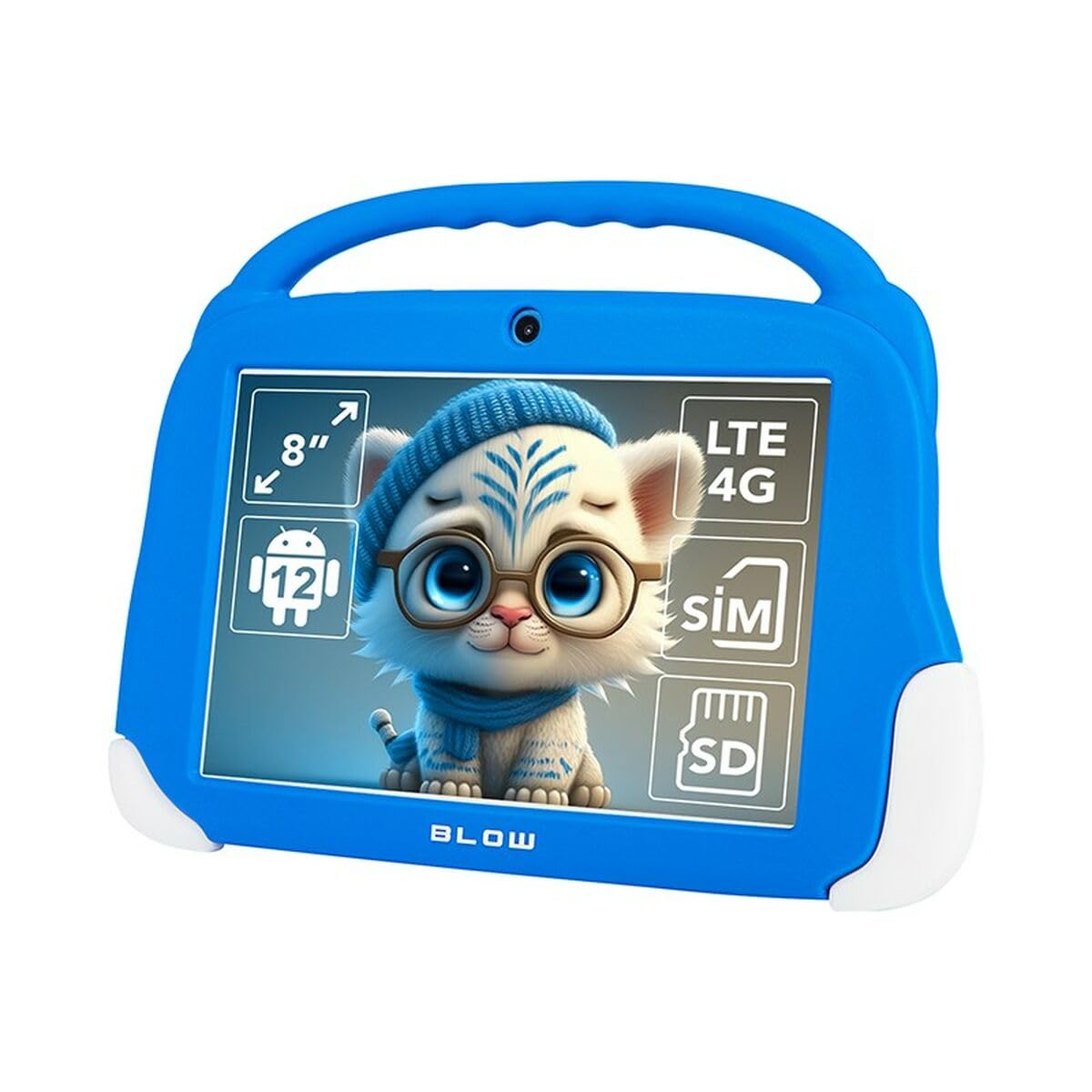
Figura 4.1: Frente view of the Blow KidsTAB8 tablet, showing the 8-inch display and front camera.
4.1 Características físicas
- Pantalla IPS de 8 pulgadas: Pantalla de alta definición para imágenes claras.
- Cámara frontal: Located above the screen for video calls and selfies.
- Cámara trasera: Located on the back for capturing photos and videos (2 MP resolution).
- Botón de encendido: Typically on the side, used to power on/off and wake/sleep the device.
- Botones de volumen: Ajustar los niveles de audio.
- Puerto USB-C: Para carga y transferencia de datos.
- Micro SIM/SD Card Slot: For mobile connectivity and expandable storage.
5. Configuración
5.1 Carga inicial
Before first use, fully charge your tablet. Connect the USB-C cable to the tablet's USB-C port and the power adapter to a wall outlet. The battery indicator on the screen will show charging status. The tablet has a 4800 mAh battery.
5.2 Encendido / Apagado
- Para encender: Press and hold the Power button until the Blow logo appears.
- Para apagar: Mantenga presionado el botón de Encendido, luego seleccione “Apagar” de las opciones en la pantalla.
- Para dormir/despertar: Presione brevemente el botón de encendido para poner la tableta en modo de suspensión o reactivarla.
5.3 Instalación de la tarjeta SIM y la tarjeta MicroSD
The tablet supports a Micro SIM card for 4G LTE connectivity and a MicroSD card for expandable storage up to 64GB (or more, depending on card compatibility).
- Localice la bandeja de la tarjeta SIM/MicroSD en el costado de la tableta.
- Utilice la herramienta de expulsión de SIM proporcionada (si está incluida) para abrir la bandeja.
- Carefully place the Micro SIM card and/or MicroSD card into the designated slots on the tray, ensuring correct orientation.
- Empuje suavemente la bandeja hacia la tableta hasta que encaje en su lugar.
6. Instrucciones de funcionamiento
6.1 Navegación básica (Android 12)
- Pantalla de inicio: Deslice el dedo hacia la izquierda o hacia la derecha para navegar entre las pantallas de inicio.
- Cajón de aplicaciones: Deslice el dedo hacia arriba desde la parte inferior de la pantalla para acceder a todas las aplicaciones instaladas.
- Notificaciones y configuraciones rápidas: Deslice hacia abajo desde la parte superior de la pantalla para view notificaciones y acceso a configuraciones rápidas.
- Atrás, Inicio, Aplicaciones recientes: Use the navigation buttons at the bottom of the screen (or gestures, if enabled) to navigate.
6.2 Conectividad
- Wifi: Ir a Configuración > Red e Internet > Wi-Fi to connect to available Wi-Fi networks (supports 802.11ac, b, g, n, and 5 GHz).
- Bluetooth: Ir a Configuración > Dispositivos conectados > Bluetooth to pair with Bluetooth 5.0 compatible devices.
- Datos móviles (4G LTE): If a Micro SIM card is installed, enable mobile data in Ajustes > Red e Internet > Red móvil.
- GPS: The tablet supports GPS, Glonass, and BeiDou for location services. Ensure location services are enabled in Configuración> Ubicación.
6.3 Uso de la cámara
Open the Camera app to take photos or record videos. The tablet features a front camera and a 2 MP rear camera.
6.4 Aplicaciones
Download and install applications from the Google Play Store. Ensure you have a Google account set up on your tablet.
7. Mantenimiento
7.1 Limpieza de la tableta
Use a soft, lint-free cloth to clean the screen and body of the tablet. Do not use abrasive cleaners or solvents. If necessary, slightly dampEnjuague el paño con agua o con un limpiador de pantallas específicamente diseñado para dispositivos electrónicos.
7.2 Actualizaciones de software
Revise periódicamente las actualizaciones de software para asegurarse de que su tableta tenga las últimas funciones y mejoras de seguridad. Vaya a Configuración > Sistema > Actualización del sistema.
8. Solución de problemas
| Problema | Solución |
|---|---|
| La tableta no se enciende. | Asegúrese de que la batería esté cargada. Conecte el cargador y espere unos minutos antes de intentar encenderla de nuevo. |
| Problemas de conexión Wi-Fi. | Comprueba si el wifi está habilitado en la configuración. Reinicia tu router wifi. Olvida la red y vuelve a conectarte. |
| Las aplicaciones fallan o se congelan. | Close and restart the app. Clear the app's cache in Configuración > Aplicaciones > [Nombre de la aplicación] > Almacenamiento y caché. Reinicie la tableta. |
| Rendimiento lento. | Close unused apps. Clear cache. Consider uninstalling unnecessary applications. Perform a factory reset as a last resort (backup data first). |
9. Especificaciones
| Número de modelo | S9148142 |
| Mostrar | 8-inch IPS, 1280 x 800 px (HD) |
| Procesador | UNISOC T606 de ocho núcleos |
| RAM | 4 GB |
| Almacenamiento interno | 64 GB |
| Sistema operativo | Androide 12 |
| Capacidad de la batería | 4800 mAh |
| Conectividad | Wi-Fi (802.11ac, b, g, n, 5 GHz), Bluetooth 5.0, 4G LTE, GPS, Glonass, BeiDou |
| Puertos | USB-C 3.0 x 1, Micro SIM slot, MicroSD card reader |
| Cámaras | Cámara frontal, cámara trasera (2 MP) |
| Dimensiones | 18.2 x 2.2 x 25 cm |
| Peso | 880 gramos |
10. Garantía y soporte
For warranty information and technical support, please refer to the warranty card included with your product or visit the official Blow webSitio. Conserve su comprobante de compra para reclamaciones de garantía.
Fabricante: Explotar
Modelo: KidsTAB8 (S9148142)