1. Introducción
Thank you for choosing the Defender Impulse GMC 600 RGB Gaming Stream Microphone. This high-quality wired microphone is designed for clear audio capture, ideal for gaming, streaming, podcasting, and voiceovers. It features vibrant RGB backlighting, an integrated pop filter, a shock mount, and a convenient mute button for enhanced user experience. This manual provides detailed instructions for setup, operation, and maintenance to ensure optimal performance.
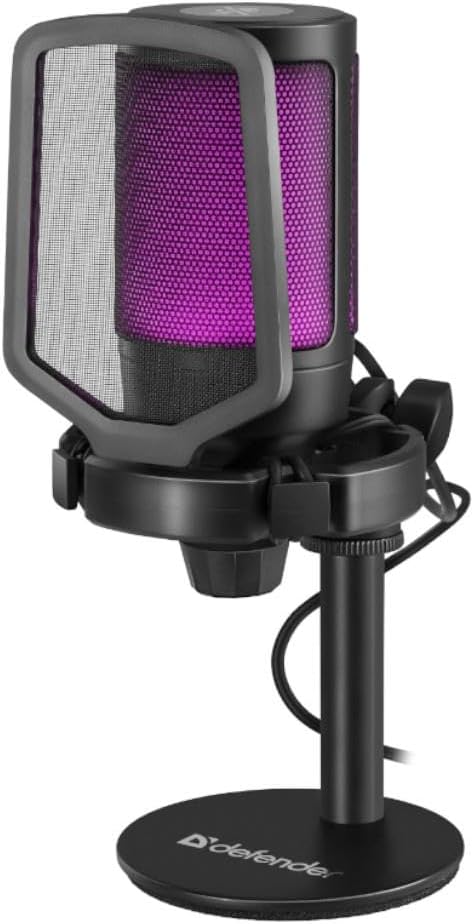
Figure 1.1: The Defender Impulse GMC 600 RGB Microphone, showcasing its integrated pop filter and purple RGB illumination.
2. Contenido del paquete
Por favor verifique que todos los artículos estén presentes en el paquete:
- Defender Impulse GMC 600 RGB Microphone
- Soporte de escritorio
- Filtro pop integrado
- Cable USB (1.7m)
- Manual de usuario (este documento)

Figure 2.1: The retail packaging of the Defender Impulse GMC 600, indicating compatibility and key features.
3. Instrucciones de configuración
3.1 Conexión del micrófono
- Desempaquetar componentes: Carefully remove the microphone, desktop stand, and USB cable from the packaging.
- Montaje del soporte: Attach the microphone to the desktop stand. Ensure it is securely fastened. The microphone features an integrated shock mount to reduce vibrations.
- Conecte el cable USB: Plug the USB-A end of the provided 1.7m cable into an available USB port on your PC or laptop.
- Conectar al micrófono: Insert the other end of the USB cable into the USB port located on the microphone.
- Encendido: The microphone will automatically power on and its RGB lighting will illuminate upon successful connection.

Figura 3.1: Lado view of the microphone, illustrating the USB connection point.

Figure 3.2: Detail of the integrated shock mount, designed to minimize handling noise and vibrations.
3.2 Initial Software Configuration (Windows/macOS)
The Defender Impulse GMC 600 is a plug-and-play device. No special drivers are typically required.
- Verificar reconocimiento: Su sistema operativo debería detectar automáticamente el micrófono.
- Acceder a la configuración de sonido:
- Ventanas: Right-click the speaker icon in the taskbar, select "Sound Settings" or "Open Sound settings". Navigate to the "Input" section.
- Mac OS: Go to System Preferences > Sound > Input.
- Seleccionar micrófono: Choose "Defender Impulse GMC 600" (or similar name) as your default input device.
- Ajustar el nivel de entrada: Speak into the microphone and adjust the input level (gain) to an appropriate level, ensuring the meter shows activity without peaking into the red zone.
4. Funcionamiento del micrófono
4.1 Colocación del micrófono
For optimal sound quality, position the microphone approximately 15-30 cm (6-12 inches) from your mouth. The integrated pop filter helps reduce plosive sounds (P's and B's).
4.2 Función de silencio
The microphone features a touch-sensitive mute button located on the top of the unit. Tap the button to mute or unmute the microphone. The RGB lighting may change or indicate the mute status (e.g., turn off or change color when muted, depending on the specific model's implementation).

Figura 4.1: Arriba view of the microphone, highlighting the touch-sensitive mute button.
4.3 Retroiluminación RGB
The Impulse GMC 600 features dynamic RGB backlighting. The lighting cycles through various colors automatically, enhancing the aesthetic of your setup. There are no user-adjustable controls for the RGB lighting patterns or colors directly on the microphone.

Figura 4.2: Examples of the microphone's RGB backlighting in different colors.
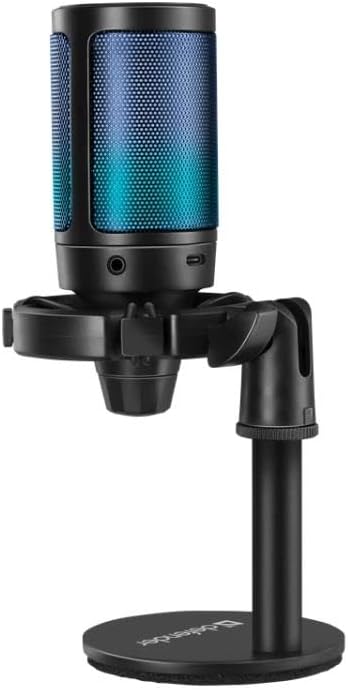
Figure 4.3: The microphone displaying blue RGB lighting, also showing a potential headphone jack for monitoring (if applicable).
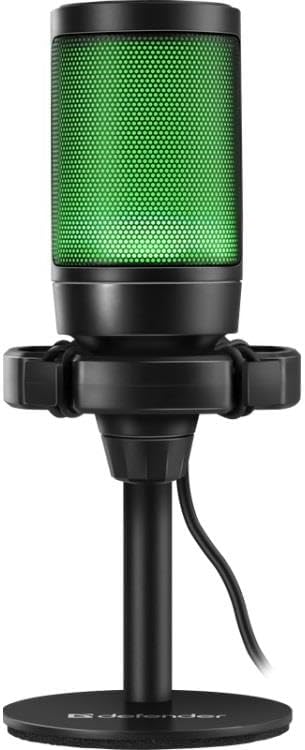
Figure 4.4: The microphone illuminated with green RGB lighting.
5. Mantenimiento
- Limpieza: Utilice un paño suave y seco para limpiar el exterior del micrófono. No utilice limpiadores líquidos ni materiales abrasivos.
- Almacenamiento: When not in use, store the microphone in a clean, dry place away from direct sunlight and extreme temperatures.
- Cuidado de cables: Evite doblar o torcer excesivamente el cable USB para evitar daños.
- Filtro pop: The integrated pop filter is not removable for cleaning. Avoid attempting to disassemble the microphone.
6. Solución de problemas
| Problema | Posible causa | Solución |
|---|---|---|
| Micrófono no detectado por la computadora. |
|
|
| No sound or low sound level. |
|
|
| Audio distorsionado o poco claro. |
|
|
| La iluminación RGB no funciona. |
|
|
7. Especificaciones técnicas
| Característica | Detalle |
|---|---|
| Número de modelo | S9158326 |
| Conectividad | USB con cable |
| Longitud del cable | 1.7 metros |
| Dimensiones (L x An x Al) | 23.5 x 17 x 9.5 cm |
| Relación señal-ruido (SNR) | 78 dB |
| Número de canales | 1 |
| Características | RGB Backlight, Integrated Pop Filter, Shock Mount, Mute Button |
| Compatibilidad | PC, Laptops with USB port |
8. Garantía y soporte
Defender products are manufactured to high-quality standards. For warranty information and technical support, please refer to the warranty card included with your purchase or visit the official Defender webSitio web. Conserve su comprobante de compra para cualquier reclamación de garantía.
For further assistance, you may contact Defender customer support through their official channels. Contact information is typically available on the product packaging or the manufacturer's websitio.


