Introducción
This manual provides instructions for the ITAWEY Wireless Dual Mode Mouse and Pad Combo. This device offers flexible connectivity options (Bluetooth 5.2 and 2.4G USB receiver), a rechargeable battery, quiet click buttons, and adjustable DPI settings. The included mouse pad is designed to enhance precision and usability.
Contenido del paquete
- Ratón inalámbrico de modo dual
- Alfombrilla de ratón
- Receptor Nano USB
- 3.3-foot USB Charging Cable
- USB-C Cable Converter

Image: The ITAWEY Wireless Mouse and Pad Combo, showing the mouse, mouse pad, USB receiver, and USB-C converter.
Producto terminadoview
Familiarize yourself with the components of your ITAWEY Wireless Mouse.

Image: A diagram illustrating the key features of the mouse, including the Precision Steel Wheel, DPI Toggle, Right Button, Left Button, and USB-C Charging Port.
- Botón izquierdo: Función de clic estándar.
- Botón derecho: Función estándar de clic derecho.
- Precision Steel Scroll Wheel: Para un desplazamiento vertical suave.
- Botón de alternancia de DPI: Adjusts cursor sensitivity (800, 1200, 1600 DPI).
- Puerto de carga USB-C: Ubicado en la parte frontal del mouse para recargarlo.
- Interruptor de encendido/modo: Located on the underside, allows switching between OFF, 2.4G USB, and Bluetooth modes.
- Ranura para receptor nano USB: Located on the underside for convenient storage of the 2.4G USB receiver.
Configuración
1. Cargar el ratón
The mouse is powered by a 500mAh rechargeable battery. Before first use, or when the battery is low, connect the included USB charging cable to the mouse's USB-C port and to a power source (e.g., computer USB port, phone charger). A full charge takes approximately 2 hours and provides up to 30 days of use. The mouse can be used while charging.

Image: The ITAWEY mouse connected to a USB-C charging cable, illustrating the charging process.
The included USB-C cable converter allows charging from both USB-A and USB-C ports.

Image: The USB-C converter attached to the USB receiver, plugged into a laptop's USB-C port for connectivity.
2. Conexión del receptor USB 2.4G
- Locate the USB Nano Receiver stored in the compartment on the underside of the mouse.
- Insert the USB Nano Receiver into an available USB-A port on your computer or device. If your device only has USB-C ports, use the included USB-C cable converter.
- Slide the power/mode switch on the underside of the mouse to the 2.4G USB posición (indicada por un icono USB).
- El mouse debería conectarse automáticamente a su dispositivo.

Image: The underside of the ITAWEY mouse, showing the USB Nano Receiver being removed from its storage slot.
3. Conexión Bluetooth 5.2
- Slide the power/mode switch on the underside of the mouse to the Bluetooth posición (indicada por un icono de Bluetooth).
- The mouse will enter pairing mode.
- On your device (PC, laptop, tablet, etc.), open Bluetooth settings.
- Buscar new devices and select "ITAWEY Mouse" (or similar) from the list to pair.
- Una vez emparejado, el ratón está listo para usarse.

Image: The underside of the ITAWEY mouse, highlighting the power/mode switch set to the Bluetooth position.
Compatibilidad: This mouse is compatible with Windows (11, 10, 7, XP), MacOS, iOS, iPad, Android Tablet, Chrome OS, and Ubuntu. It is suitable for both right-handed and left-handed users.

Image: A visual representation of the mouse's compatibility with various operating systems and devices, including Windows, MacOS, iPad, Android Tablet, Chrome OS, and Ubuntu/Linux.
Instrucciones de funcionamiento
1. Ajuste de DPI
The mouse features a DPI button on top, allowing you to adjust cursor sensitivity. Press the DPI button to cycle through the available settings: 800 DPI, 1200 DPI, and 1600 DPI. Select the sensitivity that best suits your task, such as general browsing or precise editing.
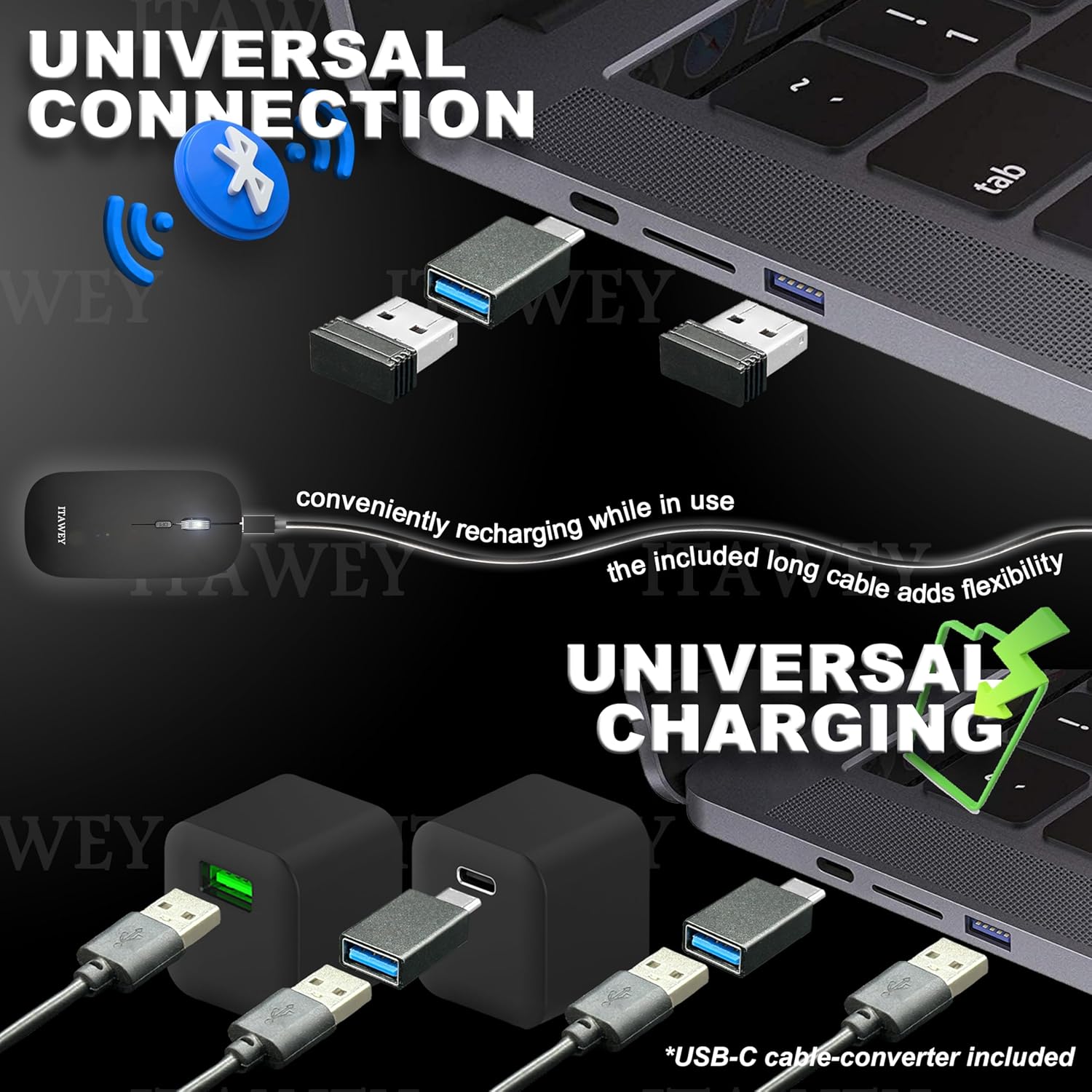
Image: A close-up of the mouse highlighting the DPI toggle button and its three settings: 800, 1200, and 1600 DPI.
2. Clics silenciosos
The left and right mouse buttons are designed for quiet operation, minimizing noise in environments where silence is preferred, such as libraries, offices, or during late-night work sessions.
3. Modo de ahorro de energía
To optimize energy efficiency, the mouse automatically enters sleep mode after 8 minutes of inactivity. To wake the mouse, simply click any button.

Image: A visual illustrating the mouse's power-saving features, including up to 30 days per charge and automatic sleep mode after 8 minutes of inactivity, waking up with a click.
Mantenimiento
- Limpieza: Use a soft, dry cloth to clean the mouse. For the mouse pad, it is washable; gently hand wash with mild soap and water, then air dry.
- Almacenamiento: When not in use, store the USB Nano Receiver in its dedicated slot on the underside of the mouse to prevent loss.
- Cuidado de la batería: Avoid fully discharging the battery frequently to prolong its lifespan. Recharge when the low battery indicator appears.
Solución de problemas
| Problema | Solución |
|---|---|
| Mouse not responding (2.4G USB) |
|
| El ratón no responde (Bluetooth) |
|
| El movimiento del cursor es errático o lento |
|
| El ratón no se carga |
|
Presupuesto
- Modelo: FIRENZE-BK
- Conectividad: Dual Mode (Bluetooth 5.2 & 2.4G USB Receiver)
- Configuración de DPI: 800/1200/1600 ppp
- Batería: Ion de litio recargable de 500 mAh
- Tiempo de carga: Aproximadamente 2 horas
- Tiempo de uso (por carga): Hasta 30 días
- Click Type: Clics silenciosos
- Rueda de desplazamiento: Precision Steel
- Dimensiones (ratón): 4.7 x 2.5 x 0.04 pulgadas (aprox. 11.9 x 6.35 x 0.1 cm)
- Peso (ratón): 2.29 onzas (aprox. 65 gramos)
- Compatibilidad: Windows (11, 10, 7, XP), MacOS, iOS, iPad, Android Tablet, Chrome OS, Ubuntu
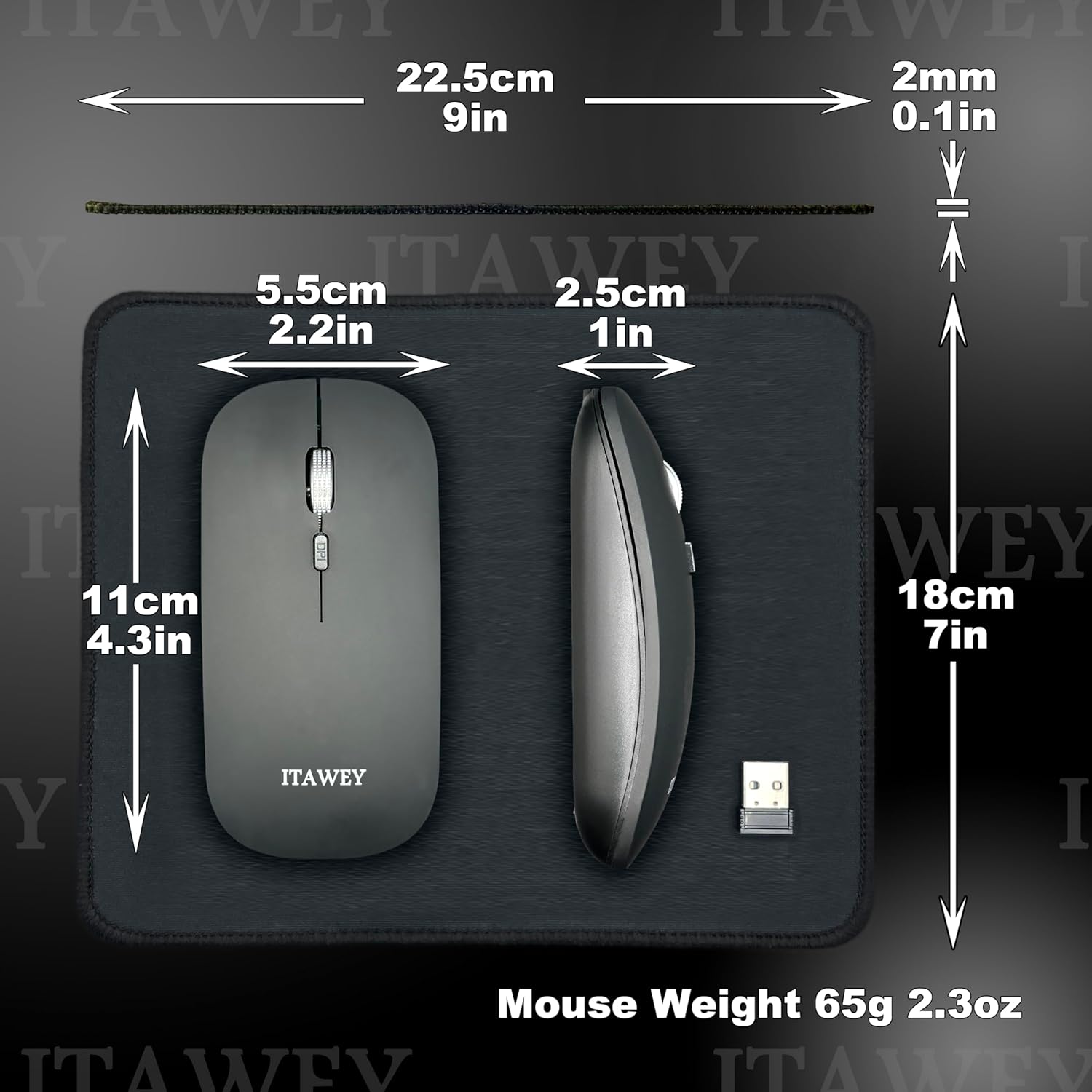
Image: A diagram showing the dimensions of the ITAWEY Wireless Mouse and the accompanying mouse pad.
Garantía y soporte
For warranty information and customer support, please refer to the product packaging or visit the official ITAWEY websitio. Guarde su recibo de compra para reclamos de garantía.
Vídeo del producto
Video: An official product video from ITAWEY demonstrating the features and usage of the Wireless Mouse and Pad Combo, including its dual-mode connectivity, quiet clicks, and rechargeable battery.


