1. Introducción y másview
The Ditec RM-L 1370 is a universal replacement remote control designed for a wide range of Sony Bravia televisions. This remote offers direct compatibility with various Sony LCD, LED, UHD, OLED, and QLED 4K Ultra HD Smart Android TV models, eliminating the need for complex programming or pairing. It features dedicated hotkeys for popular streaming services like YouTube and Netflix for convenient access.

Image: The Ditec RM-L 1370 remote control, highlighting its compatibility as a single remote solution for Sony TVs.
2. Configuración y uso inicial
This remote control is designed for immediate use without any setup or programming. Simply insert the required batteries, and it will be ready to operate your compatible Sony TV.
2.1 Instalación de la batería
- Ubique el compartimiento de la batería en la parte posterior del control remoto.
- Deslice la tapa del compartimento de la batería para abrirla.
- Insert two (2) AAA batteries (not included), ensuring correct polarity (+ and - terminals).
- Cierre bien la tapa del compartimento de la batería.

Imagen: Trasera view del control remoto, que ilustra la ubicación del compartimiento de la batería.
2.2 Primer uso
Once batteries are installed, point the remote control towards your Sony TV and press the Power button. The remote should operate your TV without any further configuration.
3. Instrucciones de funcionamiento
The Ditec RM-L 1370 remote control provides all standard functions for your Sony Bravia TV, along with convenient shortcut buttons.
3.1 Funciones básicas
- Botón de encendido: Enciende o apaga el televisor.
- Botones numéricos (0-9): Para selección directa de canales.
- Subir/Bajar volumen: Ajusta el volumen del televisor.
- Canal arriba/abajo: Cambia los canales de televisión.
- Panel de navegación (Arriba/Abajo/Izquierda/Derecha/Entrar): Para navegar y seleccionar el menú.
- Botón de inicio: Accesses the TV's Smart Home screen or main menu.
- Botón de retorno/atrás: Vuelve a la pantalla o menú anterior.
- Botón de opciones: Muestra opciones sensibles al contexto.
3.2 Funciones especiales
- YouTube Hotkey: Inicia directamente la aplicación YouTube.
- Netflix Hotkey: Inicia directamente la aplicación Netflix.
The remote features an enhanced infrared sensor for a farther transmitting distance, allowing effective control up to 50 feet.

Image: The remote control demonstrating its farther distance sensor, capable of operating up to 50 feet.
4. Compatibilidad
The Ditec RM-L 1370 universal remote is compatible with a wide range of Sony Bravia LCD, LED, UHD, OLED, and QLED 4K Ultra HD Smart Android TVs. It is designed to replace many original Sony remote models, including but not limited to:
- RMT-TX100U, RMT-TX102U
- RMF-TX200U, RMF-TX201U, RMF-TX220U
- RMT-TX300U, RMF-TX310U
- RMT-TX500U, RMF-TX520U, RMF-TX600U
- And many other Sony TV remote models.
For a comprehensive list of compatible Sony TV remote models, please refer to the image below:
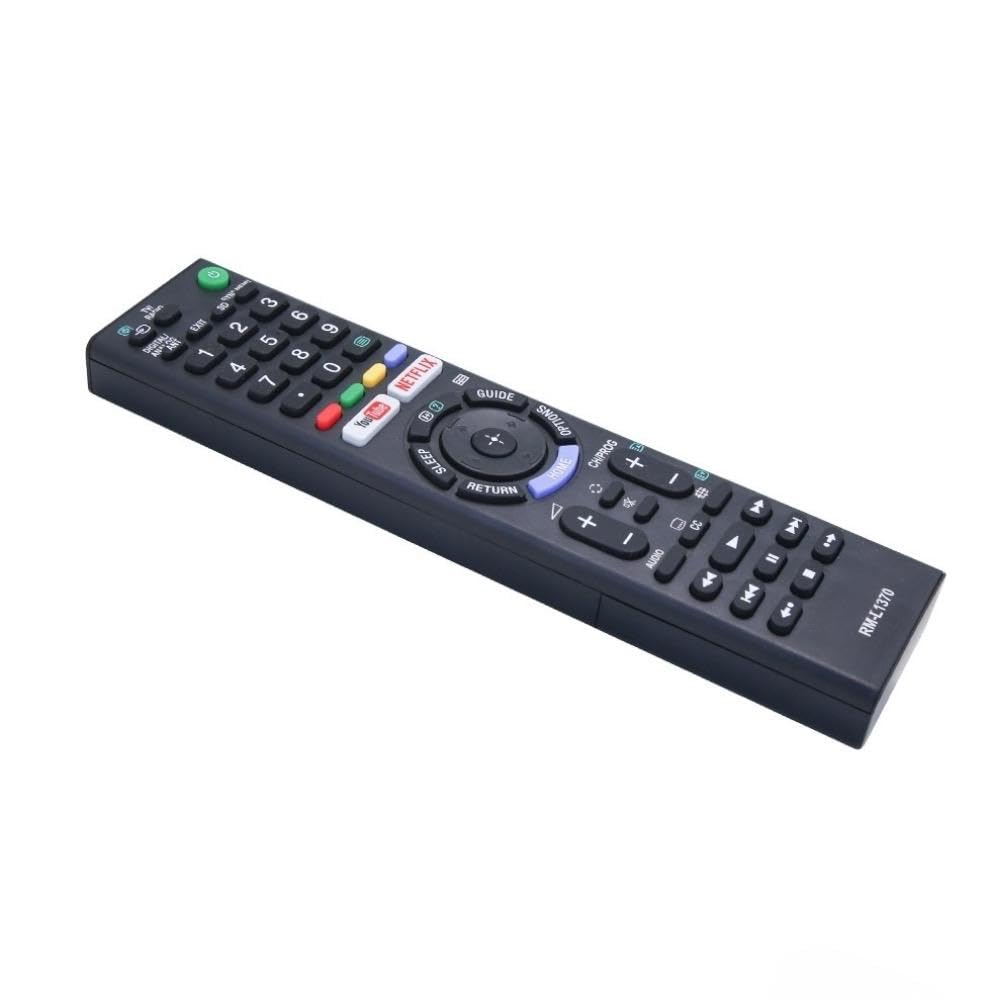
Image: A detailed list of Sony TV remote models that are compatible with the Ditec RM-L 1370.
It is recommended to compare the appearance of this remote with your original remote for visual confirmation of compatibility.
5. Mantenimiento
5.1 Reemplazo de batería
When the remote control's performance degrades or it stops responding, replace the batteries with two new AAA alkaline batteries. Always replace both batteries at the same time. Do not mix old and new batteries or different types of batteries.
5.2 Limpieza
Para limpiar el control remoto, utilice un paño suave y seco. No utilice limpiadores líquidos, aerosoles ni productos abrasivos, ya que pueden dañar la superficie o los componentes internos del control remoto.
6. Solución de problemas
- El control remoto no responde:
- Compruebe si las pilas están insertadas correctamente con la polaridad correcta.
- Reemplace las pilas viejas por otras nuevas.
- Asegúrese de que no haya obstrucciones entre el control remoto y el receptor de infrarrojos del televisor.
- Asegúrese de estar dentro del rango operativo efectivo (hasta 50 pies).
- Botones específicos que no funcionan:
- Some advanced functions or TV-specific features might not be supported by a universal replacement remote.
- Ensure the TV is powered on and functioning correctly.
7. Especificaciones
| Característica | Detalle |
|---|---|
| Marca | Ditec |
| Modelo | RM-L 1370 |
| Dispositivos compatibles | Sony Bravia LCD, LED, UHD, OLED, QLED 4K Ultra HD Smart Android TVs |
| Tipo de conector | Infrarrojos (IR) |
| Pilas necesarias | 2 x AAA (no incluido) |
| Características especiales | Ergonomic design, YouTube & Netflix Hotkeys |
| Dimensiones del producto | 3 x 3 x 12 cm |
| Peso del artículo | 80 gramos |
| País natal | Porcelana |
8. Soporte
For assistance with compatibility or any questions regarding your Ditec RM-L 1370 remote control, you may contact support by sending a picture of your old remote or your device's brand name and model number to +91 9924350801. This will help in verifying compatibility or addressing specific queries.

Image: Information on how to contact support for compatibility checks or questions.


