Introducción
The DEERC SQN-050 Robot Toy is an interactive and educational remote-controlled robot designed for children. It features 16 unique LED eye expressions, a walkie-talkie function for two-way communication, gesture sensing for intuitive control, and a programming mode to encourage creativity. This manual provides comprehensive instructions for the safe and effective use of your robot toy.
¿Qué hay en la caja?
- DEERC SQN-050 Robot Toy
- Mando a distancia
- Cable de carga USB
- Destornillador
- Batería recargable de iones de litio (preinstalada o separada)
- Manual de instrucciones (este documento)
Configuración
1. Instalación de la batería
The robot toy requires one Lithium Ion battery (included). The remote control requires two AAA batteries (not included).
- Batería del robot: Locate the battery compartment on the underside of the robot. Use the included screwdriver to open the compartment. Insert the Lithium Ion battery, ensuring correct polarity. Close the compartment and secure with the screw.
- Baterías de control remoto: Locate the battery compartment on the back of the remote control. Open the compartment. Insert two AAA batteries, observing the correct polarity (+/-). Close the compartment.
2. Carga del robot
The robot toy features a Type-C charging port for convenient recharging.
- Connect the small end of the USB charging cable to the Type-C port on the robot.
- Connect the large end of the USB charging cable to a compatible USB power source (e.g., adapter, power bank, laptop, car charger).
- A full charge typically takes 30-40 minutes and provides up to 100 minutes of playtime.

Image: The DEERC robot toy, its remote control, USB charging cable, and a screwdriver, illustrating the components included for setup.
Instrucciones de funcionamiento
1. Encendido y apagado
- To turn on the robot, slide the power switch located on its body to the "ON" position.
- Para encender el control remoto, deslice su interruptor de encendido a la posición "ON".
- To turn off both devices, slide their respective power switches to the "OFF" position.
2. Operación de control remoto
The 2.4GHz remote control allows for precise movement and function activation.
- Use the directional joysticks/buttons to move the robot forward, backward, left, and right.
- The robot can perform 360° spins.
- The remote control has buttons to switch between 16 unique LED eye expressions.
- Use the music button to play delightful music and switch between different songs. A mute button is available to stop the music.

Image: The DEERC robot toy and its remote control, demonstrating the primary control method.
3. Gesture Sensing Mode
The robot can be controlled using hand gestures from up to 5.9 inches away.
- Wave your hand in front of the robot to initiate movement.
- Specific gestures will command the robot to move forward, backward, left, right, or perform spins.

Image: A child demonstrating gesture control, with the robot responding to hand movements.
4. Función de walkie-talkie
The robot features a two-way communication function through the remote control.
- Press and hold the designated walkie-talkie button on the remote control to speak.
- Release the button to listen for a response from the robot.
- Ensure both the robot and remote control are powered on and within range for this feature to work.

Image: A child and an adult interacting with the DEERC robot using its walkie-talkie function, showing communication over a distance.
5. Modo de programación
The programming mode allows users to create custom sequences of actions for the robot.
- Refer to the remote control diagram for the programming button.
- Enter programming mode, then input a series of commands (movements, turns, expressions).
- Press the programming button again to execute the programmed sequence.
- The robot also has an auto-demo function for pre-set actions.
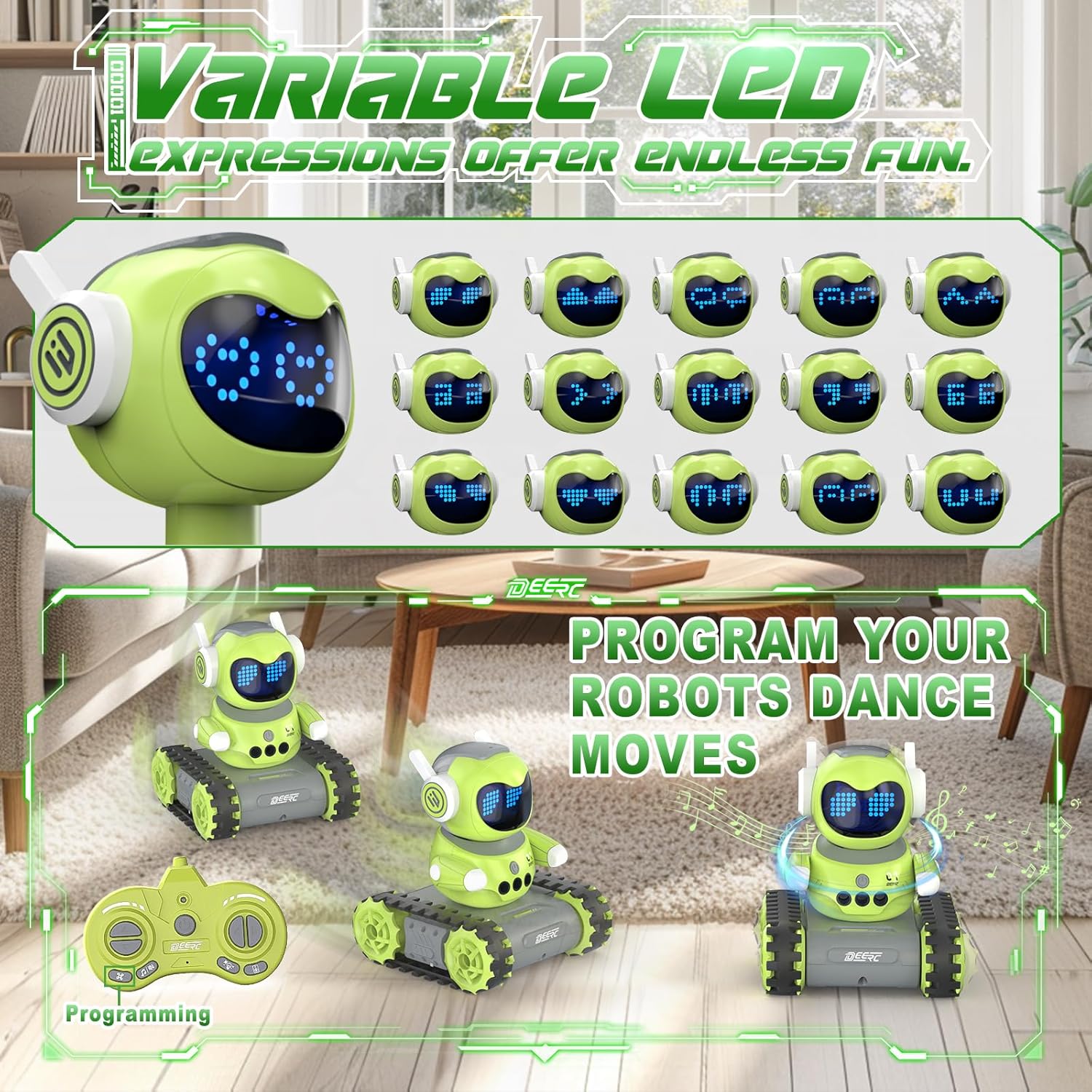
Image: The DEERC robot displaying various LED eye expressions and performing programmed movements, highlighting its interactive features.
Mantenimiento
- Mantenga el robot y el control remoto limpios limpiándolos con un paño suave y seco.
- Avoid exposing the toy to water or excessive moisture.
- Guarde el juguete en un lugar fresco y seco, lejos de la luz solar directa, cuando no esté en uso.
- Remove batteries from the remote control if the toy will not be used for an extended period to prevent leakage.
Solución de problemas
| Problema | Posible causa | Solución |
|---|---|---|
| Robot does not respond. | Low battery in robot or remote; power switch off; not paired. | Charge robot battery; replace remote batteries; ensure both are ON; re-pair if necessary (refer to pairing instructions if applicable, though not explicitly in feature bullets). |
| Tiempo de juego corto. | La batería no está completamente cargada; batería vieja. | Ensure full charge (30-40 mins); consider replacing battery if performance degrades significantly over time. |
| Walkie-talkie function unclear or not working. | Out of range; interference; button not pressed correctly. | Ensure robot and remote are within 165 feet (without obstacles); avoid areas with strong electronic interference; press and hold the talk button firmly. |
| La detección de gestos no funciona. | Hand too far; incorrect gesture; sensor obstructed. | Ensure hand is within 5.9 inches; use clear, distinct gestures; check for any obstructions on the robot's sensors. |
Presupuesto
- Modelo: SQN-050
- Marca: DEERC
- Dimensiones del producto: 5.2 x 6.4 x 5.9 pulgadas
- Peso del artículo: 1.08 libras
- Edad recomendada: 6 años y más
- Batería del robot: 1 batería de iones de litio (incluida)
- Baterías de control remoto: Pilas AAA (no incluidas)
- Tiempo de carga: 30-40 minutos
- Recreo: Hasta 100 minutos
- Frecuencia de control remoto: 2.4 GHz
- Alcance del control remoto: Hasta 165 pies (sin obstáculos)
- Gesture Sensing Range: Hasta 5.9 pulgadas
Información de seguridad
Importante: Children under 6 years old need to use this product under adult supervision. Always ensure safe play environments and keep away from small parts that could be a choking hazard for very young children. Do not disassemble or modify the product. Use only the provided charging cable and recommended batteries.
Garantía y soporte
For warranty information or technical support, please refer to the product packaging or contact DEERC customer service directly. Contact details are typically available on the official DEERC websitio o a través de su plataforma de compra.


