1. Introducción
This manual provides essential information for the safe and effective use of your UREVO Strol 2E Smart 2-in-1 Folding Treadmill. This versatile fitness equipment is designed for both walking and running, offering a compact solution for home and office environments. It features app connectivity for tracking progress and various workout modes.
Lea este manual detenidamente antes de utilizar la cinta de correr y consérvelo para futuras consultas.
2. Información de seguridad
Para garantizar un funcionamiento seguro y evitar lesiones, respete las siguientes pautas de seguridad:
- Lea todas las instrucciones de este manual antes de utilizar la cinta de correr.
- Mantenga a los niños y las mascotas alejados de la máquina para correr durante su funcionamiento.
- Coloque la cinta de correr sobre una superficie plana y estable con suficiente espacio libre a su alrededor.
- Ensure the power cord is not damaged or placed under the treadmill.
- Always use the safety key/clip during operation. In case of an emergency, the safety key will stop the treadmill.
- Use calzado deportivo apropiado.
- The maximum user weight for this treadmill is 265 lbs (120 kg).
- Si experimenta mareos, náuseas, dolor en el pecho o cualquier otro síntoma anormal, detenga su entrenamiento inmediatamente y consulte a un médico.
- No intente reparar la cinta de correr usted mismo. Contacte con personal de servicio técnico cualificado para realizar las reparaciones.
3. Contenido del paquete
Verifique que todos los componentes estén presentes en el paquete:
- UREVO Strol 2E Treadmill Unit
- Cable de alimentación (1x)
- Control remoto (1x)
- Tool Kit (1x)
- Manual de usuario (1x)
- Tablet Mount (1x)
- Hex Tool (1x)

Image: Contents of the UREVO Strol 2E Treadmill package, including the treadmill, power cord, remote control, tool kit, user manual, tablet mount, and hex tool.
4. Configuración
The UREVO Strol 2E Treadmill is designed for quick and easy setup. Follow these steps to prepare your treadmill for use:
- Desembalaje de la cinta de correr: Carefully remove the treadmill and all accessories from the packaging. Place the treadmill on a clear, level surface.
- Unfold the Handle (for Running Mode): If you intend to use the treadmill in running mode, lift the handle until it locks securely into place. Ensure both sides are fully extended and locked.
- Conecte la electricidad: Plug the power cord into the treadmill's power input and then into a grounded electrical outlet.
- Inspección inicial: Before first use, check the running belt for proper alignment and tension. Refer to the maintenance section for belt adjustment if needed.

Image: The UREVO Strol 2E Treadmill shown in its upright running configuration with the handle extended, and in its flat walking pad configuration under a standing desk.

Image: Illustration of the UREVO Strol 2E Treadmill's quick folding mechanism, demonstrating how it can be stored compactly, with a person relaxing on a sofa while the treadmill is in use.
5. Instrucciones de funcionamiento
Your UREVO Strol 2E Treadmill offers two primary operating modes and can be controlled via the included remote or the UREVO Sport App.
5.1 Encendido y apagado
- To power on, ensure the treadmill is plugged in and press the power button on the unit or remote.
- Para apagar, mantenga presionado el botón de encendido hasta que la pantalla se apague.
Modos de funcionamiento de 5.2
The treadmill automatically detects its configuration and adjusts available speed ranges:
- Walking Mode (Handle Folded): When the handle is folded down, the treadmill operates as a walking pad with a speed range of 0.6 to 4 mph (1-6 km/h). In this mode, only the lower LED display is active.
- Running Mode (Handle Unfolded): When the handle is upright and locked, the treadmill functions as a running treadmill with a speed range of 0.6 to 6.2 mph (1-10 km/h). Both the upper and lower LED displays are active.

Image: Visual comparison of the UREVO Strol 2E Treadmill in walking mode (handle folded, speed 0.6-4 mph) and running mode (handle upright, speed 0.6-6.2 mph), with two individuals demonstrating each use case.

Imagen: Primer plano view of the UREVO Strol 2E Treadmill's dual LED displays, illustrating how the upper display is active when the handrail is unfolded for running, and only the lower display lights up when the handrail is folded for walking.
5.3 control remoto
El control remoto incluido permite una operación conveniente:
- Inicio/Parada: Presione el botón de reproducción/pausa para iniciar o detener la cinta de correr.
- Ajuste de velocidad: Utilice los botones '+' y '-' para aumentar o disminuir la velocidad.
- Botón de modo: Cycles through display modes (Time, Calories, Steps, Speed, Distance).
- Función de silencio: The remote features a one-key mute function to silence operational sounds. The magnetic back allows it to attach to the treadmill.
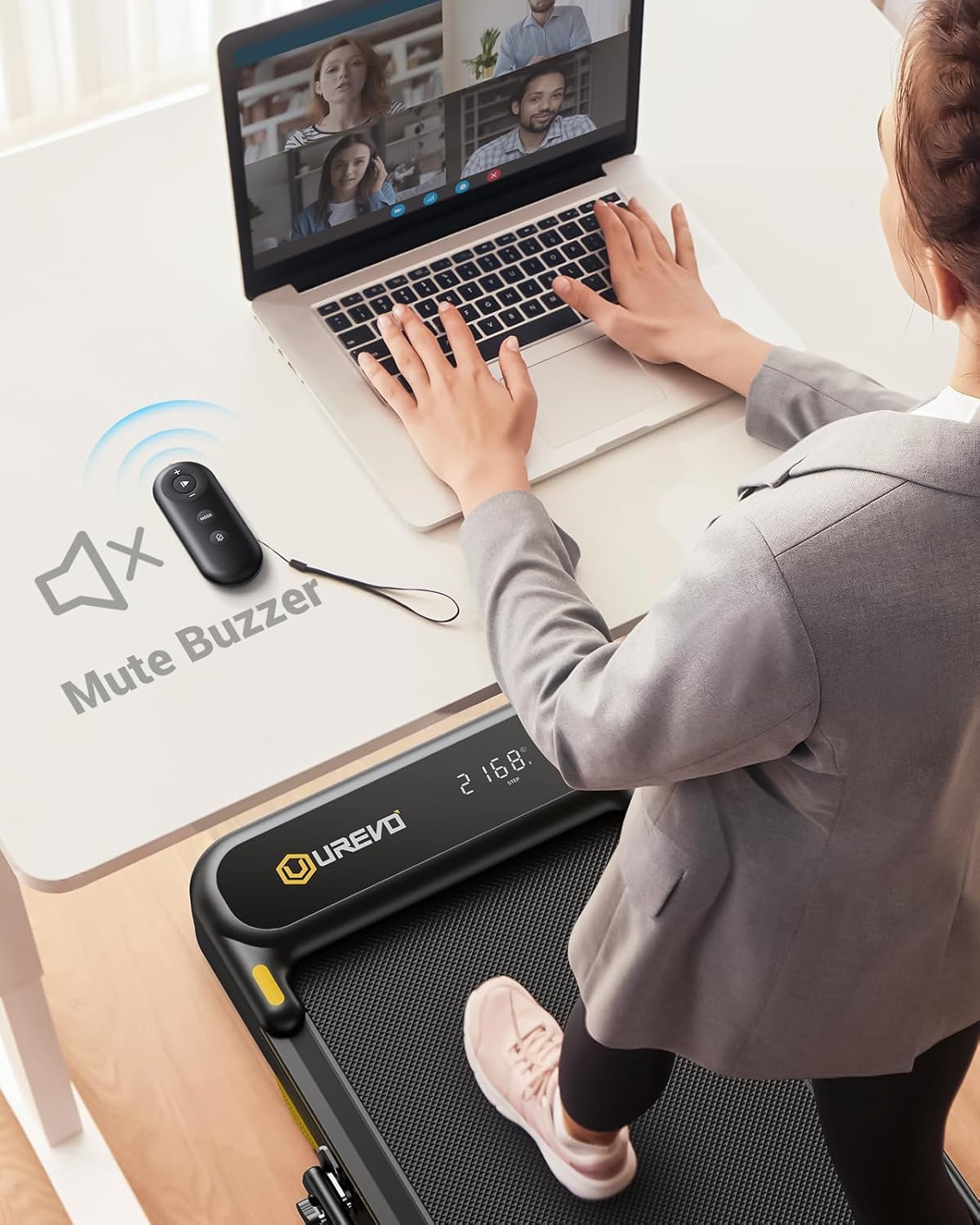
Image: A person using the UREVO Strol 2E Treadmill's remote control to mute the buzzer while working on a laptop at a standing desk, highlighting the quiet operation.
5.4 UREVO Sport App
Enhance your workout experience by connecting to the UREVO Sport App:
- Descargar la aplicación: Buscar "UREVO Sport" in your device's app store.
- Conectarse a la cinta de correr: Follow the in-app instructions to pair your device with the treadmill via Bluetooth.
- Progreso de la pista: The app tracks time, calories, steps, speed, and distance, providing detailed workout reports.
- Programas de entrenamiento: Access various workout programs, including AI RhythmFit immersive running and AI All-Terrain Simulated Hikes.

Image: The UREVO Sport App interface displaying calorie burn tracking and various workout modes like HIIT, MIIT, and LIIT, with a person running on the treadmill in the background.

Image: A user interacting with the UREVO Sport App, which displays an 'AI All-Terrain Simulated Hike' feature with various real-scene running maps for virtual exploration.
5.5 Multi-Function Display
La pantalla LED proporciona datos de entrenamiento en tiempo real:
- Tiempo
- Calorias quemadas
- Pasos
- Velocidad
- Distancia
5.6 Parada de emergencia
Attach the safety clip to your clothing before starting your workout. If you need to stop the treadmill quickly, pull the safety clip, and the treadmill will immediately cease operation.
6. Mantenimiento
El mantenimiento regular garantiza la longevidad y el rendimiento óptimo de su cinta de correr.
6.1 Lubricación
Apply lubricant to the running belt every 125 miles of use. This helps reduce friction and extends the life of the motor and belt.
Video: Instructions on how to add oil to the UREVO treadmill, demonstrating the process of loosening the belt, applying lubricant, and re-tightening.
6.2 Ajuste del cinturón para correr
If the running belt becomes misaligned or too loose/tight, it may require adjustment. Use the hex tool provided to adjust the rear corner bolts. Turn the bolts clockwise to tighten or counter-clockwise to loosen the belt. Ensure the belt is centered and has proper tension for smooth operation. The video above also demonstrates belt adjustment.
6.3 Limpieza
Limpie la cinta de correr con publicidad.amp Limpie el paño después de cada uso para eliminar el sudor y el polvo. Evite usar limpiadores abrasivos o disolventes.
6.4 Almacenamiento
The treadmill can be folded for compact storage. Ensure the handle is fully folded down before moving or storing the unit. The integrated wheels allow for easy relocation.
7. Solución de problemas
If you encounter issues with your UREVO Strol 2E Treadmill, refer to the following common solutions:
- La cinta de correr no se enciende: Check if the power cord is securely plugged into both the treadmill and a grounded outlet. Ensure the power switch is in the 'on' position.
- Running belt slipping or misaligned: Refer to the 'Running Belt Adjustment' section (6.2) for instructions on how to adjust the belt tension and alignment.
- Ruido inusual durante el funcionamiento: Check for any loose parts. Ensure the treadmill is on a level surface. If the noise persists, it may indicate a need for lubrication (refer to section 6.1) or professional inspection.
- Problemas de conectividad de la aplicación: Asegúrate de que el Bluetooth esté activado en tu dispositivo y que la cinta de correr esté encendida. Intenta reiniciar la aplicación y la cinta de correr.
- El control remoto no responde: Check the remote's battery. Ensure there are no obstructions between the remote and the treadmill's receiver.
For issues not covered here, please contact UREVO customer support.
8. Especificaciones
| Característica | Especificación |
|---|---|
| Número de modelo | URTM030 |
| Dimensiones del producto | 130 cm de profundidad x 58 cm de ancho x 11.3 cm de alto |
| Peso del artículo | 17.01 kilogramos |
| Caballo de fuerza | 2.25 CV |
| Clasificación de velocidad | 1-10 km/h (0.6-6.2 mph) |
| Velocidad del modo caminar | 0.6-4 mph |
| Velocidad del modo de funcionamiento | 0.6-6.2 mph |
| Tipo de pantalla | CONDUJO |
| Material del marco | Aluminio |
| Material | Acero aleado |
| Peso máximo del usuario | 265 libras |
| Características especiales | Foldable, Lightweight, Portable, Shock Absorbent, Wheeled |
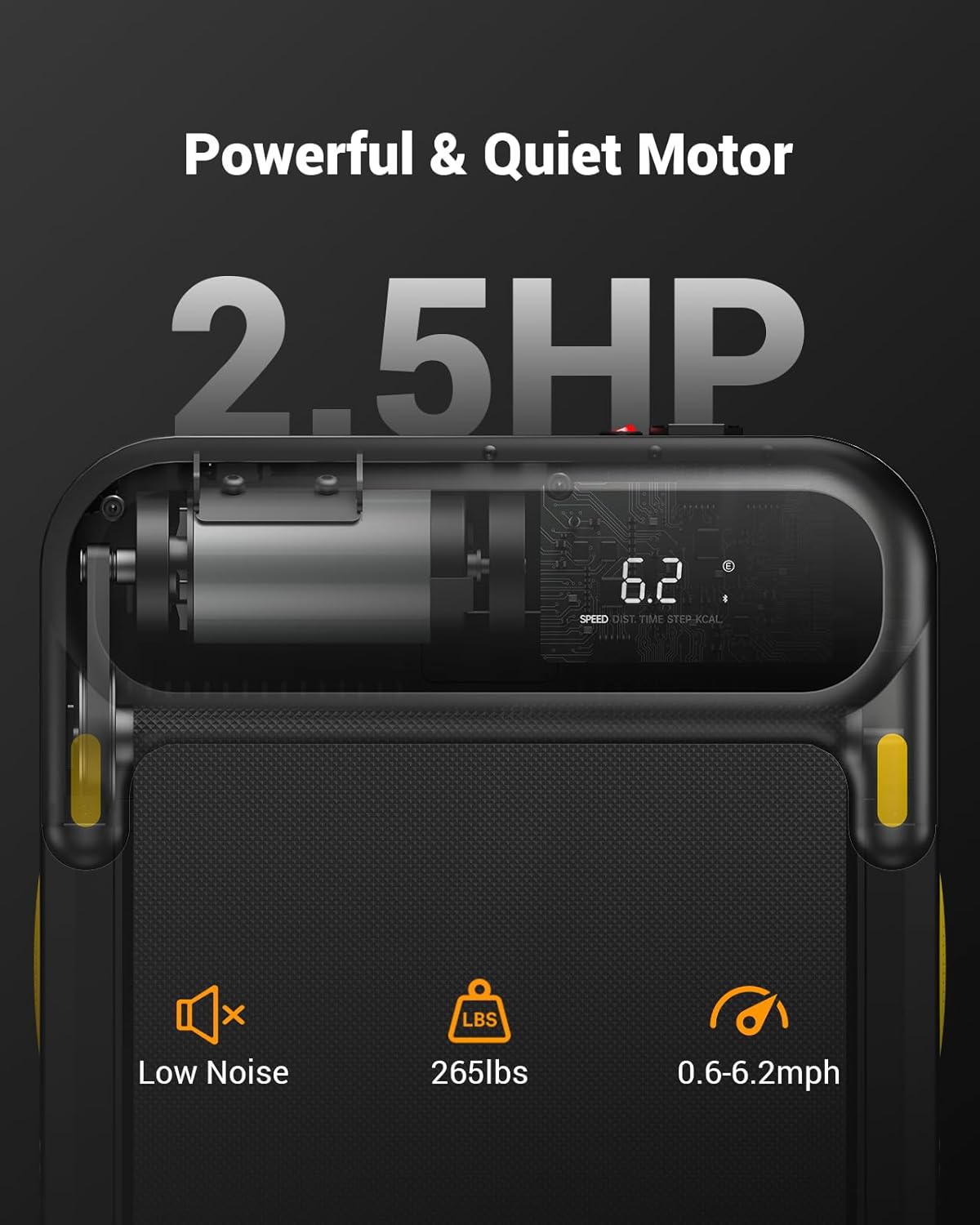
Imagen: Primer plano view of the UREVO Strol 2E Treadmill's motor specifications, highlighting its 2.5 HP power, low noise operation, 265 lbs weight capacity, and speed range of 0.6-6.2 mph.

Image: Diagram illustrating the UREVO Strol 2E Treadmill's joint protection system, featuring 2 soft cushions, a 5-layer running belt, and 8 silicone shock absorbers.
9. Garantía y soporte
UREVO offers a 1-year warranty for the Strol 2E Smart 2-in-1 Folding Treadmill. For any questions, concerns, or warranty claims, please contact UREVO customer support. Our professional team is available to assist you.
Please refer to the contact information provided with your product packaging or visit the official UREVO websitio para detalles de soporte.


