Introducción
Thank you for choosing the Tracer M45 Portable Bluetooth Speaker. This manual provides essential information for the safe and efficient use of your device. Please read it thoroughly before operating the speaker and keep it for future reference.
The Tracer M45 is a versatile 45W portable Bluetooth speaker designed for high-quality audio playback from various sources, including Bluetooth-enabled devices, FM radio, and other audio inputs. It features a robust design and intuitive controls for an enhanced listening experience.
Información de seguridad
- No exponga el altavoz al agua, la humedad o temperaturas extremas.
- Evite dejar caer o someter el altavoz a impactos fuertes.
- No desmonte, repare ni modifique el altavoz usted mismo. Encargue cualquier reparación a personal cualificado.
- Mantenga el altavoz alejado de fuentes de calor y de la luz solar directa.
- Utilice únicamente el cable de carga y el adaptador de corriente especificados.
- Limpie el altavoz con un paño suave y seco. No utilice limpiadores abrasivos ni disolventes.
- Asegúrese de que haya una ventilación adecuada al utilizar el altavoz.
Contenido del paquete
Por favor, compruebe que todos los artículos estén presentes en el paquete:
- Tracer M45 Portable Bluetooth Speaker
- Cable de carga
- Mando a distancia
- Manual de usuario (este documento)
Producto terminadoview
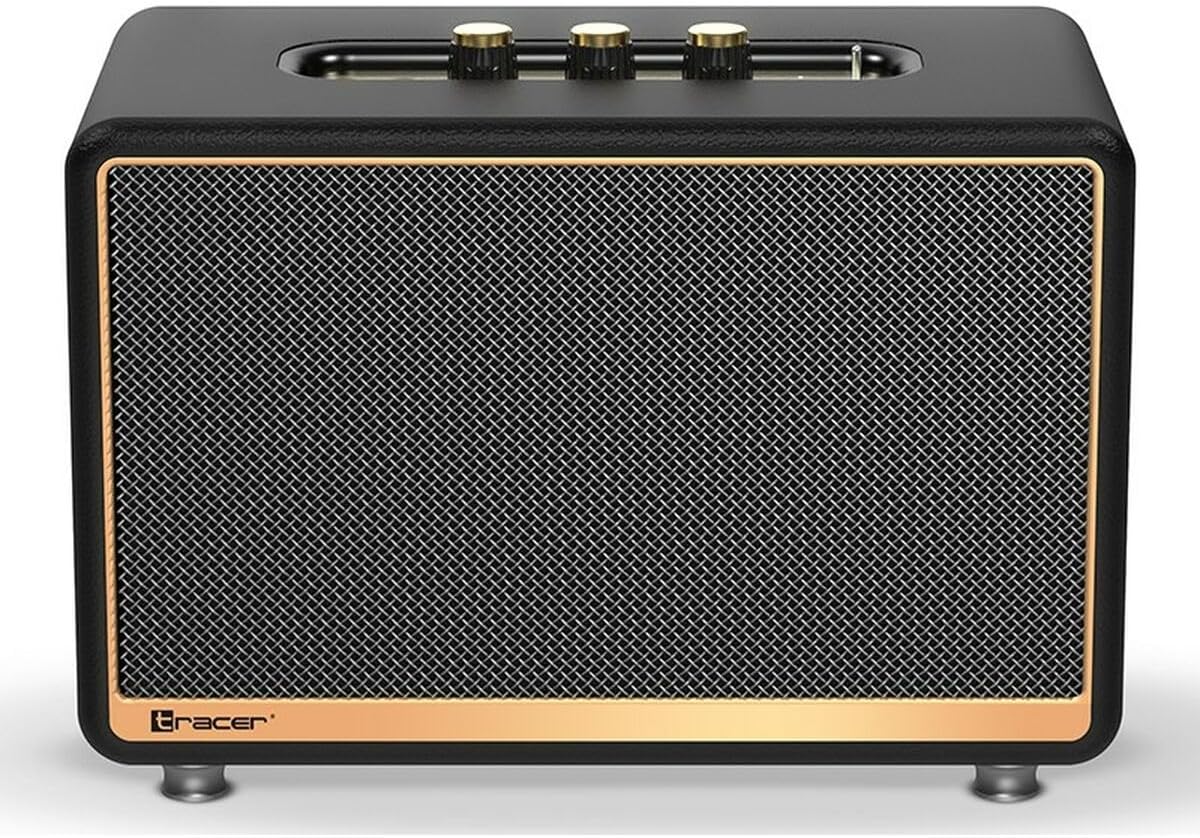
Figura 1: Frente view of the Tracer M45 Portable Bluetooth Speaker. The speaker features a black mesh grille with a gold-colored trim, and three gold-colored control knobs are visible on the top panel. The Tracer logo is located at the bottom left of the grille.
Controles y Puertos
Familiarize yourself with the various controls and ports on your Tracer M45 speaker:
- Botón/interruptor de encendido: Located on the rear or top panel, used to turn the speaker ON/OFF.
- Perillas de volumen: Three gold-colored knobs on the top panel for adjusting volume, bass, and treble.
- Botón de modo: To switch between Bluetooth, FM Radio, and other input modes.
- Botón de reproducción/pausa: For controlling audio playback.
- Botones de pista anterior/siguiente: For navigating through tracks or FM radio stations.
- Puerto de carga: Para conectar el cable de carga.
- Puerto de entrada auxiliar: Para conectar dispositivos de audio externos mediante un cable de audio de 3.5 mm.
- Puerto USB: (If present) For playing music from a USB drive.
- Indicador LED: Muestra el estado de energía, el estado de carga y el estado de emparejamiento de Bluetooth.
Configuración
1. Carga del altavoz
Before first use, fully charge the speaker. Connect the charging cable to the speaker's charging port and the other end to a suitable USB power adapter (not included) or a computer's USB port. The LED indicator will show the charging status and turn off or change color when fully charged.
2. Encendido / apagado
To turn the speaker ON, locate the power switch/button and slide it to the "ON" position or press and hold it for a few seconds. The LED indicator will light up. To turn OFF, repeat the process.
3. Emparejamiento Bluetooth
- Ensure the speaker is ON and in Bluetooth mode. If not, press the Mode button until you hear a Bluetooth pairing prompt or see the LED indicator flashing rapidly.
- On your smartphone, tablet, or other Bluetooth device, enable Bluetooth.
- Buscar available devices. You should see "Tracer M45" or a similar name in the list.
- Select "Tracer M45" to connect. Once paired, the speaker will indicate a successful connection (e.g., a sound prompt or steady LED light).
- The speaker will automatically reconnect to the last paired device when in range and Bluetooth is enabled.
4. Connecting via Aux-in
For devices without Bluetooth, connect a 3.5mm audio cable (not included) from your device's headphone jack to the speaker's Aux-in port. The speaker should automatically switch to Aux mode, or you may need to press the Mode button.
5. Configuración de radio FM
To use the FM Radio function, switch the speaker to FM mode using the Mode button. For best reception, ensure the speaker is in an open area. Press and hold the Play/Pause button to auto-scan and save available FM stations. Use the Previous/Next Track buttons to navigate between saved stations.
Operante
Reproducción básica
- Reproducir/Pausa: Presione el botón Reproducir/Pausa una vez para reproducir o pausar el audio.
- Control de volumen: Rotate the main volume knob on the top panel to increase or decrease the volume. Use the bass and treble knobs to adjust sound equalization.
- Pista siguiente / anterior: Press the Next or Previous track buttons to skip to the next or previous song/station.
Uso del control remoto
The Tracer M45 comes with a remote control for convenient operation. Ensure the remote has working batteries. The remote allows you to control power, mode, volume, track navigation, and FM radio functions from a distance.
Mantenimiento
- Limpieza: Limpie la superficie del altavoz con un paño suave, seco y sin pelusa. No utilice limpiadores líquidos, aerosoles ni disolventes.
- Almacenamiento: Cuando no utilice el altavoz durante períodos prolongados, guarde el altavoz en un lugar fresco y seco, alejado de la luz solar directa y de temperaturas extremas.
- Cuidado de la batería: Para prolongar la vida útil de la batería, evite descargarla por completo con frecuencia. Cargue el altavoz regularmente, incluso si no lo usa.
Solución de problemas
| Problema | Posible causa | Solución |
|---|---|---|
| El altavoz no se enciende. | La batería está baja o agotada. | Cargue el altavoz completamente. |
| No se puede emparejar a través de Bluetooth. | El altavoz no está en modo de emparejamiento; el Bluetooth está desactivado en el dispositivo; el dispositivo está demasiado lejos. | Ensure speaker is in Bluetooth pairing mode. Turn on Bluetooth on your device. Move device closer to speaker (within 10 meters). |
| No hay sonido. | El volumen es demasiado bajo; modo de entrada incorrecto; el dispositivo no reproduce. | Increase speaker and device volume. Check if the correct input mode (Bluetooth, Aux) is selected. Ensure audio is playing on the connected device. |
| Mala recepción de radio FM. | Señal débil; interferencia. | Relocate the speaker to an area with better signal. Perform auto-scan again. |
Presupuesto
| Característica | Detalle |
|---|---|
| Número de modelo | S9174238 |
| Marca | Trazador |
| Tecnología de conectividad | Bluetooth 5.0 |
| Potencia máxima de salida | 45 vatios |
| Tipo de altavoz | Portable Bluetooth Speaker (with Subwoofer component) |
| Modo de salida de audio | BÁSICO |
| Tipo de montaje | Soporte de mesa |
| Características especiales | Wireless, LED Indicator, ON/OFF Switch, FM Radio |
| Usos recomendados | For computer, For smartphone or tablet |
| Tipo de controlador | Mando a distancia |
| Color | Negro |
| Dimensiones del producto (L x An x Al) | 22 x 20 x 32 cm (8.66 x 7.87 x 12.6 pulgadas) |
| Peso | 4.04 kg (8.9 libras) |
Garantía y soporte
Tracer products are designed and manufactured to the highest quality standards. For information regarding warranty coverage, please refer to the warranty card included with your product or visit the official Tracer webSitio. Conserve su recibo de compra como comprobante de compra.
For technical support, troubleshooting assistance, or service inquiries, please contact Tracer customer support through their official channels. Contact information can typically be found on the product packaging or the manufacturer's websitio.
Nota: Los términos y condiciones de la garantía pueden variar según la región.