1. Producto terminadoview
The INNOVV N1 is a portable 5.5-inch smart screen designed for motorcycles, integrating Apple CarPlay, Android Auto, GPS navigation, and a dual dash cam system. It features front and rear 1080P@30FPS recording, 5.8G Wi-Fi connectivity, IP67 waterproofing, a full-screen touch interface, and parking monitoring. This manual provides comprehensive instructions for its setup, operation, and maintenance.

Image 1.1: The INNOVV N1 smart screen display unit and two compact dash cameras.
2. Contenido del paquete
Verifique que todos los artículos enumerados a continuación estén incluidos en su paquete. Si falta algún artículo o está dañado, comuníquese con atención al cliente.
- DVR and Display Unit (1 pc)
- 0.6 Meter Extended Cable (2 pcs)
- 2.5 Meter Extended Cable (1 pc)
- Power Supply Cable (1 pc)
- Accessory Kit (3 pcs)
- Manual de usuario (1 pieza)
- GPS Module (1 pc)
- Front Camera (1 pc)
- Rear Camera (1 pc)
- TPMS Sensors (2 pcs, if included in your model)
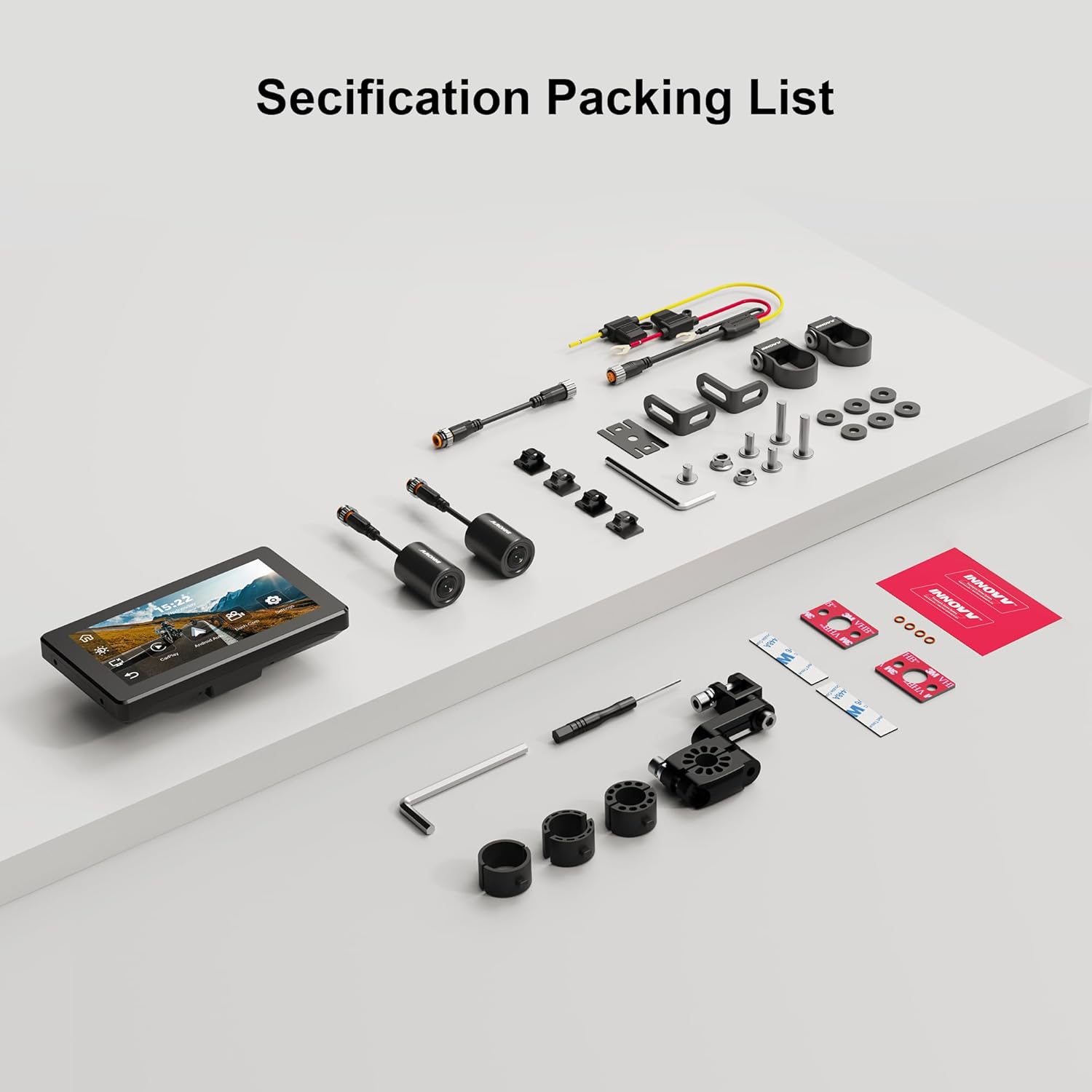
Image 2.1: A visual representation of the INNOVV N1 system components and accessories included in the package.
3. Guía de instalación
Proper installation ensures optimal performance and safety. It is recommended to have this device installed by a qualified professional if you are unsure about any steps.
3.1 Montaje de la unidad de visualización
- Seleccione una ubicación adecuada en el manillar de su motocicleta que no obstruya su view o el control del vehículo.
- Use the provided handlebar mount from the accessory kit to securely attach the display unit. Ensure it is firmly installed without shaking.
- Ajustar el viewÁngulo de inclinación para una visibilidad óptima.

Image 3.1: The 5.5-inch display unit securely mounted on a motorcycle handlebar, showing its compact dimensions (150mm x 84.5mm).
3.2 Conexión de las cámaras
- Identify the front and rear cameras. The cameras are designed for 1080P recording with a 125-degree wide-angle lens.
- Monte la cámara frontal en una posición que proporcione una visión clara y sin obstrucciones. view del camino por delante.
- Monte la cámara trasera para capturar la view detrás de tu motocicleta.
- Connect the camera cables to the corresponding ports on the main DVR unit. Use the extended cables as needed.

Imagen 3.2: Primer plano view of the dual 1080P cameras with 125-degree wide-angle lenses, designed for comprehensive coverage.
3.3 Conexión de alimentación
- Connect the power supply cable to the main DVR unit.
- Route the power cable safely to your motorcycle's power source, ensuring it does not interfere with moving parts or get pinched.
3.4 Instalación del módulo GPS
- Connect the GPS module to the designated port on the main unit.
- Monte el módulo GPS en un lugar despejado. view del cielo para una recepción óptima de la señal.
3.5 TPMS Sensor Installation (If Applicable)
- If your package includes TPMS sensors, install them on your motorcycle's tire valves according to the instructions provided with the sensors.
- Ensure the sensors are securely fastened to prevent air leakage.
3.6 Instalación terminadaview Video
For a visual guide on the installation and features of the INNOVV N1, please refer to the video below:
Video 3.1: This video demonstrates the physical components, connections, and initial setup of the INNOVV N1 system, including the dash cameras, GPS module, and tire pressure sensors, along with a brief overview of its functions like CarPlay and Android Auto.
4. Instrucciones de funcionamiento
Familiarize yourself with the device's functions to enhance your riding experience.
4.1 Encendido y apagado
- Encendido: The device will automatically power on when your motorcycle's ignition is turned on.
- Apagado: The device will automatically power off when your motorcycle's ignition is turned off.
4.2 Interfaz de pantalla táctil
The 5.5-inch full-screen touch display allows for intuitive navigation. Tap icons to access different functions such as CarPlay, Android Auto, Dash Cam, and Settings.
4.3 Apple CarPlay y Android Auto
Connect your smartphone wirelessly via Bluetooth 4.2 and 5.8G Wi-Fi to access CarPlay or Android Auto features directly on the N1 display.
- Asegúrese de que Bluetooth y Wi-Fi estén habilitados en su teléfono inteligente.
- On the N1 display, select the CarPlay or Android Auto icon.
- Follow the on-screen prompts to pair your device. For CarPlay, your iPhone must be iOS 13 or above. For Android Auto, your Android phone must be Android 11 or above and support 5G Wi-Fi.
- Once connected, you can use navigation apps, make calls, send messages, and play music through the N1 display.

Image 4.1: The INNOVV N1 display showing the Apple CarPlay and Android Auto interfaces, demonstrating seamless smartphone integration.
4.4 Funcionalidad de la cámara de salpicadero
The integrated dual dash cam records continuously in 1080P@30FPS from both front and rear cameras.
- Grabación: Recording starts automatically when the device powers on.
- Grabación en bucle: The system supports loop recording, overwriting the oldest footage cuando la tarjeta de almacenamiento está llena.
- Grabación de eventos: In case of sudden impact or vibration, the G-sensor will trigger event recording, locking the footage para evitar sobrescribir.
- Reproducción: Access recorded videos through the Dash Cam menu on the display.
4.5 Navegación GPS
Utilize the GPS module for accurate location tracking and navigation through connected CarPlay or Android Auto applications.
- Asegúrese de que el módulo GPS esté conectado correctamente y tenga una señal clara. view del cielo.
- Open your preferred navigation app (e.g., Google Maps, Apple Maps) via CarPlay or Android Auto.
4.6 Parking Monitoring Mode
The N1 automatically monitors your motorcycle's status when parked. If vibrations are detected, it will record videos from the front and rear cameras, providing 24-hour parking surveillance.

Image 4.2: The INNOVV N1's parking monitoring feature, which activates 24-hour surveillance upon detecting vibrations while parked.
4.7 Sistema de control de presión de neumáticos (TPMS)
If equipped, the TPMS sensors provide real-time tire pressure and temperature readings directly on the N1 display, enhancing safety.
- The display will show current tire pressure and temperature for both front and rear tires.
- Set high and low pressure alarms in the settings to receive alerts for abnormal tire conditions.
5. Mantenimiento
Regular maintenance ensures the longevity and optimal performance of your INNOVV N1 system.
- Limpieza: Utilice un paño suave y seco.amp Paño para limpiar la pantalla y las lentes de la cámara. Evite limpiadores abrasivos o disolventes.
- Actualizaciones de firmware: Periodically check the INNOVV website for firmware updates to ensure your device has the latest features and bug fixes. Follow the provided instructions carefully for any updates.
- Almacenamiento: Cuando no utilice el dispositivo durante períodos prolongados, guárdelo en un lugar fresco y seco, alejado de la luz solar directa.
- Tarjeta SD: Format the microSD card regularly (e.g., once a month) to maintain optimal recording performance and prevent data corruption.
6. Solución de problemas
If you encounter issues with your INNOVV N1, refer to the table below for common problems and solutions.
| Problema | Posible causa | Solución |
|---|---|---|
| El dispositivo no se enciende. | No hay fuente de alimentación; conexión suelta. | Check power cable connection to the motorcycle and the device. Ensure ignition is on. |
| Las cámaras no graban ni muestran video. | Loose camera connection; faulty SD card; camera malfunction. | Check camera cable connections. Ensure SD card is inserted correctly and formatted. Try a different SD card. |
| CarPlay/Android Auto no se conecta. | Bluetooth/Wi-Fi desactivado en el teléfono; emparejamiento incorrecto; sistema operativo del teléfono no compatible. | Ensure phone's Bluetooth and Wi-Fi are on. Re-pair the device. Check phone OS version compatibility. |
| Señal GPS débil o no disponible. | GPS module obstructed; faulty module. | Asegúrese de que el módulo GPS tenga una vista clara view of the sky. Check connection. |
| TPMS no muestra lecturas. | Sensors not paired; low sensor battery; incorrect installation. | Ensure sensors are correctly installed and paired. Check sensor battery status. |
7. Especificaciones del producto
| Característica | Especificación |
|---|---|
| Tamaño de la pantalla | 5.5 pulgadas |
| Resolución | 1080p (Video Recording) |
| Sistema operativo | Android (for internal system, supports CarPlay/Android Auto) |
| Entrada de interfaz humana | Pantalla táctil |
| Tipo de pantalla | Pantalla LCD |
| Tipo de pantalla táctil | Capacitivo |
| Tipo de montaje | Montaje del manillar |
| Tipo de mapa | Street (via connected smartphone apps) |
| Tipo de servicio del vehículo | Motocicleta |
| Clasificación de impermeabilidad | IP67 |
| Frecuencia de Wi-Fi | 5.8G |
8. Garantía y soporte
The INNOVV N1 comes with a Garantía de 12 meses A partir de la fecha de compra, cubre defectos de fabricación. Conserve el comprobante de compra para reclamaciones de garantía.
For technical support, troubleshooting assistance, or warranty inquiries, please contact INNOVV customer service through their official websitio o el minorista donde compró el producto.
Recursos en línea: Visit the official INNOVV website for FAQs, updated manuals, and firmware downloads.


