1. Introducción
This manual provides essential instructions for the safe and effective operation of your GOOLOO GT4000S Jump Starter and GOOLOO GT150 Tire Inflator. Please read this manual thoroughly before use and retain it for future reference.

Image: The GOOLOO GT4000S Jump Starter (yellow and black unit with clamps) and the GOOLOO GT150 Tire Inflator (black rectangular unit with digital display).
2. Información importante de seguridad
Observe siempre las siguientes precauciones de seguridad para evitar lesiones o daños al dispositivo y al vehículo:
- Lea todas las instrucciones antes de usar.
- Do not operate the jump starter if the cables or clamps están dañados.
- Ensure correct polarity connection (red to positive, black to negative) to avoid sparks or damage.
- Do not jump start vehicles with battery voltage otro que 12V.
- Mantener fuera del alcance de los niños.
- No exponer a la lluvia ni a temperaturas extremas.
- Do not use the tire inflator for purposes other than inflating tires or compatible items.
- Avoid over-inflating tires; always check recommended PSI.
3. Producto terminadoview
3.1 GOOLOO GT4000S Jump Starter
- Corriente pico: 4000A
- Compatibilidad del motor: Hasta 12.0 L de gasolina, 10.0 L de diésel
- Cargando: 100W Fast-Charging (1.2 hours for full charge, 5 minutes for a single jumpstart). Type-C port for charging.
- Producción: Up to 100W for charging MacBooks and other laptops (Type-C port only).
- Duración de la batería: Up to 60 jumpstarts on a single full charge.
- Compatibilidad: Suitable for RVs, pickup trucks, motorcycles, SUVs, tractors, boats, and other 12V vehicles.

Image: The GOOLOO GT4000S Jump Starter connected to a car battery in an engine bay, illustrating its primary function.
Inflador de neumáticos 3.2 GOOLOO GT150
- Presión máxima: 150 PSI
- Velocidad de inflación: Inflates a completely flat 205/55 R16 car tire (0-36PSI) in approximately 7 minutes.
- Características: Auto-shutoff, cordless design, portable size, ultra-bright LED screen for clear display.
- Compatibilidad: Suitable for car tires, SUV tires, motorcycle tires, bicycle tires, balls, kayaks, and swim rings.

Image: The GOOLOO GT150 Tire Inflator connected to a car tire, demonstrating its inflation capability.
4. Configuración y carga
4.1 Charging the GT4000S Jump Starter
- Connect the provided USB-C cable to the jump starter's Type-C input port.
- Connect the other end of the USB-C cable to a 100W fast-charging wall adapter (not included, unless specified in package contents) or a compatible car charger.
- The display will show the charging wattage y porcentaje de bateríatage. A full charge from 0% to 100% typically takes 1.2 hours with a 100W charger.

Image: The GOOLOO GT4000S Jump Starter being charged via its USB-C port inside a vehicle, highlighting its fast-charging capability.
4.2 Carga del inflador de neumáticos GT150
The GT150 Tire Inflator is charged via its USB-C port. Connect it to a compatible USB-C charger. The LED screen will indicate the charging status.

Image: The GOOLOO GT150 Tire Inflator connected to a smartphone via a USB cable, demonstrating its power bank functionality.
5. Instrucciones de funcionamiento
5.1 Using the GT4000S Jump Starter
- Ensure the jump starter is sufficiently charged (above 20%).
- Conecte el cable puente clamps to the jump starter unit.
- Adjuntar el cl rojoamp al terminal positivo (+) de la batería del vehículo y al cable negroamp al terminal negativo (-).
- Turn on the jump starter. The screen should display "READY" if the connection is correct and the battery is detectable.
- If the battery is completely dead or too low to detect, press the "BOOST" button for 1-2 seconds until "READY" is displayed. This forces the jump starter to provide maximum output.
- Arranque el motor de su vehículo dentro de los 30 segundos.
- Una vez que el vehículo arranque, retire inmediatamente el clamps de la batería del automóvil, luego desconéctelos del arrancador.
Video: Official GOOLOO demonstration on how to jump start a car using a GOOLOO jump starter. This video illustrates the connection process and starting the vehicle.
5.2 Uso del inflador de neumáticos GT150
- Connect the air hose to the GT150 inflator and then securely attach it to the tire valve stem.
- Turn on the GT150. The LED screen will display the current tire pressure.
- Utilice los botones '+' y '-' para establecer la presión objetivo deseada.
- Presione el botón de encendido para iniciar el inflado. El inflador se detendrá automáticamente al alcanzar la presión deseada.
- Disconnect the air hose and store the unit.
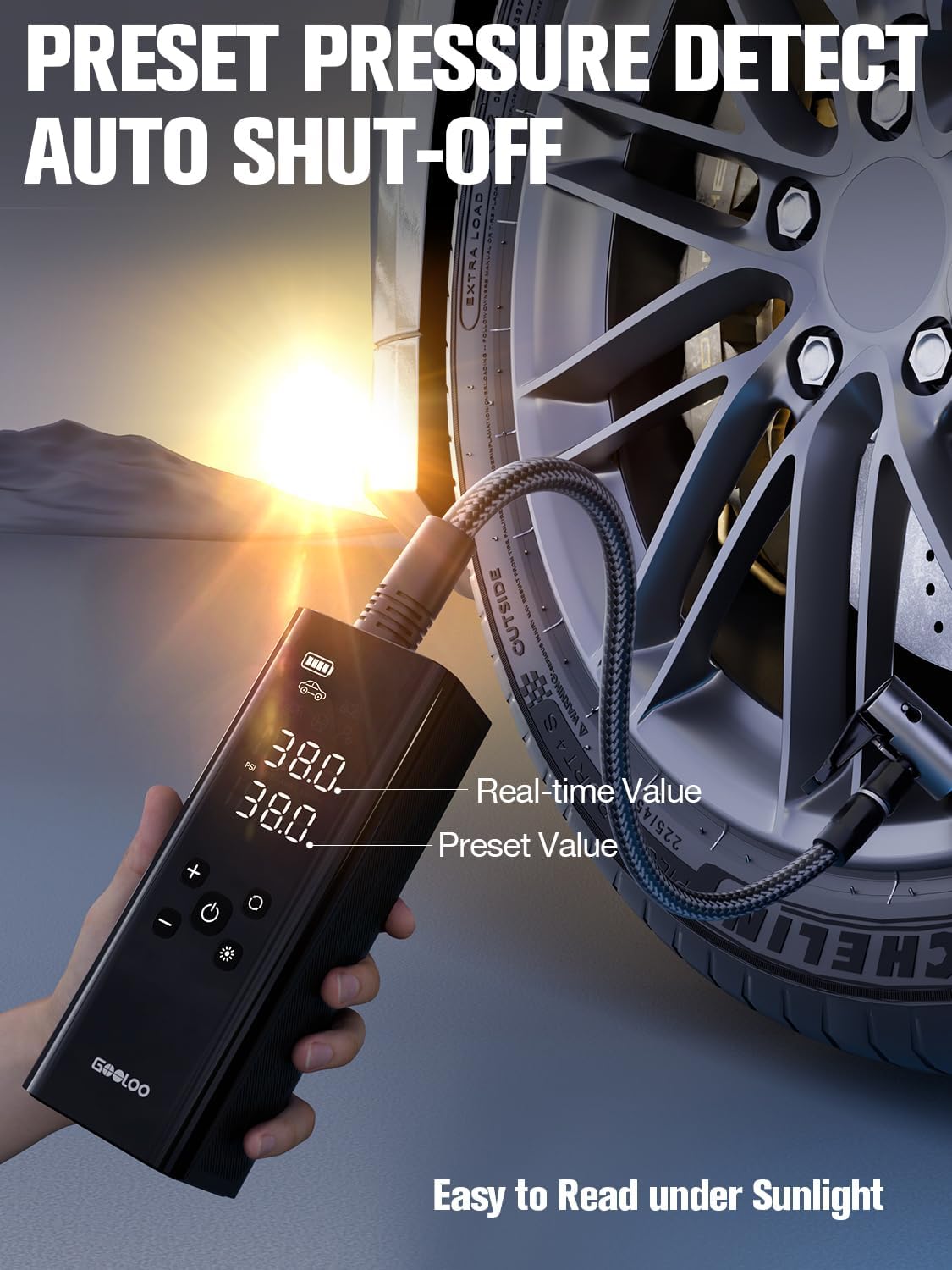
Image: The GOOLOO GT150 Tire Inflator's LED screen showing both the real-time and preset tire pressure values, indicating its auto-shutoff feature.
6. Mantenimiento y almacenamiento
- Store the units in a cool, dry place away from direct sunlight and moisture.
- Recharge the jump starter every 3-6 months to maintain battery health, even if not used.
- Clean the units with a dry, soft cloth. Do not use harsh chemicals.
7. Solución de problemas
| Problema | Posible causa | Solución |
|---|---|---|
| Jump Starter not turning on | Low battery or faulty unit | Charge the unit fully. If issue persists, contact support. |
| "READY" not displayed (GT4000S) | Incorrect connection or battery too low | Compruebe clamp connections. Use "BOOST" function for completely dead batteries. |
| Tire Inflator not working (GT150) | Low battery, hose not connected properly | Charge the unit. Ensure hose is securely attached to tire valve. |
8. Especificaciones
Arrancador auxiliar GOOLOO GT4000S
- Cima Ampedad: 4000A
- Volumentage: 12 V
- Tipo de batería: Iones de litio
- Entrada de carga: USB-C (100 W máx.)
- Salida USB: USB-C (100W Max), USB-A (various outputs)
Inflador de neumáticos GOOLOO GT150
- Presión máxima: 150 PSI
- Fuente de energía: Cordless (Internal Battery)
- Mostrar: Pantalla LED ultrabrillante
9. Garantía y soporte
For warranty information or technical support, please refer to the contact details provided in your product packaging or visit the official GOOLOO website. Please have your model numbers (GT4000S, GT150) ready when contacting support.


