Introducción
This instruction manual provides essential information for the setup, operation, and maintenance of your LOUTOC Replacement Remote Control, model URMT26CND002. This remote is designed as a universal replacement for various Philips Android and Google Smart TV models. Please read this manual thoroughly before use to ensure optimal performance and longevity of your device.
Configuración
1. Instalación de la batería
El control remoto requiere dos (2) pilas AAA (no incluidas). Siga estos pasos para instalarlas:
- Ubique la tapa del compartimiento de la batería en la parte posterior del control remoto.
- Deslice la tapa hacia abajo para abrir el compartimento.
- Inserte dos pilas AAA, asegurándose de que los terminales positivo (+) y negativo (-) estén alineados correctamente con las marcas dentro del compartimiento.
- Deslice la tapa del compartimiento de la batería nuevamente a su lugar hasta que encaje firmemente.
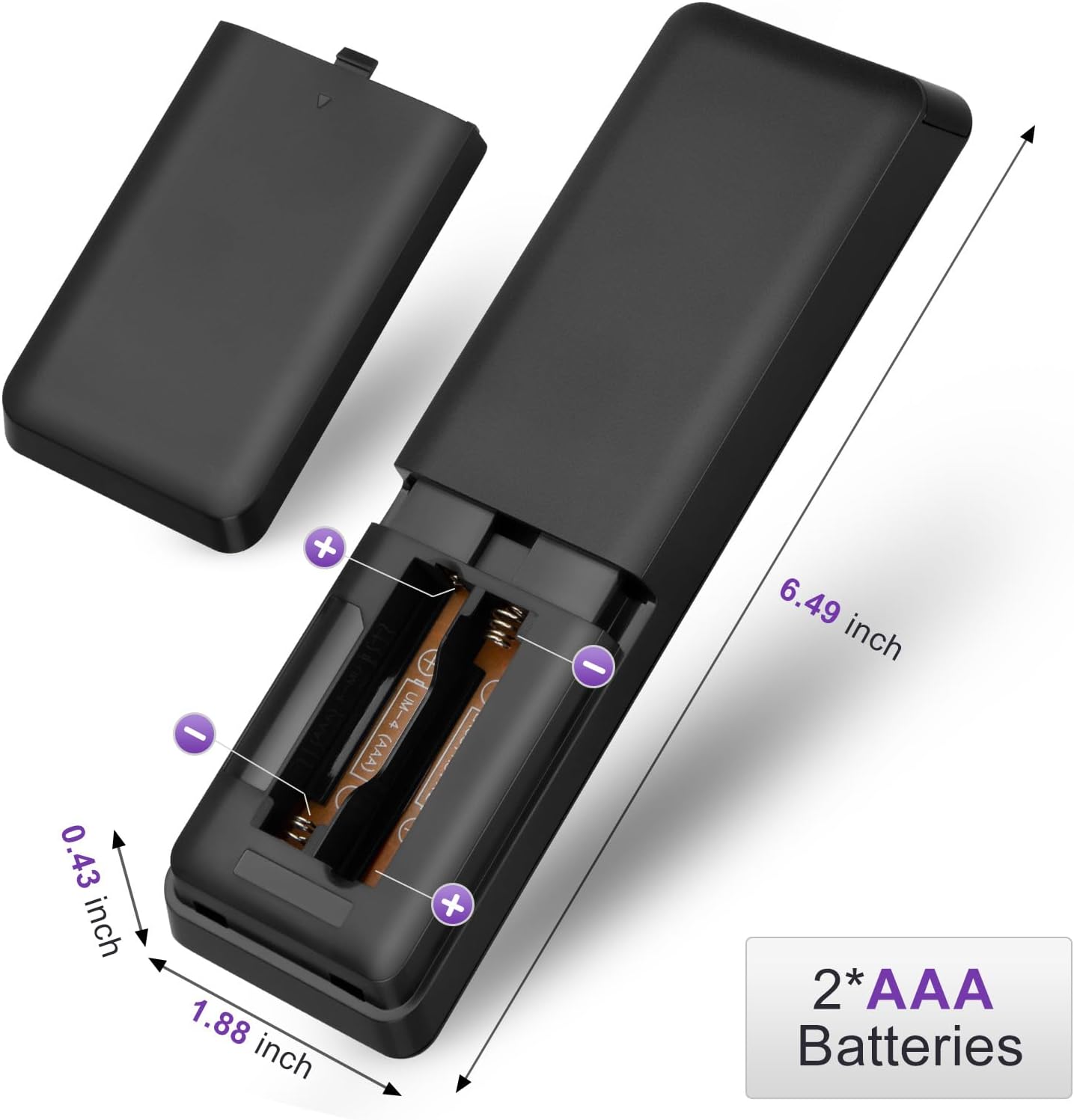
Figure 1: Battery installation for the LOUTOC remote control.
2. Uso inicial
This LOUTOC remote control is pre-programmed and designed to work immediately with compatible Philips Smart TVs. No additional setup or pairing is required. Simply install the batteries, point the remote at your TV, and begin use.

Figure 2: Key features including no setup required and fast response time.
Instrucciones de funcionamiento
The LOUTOC remote control features a standard layout for easy navigation and control of your Philips Smart TV. Below is a detailed description of each button's function.
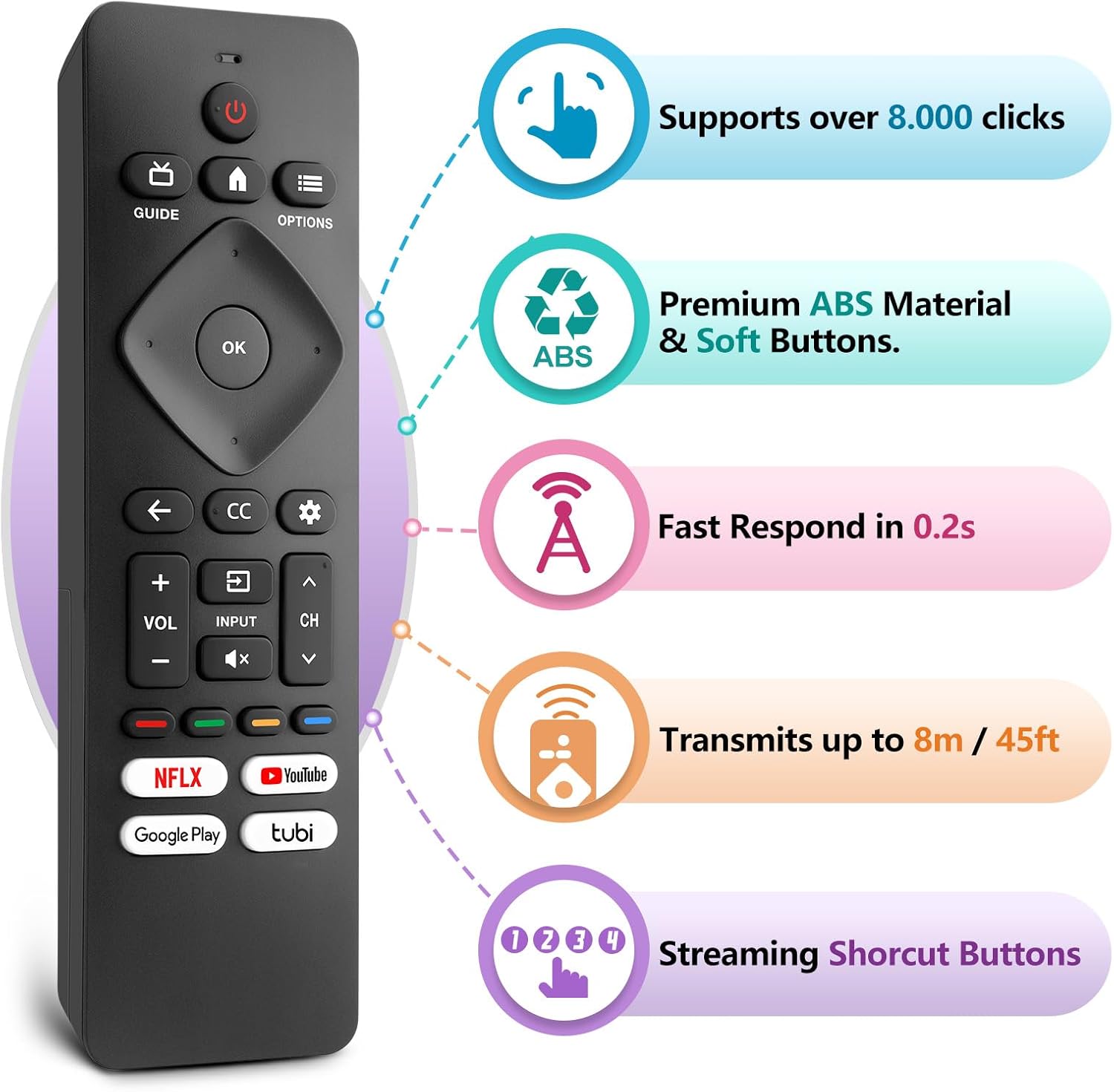
Figure 3: LOUTOC Remote Control Button Layout and Functions.
- FUERZA: Turns the TV on or off. Press for less than 1 second for Quick Start Standby. Hold for 1 second or more for Low Power Standby.
- GUÍA: Displays the TV program guide (availability may vary by service provider and region).
- HOGAR: Accesses your apps, Live TV, input devices, settings, and the Google Play Store.
- OPCIONES: Provides quick access to TV settings (settings vary depending on active screen).
- CURSOR (Up, Down, Left, Right) & OK: Moves to select an item and confirms selections on the menu.
- ATRÁS: Vuelve a la pantalla anterior.
- CC (Subtítulos): Selects closed caption settings.
- PANEL: Accesses the Google TV dashboard for user settings, notifications, and kids mode.
- APORTE: Selects the input source for connected devices.
- MUTE: Toggles the sound on and off.
- VOLUMEN +/-: Ajusta el nivel de volumen.
- CH +/-: Selects the next or previous channel.
- BOTONES DE COLOR (Rojo, Verde, Amarillo, Azul): Works as direct access to user-specified net apps or functions.
Botones de acceso directo
The remote includes dedicated shortcut buttons for popular streaming services:
- Netflix
- YouTube
- Google Play
- Tubo

Figure 4: Dedicated streaming service shortcut buttons.
Compatibilidad
This LOUTOC remote control is compatible with a wide range of Philips Android and Google Smart TV models. It is designed to replace various original Philips remote controls.
Compatible Philips Google TV Models:
- 70PUL7553/F7, 75PUL7552/F7, 65PUL7552/F7, 55PUL7552/F7, 50PUL7552/F7
- 43PUL7672/F7, 43PUL7652/F7, 65PUL7672/F7, 55PUL7672/F7, 50PUL7672/F7
- Generally compatible with Philips Google TV 7000 and 7600 Series.
Compatible Philips Android TV Models:
- 65PFL5766/F7, 55PFL5766/F7, 50PFL5766/F7, 43PFL5766/F7, 50PFL5806/F7
- 75PFL5604/F7, 75PFL5604/F7A, 75PFL5604/F7E, 75PFL5704/F7A, 75PFL5704/F7
- 32PFL5505/F7, 65PFL5604/F7, 55PFL5604/F7, 50PFL5604/F7, 43PFL5604/F7
- 50PFL5604/F7A, 43PFL5766/F6, 50PFL5766/F6, 65PFL5766/F6, 55PFL5766/F6
- 55PFL5704/F7, 65PFL5704/F7, 50PFL5704/F7, 43PFL5704/F7, 65PFL5504/F7
- 65PFL5604/F7A, 55PFL5604/F7A, 55PFL5766/F7E
- Generally compatible with Philips Android TV 5000, 5500, 5700, 5704, and 5800 Series.

Figure 5: Compatibility with Philips Google TV and Android TV series.
Presupuesto
| Característica | Detalle |
|---|---|
| Número de modelo | URMT26CND002 |
| Dimensiones | 6 x 1.2 x 0.8 pulgadas (15.24 x 3.05 x 2.03 cm) |
| Peso del artículo | 1.76 onzas (50 gramos) |
| Pilas necesarias | 2 pilas AAA (no incluidas) |
| Distancia de transmisión | Aproximadamente 6-8 metros (19-26 pies) |
| Tiempo de respuesta | En 0.5 segundos |
| Material | Premium ABS Material |
| Características especiales | Ergonomic, Lightweight, No Programming Required, Pre-Programmed, Universal |
Solución de problemas
- El control remoto no responde:
- Asegúrese de que las baterías estén insertadas correctamente con la polaridad correcta (+/-).
- Reemplace las baterías viejas con baterías AAA nuevas.
- Verifique si hay obstrucciones entre el control remoto y el receptor de infrarrojos del televisor.
- Ensure you are within the effective operating range (6-8 meters) of the TV.
- Botones específicos que no funcionan:
- Verify that the button is clean and not stuck.
- Some functions may be specific to certain TV models or require the TV to be in a particular mode (e.g., input selection).
- Sin control de voz:
- This remote control does not support voice control functionality.
Mantenimiento
Para garantizar la longevidad y el correcto funcionamiento de su control remoto, siga estas pautas de mantenimiento:
- Limpieza: Utilice un paño suave y seco para limpiar el control remoto. Evite usar limpiadores líquidos o materiales abrasivos.
- Almacenamiento: Guarde el control remoto en un lugar fresco y seco, alejado de la luz solar directa y de temperaturas extremas.
- Cuidado de la batería: Retire las pilas si el mando a distancia no se va a utilizar durante un período prolongado para evitar fugas.
- Evite las gotas: Proteja el control remoto contra impactos físicos, ya que esto puede dañar los componentes internos.
Garantía y soporte
LOUTOC offers a 60-day replacement policy for this product. If you encounter any issues or have questions regarding your order, please contact LOUTOC customer support directly. Our team aims to respond within 12 hours during the work week to assist you.
For further assistance, please refer to the contact information provided with your purchase or visit the official LOUTOC store on Amazon: LOUTOC Store