Producto terminadoview
The Honeywell Home DT4 spatial thermostats combine a sleek, modern design with simple features for ease of use. DT4 spatial thermostats are suitable for almost any home and application, from on/off and OpenTherm boilers to district heating and heat pumps. They are designed for various residential applications and systems and are available as wired or wireless solutions. DT4 spatial thermostats can be installed as a standalone thermostat or as part of a broader comfort solution, such as the HCC100 multi-zone floor comfort controller or as part of Honeywell Evohome. DT4 spatial thermostats are compatible with hybrid and greener energy systems, including heat pumps, zoning, and underfloor heating and cooling.
Características principales
- On/Off 24V and 230V: Volumen versátiltage compatibility for various heating systems.
- Conexión de 2 cables: Simple and straightforward wiring for easy installation.
- Suitable for Heating and Cooling: Provides year-round climate control for optimal comfort.
- Batería incluida: Ready for immediate use upon installation.
- Battery Life: 3.5 Years: Long-lasting battery ensures reliable operation.
- Botones táctiles retroiluminados: Easy-to-use interface with clear visibility in any lighting condition.
Instalación y configuración
Before proceeding with installation, ensure the power supply to your heating/cooling system is turned off at the main circuit breaker to prevent electrical shock.
Desembalaje
Carefully remove all components from the packaging. Verify that all parts listed in the product contents are present and undamaged.
Montaje
The DT4 thermostat can be wall-mounted. Choose a location on an interior wall, away from direct sunlight, drafts, or heat sources, which could affect temperature readings. Ensure the mounting height is approximately 1.5 meters (5 feet) from the floor for accurate room temperature sensing.
Alambrado
The DT4 thermostat supports both 24V and 230V on/off systems. Connect the two wires from your heating/cooling system to the appropriate terminals on the thermostat's backplate. Refer to the detailed wiring diagram provided in the separate installation guide for specific terminal connections. Ensure all connections are secure.
Encendido inicial
Once wiring is complete and the thermostat is securely mounted, restore power to your heating/cooling system. The thermostat display should illuminate, indicating it is powered on. Follow any on-screen prompts for initial setup, such as language selection or time setting.
Instrucciones de funcionamiento
The Honeywell Home DT4 thermostat features intuitive backlit touch buttons for easy operation.
Ajuste de temperatura
Use the 'Up' and 'Down' arrow buttons on the thermostat to adjust the desired room temperature. The new setpoint will be displayed prominently on the screen.
Selección de modo (calefacción/refrigeración)
The thermostat can be switched between heating and cooling modes, depending on your system's capabilities. Consult the full user manual for specific instructions on how to change the operating mode, typically accessed through a dedicated mode button or menu option.
Backlit Touch Buttons
The touch buttons illuminate when pressed, providing clear feedback and ease of use, especially in low-light conditions. The display also features a temperature indicator for quick reference.
Mantenimiento
Reemplazo de batería
The DT4 thermostat is powered by batteries with an expected life of 3.5 years. When the battery indicator appears on the display, replace the batteries promptly to ensure continuous operation. Refer to the full user manual for instructions on how to access the battery compartment and replace the batteries.
Limpieza
Para limpiar el termostato, limpie suavemente la pantalla yasing con un suave, damp Paño. No utilice limpiadores abrasivos, disolventes ni aerosoles químicos, ya que pueden dañar el dispositivo.
Solución de problemas
| Asunto | Posible causa | Solución |
|---|---|---|
| La pantalla está en blanco | Sin energía o baterías agotadas. | Check power supply to the heating system. Replace batteries if applicable. |
| Heating/Cooling not turning on | Incorrect mode selected, setpoint not reached, or wiring issue. | Verify the thermostat is in the correct mode (heating/cooling). Adjust the setpoint to be above/below the current room temperature. Check wiring connections. |
| Lectura de temperatura inexacta | Thermostat location affected by external factors. | Ensure the thermostat is not in direct sunlight, near drafts, or close to heat-emitting appliances. |
Especificaciones técnicas
| Especificación | Detalle |
|---|---|
| Marca | Hogar Honeywell |
| Nombre del modelo | DT4 |
| Color | Negro |
| Volumentage | 230 voltios, 24 voltios |
| Características especiales | Indicador de temperatura |
| Tipo de controlador | Control manual |
| Usos específicos del producto | CV boiler |
| Tipo de control de temperatura | Manual de instrucciones |
| Tecnología de conectividad | Cableado |
| Componentes incluidos | Connection cables (2) |
| Fuente de poder | Funciona con pilas |
Imágenes y demostraciones de productos
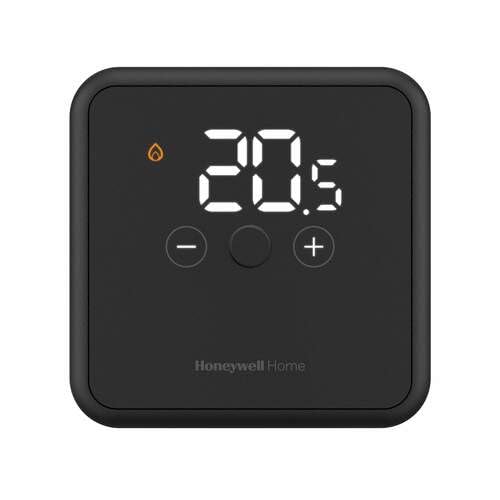
Descripción de la imagen: un frente view of the Honeywell Home DT4 Wired Thermostat in black, showcasing its sleek design and digital display. The thermostat is placed on a stand with its power adapter visible.
Descripción de la imagen: Una parte trasera view of the Honeywell Home DT4 Wired Thermostat, highlighting the backplate with wiring terminals for connection to the heating/cooling system. This view demonstrates the ease of installation.
Descripción de la imagen: The Honeywell Home DT4 Wired Thermostat mounted on a wall, illustrating its discreet and modern appearance in a typical home environment. The digital display shows temperature information.
Vídeos oficiales de productos
No official product videos specifically for the Honeywell Home DT4 model from a 'Seller' creator type were found in the provided data. Please refer to the written instructions for detailed guidance.
Garantía y soporte
Para obtener información sobre la garantía, consulte la documentación incluida con su producto o visite el sitio web oficial de Honeywell Home. website. Technical support and customer service contact details can also be found on the official website or by contacting your retailer.