1. Introducción
Thank you for choosing the BuTure VAC BR700 Portable Car Jump Starter with Air Compressor. This versatile device is designed to be your reliable companion for various automotive and outdoor needs, combining multiple essential functions into one compact unit. Please read this manual thoroughly before use to ensure safe and optimal performance.
The BR700 integrates a powerful jump starter, a high-capacity power bank, a digital tire inflator, and an emergency LED light, making it an indispensable tool for roadside emergencies, camping y uso diario.
2. Características del producto
- Arrancador de batería de pico de 6000 A: Capable of starting all 12V gas engines and up to 8.0L diesel engines. Features a manual override function for extreme cases.
- Compresor de aire de 150 PSI: Cordless digital tire inflator with 45L/Min airflow, smart preset pressure, and auto shut-off to prevent over-inflation. Suitable for car tires, bicycles, motorcycles, balls, and inflatable toys.
- Banco de energía de 26800 mAh: High-capacity battery charger with two smart USB output ports (including 18W Quick Charge) and a 160W max DC output for powering various 12V devices like car vacuum cleaners or refrigerators.
- 5W Emergency LED Light: Features a large luminous area with upgraded floodlight brightness and enlarged coverage. Includes multiple modes: steady, strobe, and SOS for emergency signaling.
- Pantalla LCD: Clear digital display for real-time battery status and tire pressure readings, enhancing diagnostics and adjustments.
- Protecciones de seguridad avanzadas: Built-in intelligent clip protection against over-discharge, over-current, reverse-connection, high-temperature, reverse-charge, short-circuit, high-voltage, y sobrecarga.
3. Contenido del paquete
Por favor, compruebe el contenido del paquete al desembalarlo:
- BuTure VAC BR700 Jump Starter Unit
- Cables de puente inteligentes
- Air Hose with Nozzle Adapters (Tire Pump Nozzle, Ball Needle, Cone Adapter)
- Cable de carga USB-C
- Adaptador de cargador de coche de 12 V CC
- Estuche de almacenamiento duradero
- Manual de usuario

Image: BuTure VAC BR700 Jump Starter with all included accessories.
4. Configuración y uso inicial
4.1 Carga de la unidad
Before first use, fully charge the BR700 unit. It is recommended to charge the product every 3 months to prolong its lifespan, especially if not in regular use.
- Connect the provided USB-C charging cable to the unit's input port.
- Connect the other end of the USB-C cable to a 5V/2A or higher rated USB charger (not included).
- The LCD screen will indicate charging status. The unit is fully charged when the battery icon is full.
4.2 Familiarizing with Ports and Controls
Locate the various ports and controls on your BR700 unit:
- Interruptor de alimentación: On/Off toggle for the main unit.
- Pantalla LCD: Shows battery level, pressure readings, and operating modes.
- Botones de control: Navigation and selection for air compressor settings and light modes.
- Puertos de salida USB: Para cargar dispositivos móviles.
- Puerto de salida de CC: Para alimentar dispositivos de 12 V.
- Puerto de arranque auxiliar: Para conectar los cables puente inteligentes.
- Puerto de manguera de aire: For connecting the air inflation hose.
5. Instrucciones de funcionamiento
5.1 Arrancar un vehículo con ayuda de un puente
Ensure the BR700 unit is sufficiently charged before attempting a jump start.
- Apague el encendido de su vehículo y todos los accesorios.
- Insert the blue plug of the smart jumper cables into the jump start port on the BR700 unit.
- Conectar el rojo (+) clamp al terminal positivo de la batería de su vehículo.
- Conectar el negro (-) clamp al terminal negativo de la batería de su vehículo.
- Once connected, the indicator light on the smart jumper cable will turn verde sólido, indicating it's ready to jump start. If it flashes red/green, check connections. If it's solid red, there's an error (e.g., reverse polarity).
- Arranque su vehículo.
- Una vez que el vehículo arranque, retire inmediatamente el negro (-) clamp de la batería del vehículo, seguido de la rojo (+) clamp.
- Disconnect the smart jumper cables from the BR700 unit.
Manual Override (Force Start): In extreme cases where the battery is completely dead and the smart cable indicator does not turn green, you can use the manual override function. Press and hold the 'Force Start' button on the smart cable until the indicator turns solid green. Precaución: Using manual override disables safety features. Ensure correct polarity before proceeding.

Image: Proper connection for jump starting a vehicle.
Video: Demonstration of the 6000A Heavy-duty Car Jump Starter in action.
5.2 Uso del compresor de aire
The BR700's air compressor can inflate tires and other inflatables quickly and accurately.
- Connect the air hose to the air hose port on the BR700 unit.
- Attach the appropriate nozzle adapter to the air hose and securely connect it to the item you wish to inflate (e.g., tire valve).
- Turn on the BR700 unit using the power switch. The LCD screen will display the current pressure.
- Use the control buttons to set your desired pressure (PSI, BAR, KPA, Kg/CM²).
- Presione el botón de inicio para comenzar el inflado. El compresor se detendrá automáticamente al alcanzar la presión preestablecida.
- Disconnect the air hose from the item and the BR700 unit.
Nota: For extended inflation, it's recommended to stop the compressor every 8 minutes to allow it to cool down, preventing overheating.
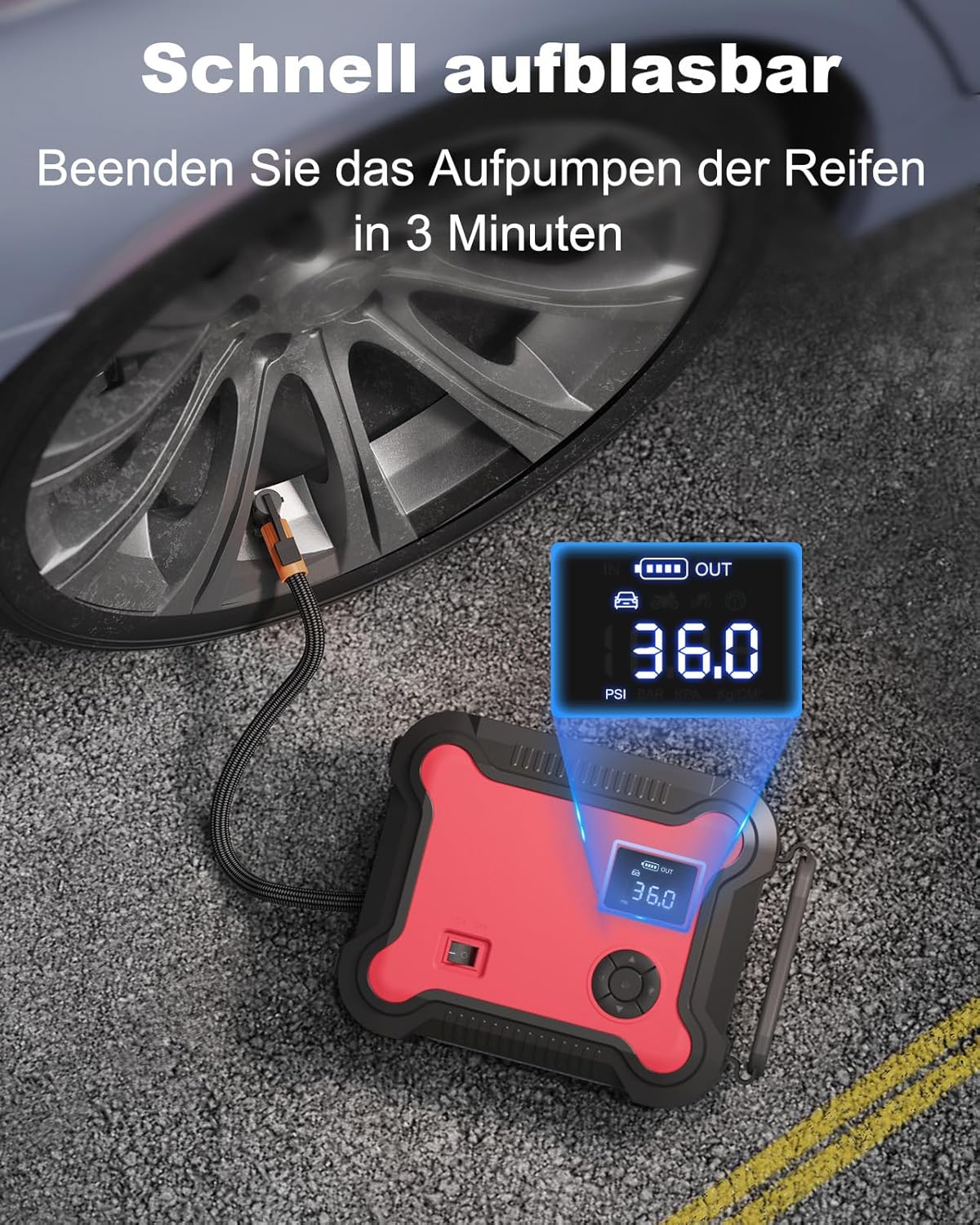
Image: The BR700 unit actively inflating a car tire, showing the digital pressure display.

Image: Various nozzle adapters for different inflation needs, including tire, ball, and cone adapters.
5.3 Uso como banco de energía
The 26800mAh capacity allows you to charge multiple electronic devices or power 12V accessories.
- Abra la cubierta protectora de los puertos de salida USB.
- Connect your mobile phone, tablet, or other USB-powered devices to the USB-A or USB-C output ports using their respective charging cables.
- For 12V accessories, connect the 12V DC car charger adapter to the DC output port on the BR700, then plug in your accessory.

Image: The BR700 unit charging a smartphone and a tablet, demonstrating its power bank functionality.

Image: The BR700 unit powering a car vacuum cleaner via its 160W DC output, highlighting its versatility.
5.4 Uso de la luz LED de emergencia
La luz LED integrada proporciona iluminación para diversas situaciones.
- Press the dedicated light button to cycle through the different light modes:
- Primera pulsación: Steady white light (flashlight mode).
- Segunda pulsación: Strobe light (for signaling).
- Tercera Prensa: SOS signal (for emergencies).
- Cuarta Prensa: Apagar la luz.

Image: The BR700 unit providing bright illumination in a dark outdoor setting, showcasing its emergency light feature.
6. Mantenimiento y almacenamiento
Proper maintenance ensures the longevity and optimal performance of your BR700 unit.
- Carga regular: Recharge the unit every 3 months, even if not in use, to maintain battery health.
- Temperatura de almacenamiento: Store the unit at temperatures no higher than 122℉ (50℃). The operating temperature range is -4℉ to 140℉ (-20℃ to 60℃).
- Evite la descarga completa: Do not frequently fully discharge the unit, as this can reduce battery lifespan.
- Evite la luz solar directa: Prolonged exposure to direct sunlight can damage the unit.
- Limpieza: Utilice un paño suave y seco para limpiar la unidad. No utilice productos químicos agresivos ni materiales abrasivos.
- Air Compressor Cooling: If using the air inflator for extended periods, stop for 8 minutes after every 8 minutes of continuous use to allow the unit to cool down.
7. Solución de problemas
If you encounter issues with your BR700 unit, refer to the following common problems and solutions:
| Problema | Posible causa | Solución |
|---|---|---|
| La unidad no se enciende. | La batería está completamente agotada. | Cargue la unidad completamente. |
| Jump start fails. | Clase incorrectaamp connection; battery too low; vehicle issue. | Ensure correct polarity (red to +, black to -). Use manual override if necessary (with caution). Check vehicle battery health. |
| El compresor de aire no infla. | Hose not securely connected; pressure not set; unit not powered on. | Check all connections. Ensure unit is on and desired pressure is set. |
| La pantalla LCD no muestra nada. | Unit is off or in standby mode. | Pulse el botón de encendido para activar la pantalla. |
Si el problema persiste después de probar estas soluciones, comuníquese con el servicio de atención al cliente.
8. Especificaciones
| Característica | Detalle |
|---|---|
| Número de modelo | BR700 |
| Corriente pico | 6000A |
| Capacidad de la batería | 26800 mAh |
| Presión máxima de aire | 150 PSI |
| Rango del flujo de aire | 45 litros por minuto |
| Salida DC | 160 W |
| Potencia de la luz LED | 5W |
| Peso del artículo | 6.36 libras |
| Dimensiones del paquete | 12.52 x 11.69 x 6.18 pulgadas |
| Tipo de batería | Polímero de litio |
9. Garantía y soporte
BuTure VAC offers a Lifetime Hassle-Free Service for this product. For any inquiries or support needs, please contact our dedicated support team.
Correo electrónico de soporte: soporte@ibuture.com
We aim to reply to all inquiries within 12 working hours.

Image: BuTure VAC customer support is available to assist you.


