1. Introducción
The Vrabocry SP548E is an advanced SPI RGB LED controller designed for digital addressable LED strip lights. It offers versatile control options including WiFi, Bluetooth, 2.4G RF remote, and onboard buttons. This controller supports a wide range of LED ICs such as WS2811, WS2812B, WS2815, and SK series, operating on DC 5-24V. It enables users to manage up to 1200 controllable pixels, providing dynamic lighting effects, music synchronization, and smart home integration via Alexa.
2. Contenido del paquete
Verifique que todos los artículos enumerados a continuación estén incluidos en su paquete:
- 1x Vrabocry SP548E WiFi BT Pixel LED Controller
- 1x 2.4G RF Remote Control (Battery not included)
- 1x Manual de usuario (este documento)
- 1x Mounting Clip (may vary by package)
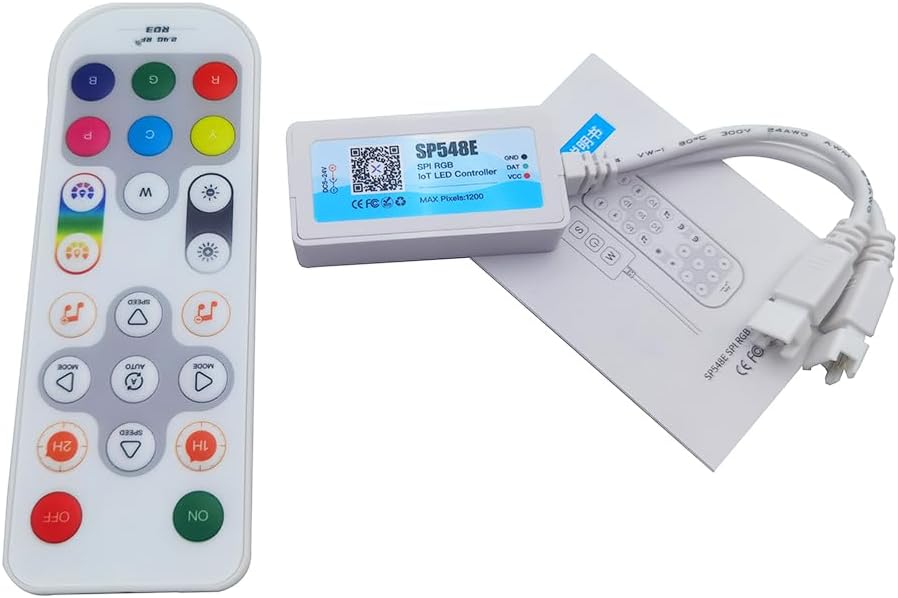
Image: The SP548E controller, its 2.4G RF remote, and the included instruction manual, laid out on a white surface.
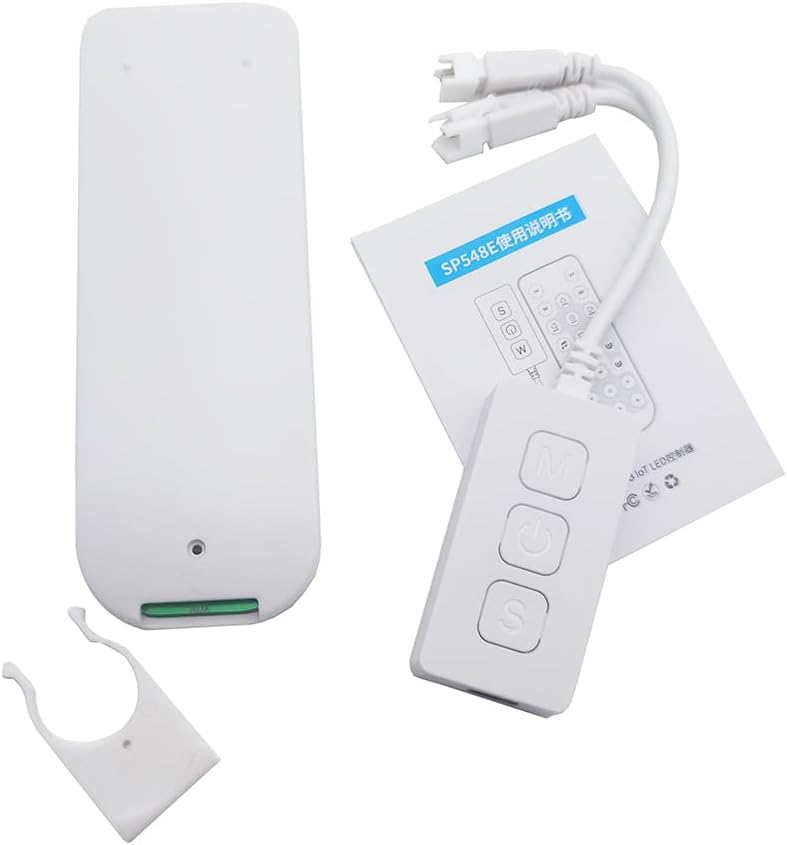
Imagen: Una completa view of the package contents, including the SP548E controller, the remote, the manual, and a white mounting clip.
3. Especificaciones
| Vol de entradatage | DC-5 24V |
| Tipo de conexión | Wi-Fi, Bluetooth |
| Controllable Pixels | Up to 1200 ICs |
| Solicitud | Digital Addressable LED Light Strips |
| Señal de salida | SPI (TTL) Digital Signal |
| Compatible LED Strips | WS2811, WS2812, WS2815, SK series IC SPI RGB LED strips |
| Nombre de la aplicación | Banlanx |
| Temperatura de trabajo | -20℃ a 60℃ |
| Corriente maxima | 6A |
| Métodos de control | APP, IR Remote, Buttons, Alexa Voice Control |
4. Instrucciones de configuración
4.1 Controlador terminadoview
Familiarize yourself with the controller's ports and buttons before proceeding with installation.

Image: The SP548E controller showing its 5.5x2.5mm DC input, 3-pin output for LED strips, and onboard buttons labeled for Music mode, ON/OFF, and Speed adjustment.
4.2 Diagrama de cableado
Follow the diagram below to correctly connect the LED controller to your power supply and LED strip.

Image: A simplified wiring diagram illustrating the connection. The DC 5-24V power input connects to the controller, and the controller's 3-pin output connects to a compatible LED strip (e.g., Cob Strip).
- Ensure all power is disconnected before making any connections.
- Connect a DC 5-24V power supply to the controller's DC input port.
- Connect your compatible digital addressable LED strip (e.g., WS2811, WS2812B) to the controller's 3-pin output connector. Ensure correct polarity (Data, Ground, VCC).
- Once all connections are secure, connect the power supply to an electrical outlet.
4.3 App Installation (Banlanx)
To utilize the full features of your controller, download the "Banlanx" app from your device's app store (available for iOS and Android). Follow the in-app instructions to pair your controller via WiFi or Bluetooth.
5. Instrucciones de funcionamiento
5.1 Funciones de control remoto
The included 2.4G RF remote control provides convenient access to various lighting modes and settings. Ensure the remote has batteries installed (not included).
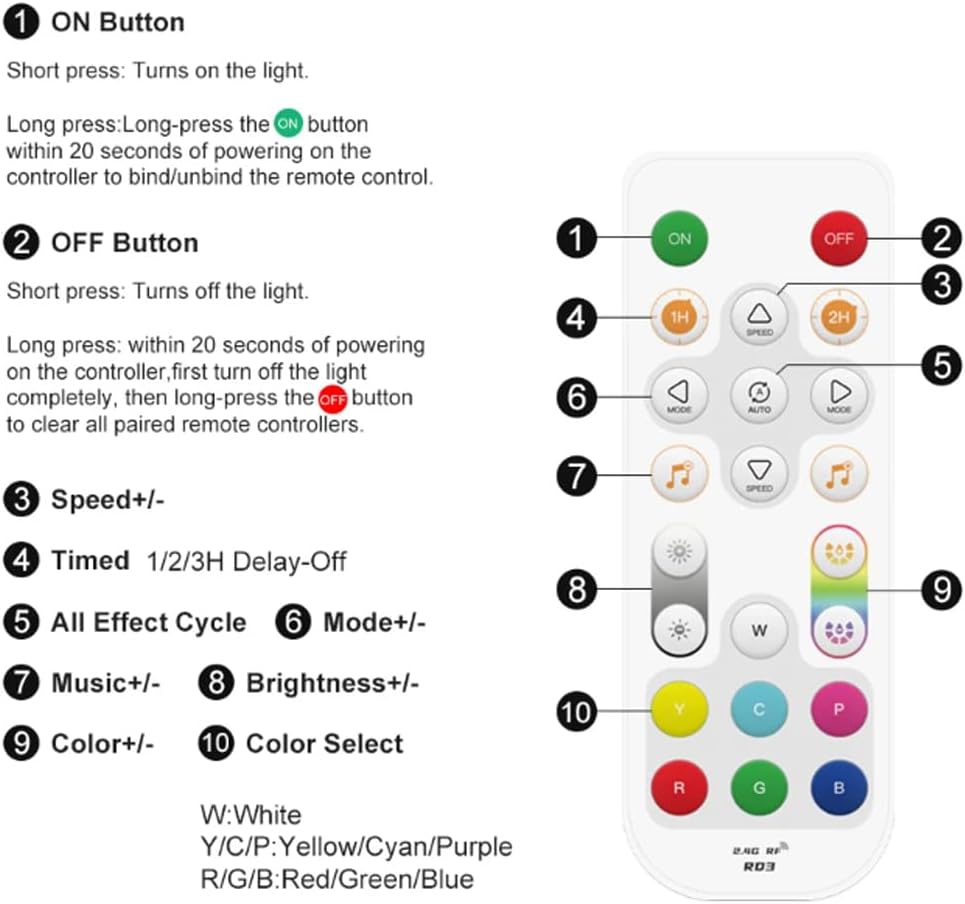
Image: A detailed layout of the 2.4G RF remote control, indicating the function of each button. Key functions include ON/OFF, Speed adjustment, Timed Delay-Off, Effect Cycle, Mode selection, Music effects, Brightness control, and Color selection.
- Botón de encendido: Presione brevemente para encender la luz. Mantenga presionado dentro de los 20 segundos posteriores a encender el controlador para vincular/desvincular el control remoto.
- Botón APAGADO: Short press to turn off the light. Long press within 20 seconds of powering on the controller (after turning off the light completely) to clear all paired remote controllers.
- Velocidad +/-: Adjusts the speed of dynamic effects.
- Timed 1H/2H Delay-Off: Sets a timer for the lights to turn off after 1 or 2 hours.
- All Effect Cycle (AUTO): Cycles through all available dynamic effects.
- Modo +/-: Selects different dynamic lighting modes.
- Music +/-: Selects different music synchronization effects.
- Brillo +/-: Ajusta el nivel de brillo de las luces.
- Color +/-: Fine-tunes color selection within certain modes.
- Color Select Buttons (W, Y, C, P, R, G, B): Directly selects White, Yellow, Cyan, Purple, Red, Green, or Blue colors.
The 2.4G RF remote offers a long control distance and stable signal transmission.

Image: The 2.4G RF remote control overlaid on an image of a room illuminated by colorful LED strip lights, demonstrating its wireless control capability.
5.2 Control de botones integrado
The controller itself features three buttons for basic control:

Image: The SP548E controller with its three buttons labeled: 'M' for Mode adjust, power symbol for ON/OFF, and 'S' for Speed adjust. The controller is shown in a room with LED strip lighting.
- Botón de encendido (medio): Enciende o apaga las luces LED.
- 'M' Button (Top): Adjusts the lighting mode.
- 'S' Button (Bottom): Ajusta la velocidad de los efectos de iluminación dinámicos.
5.3 Smart APP Control (Banlanx)
The "Banlanx" app provides comprehensive control over your LED lights. After pairing your controller via WiFi or Bluetooth, you can:
- Select from 180 non-music dynamic effects with adjustable brightness and speed.
- Choose from 8 built-in music effects for synchronization with audio.
- Access 8 dynamic LED effects and 8 solid color scenes.
- Personaliza colores y crea escenas de iluminación personalizadas.
- Establecer temporizadores y programaciones para el funcionamiento automático.
5.4 Alexa Smart Voice Control
The SP548E controller supports integration with Alexa for voice commands. Once configured through the Banlanx app and linked to your Alexa account, you can use voice commands to:
- Encender y apagar las luces.
- Cambiar colores.
- Ajustar el brillo.
- Activate specific dynamic LED effects, solid color scenes, or music effects.
Refer to the Banlanx app's help section for detailed instructions on Alexa integration.
6. Mantenimiento
- Mantenga el controlador en un ambiente seco, alejado de la humedad y temperaturas extremas.
- Clean the controller's exterior with a soft, dry cloth. Do not use liquid cleaners or solvents.
- Asegúrese de que haya una ventilación adecuada alrededor del controlador para evitar el sobrecalentamiento.
- If the remote control is unresponsive, check and replace its batteries.
7. Solución de problemas
| Problema | Posible causa | Solución |
|---|---|---|
| La tira de LED no se enciende. |
|
|
| El control remoto no responde. |
|
|
| App cannot connect to the controller. |
|
|
| Las luces parpadean o muestran colores incorrectos. |
|
|
8. Garantía y soporte
Specific warranty information for the Vrabocry SP548E SPI RGB LED Controller is not provided in this manual. For warranty details, technical support, or further assistance, please contact your retailer or the manufacturer directly. Please retain your proof of purchase for any warranty claims.


