1. Introducción
The Loop Social Link Bundle provides a versatile solution for noise reduction and sound control in various environments. This bundle includes two distinct sets of earplugs: Loop Experience 2 Plus and Loop Engage 2, along with the Loop Link connector. Loop Experience 2 Plus earplugs are designed for environments with loud music or events, offering clear sound while protecting your hearing. Loop Engage 2 earplugs are optimized for social settings and conversations, filtering background noise while maintaining speech clarity. The Loop Link connector ensures your earplugs remain secure and accessible.
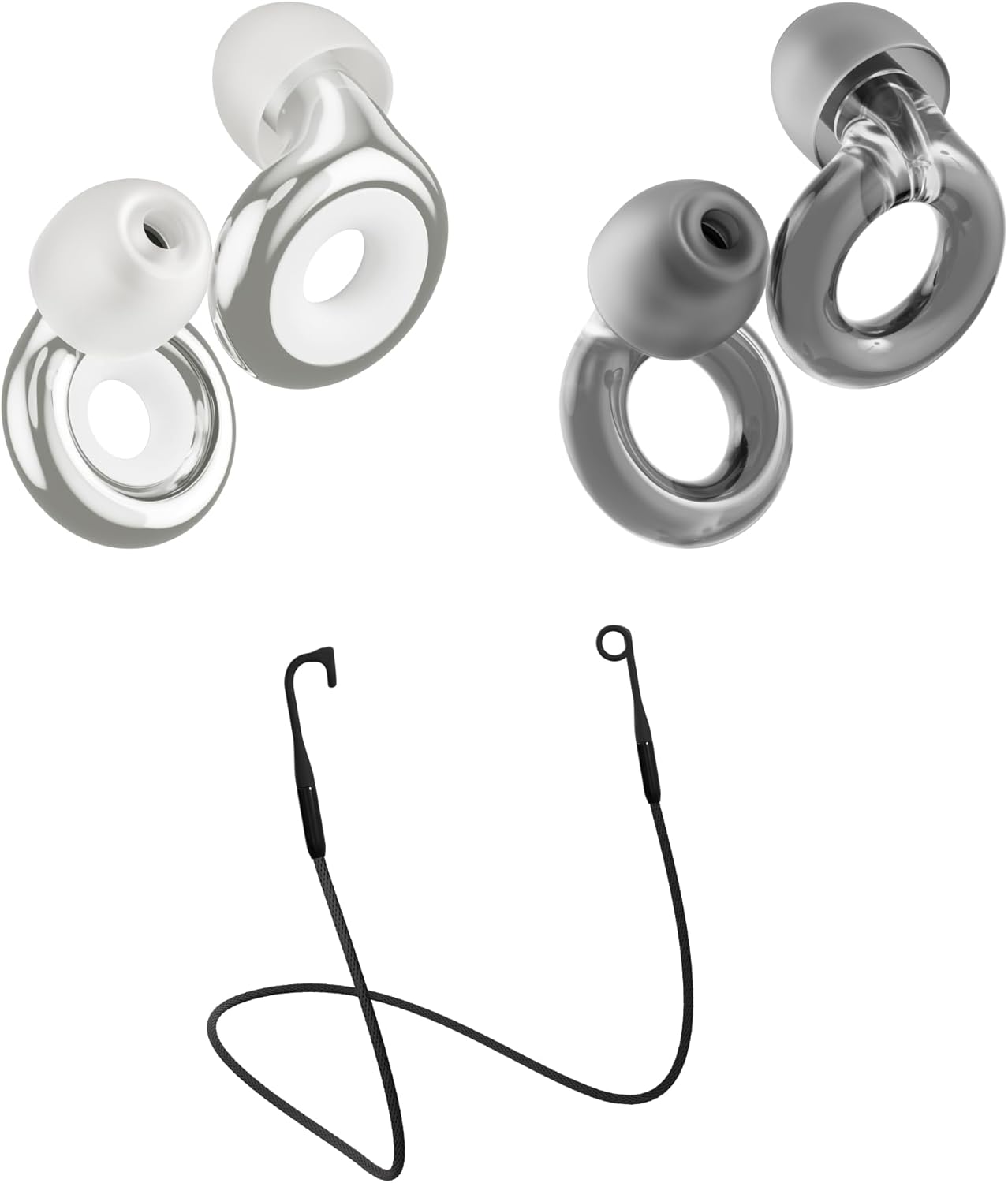
Figura 1.1: Sobreview of the Loop Social Link Bundle components, including Loop Experience 2 Plus, Loop Engage 2, and the Loop Link connector.
2. Componentes del producto
The Loop Social Link Bundle includes the following items:
- 1 x set Loop Experience 2 Plus earplugs (Black)
- 1 x set Loop Engage 2 earplugs (Clear)
- 1 x Loop Link connector cord (Warm Charcoal)
- For each set of earplugs: 4 x adjustable silicone ear tip sizes (XS, S, M, L)
- For each set of earplugs: 1 x portable Carry Case
- For Loop Experience 2 Plus: 4 x foam ear tips
- For Loop Experience 2 Plus: Loop Mute accessories

Figure 2.1: The packaging for each component of the bundle, illustrating how the earplugs and accessories are presented.
Características principales:
- Loop Experience 2 Plus: Filters noise for clear sound, certified hearing protection for live music and events, 18 dB (SNR) noise reduction (additional 3 dB with Loop Mute), acoustic channel & mesh filter, metallic finish.
- Loop Engage 2: Filters noise for clear conversations, discreet relief from everyday noise, 16 dB (SNR) noise reduction, acoustic channel & mesh filter, transparent style.
- Loop Link: Magnetic earplug connector cord for secure and easy access to earplugs.
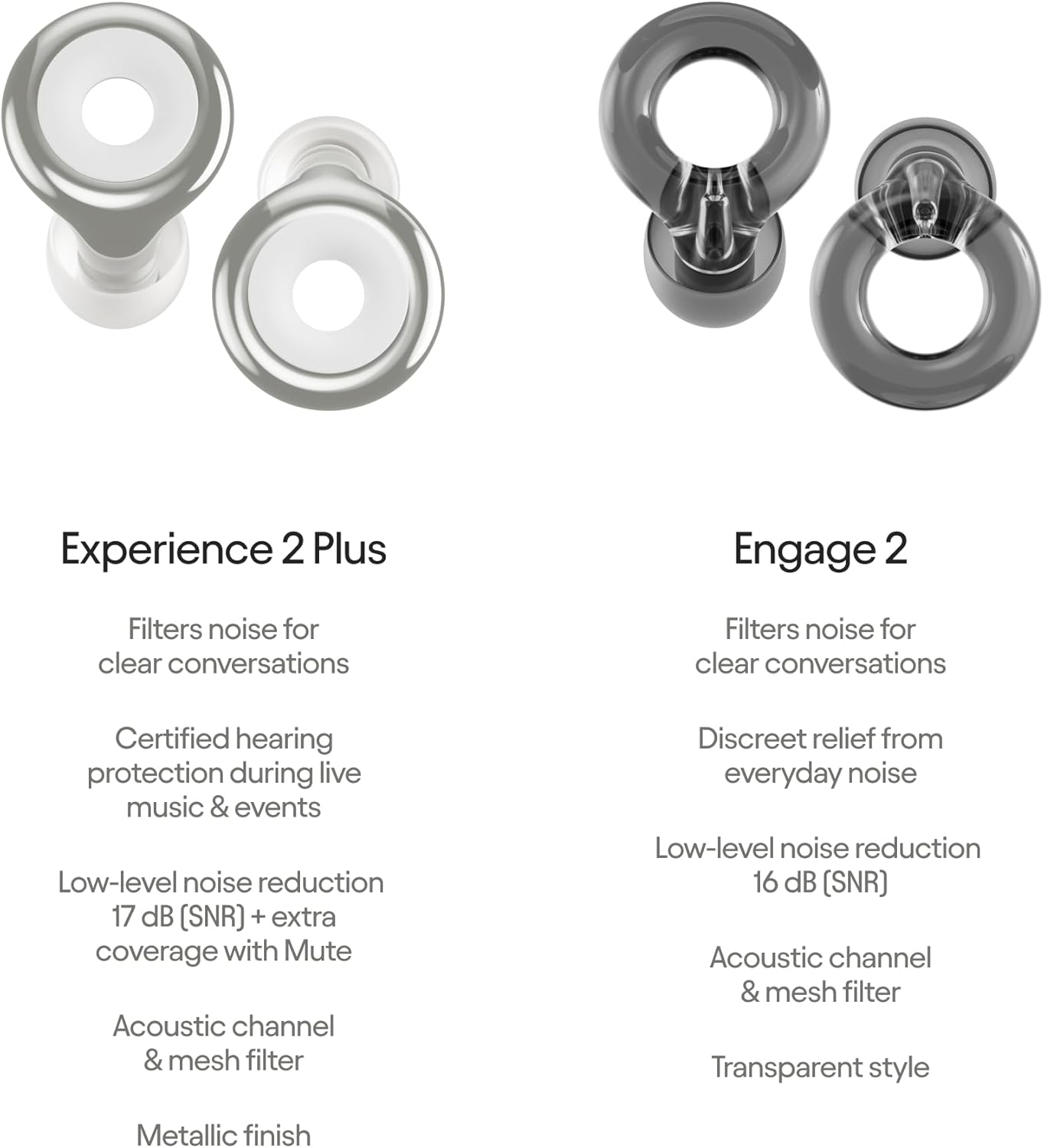
Figure 2.2: A detailed comparison highlighting the specific features and noise reduction capabilities of Loop Experience 2 Plus and Loop Engage 2 earplugs.
3. Configuración y ajuste
Achieving the correct fit is crucial for optimal performance and comfort. Each set of Loop earplugs comes with four adjustable silicone ear tip sizes (XS, S, M, L) to ensure a proper seal in your ear canal.
3.1 Selecting Ear Tip Size
- Begin by trying the medium (M) size ear tips.
- Insert the earplug into your ear. It should fit snugly without causing discomfort.
- The earplug should not stick out or be visible from the front when properly inserted.
- If the earplug feels loose, doesn't provide adequate noise reduction, or feels like it might fall out, try a larger size.
- If the earplug feels too tight, causes pressure, or is uncomfortable, try a smaller size.
- Experiment with different sizes until you find the most comfortable and secure fit that provides effective noise reduction.

Figure 3.1: Guide to finding your perfect fit, demonstrating proper insertion and the importance of trying all ear tip sizes.
3.2 Attaching Loop Link
The Loop Link connector cord helps keep your earplugs secure and easily accessible around your neck.
- Alinear: Align the silicone ring on your Loop Link with the ear tip of your earplug.
- Adjuntar: Push the tip through the opening. It is not necessary to remove the ear tip from the earplug for this step.
- Seguro: Once attached, place the cord around your neck. The magnetic closure will snap into place, securing the earplugs when not in use.

Figure 3.2: Visual instructions for attaching the Loop Link magnetic connector cord to your earplugs.
4. Instrucciones de funcionamiento
The Loop Social Link Bundle provides two types of earplugs, each designed for specific scenarios to optimize your listening experience and protection.
4.1 Using Loop Experience 2 Plus
Loop Experience 2 Plus earplugs are ideal for environments where you want to reduce overall noise levels while maintaining sound clarity, such as:
- Concerts and music festivals
- Live entertainment events
- Eventos deportivos
- Any setting requiring significant noise reduction with clear sound.
To use, simply insert the earplugs into your ears as described in Section 3. The acoustic channel and mesh filter work to reduce noise by 18 dB (SNR) while preserving sound quality. For an additional 3 dB of noise reduction, insert the included Loop Mute accessories into the center of the earplugs.
4.2 Using Loop Engage 2
Loop Engage 2 earplugs are designed for situations where you need to filter out background noise but still engage in conversations clearly, such as:
- Reuniones sociales
- Parenting in noisy environments
- Workplaces or study areas with distracting background noise
- Any setting where clear communication is essential.
Insert the earplugs into your ears as described in Section 3. These earplugs provide up to 16 dB of noise reduction, allowing you to hear speech without it sounding muffled, facilitating natural conversations.

Figura 4.1: Examples of individuals wearing Loop earplugs in various settings, highlighting their discreet design and comfortable fit.
5. Mantenimiento y cuidado
Proper maintenance ensures the longevity and hygiene of your Loop earplugs.
5.1 Cleaning Your Earplugs
- Regularly clean the silicone ear tips with a soft cloth dampened con agua tibia y un jabón suave.
- Ensure the ear tips are completely dry before reattaching them to the earplug body.
- The earplug bodies (the metallic or transparent rings) can be wiped clean with a dry or slightly damp cloth. Avoid submerging the earplug bodies in water.
- Do not use harsh chemicals or abrasive materials for cleaning, as this may damage the earplugs.
5.2 Almacenamiento
When not in use, store your Loop earplugs in the provided portable carry case. This protects them from dust, dirt, and physical damage, and prevents loss. Keep the earplugs in a cool, dry place away from direct sunlight and extreme temperatures.
6. Solución de problemas
If you encounter issues with your Loop earplugs, consider the following common solutions:
6.1 Reducción de ruido insuficiente
- Comprobar ajuste: The most common reason for poor performance is an improper fit. Refer to Section 3.1 to ensure you are using the correct ear tip size and that the earplugs are inserted correctly. The ear tip must create a seal in your ear canal.
- Ear Tip Condition: Ensure the ear tips are clean and free from debris that might prevent a proper seal. Replace worn or damaged ear tips.
- Correct Model: Ensure you are using the appropriate earplug model for your environment (e.g., Experience 2 Plus for louder events, Engage 2 for conversations).
6.2 Discomfort or Pain
- Tamaño incorrecto: If the earplugs feel too tight or cause pressure, try a smaller ear tip size.
- Inserción incorrecta: Ensure you are not pushing the earplugs in too far or at an awkward angle. They should sit comfortably in your ear.
- Alergias: In rare cases, sensitivity to silicone may occur. If discomfort persists, discontinue use and consult a healthcare professional.
6.3 Earplugs Falling Out
- Tamaño incorrecto: If the earplugs feel loose or tend to fall out, try a larger ear tip size to achieve a more secure fit.
- Movimiento: For active use, ensure the Loop Link connector is used to prevent loss if an earplug dislodges.
7. Especificaciones
| Atributo | Detalle |
|---|---|
| Nombre del producto | Loop Earplugs Social Link Bundle (2-Pack) |
| Modelos incluidos | Loop Experience 2 Plus, Loop Engage 2, Loop Link |
| Noise Reduction Rating (SNR) - Experience 2 Plus | 18 dB (up to 21 dB with Loop Mute) |
| Noise Reduction Rating (SNR) - Engage 2 | 16 dB |
| Tamaños de las puntas de los oídos | XS, S, M, L (Silicone and Foam for Experience 2 Plus) |
| Fabricante | Bucle |
| ASIN | B0DBLRS7HS |
| Primera fecha disponible | 30 de julio de 2024 |
8. Garantía y soporte
For information regarding product warranty, returns, or customer support, please refer to the official Loop website or contact the seller directly. As per the purchase terms, a return policy of 30 days for refund/replacement is typically offered.
Para obtener más ayuda, puede visitar el Tienda Loop en Amazon.


