Introducción
This manual provides instructions for the safe and effective use of your Ashfly Portable Handheld Kids Microscope. Please read this manual thoroughly before operating the device and retain it for future reference.
The Ashfly Portable Handheld Kids Microscope is designed to introduce young scientists to the microscopic world. Featuring a 2-inch LCD screen and 200x magnification, it allows for real-time observation of small objects.
Contenido del paquete
Verifique que todos los artículos que se enumeran a continuación estén presentes en su paquete:
- Ashfly Portable Handheld Kids Microscope
- Cable de carga USB
- Cordón/Correa de muñeca
- Manual de usuario (este documento)

Image: Contents of the Ashfly Portable Handheld Kids Microscope package, including the microscope, USB cable, and wrist strap.
Configuración
1. Carga del dispositivo
- Locate the USB charging port on the microscope.
- Connect the provided USB charging cable to the microscope and a compatible USB power source (e.g., computer, wall adapter).
- La luz indicadora de carga se iluminará. La carga completa demora aproximadamente de 2 a 3 horas.
- Una vez que esté completamente cargado, desconecte el cable de carga.
2. Attaching the Lanyard/Wrist Strap
Thread the lanyard or wrist strap through the designated loop on the microscope to prevent accidental drops during use.
Instrucciones de funcionamiento
1. Encendido y apagado
- To power on, press and hold the power button (usually marked with a power symbol) for a few seconds until the screen illuminates.
- Para apagar, mantenga presionado el botón de encendido nuevamente hasta que la pantalla se apague.
2. Observación de objetos
- Place the object you wish to observe on a flat surface.
- Position the microscope's lens directly over the object.
- Adjust the focus wheel (if present) or move the microscope closer/further from the object until a clear image appears on the 2-inch LCD screen.
- Use the zoom adjustment button (4x zoom) to further magnify the image up to 200x.

Image: A child holding the Ashfly microscope, observing a small object on a surface, demonstrating its handheld operation.
3. Captura de fotografías y vídeos
The microscope supports photo and video functions. It comes with built-in memory for storing observations.
- To take a photo: Press the designated photo capture button (refer to device markings).
- To record a video: Press the designated video record button to start recording, and press it again to stop.

Image: The Ashfly microscope's screen displaying a magnified image of an insect, illustrating its digital imaging capability.
4. Dual-Lens Design
This microscope features a dual-lens design. One side is the digital microscope for recording observations, and the other side is a physical magnifier for quick viewing de objetos.
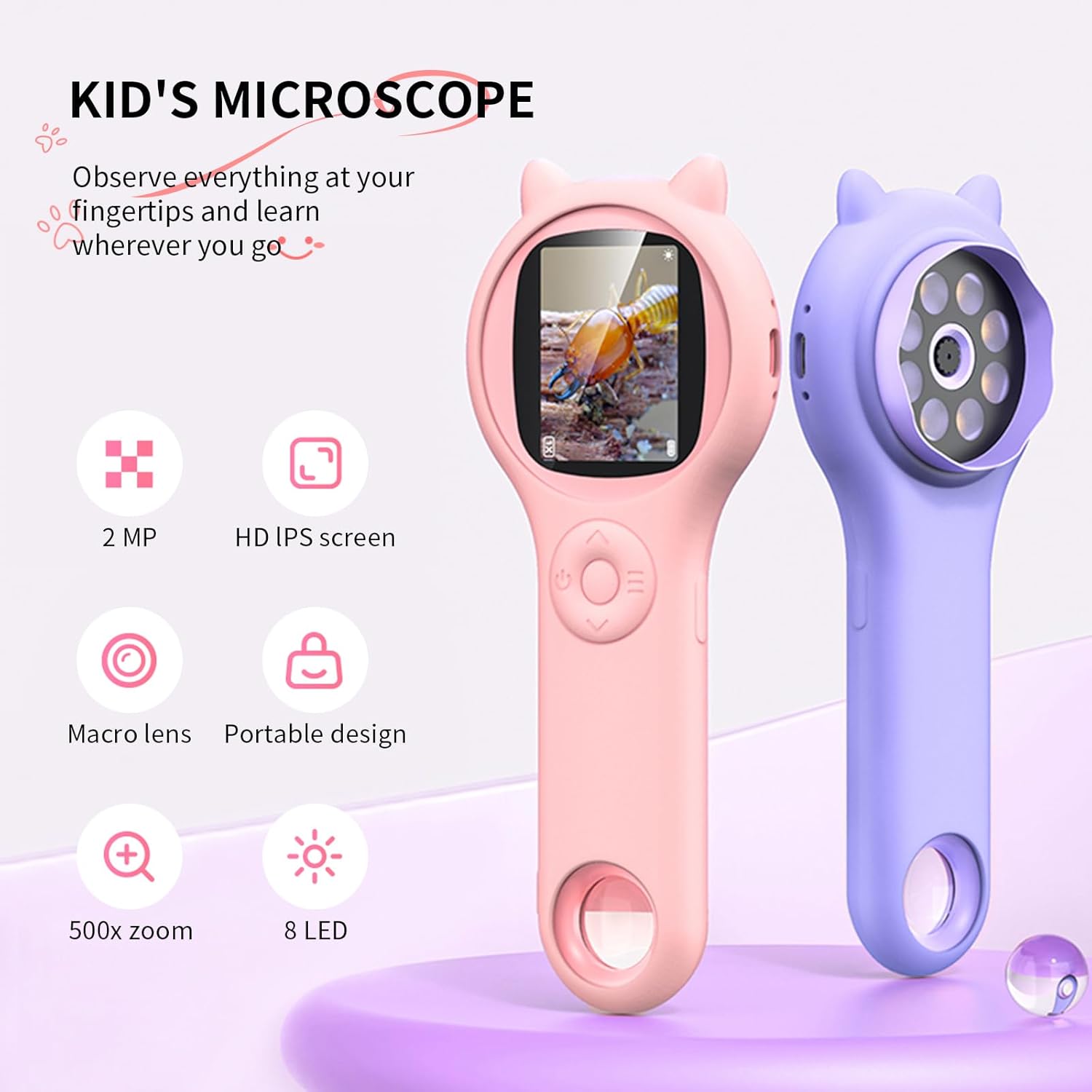
Image: Two Ashfly Kids Microscopes, one pink and one purple, illustrating the compact design and the different lenses/screens on each side.
Mantenimiento
- Limpieza: Use a soft, dry cloth to clean the exterior of the microscope. For the lens and screen, use a specialized lens cleaning cloth. Do not use abrasive cleaners or solvents.
- Almacenamiento: Guarde el microscopio en un lugar fresco y seco, alejado de la luz solar directa y de temperaturas extremas.
- Cuidado de la batería: Para prolongar la vida útil de la batería, evite descargarla por completo con frecuencia. Cargue el dispositivo regularmente, incluso si no lo usa durante períodos prolongados.
Solución de problemas
| Problema | Posible causa | Solución |
|---|---|---|
| El dispositivo no se enciende. | La batería está descargada. | Cargue el dispositivo con el cable USB proporcionado. |
| La imagen en la pantalla está borrosa. | Incorrect focus or distance from object. | Adjust the microscope's distance from the object or use the focus wheel (if applicable) until the image is clear. |
| No se pueden capturar fotografías/vídeos. | La memoria interna está llena. | Transfer existing photos/videos to a computer to free up space. |
Presupuesto
| Característica | Detalle |
|---|---|
| Modelo | ASIN B0DBVB3RGT |
| Marca | mosca de ceniza |
| Aumento | Up to 200x (with 4x zoom adjustment) |
| Pantalla | 2-inch LCD, 1080P HD digital imaging |
| Fuente de luz | CONDUJO |
| Material | Plástico |
| Color | Púrpura |
| Fuente de poder | Funciona con pilas |
| Lente objetivo | Acromático |
Información de garantía
Ashfly products are designed for quality and durability. For specific warranty details, please refer to the warranty card included with your product or visit the official Ashfly webSitio. Conserve su recibo de compra como comprobante para reclamaciones de garantía.
Atención al cliente
If you encounter any issues or have questions regarding your Ashfly Portable Handheld Kids Microscope, please contact our customer support team:
- Soporte en línea: Visita el Ashfly Store on Amazon Para preguntas frecuentes y opciones de contacto.
- Correo electrónico: Consulte el embalaje del producto o la información oficial. webSitio para soporte directo por correo electrónico.


