1. Introducción
Welcome to the Headwolf FPad6 Android Tablet. This manual provides comprehensive instructions for setting up, operating, and maintaining your device. The FPad6 is an 8-inch tablet featuring the latest Android 15 operating system, a powerful Helio G99 processor, a high-resolution 2.5K display, and 4G LTE connectivity, designed for a versatile and efficient user experience.

Figure 1.1: Headwolf FPad6 Tablet with key specifications highlighted.
Vídeo 1.1: Un finalview of the Headwolf FPad6 tablet's features and design. This video demonstrates the tablet's sleek profile, display quality, and general usage scenarios.
2. Configuración
2.1 Contenido del paquete
Verifique que todos los artículos estén presentes en el paquete:
- Tableta Headwolf FPad6
- Cable USB tipo C
- Adaptador de corriente
- PIN DE LA TARJETA SIM
- Manual de usuario (japonés)

Figure 2.1: Contents of the Headwolf FPad6 package and device port layout.
2.2 Encendido y carga inicial
To power on your tablet for the first time, press and hold the Power button located on the side of the device until the Headwolf logo appears. If the battery is low, connect the tablet to the power adapter using the provided Type-C cable and charge it fully before first use.

Figure 2.2: Charging the Headwolf FPad6 tablet with the Type-C cable.
2.3 Tarjeta SIM y expansión de almacenamiento
The FPad6 supports dual SIM cards or one SIM card and one microSD card for expanded storage up to 2TB. Use the provided SIM card pin to open the SIM tray. Insert your nano-SIM card(s) and/or microSD card into the appropriate slots as indicated on the tray.

Figure 2.3: Inserting SIM cards and understanding 4G LTE capabilities.
3. Operación de su tableta
3.1 Características de Android 15
The FPad6 runs on the latest Android 15, offering enhanced privacy, productivity, and AI capabilities. Key features include:
- Espacio privado: Secure sensitive apps and data with dual authentication.
- Single App Recording: Record specific app screens without capturing the entire display.
- Par de aplicaciones: Pin app combinations to your home screen for quick split-screen multitasking.
- Géminis IA: Google's advanced AI assists with text input, search, and translation.

Figure 3.1: New features available with Android 15 on the FPad6.
3.2 Pantalla y elementos visuales
Experience stunning visuals on the 8.4-inch 2.5K (2560x1600) In-Cell IPS display. With 500 Nits brightness, images are vibrant and clear from any angle. The tablet also supports Widevine L1, allowing you to stream 1080P HD content from major platforms like Netflix, Amazon Prime Video, and Disney+.

Figure 3.2: The FPad6's 2.5K In-Cell IPS display with Widevine L1 support.
3.3 Rendimiento y almacenamiento
Powered by the MTK Helio G99 octa-core processor and Mali G57 GPU, the FPad6 delivers smooth performance for gaming and graphic-intensive applications. It comes with 16GB (8GB physical + 8GB virtual) RAM and 128GB UFS 2.1 ROM, expandable up to 2TB via microSD card, providing ample space for all your apps, videos, and files.
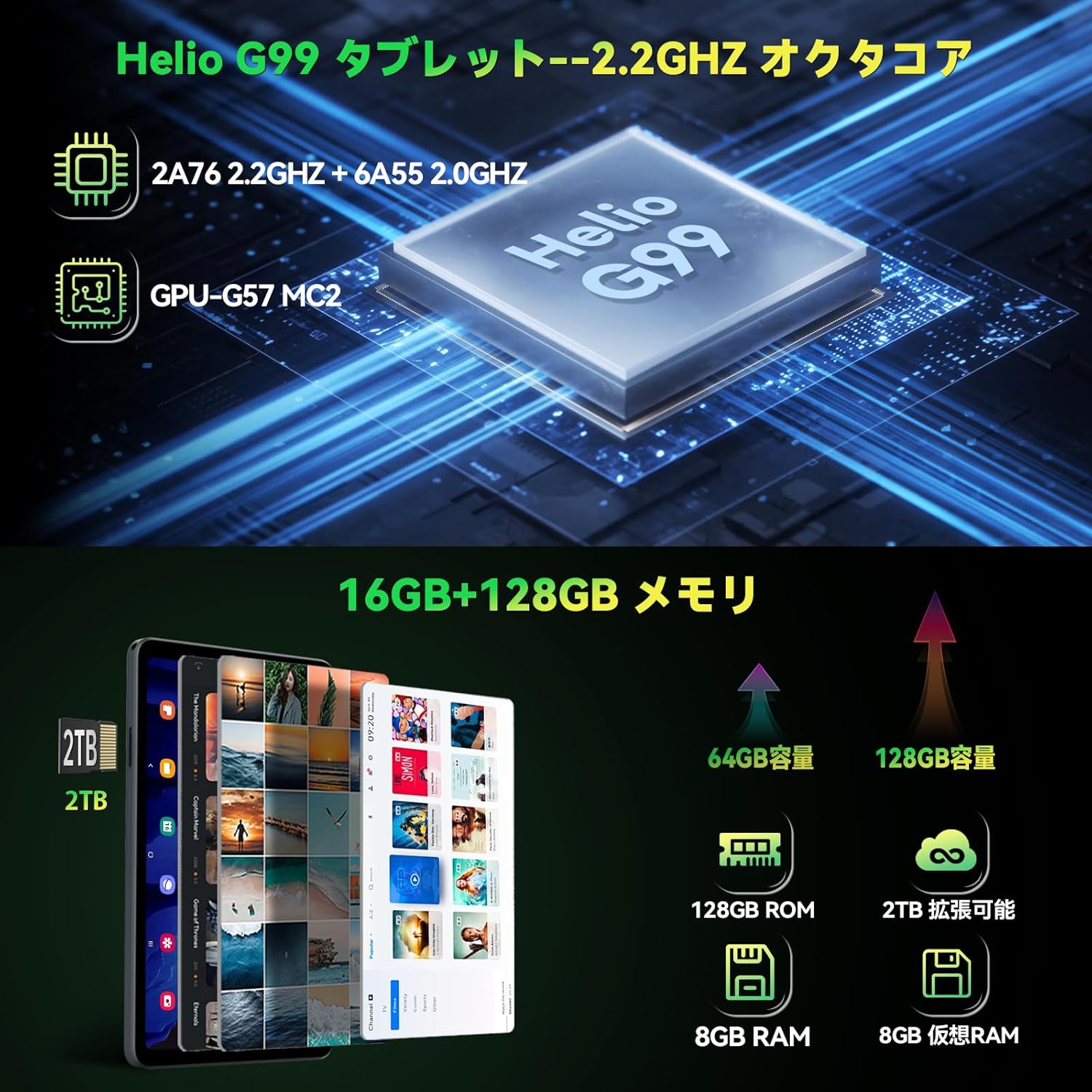
Figure 3.3: Helio G99 processor and memory specifications.
3.4 Funciones de la cámara
The FPad6 is equipped with an 8MP front camera for video calls and face recognition, and a 16MP rear camera with autofocus and background blur support for capturing clear photos and videos.

Figure 3.4: Front and rear camera capabilities.
3.5 Conectividad
Stay connected with 4G LTE communication, 2.4/5G WiFi, and Bluetooth 5.2. The tablet also features a quad-satellite positioning system (GPS) for accurate navigation.

Figure 3.5: GPS navigation on the FPad6 tablet.
3.6 Gestión de la batería
The 6500mAh cobalt acid lithium battery provides extended usage time. Charge your device using the Type-C port. The tablet also includes a 3.5mm headphone jack for audio connectivity.

Figure 3.6: Battery capacity and charging interface.
3.7 Gaming and Sensors
Enhance your gaming experience with the 6-axis gyroscope and geomagnetic sensor, providing precise control and improved immersion. These sensors also contribute to accurate navigation and orientation.

Figure 3.7: Gaming with the 6-axis gyroscope.
3.8 Basic Operations and Accessibility
The FPad6 offers convenient features such as screen splitting for multitasking, lift-to-wake functionality, and a three-finger screenshot gesture. Its lightweight (385g) and thin (8.5mm) metal body make it comfortable for one-handed use and highly portable.
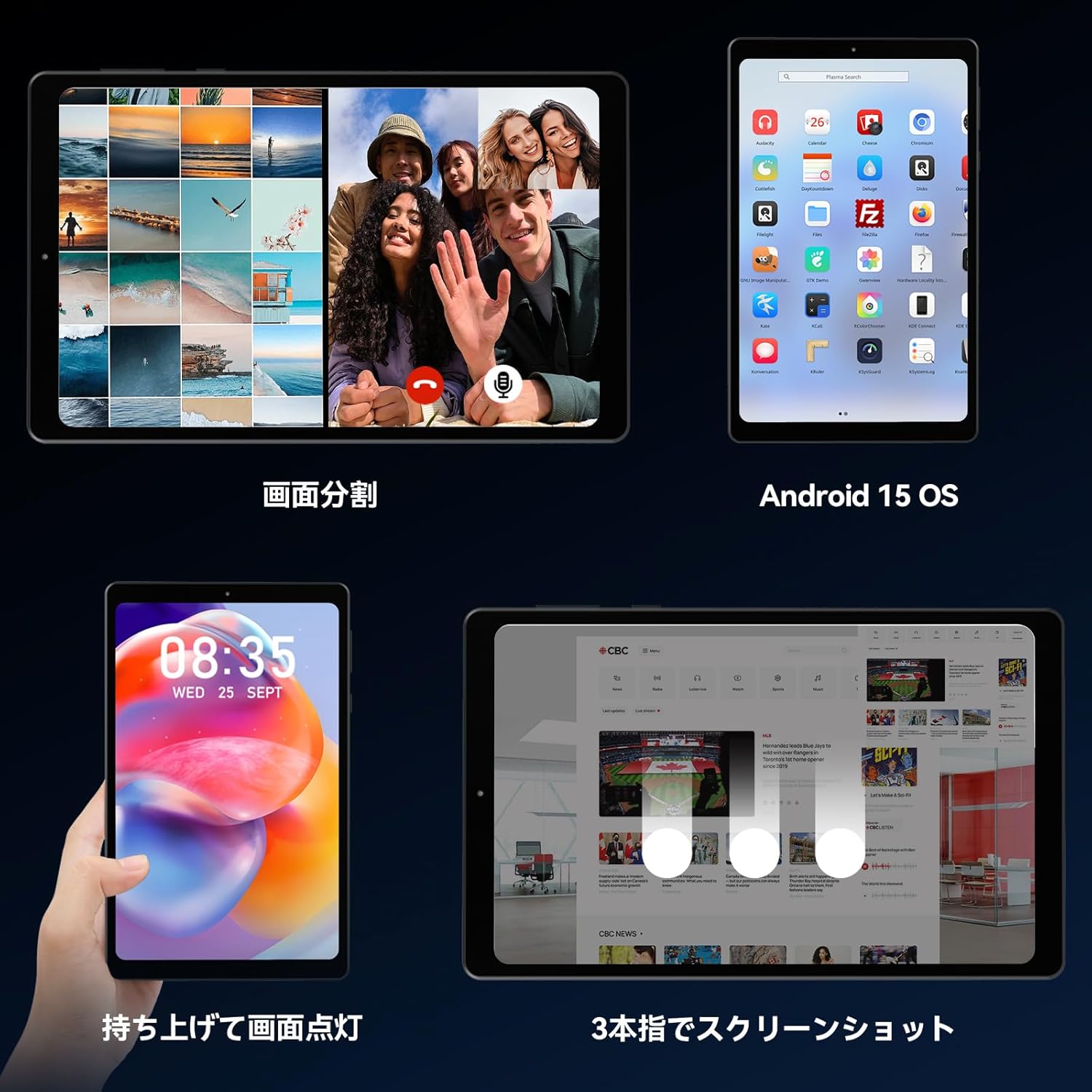
Figure 3.8: Various operational features of the FPad6.

Figure 3.9: Physical design and portability of the FPad6.
4. Mantenimiento
To ensure the longevity of your Headwolf FPad6 tablet, follow these maintenance guidelines:
- Limpieza: Utilice un paño suave y sin pelusa para limpiar la pantalla y el cuerpo. Evite materiales abrasivos o productos químicos agresivos.
- Almacenamiento: Guarde la tableta en un lugar fresco y seco, alejado de la luz solar directa y de temperaturas extremas.
- Cuidado de la batería: Avoid fully discharging the battery frequently. For long-term storage, charge the battery to about 50% to prevent deep discharge.
- Actualizaciones de software: Compruebe e instale periódicamente las actualizaciones del sistema para garantizar un rendimiento y una seguridad óptimos.
5. Solución de problemas
This section addresses common issues you might encounter with your Headwolf FPad6 tablet. If you experience problems not listed here, please refer to the support section.
| Problema | Posible causa | Solución |
|---|---|---|
| La tableta no se enciende. | Batería baja; bloqueo del sistema. | Cargue la tableta durante al menos 30 minutos. Mantenga presionado el botón de encendido durante 10 a 15 segundos para forzar el reinicio. |
| La pantalla no responde. | Fallo de software; interferencia del protector de pantalla. | Restart the tablet. Ensure screen protector is properly applied and not damaged. |
| No se puede conectar al wifi. | Contraseña incorrecta; problema con el enrutador; Wi-Fi deshabilitado. | Verify Wi-Fi password. Restart router. Ensure Wi-Fi is enabled in settings. |
| Las aplicaciones fallan o se congelan. | Insufficient memory; app bug; outdated app. | Cierra las aplicaciones en segundo plano. Borra la caché de la aplicación. Actualiza la aplicación o reinstálala. |
| Rendimiento lento. | Demasiadas aplicaciones ejecutándose; poco almacenamiento; software desactualizado. | Cierra las aplicaciones que no uses. Libera espacio de almacenamiento. Busca actualizaciones del sistema. |
6. Especificaciones
| Característica | Detalle |
|---|---|
| Marca | Lobo de cabeza |
| Nombre del modelo | FPad6 |
| Sistema operativo | Androide 15 |
| Tamaño de pantalla | 8.4 pulgadas |
| Resolución de pantalla | 2560 x 1600 píxeles (2.5K) |
| Procesador | Helio G99 |
| RAM | 16 GB (8 GB + 8 GB de expansión) |
| Almacenamiento interno | 128 GB UFS 2.1 |
| Almacenamiento expandible | Hasta 2 TB (microSD) |
| Capacidad de la batería | 6500 mAh |
| Cámara frontal | 8MP |
| Cámara trasera | 16MP |
| Conectividad | 4G LTE, 2.4/5G WiFi (802.11n), Bluetooth 5.2 |
| Sensores | 6-axis Gyroscope, Geomagnetic Sensor, GPS |
| Dimensiones | 21.8 x 13.8 x 4.9 cm |
| Peso | 320 gramos |
7. Garantía y soporte
Headwolf provides customer support for its products. For warranty information, technical assistance, or service inquiries, please visit the official Headwolf store on Amazon or contact their customer service directly.
Official Headwolf Store: Headwolf Japan Official Store
Conserve su comprobante de compra para reclamos de garantía.


