1. Introducción
This manual provides detailed instructions for the safe installation, operation, and maintenance of your PHORUS 48-inch Modern White Ceiling Fan with Lights and Remote/APP Control. Please read all instructions carefully before beginning installation and retain this manual for future reference.
2. Información de seguridad
- Asegúrese de que la energía esté desconectada en el disyuntor antes de realizar la instalación o el mantenimiento.
- Todo el cableado debe cumplir con los códigos eléctricos nacionales y locales. Si no está familiarizado con el cableado, consulte a un electricista cualificado.
- The fan must be mounted with a minimum of 7 feet (2.1 meters) clearance from the floor to the blade trailing edge.
- La estructura de montaje debe ser capaz de soportar el peso del ventilador (aproximadamente 13.4 libras).
- No doble los portacuchillas durante la instalación o la limpieza.
- Este ventilador está diseñado para uso en interiores.
3. Contenido del paquete
Verifique que todos los componentes estén presentes antes de comenzar la instalación:
- Ensamblaje del motor del ventilador
- Tablero colgante
- Cuchillas de ventilador 5
- LED Lampsombra
- Control remoto (con 2 pilas AAA)
- Tornillos y herrajes de montaje
- Manual de instrucciones

4. Especificaciones
| Característica | Especificación |
|---|---|
| Marca | FORO |
| Nombre del modelo | #8907 |
| Tamaño | 48 pulgadas |
| Color | Blanco |
| Material | Acrílico, Plástico |
| Tipo de motor | DC Motor (30W) |
| Fuente de luz | LED (28W) |
| Colores claros | 3 (White, Warm, Neutral) |
| Rango de regulación | Sin escalas (10%-100%) |
| Velocidades del viento | 6 |
| Método de control | Control remoto, control por aplicación |
| Características especiales | Reversible Function, 2-Hour Timer, Memory Function |
| Nivel de sonido | Por debajo de 35 dB |
| Dimensiones del producto | 48" de largo x 48" de ancho x 10.83" de alto |
| Peso del artículo | 13.4 libras |
5. Configuración e instalación
5.1 Lista de verificación previa a la instalación
- Ensure the power supply is turned off at the main circuit breaker.
- Confirm you have all necessary tools (screwdriver, drill, wire strippers, etc.).
- Verify that the ceiling junction box is securely mounted and capable of supporting the fan.
5.2 Instalación paso a paso
- Attach Blades to Motor Assembly: Secure each of the five fan blades to the motor assembly using the provided screws. Ensure the 'THIS SIDE UP' marking on the blade attachment is facing upwards.
- Install LED Light Board: Carefully place the LED light board into the designated area on the motor assembly and secure it with screws. Connect the LED wires.
- Adjuntar LED Lampsombra: Coloque el LED lampshade over the light board and twist it clockwise until it is securely fastened.
- Mount Hanging Board: Secure the hanging board to your ceiling junction box using appropriate screws. Ensure it is firmly attached.
- Conectar el cableado: Connect the fan's electrical wires to your household wiring. The typical connections are: Black (Live) to Black (Live), White (Neutral) to White (Neutral), and Yellow/Green (Ground) to Green (Ground). Use the provided wire connectors.
- Secure Fan to Hanging Board: Lift the fan assembly and attach it to the hanging board, ensuring all wires are tucked safely inside the canopy. Secure the fan with the provided screws.
6. Instrucciones de funcionamiento
6.1 Funciones de control remoto
The included remote control allows for convenient operation of your ceiling fan:
- Encendido/apagado: Presione el botón de encendido para encender o apagar el ventilador y la luz.
- Velocidad del ventilador: Select from 6 wind speeds (1-6) to adjust airflow.
- Luz encendida / apagada: Controla la luz independientemente del ventilador.
- Temperatura de color: Cycle through 3 light colors: White (6000K), Neutral (4500K), and Warm (3000K).
- Atenuación: Ajuste el brillo de la luz del 10% al 100%.
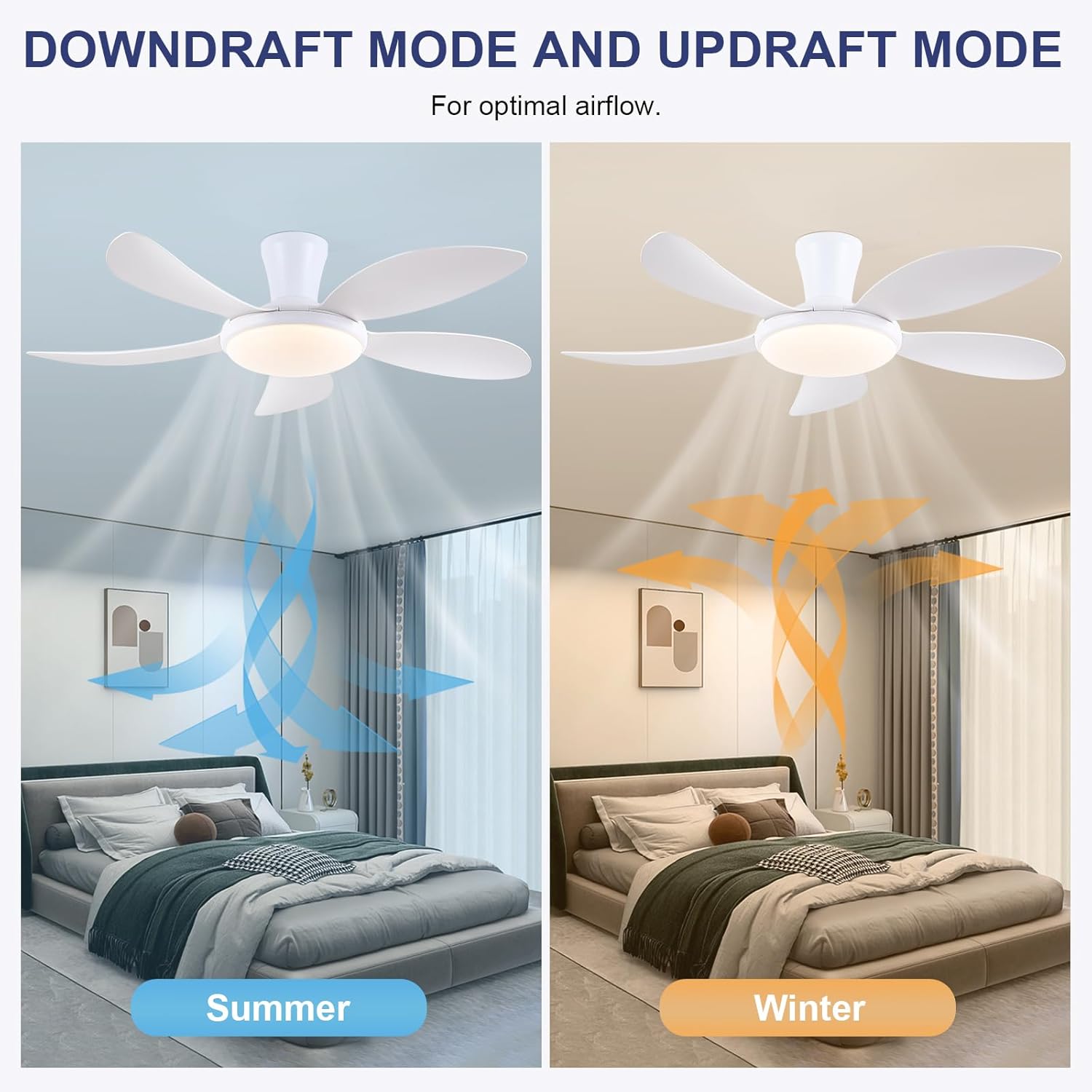
- Función reversible: Press the F/R key to change the blade rotation direction for summer (downdraft) or winter (updraft) modes. The fan will stop briefly before reversing.
- Minutero: Set a 2-hour timer for automatic shutdown.
- Modo nocturno: Activates a low-speed fan and dim light setting.

6.2 Remote Code Pairing
If the remote control is not responding, it may need to be paired:
- Turn off the main power supply to the fan for one minute.
- Turn on the main power supply and simultaneously long-press the 'Code Key' button on the remote control for 3-5 seconds.
- The fan light will blink 2-3 times, indicating successful code matching. The remote can now be operated normally.
6.3 Control de aplicaciones
Control your fan using the 'Fan Lamp Pro' mobile application:
- Descargar aplicación: Scan the QR code provided in the product images or search for "Fan Lamp Pro" en tu tienda de aplicaciones.
- Conectar a través de Bluetooth: Asegúrese de que el Bluetooth de su teléfono esté habilitado.
- Emparejar dispositivo: Open the app, add a new device, and follow the on-screen instructions to connect to your fan. The fan light will blink twice upon successful connection.
- Funciones: The app allows control over fan speeds, light colors, dimming, reverse function, and timer settings, similar to the remote control.
6.4 Velocidad del ventilador y flujo de aire
- Niveles 1-2: Low Comfortable Wind, suitable for sleep.
- Niveles 3-4: Medium Natural Wind, suitable for daily life.
- Niveles 5-6: High Cooling Wind, suitable for hot weather.

6.5 configuraciones de luz
- The LED light source supports stepless dimming and memory function, retaining your last brightness and color temperature setting.
- Choose from 3 color temperatures: 3000K (Warm Light), 4500K (Natural Light), and 6000K (White Light).

6.6 Función reversible
The reversible DC motor allows you to change the direction of the fan seasonally:
- Modo verano (corriente descendente): Blades rotate counter-clockwise, pushing cool air downwards.
- Modo invierno (corriente ascendente): Blades rotate clockwise, drawing cool air up and circulating warm air downwards.
7. Mantenimiento
- Limpieza: Para limpiar el ventilador, límpielo con un paño suave y seco.amp Paño. No utilice limpiadores abrasivos ni disolventes.
- Cuidado de la hoja: The ABS blades are designed to be easy to clean and resistant to deformation.
- Controles periódicos: Periodically check all connections and screws to ensure they are secure.
8. Solución de problemas
Si tiene problemas con su ventilador, consulte los siguientes problemas y soluciones comunes:
- El ventilador no funciona: Check power supply, ensure all wiring connections are secure, and verify remote control pairing.
- La luz no funciona: Check power supply, ensure light wires are connected, and verify remote control pairing.
- El ventilador hace ruido: Ensure all screws are tightened, especially on the blades and mounting bracket. Check for any obstructions.
- El control remoto no funciona: Replace batteries, ensure line of sight to the fan, and re-pair the remote control as per section 6.2.
- Problemas de conexión de la aplicación: Ensure Bluetooth is on, the app is updated, and try re-pairing the device.
9. Garantía y soporte
PHORUS provides a one-year quality warranty for this product. For any damage or quality problems, free replacement service is offered. If you have any questions or require assistance, please contact PHORUS customer service. You will receive a satisfactory answer within 24 hours.
For additional support and resources, please visit the official PHORUS websitio o consulte la información de contacto proporcionada con su compra.


