1. Introducción
Thank you for choosing the MOUNTUP EconoMe Full Motion TV Wall Mount. This manual provides essential information for the safe and proper installation, operation, and maintenance of your new TV wall mount. Designed for most 32-65 inch flat screen, LED, and 4K TVs, this mount offers swivel, tilt, and extension capabilities to optimize your viewing experience. It supports VESA patterns from 100x100mm to 400x400mm and can hold TVs up to 99 lbs.
Please read this manual thoroughly before installation and keep it for future reference. If you have any questions or require assistance, please contact our customer service.
2. Información de seguridad
ADVERTENCIA: Improper installation may result in serious personal injury or damage to your TV and property. If you do not understand these instructions or have doubts about the safety of the installation, please consult a qualified professional.
- Capacidad de peso: No exceda la capacidad máxima de peso de 99 libras (45 kg).
- Tamaño de TV: Este soporte está diseñado para televisores de entre 32 y 65 pulgadas.
- Compatibilidad VESA: Ensure your TV's VESA pattern (mounting hole spacing) is within the supported range of 100x100mm to 400x400mm.
- Tipo de pared: This mount is intended for installation on wood studs (max 16" spacing), concrete walls, or brick walls. NO lo instale solo en paneles de yeso. Always use a stud finder to confirm wood stud locations.
- Anclajes: Concrete and brick wall installations require appropriate anchors. Concrete anchors (Φ10×61mm) can be provided upon request.
- Herramientas: Utilice herramientas adecuadas y use equipo de seguridad durante la instalación.
- Supervisión: Mantenga a los niños y a las mascotas alejados durante la instalación.
3. Contenido del paquete
Before beginning installation, verify that all parts are present and undamaged. If any parts are missing or defective, contact customer service immediately.
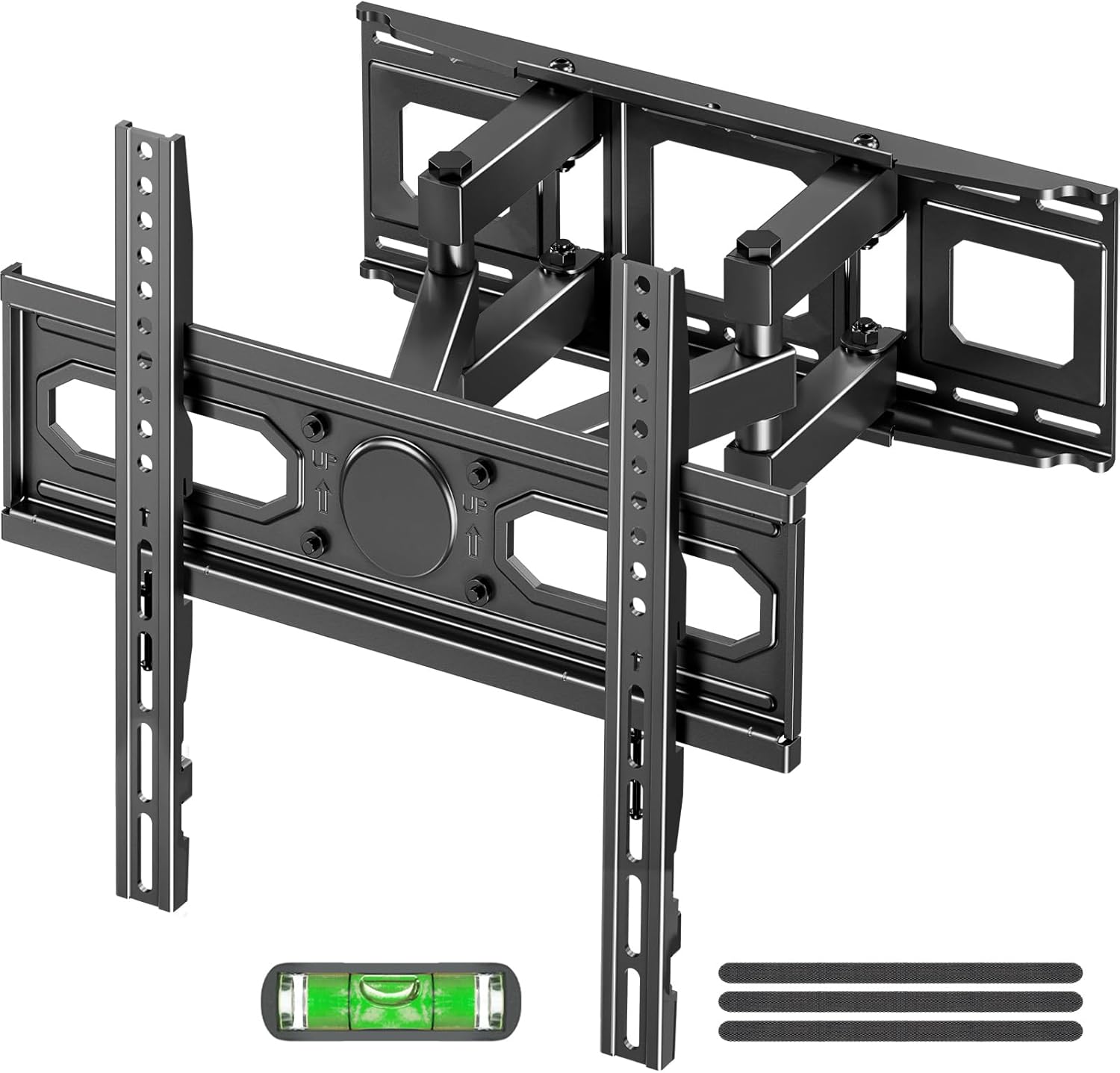
Imagen: Más alláview of the MOUNTUP EconoMe Full Motion TV Wall Mount and included accessories.
- Conjunto de placa de pared
- Soportes de TV (2)
- Kit de hardware (varios tornillos, arandelas, espaciadores, anclajes)
- Herramienta de nivel de burbuja
- Plantilla de montaje de papel
- Bridas para cables
4. Configuración e instalación
The installation process involves three main steps. For detailed visual instructions, please refer to the official installation manual PDF available on the product page or contact customer support.

Image: Simplified three-step installation process for the TV wall mount.
- Paso 1: coloque los soportes en el televisor
Carefully place your TV face down on a soft, clean surface. Identify the VESA mounting holes on the back of your TV. Select the appropriate screws, washers, and spacers from the hardware kit that fit your TV's VESA pattern. Attach the two vertical TV brackets to the back of your TV, ensuring they are securely fastened and evenly aligned.

Image: Guide to available VESA patterns and suitable sizes for TV compatibility.
- Paso 2: fije la placa de pared a la pared
Determine the desired height for your TV. Use a stud finder to locate wood studs if installing on a stud wall. Mark the drilling locations using the provided paper mounting template and the integrated level tool. For concrete or brick walls, use a hammer drill to create pilot holes and insert the appropriate anchors. Secure the wall plate assembly to the wall using the provided lag bolts. Ensure the wall plate is level and firmly attached.
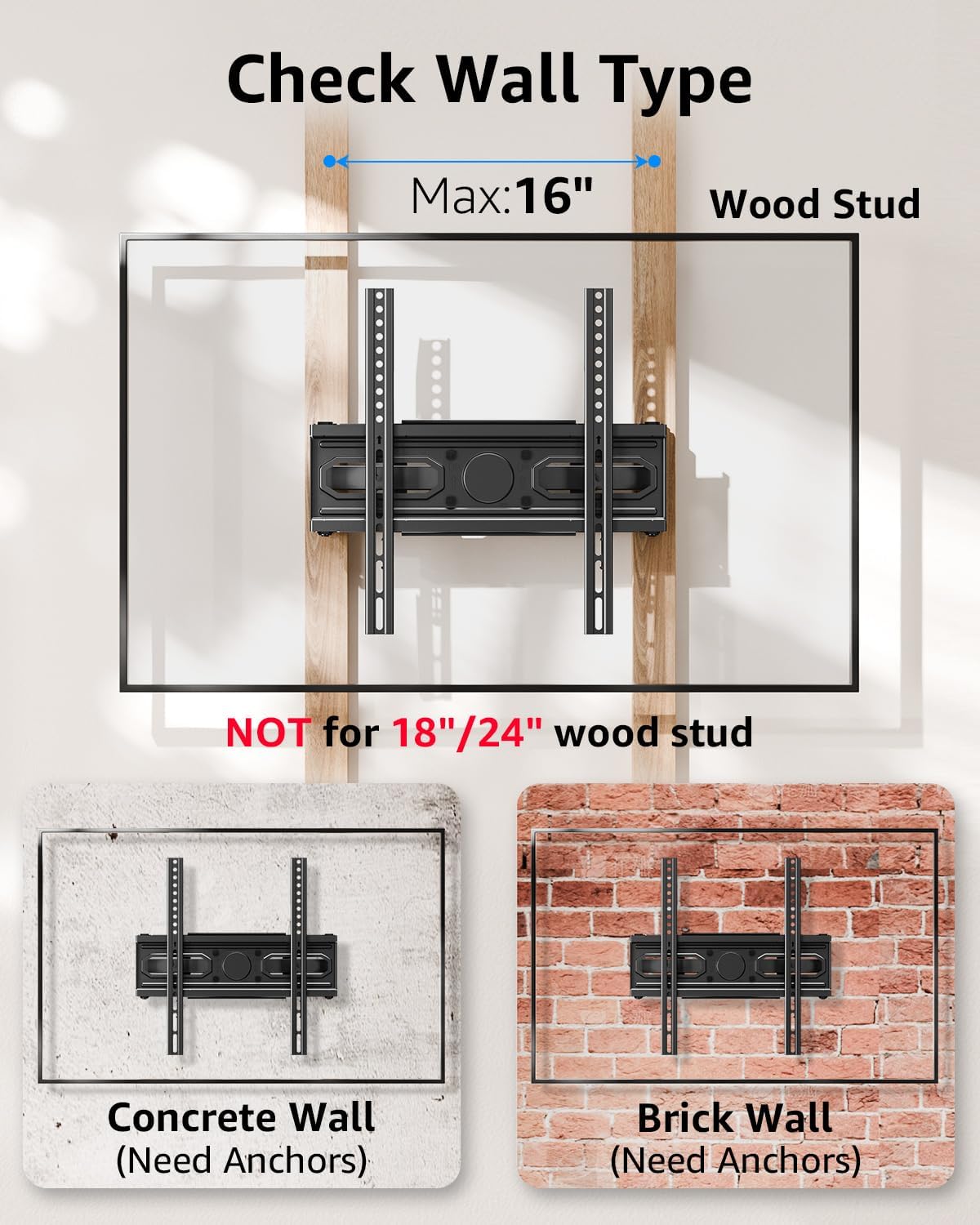
Image: Important information on checking wall type and stud spacing before installation.
- Paso 3: Cuelgue y fije el televisor a la placa de pared
With assistance, carefully lift the TV (with brackets attached) and hook the TV brackets onto the wall plate. Ensure the TV is securely seated on the wall plate. Tighten any safety screws or locking mechanisms on the TV brackets to prevent accidental dislodgement. Double-check all connections for security before releasing el televisor.
5. Operación y ajustes
Your MOUNTUP EconoMe TV wall mount offers a range of adjustments to achieve optimal viewing angles and flexibility.
5.1. Ajuste de inclinación
The mount allows for vertical tilt adjustment to reduce glare and improve viewing comfort. You can tilt the TV up by +5° and down by -10°.

Image: Illustration of the tilting capability for anti-glare viewEn.
5.2. Ajuste del giro
The articulating arms allow you to swivel your TV left or right by up to ±45°, providing flexible viewing options from different areas of the room. The maximum swivel angle may vary depending on your TV's size.
5.3. Ajuste de nivelación
After installation, you can fine-tune the horizontal level of your TV by ±3° to ensure it is perfectly straight.

Image: Demonstrates premium adaptability with leveling and swivel adjustments.
5.4. Extensión y retracción
The dual articulating arms allow the TV to extend up to 14.5 inches (36.8 cm) from the wall and retract back to a slim 2.7 inches (6.8 cm) profile, ahorrando espacio cuando no está en uso.

Image: Illustrates the ultimate flexibility of extension and retraction.
5.5. Height Options
The design allows for two height options for mounting the TV brackets on the wall plate, providing flexibility to achieve eye-level comfort.

Image: Demonstrates two height options for optimal eye-level viewEn.
6. Mantenimiento
To ensure the longevity and safe operation of your TV wall mount, follow these simple maintenance guidelines:
- Limpieza: Limpie el soporte regularmente con un paño suave y seco. Para manchas difíciles, use un paño ligeramente seco.amp Paño y detergente suave, luego seque. Evite limpiadores abrasivos o solventes.
- Controles periódicos: Every few months, inspect all screws and connections to ensure they remain tight and secure. Re-tighten any loose fasteners.
- Movimiento: If the articulating arms become stiff, a small amount of silicone-based lubricant can be applied to the pivot points, avoiding contact with the TV or wall.
7. Solución de problemas
If you encounter any issues with your MOUNTUP EconoMe TV Wall Mount, please refer to the common problems and solutions below. If the issue persists, contact our customer service.
| Problema | Posible causa | Solución |
|---|---|---|
| El televisor no está nivelado después de la instalación. | Wall plate not perfectly level; minor adjustments needed. | Use the leveling adjustment feature (±3°) to fine-tune the TV's horizontal position. |
| Difficulty moving or adjusting the TV. | Screws at pivot points are too tight; lack of lubrication. | Slightly loosen the screws at the articulating joints. Apply a small amount of silicone-based lubricant if necessary. |
| El soporte se siente suelto en la pared. | Lag bolts not fully tightened; incorrect wall anchors used. | Ensure all lag bolts securing the wall plate are fully tightened. Verify that the correct anchors were used for your wall type. If unsure, consult a professional. |
| El televisor no encaja en el soporte. | Patrón VESA o tamaño/peso del televisor incorrectos. | Double-check your TV's VESA pattern and weight against the mount's specifications. This mount supports VESA from 100x100mm to 400x400mm and up to 99 lbs. |
8. Especificaciones
| Característica | Especificación |
|---|---|
| Número de modelo | EU0092A |
| Compatibilidad de tamaño de TV | 32 - 65 pulgadas |
| Capacidad de peso | Hasta 99 libras (45 kg) |
| Compatibilidad VESA | 100x100mm, 150x150mm, 200x200mm, 200x300mm, 300x300mm, 400x400mm, etc. (Min 100x100mm, Max 400x400mm) |
| Ángulo de inclinación | +5° / -10° |
| Ángulo de giro | ±45° (Max angle depends on TV size) |
| Ajuste de nivel | ±3° |
| Extensión desde la pared | 2.7 pulgadas (6.8 cm) a 14.5 pulgadas (36.8 cm) |
| Material | Acero aleado |
| Color | Negro |
| Peso del artículo | 8.14 libras |
| Dimensiones del paquete | 17.56 x 6.65 x 2.83 pulgadas |

Image: Demonstrates the durability and stability of the mount, supporting up to 99 lbs.
9. Garantía y soporte
MOUNTUP is committed to providing quality products and excellent customer service. For any inquiries, concerns, or assistance with installation or parts, please do not hesitate to contact our support team. We are available to help you with any issues you may encounter.
For the most up-to-date warranty information and detailed support resources, please refer to the official MOUNTUP website or the product's Amazon page. You can also find a downloadable PDF version of the installation manual aquí.


