1. Producto terminadoview
The suptek MD01ABP Single Monitor Mount is an adjustable gas spring desk mount designed to enhance your ergonomic workspace. It supports most screens from 13 to 32 inches, weighing between 4.4 and 19.8 lbs (2-9 kg), and is compatible with VESA mounting patterns of 75x75mm or 100x100mm.
This monitor arm provides extensive adjustability, including 360° rotation, ±80° tilt (up and down), and ±90° swivel (left and right), allowing you to position your screen for optimal viewing comfort and to reduce neck and shoulder fatigue.

Image 1: suptek MD01ABP Monitor Mount showcasing load capacity (2-9kg), screen size compatibility (13"-32"), and VESA patterns (75x75/100x100mm).
2. Información de seguridad
- Lea atentamente todas las instrucciones: Before installation and use, read the entire instruction manual to ensure proper assembly and operation.
- Capacidad de peso: No exceda la capacidad máxima de carga de 9 kg (19.8 lb). La sobrecarga puede causar lesiones graves o daños al producto.
- Tamaño del monitor: Ensure your monitor is within the recommended size range of 13-32 inches.
- Compatibilidad VESA: Verify your monitor has VESA mounting holes of 75x75mm or 100x100mm. If not, a VESA adapter (not included) may be required.
- Grosor del escritorio: El C-clamp and grommet base options fit desks up to 100mm thickness. Ensure your desk is sturdy enough to support the combined weight of the mount and monitor.
- Advertencia sobre el resorte de gas: The gas spring is under high pressure. Do not attempt to disassemble the gas spring arm. Adjust tension only after the monitor is installed.
- Instalación segura: Ensure all bolts and screws are securely tightened. Do not overtighten.
- Niños: Mantenga a los niños alejados del producto durante la instalación. Las piezas pequeñas pueden suponer un peligro de asfixia.
3. Contenido del paquete
Verifique que todos los componentes estén presentes y sin daños antes del montaje. Si alguna pieza falta o está dañada, contacte con el servicio de atención al cliente.
- Conjunto del brazo del monitor
- C-Clamp Base
- Grommet Base (optional)
- Placa VESA
- Hardware Kit (various screws, washers, Allen wrenches)
- Manual de instrucciones

Image 2: All components of the suptek MD01ABP Single Monitor Mount, including the arm, clamp, and VESA plate.
4. Configuración e instalación
The suptek MD01ABP monitor mount offers two installation options: C-clamp and grommet mount. Choose the method best suited for your desk.
4.1 Choose Installation Method

Image 3: Illustration of the C-Clamp and Grommet Mount installation options, showing desk thickness compatibility.
4.2 Cl Camp Instalación
- Coloque el C-clamp to the edge of your desk. Ensure the desk thickness is between 10-70mm.
- Apriete el C-clamp screw until the base is securely fastened to the desk.
4.3 Grommet Mount Installation (Optional)
- If your desk has a grommet hole, ensure its diameter is between 10-60mm.
- Desmontar el C-clamp and use the grommet base components to secure the mount through the desk hole.
- Tighten the grommet screw from underneath the desk until the base is stable.
4.4 Conexión del monitor
- Attach the VESA plate to the back of your monitor using the appropriate screws and washers from the hardware kit. Ensure the VESA pattern (75x75mm or 100x100mm) matches your monitor.
- Slide the assembled monitor (with VESA plate) onto the monitor arm's head. Ensure it clicks securely into place.
- Tighten the security screw on the VESA plate to prevent accidental detachment.
Video 1: Detailed installation guide for the suptek Single Monitor Arm Desk Mount.
5. Operación y ajustes
The gas spring arm allows for smooth and effortless adjustments to your monitor's position.
5.1 Full Range of Motion
- Ajuste de altura: Push the gas arm up or down with one hand to stop at any desired height.
- Rotación: Rotate your monitor 360° for landscape or portrait viewEn.
- Inclinación: Tilt the screen ±80° up or down to reduce glare and optimize viewángulos de ing.
- Girar: Swivel the monitor ±90° left or right to share your screen or adjust your position.
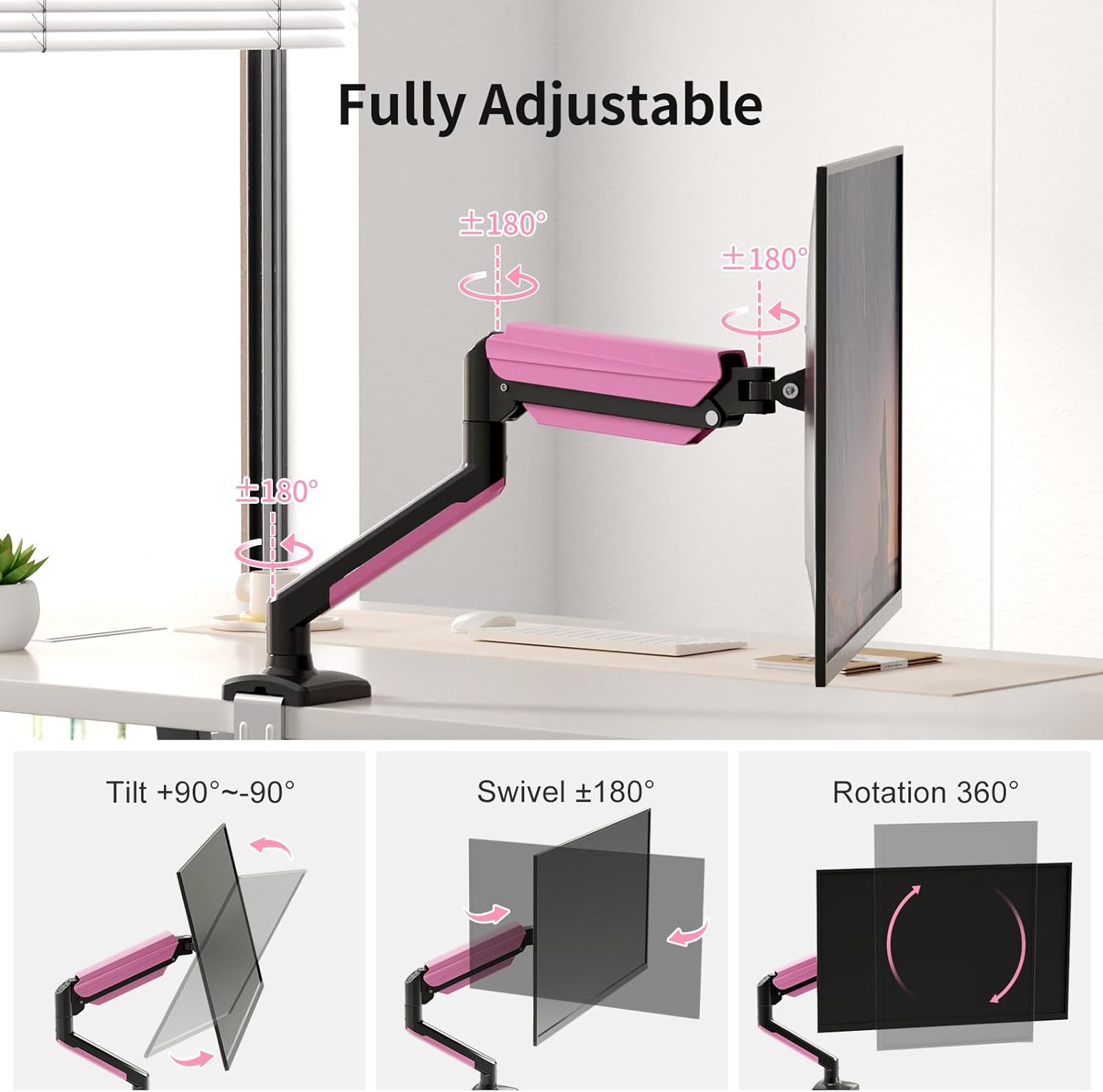
Image 4: The monitor arm demonstrating its full range of motion, including 360° rotation, ±180° swivel, and ±180° tilt.
5.2 Ajuste de la tensión del resorte de gas
The gas spring tension needs to be adjusted according to your monitor's weight to ensure it holds its position correctly.
- If the monitor arm falls down, turn the inside screw counter-clockwise (towards the "+" direction) to increase gas spring tension until the arm stays as intended.
- If the monitor arm rises up or cannot be pressed down, turn the inside screw clockwise (towards the "-" direction) to decrease gas spring tension until the arm stays as intended.
- Nota: Asegúrese de mantener el brazo en posición horizontal durante el ajuste.

Imagen 5: Primer plano view of the gas spring adjustment mechanism on the suptek monitor arm, indicating '+' for increasing tension and '-' for decreasintensión g.
Video 2: Short demonstration of the suptek Single Gas Spring Monitor Arm Desk Mount in action.
6. Gestión de cables
The monitor arm features integrated cable management to keep your workspace tidy and organized. Route your monitor cables through the designated channels on the arm to prevent clutter and tangles.

Image 6: The monitor arm demonstrating its integrated cable management system, keeping wires neat and free from entanglement.
7. Mantenimiento
- Limpieza: Limpie el brazo del monitor con un paño suave.amp paño. Evite el uso de limpiadores o disolventes abrasivos.
- Controles periódicos: Revise periódicamente todos los tornillos y conexiones para asegurarse de que estén bien apretados y seguros. Vuelva a apretarlos si es necesario.
- Resorte de gas: Do not attempt to lubricate or service the internal gas spring mechanism.
8. Solución de problemas
- Monitor not holding position: Adjust the gas spring tension as described in Section 5.2. Ensure your monitor's weight is within the specified range (4.4-19.8 lbs).
- Arm too stiff/loose: Adjust the gas spring tension using the provided Allen wrench.
- El monitor se tambalea: Check all mounting screws and connections for tightness. Ensure the desk mount is securely fastened to the desk.
9. Especificaciones
| Característica | Especificación |
|---|---|
| Marca | Suptek |
| Modelo | MD01ABP |
| Compatibilidad de tamaño de pantalla | 13 - 32 pulgadas |
| Capacidad de carga | 4.4 - 19.8 libras (2 - 9 kg) |
| Compatibilidad VESA | 75 x 75 mm, 100 x 100 mm |
| Ángulo de inclinación | ±80° |
| Ángulo de giro | ±90° |
| Rotación | 360° |
| Tipo de montaje | Montaje de sobremesa (C-clamp y ojal) |
| Grosor del escritorio (C-clamp) | 10-70 mm |
| Grosor del escritorio (ojal) | 10-70 mm |
| Diámetro del orificio del ojal | 10-60 mm |
| Material | Acero aleado |
10. Garantía y soporte
For warranty information and customer support, please refer to the documentation included with your product or contact suptek customer service directly. Keep your purchase receipt for warranty claims.


