1. Producto terminadoview
The ErGear Height Adjustable Desk is an electric standing desk designed for computer workplaces, offering excellent stability and ergonomic flexibility. It features a sturdy steel frame with aviation lifting column connections, ensuring a firm foundation even at full height. The desk includes a memory function for convenient height adjustments and comes with a practical storage bag.

Image 1.1: The ErGear Height Adjustable Desk in a typical office setup, showcasing su elegante diseño y ampEl espacio de trabajo para múltiples monitores y accesorios.
2. Información de seguridad
Importante advertencia de seguridad: Para garantizar un funcionamiento seguro y evitar daños, siga las siguientes pautas:
- No exceda la capacidad máxima de peso de 80 kilogramos (176 lbs) on the desk surface. Overloading can lead to instability and potential damage to the lifting mechanism.
- Mantenga a los niños y a las mascotas alejados del escritorio durante su funcionamiento para evitar accidentes.
- Ensure there are no obstructions in the desk's path when adjusting height. Check for cables, chairs, or other objects that could be pinched or damaged.
- No se siente ni se pare sobre el escritorio.
- Desconecte el escritorio de la toma de corriente antes de limpiarlo o realizar cualquier mantenimiento.
- If the desk malfunctions or makes unusual noises, discontinue use immediately and consult the troubleshooting section or contact customer support.

Image 2.1: Illustration demonstrating the desk's robust 80KG load capacity, emphasizing the importance of not exceeding this limit for safe and reliable performance.
3. Contenido del paquete
Before assembly, please verify that all components listed below are present and undamaged. If any parts are missing or damaged, contact customer support.
- Desktop Surface (1)
- Lifting Columns/Legs (2)
- Feet/Bases (2)
- Panel de control (1)
- Caja de control (1)
- Adaptador de corriente y cable (1)
- Bolsa de almacenamiento (1)
- Hardware Kit (Screws, Allen wrenches, Cable ties)
- Manual de instrucciones (este documento)
4. Configuración y montaje
El montaje suele requerir dos personas. Siga estos pasos generales. Consulte el diagrama de montaje incluido para obtener instrucciones detalladas específicas para su modelo.
- Preparar el espacio de trabajo: Clear a large, flat area for assembly. Lay down a blanket or cardboard to protect the desktop surface from scratches.
- Attach Lifting Columns to Desktop: Carefully place the desktop upside down. Attach the lifting columns to the pre-drilled holes on the underside of the desktop using the provided screws.
- Attach Feet to Lifting Columns: Secure the feet/bases to the bottom of the lifting columns.
- Install Control Box and Control Panel: Mount the control box to the designated area under the desktop. Connect the control panel to the control box, and then connect the lifting columns to the control box. Ensure all cables are securely connected and routed neatly.
- Instalar la bolsa de almacenamiento: Attach the storage bag to the side of the desk as desired, typically using hooks or clips provided.
- Conecte la electricidad: Conecte el adaptador de corriente a la caja de control y luego a un tomacorriente de pared.
- Calibración inicial (si es necesaria): Some models may require an initial calibration. Refer to the specific assembly diagram for your model for details on how to perform this. Typically, this involves pressing and holding the "Down" button until the desk reaches its lowest point and slightly retracts.

Imagen 4.1: Primer plano view of the desk's side storage pockets, demonstrating their capacity for organizing various office supplies and documents. These pockets are typically attached during assembly.
5. Instrucciones de funcionamiento
5.1. Ajuste de altura
The ErGear Height Adjustable Desk features an electric lifting system for smooth and precise height adjustments.
- Para levantar el escritorio: Mantenga pulsado el "Arriba" arrow button (▲) on the control panel. The desk will move upwards. Release the button when the desired height is reached.
- Para bajar el escritorio: Mantenga pulsado el "Abajo" arrow button (▼) on the control panel. The desk will move downwards. Release the button when the desired height is reached.
5.2. Función de memoria
The desk's memory function allows you to save and recall preferred sitting and standing heights.
- To Save a Height Setting:
- Ajuste el escritorio a la altura deseada utilizando los botones Arriba/Abajo.
- Presione el "METRO" (Memory) button. The display may flash or show "S-".
- Dentro de unos segundos, presione uno de los botones preestablecidos numerados (1, 2, 3 o 4) to save the current height to that position. The display will confirm the save (e.g., "S-1").
- To Recall a Saved Height:
- Simplemente presione el botón preestablecido numerado correspondiente (1, 2, 3 o 4). El escritorio se moverá automáticamente a la altura guardada.

Image 5.1: Visual representation of the desk's adjustable height range, illustrating movement from a minimum of 71cm to a maximum of 119cm, allowing users to set ideal sit or stand positions.
6. Mantenimiento
Regular maintenance helps ensure the longevity and smooth operation of your ErGear desk.
- Limpieza: Limpie la superficie del escritorio y las patas con un paño suave.amp paño. Evite productos químicos agresivos o limpiadores abrasivos que puedan dañar el acabado.
- Sistema de organización de cables: Periodically check and organize cables to prevent tangling or interference with the lifting mechanism. Use the provided cable ties if necessary.
- Inspección: Inspeccione periódicamente todos los tornillos y conexiones para asegurarse de que estén bien apretados. Vuelva a apretarlos si es necesario.
- Distribución del peso: Distribuya el peso de manera uniforme sobre el escritorio para evitar tensiones en el mecanismo de elevación.
7. Solución de problemas
If you encounter issues with your ErGear desk, refer to the following common troubleshooting steps:
| Problema | Posible causa | Solución |
|---|---|---|
| El escritorio no se mueve. | Power cable disconnected; Overload; Motor protection activated. | Check power connections. Reduce weight on desk. Unplug for 20 minutes, then plug back in. |
| El escritorio se mueve de manera desigual o hace un ruido inusual. | Conexiones sueltas; Obstrucción; Distribución desigual del peso. | Check all screws and connections. Remove any obstructions. Redistribute weight evenly. |
| Código de error mostrado (por ejemplo, E01, E02). | Mal funcionamiento específico o problema del sensor. | Refer to the specific error code in your detailed assembly manual or contact customer support. Often, a power cycle (unplug, wait 20s, plug in) can resolve temporary errors. |
| La función de memoria no funciona. | Procedimiento de guardado incorrecto. | Ensure you press "M" then the preset number within the specified time. Repeat the saving process. |
If the problem persists after trying these solutions, please contact ErGear customer support.
8. Especificaciones
| Característica | Detalle |
|---|---|
| Marca | Equipo ErGear |
| Número de modelo | 7B-N1-UK |
| Dimensiones del producto | 120 cm (Width) x 60 cm (Depth) x 70-119 cm (Height) |
| Peso | 17.86 kilogramos |
| Material | Vidrio templado, acero aleado |
| Color | Negro |
| Capacidad de carga máxima | 80 kg (176 libras) |
| Características especiales | Adjustable height, Memory function |
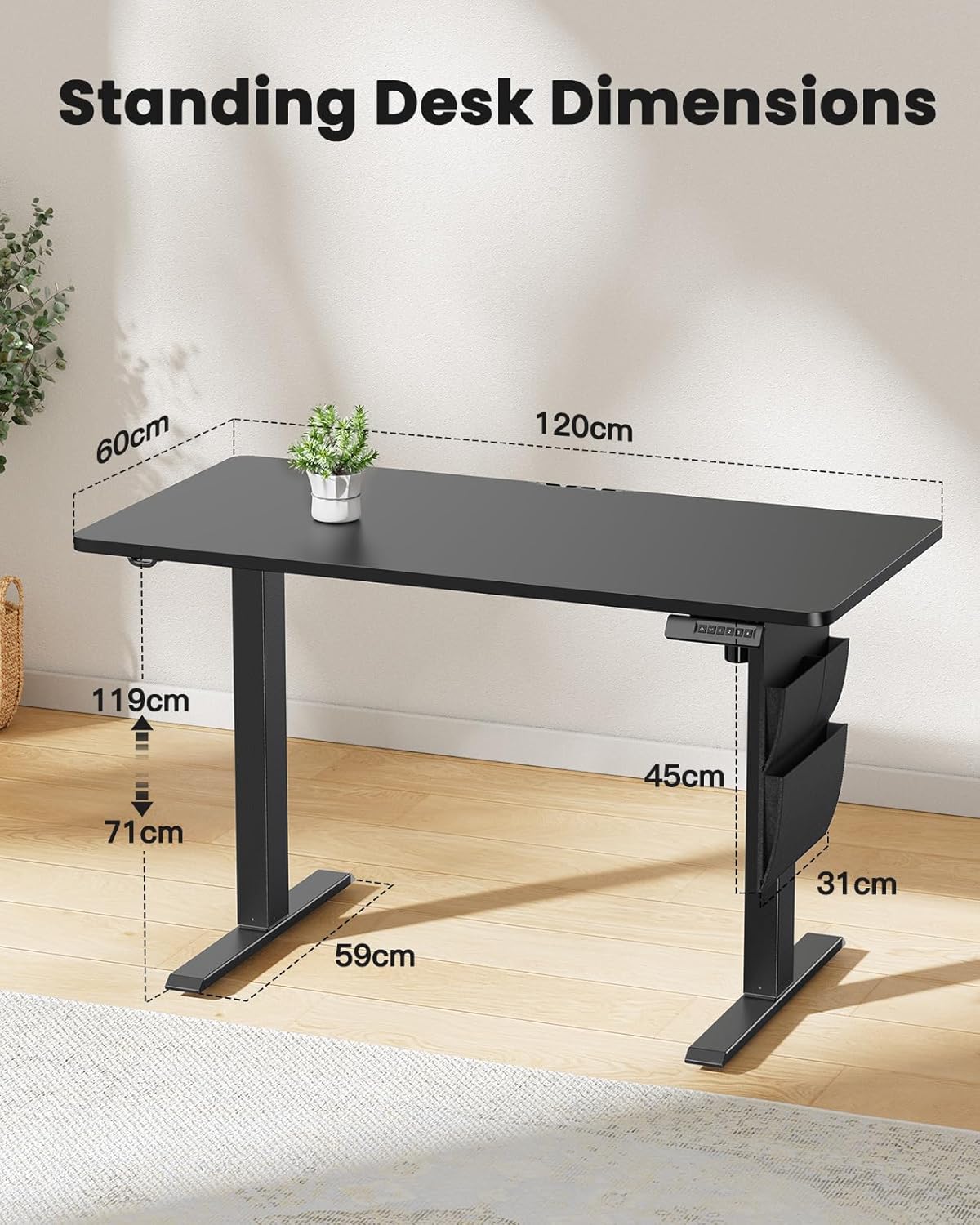
Image 8.1: Detailed diagram illustrating the key dimensions of the ErGear standing desk, including desktop width (120cm), depth (60cm), and height range (71cm to 119cm).
9. Garantía y soporte
ErGear products are designed for durability and performance. For any questions, technical assistance, or warranty claims, please contact ErGear customer support.
- Política de devoluciones: This product is eligible for a refund or replacement within 30 days of purchase, as per standard policy.
- Información del contacto: Please refer to the contact details provided on the ErGear official websitio o su documentación de compra para obtener los canales de soporte más actualizados.


