Introducción
This manual provides detailed instructions for the setup, operation, maintenance, and troubleshooting of your Edifier NeoBuds Plus active noise cancelling earbuds. Please read this manual thoroughly before using the product to ensure optimal performance and longevity.
¿Qué hay en la caja?
- Edifier NeoBuds Plus Earbuds (1 pair)
- Estuche de carga (1)
- Ear Tips (7 sets: XXS/XS/S/M/L/XL/XXL)
- cable de carga (1)
- Bolsa (1)
- Manual de usuario (este documento)

Image: The Edifier NeoBuds Plus earbuds are shown inside their open charging case, with one earbud also displayed separately. The black earbuds and case have a sleek, modern design.
Producto terminadoview
The Edifier NeoBuds Plus feature a compact design with advanced audio components. Each earbud is equipped with a 10mm dynamic driver and a Knowles balanced armature driver for a balanced sound profile. The charging case provides extended battery life and supports wireless charging.

Image: A cutaway diagram illustrates the internal structure of an Edifier NeoBuds Plus earbud, highlighting the 10mm Dynamic Driver and the Balanced Armature Driver, which work together to produce high-quality audio.
Configuración
1. Carga inicial
Before first use, fully charge the NeoBuds Plus and their charging case. Connect the charging cable to the USB-C port on the case, or place the case on a compatible wireless charging pad. A 15-minute charge provides approximately 4 hours of playtime.

Image: The Edifier NeoBuds Plus charging case is shown resting on a wireless charging pad, indicating its wireless charging capability. The earbuds are inside the open case, and text highlights the 47-hour total battery life with ANC off.
2. Emparejamiento
The NeoBuds Plus support Bluetooth 5.4 for stable connections and Google Fast Pair for quick setup with Android devices. They also feature multipoint connection, allowing simultaneous connection to two devices.
- Abre el estuche de carga. Los auriculares entrarán automáticamente en modo de emparejamiento.
- On your device (smartphone, laptop, tablet), enable Bluetooth and select "Edifier NeoBuds Plus" from the list of available devices.
- For Google Fast Pair, simply open the case near a compatible Android device and follow the on-screen prompts.

Image: A smartphone displaying the Edifier Connect app and a laptop showing activity data are positioned next to the open Edifier NeoBuds Plus charging case, illustrating the multipoint connection and Google Fast Pair features.
3. Ear Tip Selection
Choose the ear tips that provide the best seal and comfort for your ears. A proper fit is crucial for optimal sound quality and noise cancellation. Seven different sizes (XXS to XXL) are included to ensure a secure and comfortable fit.
Instrucciones de funcionamiento
Controles
The NeoBuds Plus can be controlled via the Edifier Connect App, push buttons on the earbuds, or voice commands. The push buttons offer customizable functions for playback, call management, and noise control.
- Solo toque: Typically for play/pause.
- Doble toque: Customizable (e.g., next track, answer/end call).
- Triple Tap: Customizable (e.g., previous track, activate voice assistant).
- Toque y mantenga: Customizable (e.g., switch ANC modes).
Refer to the Edifier Connect App for full customization options and detailed control settings.
Cancelación activa de ruido (ANC)
The NeoBuds Plus feature hybrid ANC with up to -48dB noise reduction. Various modes are available to adapt to your environment:
- Cancelación de alto ruido: For maximum noise reduction in very noisy environments (e.g., airplanes, trains).
- Cancelación de ruido media: Suitable for moderately noisy environments (e.g., offices, cafes).
- Cancelación de bajo ruido: For subtle noise reduction.
- Modo de sonido ambiental: Le permite escuchar su entorno sin quitarse los auriculares.
- Reducción del viento: Minimiza el ruido del viento durante las actividades al aire libre.

Image: A woman is depicted using her smartphone while wearing Edifier NeoBuds Plus earbuds, with an overlay illustrating the -48dB noise cancellation capability. Icons below depict various noise cancellation modes: High, Low, Medium, Wind Reduction, and Ambient Sound, demonstrating adaptability to different environments.
Audio de alta fidelidad
Experience superior sound quality with Hi-Res Audio Wireless certification. The NeoBuds Plus support LHDC5.0, LDAC, and AAC codecs, delivering near-lossless 24bit/192kHz audio at up to 990kbps for exceptional detail and clarity.

Image: A woman is shown wearing the Edifier NeoBuds Plus earbuds, with visual cues indicating immersive high-resolution sound. Logos for Hi-Res Audio Wireless, LDAC, LHDC192, and LHDCX are displayed, signifying support for advanced audio codecs.
Funciones de llamada
Each earbud is equipped with three microphones and AI voice pickup technology, totaling six microphones for clear hands-free calls. This system ensures your voice is transmitted clearly, even in challenging conditions like winds up to 25km/h.
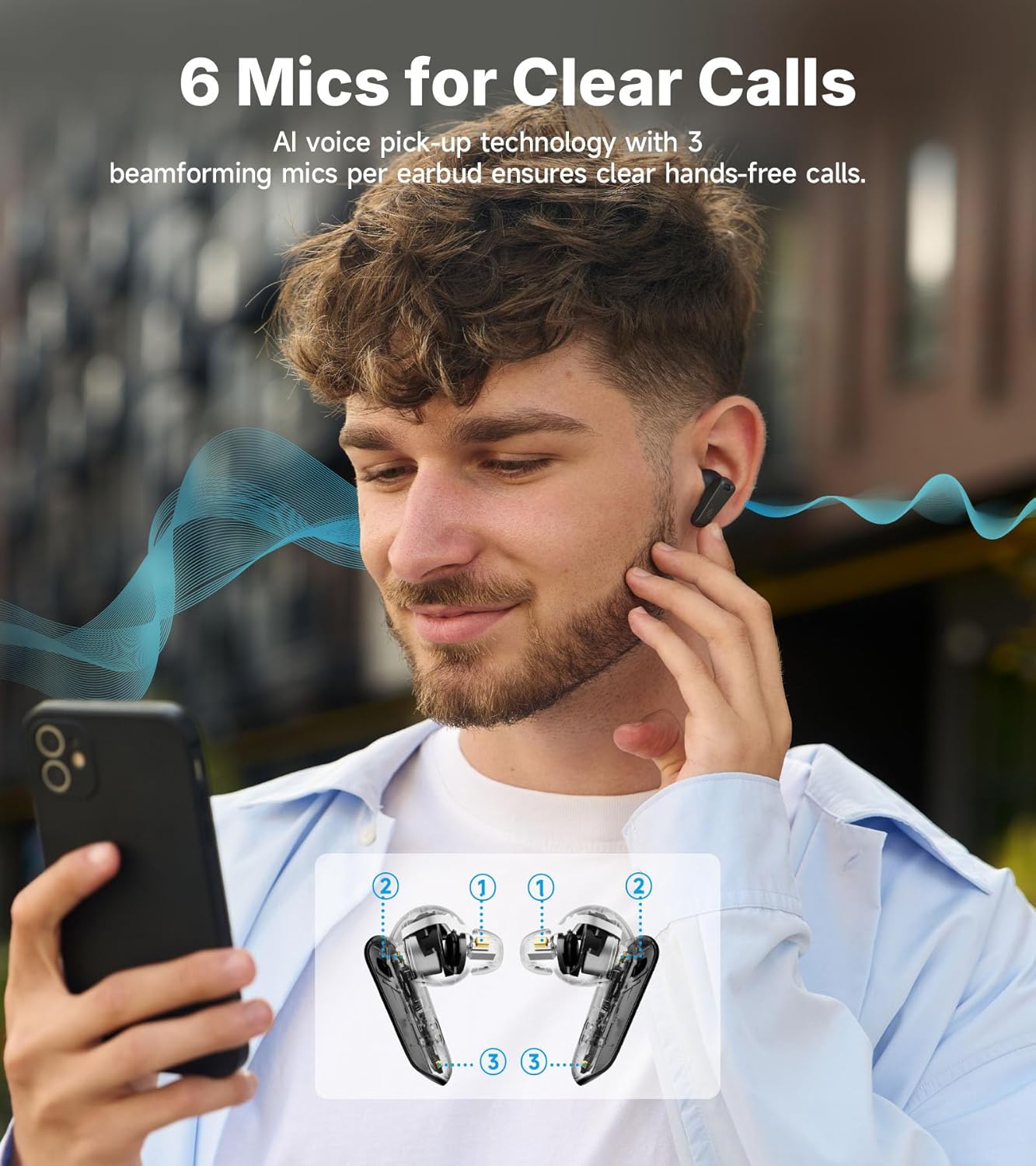
Image: A man is depicted using his smartphone while wearing Edifier NeoBuds Plus earbuds. An inset diagram highlights the location of the six microphones (three per earbud) used for AI voice pickup, ensuring clear call quality.
Arranque y parada inteligentes
The earbuds feature wear sensors that automatically pause audio when removed from your ears and resume playback when reinserted, ensuring you never miss a beat.
Mantenimiento
Limpieza
Regularly clean your earbuds and charging case with a soft, dry cloth. For ear tips, remove them from the earbuds and clean with mild soap and water, then dry thoroughly before reattaching. Avoid using harsh chemicals or abrasive materials.
Duración de la batería y carga
The NeoBuds Plus offer up to 47 hours of total playtime with ANC off (earbuds + charging case). With ANC on, you can expect up to 34 hours. The case supports both USB-C wired charging and convenient wireless charging.
Resistencia al agua
The earbuds are rated IP54 for dust and water resistance, making them suitable for light splashes and sweat. They are not designed for submersion in water.
Solución de problemas
| Problema | Posible causa | Solución |
|---|---|---|
| Los auriculares no se encienden. | Batería baja. | Coloque los auriculares en el estuche de carga y cárguelos por completo. |
| No se puede emparejar con el dispositivo. | Los auriculares no están en modo de emparejamiento; Bluetooth desactivado en el dispositivo; el dispositivo está demasiado lejos. | Open case to enter pairing mode. Ensure device Bluetooth is on. Move device closer to earbuds. |
| No hay sonido o volumen bajo. | Volume too low; improper ear tip fit; earbud obstruction. | Adjust volume on device. Ensure ear tips provide a good seal. Clean earbud mesh if obstructed. |
| El ANC no es efectivo. | Improper ear tip fit; incorrect ANC mode selected. | Ensure ear tips provide a tight seal. Switch to High Noise Cancellation mode via the app or earbud controls. |
| La calidad de la llamada es mala. | Obstrucción del micrófono; ruido ambiental. | Asegúrese de que los micrófonos no estén tapados. Si es posible, busque un entorno más tranquilo. |
Presupuesto
- Nombre del modelo: NeoBuds Plus
- Tecnología de conectividad: Inalámbrico (Bluetooth 5.4)
- Tipo de controlador de audio: Hybrid Driver (Knowles balanced armature + 10mm dynamic)
- Control de ruido: Cancelación activa de ruido (ANC híbrida de -48 dB)
- Duración de la batería: Up to 47 hours (ANC off with case)
- Tiempo de carga: 15 minutos para 4 horas de juego
- Micrófonos: 6 (3 per earbud with AI voice pickup)
- Resistencia al agua: IP54
- Códecs de audio compatibles: LHDC5.0, LDAC, AAC
- Alcance de Bluetooth: 10 metros
- Método de control: Aplicación, pulsador, voz
- Rango de frecuencia: 20 Hz - 40 kHz
- Peso del artículo: 10.8 onzas
Vídeo oficial del producto
Vídeo: Un vídeo oficial del producto Edifier muestraasing the key features and design of the NeoBuds Plus earbuds, including their active noise cancellation, sound quality, and battery life.
Garantía y soporte
Edifier products are designed and manufactured to the highest quality standards. For warranty information, technical support, or service inquiries, please visit the official Edifier webSitio web o contacte directamente con el servicio de atención al cliente. Conserve su recibo de compra como comprobante para reclamaciones de garantía.
Tienda oficial de Edifier: Tienda Edifier en Amazon