1. Introducción
This user manual provides detailed instructions for the SONRU Bluetooth 5.3 Receiver. This wireless audio adapter is designed to bring Bluetooth connectivity to various audio systems, including car stereos, home stereos, wired headphones, and speakers. Featuring advanced Bluetooth 5.3 technology, it ensures a faster, more stable, and smarter connection with minimal sound quality loss. The device also supports hands-free calling and dual device connection, enhancing your audio experience and convenience.
2. Información de seguridad
Keep away from water and extreme temperatures. Do not expose to high heat or fire. Do not short-circuit. Avoid contact with liquids. Do not dispose of in fire. May interfere with other wireless devices. Follow local regulations for battery disposal.
3. Contenido del paquete
Por favor verifique que todos los artículos estén incluidos en su paquete:
- 1 x SONRU Bluetooth Wireless Receiver (Model J48)
- 1 adaptador de audio de 3.5 mm
- 1 cable de audio de 3.5 mm
- 1 cable de audio RCA.
- 1 x cable de carga tipo C
- 1 x Manual de usuario y tarjeta de garantía

Image: All components included in the SONRU Bluetooth Receiver package.
4. Configuración
4.1 Carga inicial
Before first use, fully charge the Bluetooth receiver. Connect the provided Type-C charging cable to the receiver's charging port and a USB power source. A full charge typically takes approximately 1.5 hours. The device supports charging while in use.
4.2 Conexión a la fuente de audio
The SONRU Bluetooth Receiver offers versatile connectivity options:
- For 3.5mm AUX Input: Use the included 3.5mm audio adapter or 3.5mm audio cable to connect the receiver to your car's AUX port, home stereo, wired headphones, or speaker.
- Para entrada RCA: Use the included RCA audio cable to connect the receiver to older home stereo systems or other audio equipment with RCA inputs.

Image: The receiver's wide compatibility with various audio devices.
4.3 Emparejamiento Bluetooth
- Encendido: Press and hold the multifunction button on the receiver to power it on. The LED display will light up.
- Habilitar Bluetooth: En su dispositivo móvil (teléfono inteligente, tableta, etc.), vaya a la configuración de Bluetooth y asegúrese de que Bluetooth esté habilitado.
- Seleccione el dispositivo: Look for "J48" in the list of available Bluetooth devices and select it to pair. Once connected, the receiver will indicate successful pairing.
- Reproducir audio: Begin playing audio on your mobile device. The sound will now be transmitted wirelessly to the connected audio system.
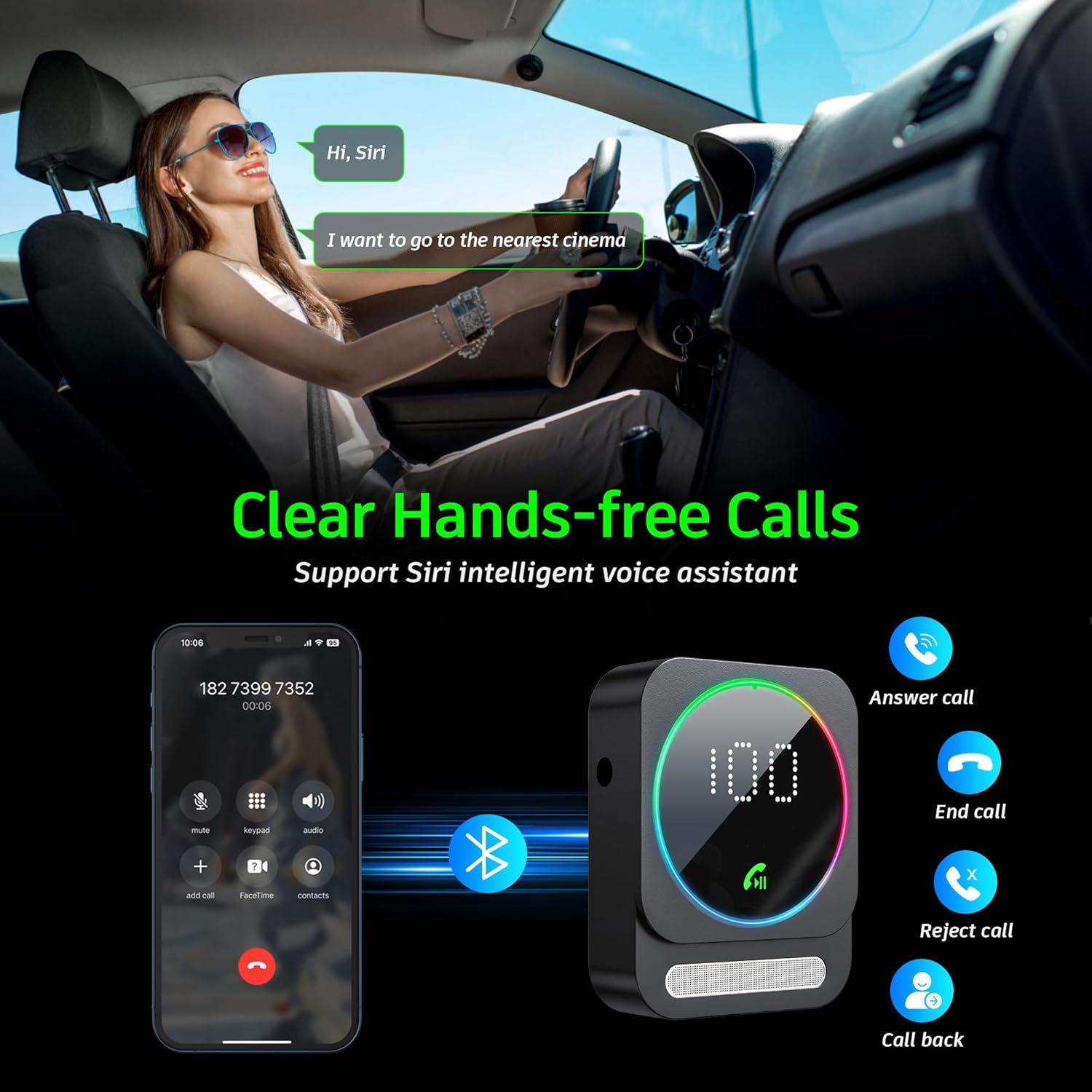
Image: Bluetooth pairing process in a car environment.
5. Instrucciones de funcionamiento
5.1 Llamadas manos libres
The receiver is equipped with a high-quality microphone and CVC8.0 technology for clear hands-free calls.
- Responder llamada: Pulse el botón multifunción una vez.
- Finalizar llamada: Presione el botón multifunción una vez durante una llamada.
- Rechazar llamada: Mantenga pulsado el botón multifunción durante 2 segundos.
- Volver a marcar el último número: Presione dos veces el botón multifunción.
- Activar Asistente de voz (Siri/Asistente de Google): Presione tres veces el botón multifunción.

Image: Multifunction and volume buttons on the receiver.
5.2 Reproducción de música
- Reproducir/Pausa: Pulse el botón multifunción una vez.
- Pista siguiente: Presione brevemente el botón "+".
- Pista anterior: Presione brevemente el botón "-".
- Sube el volumen: Mantenga presionado el botón "+".
- Bajar volumen: Mantenga presionado el botón "-".
5.3 Conexión de dos dispositivos
The SONRU Bluetooth Receiver can connect to two Bluetooth devices simultaneously. This allows for convenient switching between devices for music or calls. Note that audio from both devices cannot be played simultaneously; you must switch between them.
Image: The receiver's ability to connect to two devices simultaneously.
5.4 Duración de la batería y carga
The built-in 250mAh battery provides up to 16 hours of continuous use on a single charge. The device can be fully charged in approximately 1.5 hours using the provided Type-C cable. It supports charging while in use, making it ideal for long journeys.

Image: Visual representation of the receiver's battery life and charging features.
6. Mantenimiento
To ensure the longevity and optimal performance of your SONRU Bluetooth Receiver, follow these maintenance guidelines:
- Limpieza: Utilice un paño suave y seco para limpiar el dispositivo. No utilice limpiadores líquidos ni aerosoles.
- Almacenamiento: Guarde el dispositivo en un lugar fresco y seco, alejado de la luz solar directa y de temperaturas extremas.
- Evite el impacto: No deje caer ni someta el dispositivo a impactos fuertes, ya que esto puede dañar los componentes internos.
- Cuidado de cables: Handle cables gently. Avoid bending or pulling them excessively to prevent damage.
7. Solución de problemas
If you encounter issues with your SONRU Bluetooth Receiver, please refer to the following common solutions:
| Problema | Solución |
|---|---|
| El dispositivo no se enciende. | Asegúrese de que el dispositivo esté completamente cargado. Conéctelo a una fuente de alimentación con el cable tipo C y vuelva a intentarlo. |
| No se puede emparejar con el dispositivo móvil. |
|
| No hay sonido o la calidad del sonido es mala. |
|
| La calidad de la llamada es mala. | Ensure the microphone is not obstructed. Reduce background noise if possible. The CVC8.0 technology helps filter out echoes and background noise. |
8. Especificaciones
| Característica | Detalle |
|---|---|
| Versión de Bluetooth | 5.3 |
| Tecnología de conectividad | AUX, RCA |
| Capacidad de la batería | 250 mAh |
| Tiempo de carga | Aproximadamente 1.5 horas |
| Tiempo de uso | Hasta 16 horas |
| Características especiales | Hands-Free Calls, Dual AUX Outputs, Digital Display, Ambient Light |
| Rango de trabajo | Hasta 33 pies (10 m) sin obstáculos |
| Dimensiones | 6.65 x 2.76 x 0.94 pulgadas |
| Peso del artículo | 2.89 onzas |
Vídeo: Un overview of the SONRU Bluetooth 5.3 Receiver's features and usage scenarios.
9. Garantía y soporte
SONRU provides a warranty for this product. For detailed warranty information, please refer to the included Warranty Card in your package. If you encounter any problems or are not satisfied with your product, please contact SONRU customer support for assistance. We are committed to providing a satisfactory solution.
Por lo general, puede encontrar información de contacto de soporte en el sitio web del fabricante. websitio o a través del minorista donde compró el producto.


