1. Introducción
Thank you for choosing the AM ARROWMAX Mini Electric Drill Pen. This precision tool is designed for detailed drilling tasks in various materials, offering portability, adjustable speed, and an intuitive OLED display. Please read this manual thoroughly before use to ensure safe and optimal operation.

Image 1.1: The AM ARROWMAX Mini Electric Drill Pen with its accompanying bit storage case.
2. Información de seguridad
- Always wear appropriate eye protection when operating the drill.
- Mantenga las manos y la ropa suelta alejadas de las piezas giratorias.
- Asegúrese de que la pieza de trabajo esté bien sujeta.amped o sostenido para evitar movimiento durante la perforación.
- Do not operate the drill in wet conditions or near flammable liquids or gases.
- Mantenga la herramienta fuera del alcance de los niños.
- Use only the specified drill bits and accessories.
- Disconnect the power source (USB-C cable) before changing bits or performing maintenance.
- If the tool shows signs of damage or malfunction, discontinue use immediately.
3. Contenido del paquete
Verifique que todos los artículos estén presentes en su paquete:
- 1 x AM ARROWMAX Mini Electric Drill Pen
- 10 x Titanium-Coated Steel Drill Bits (0.6mm to 2.2mm)
- Cable de carga 1 x USB-C
- 1 x Manual de instrucciones (este documento)
- 1 x Magnetic CNC Alloy Storage Box (for drill bits)

Imagen 3.1: Másview of the complete kit, including the drill pen, drill bits, storage box, manual, and USB-C cable.
4. Producto terminadoview
The AM ARROWMAX Mini Electric Drill Pen features a compact design with an aluminum alloy body, an OLED display, LED work lights, and a USB-C charging port. It offers 5 adjustable speed settings for versatile use.
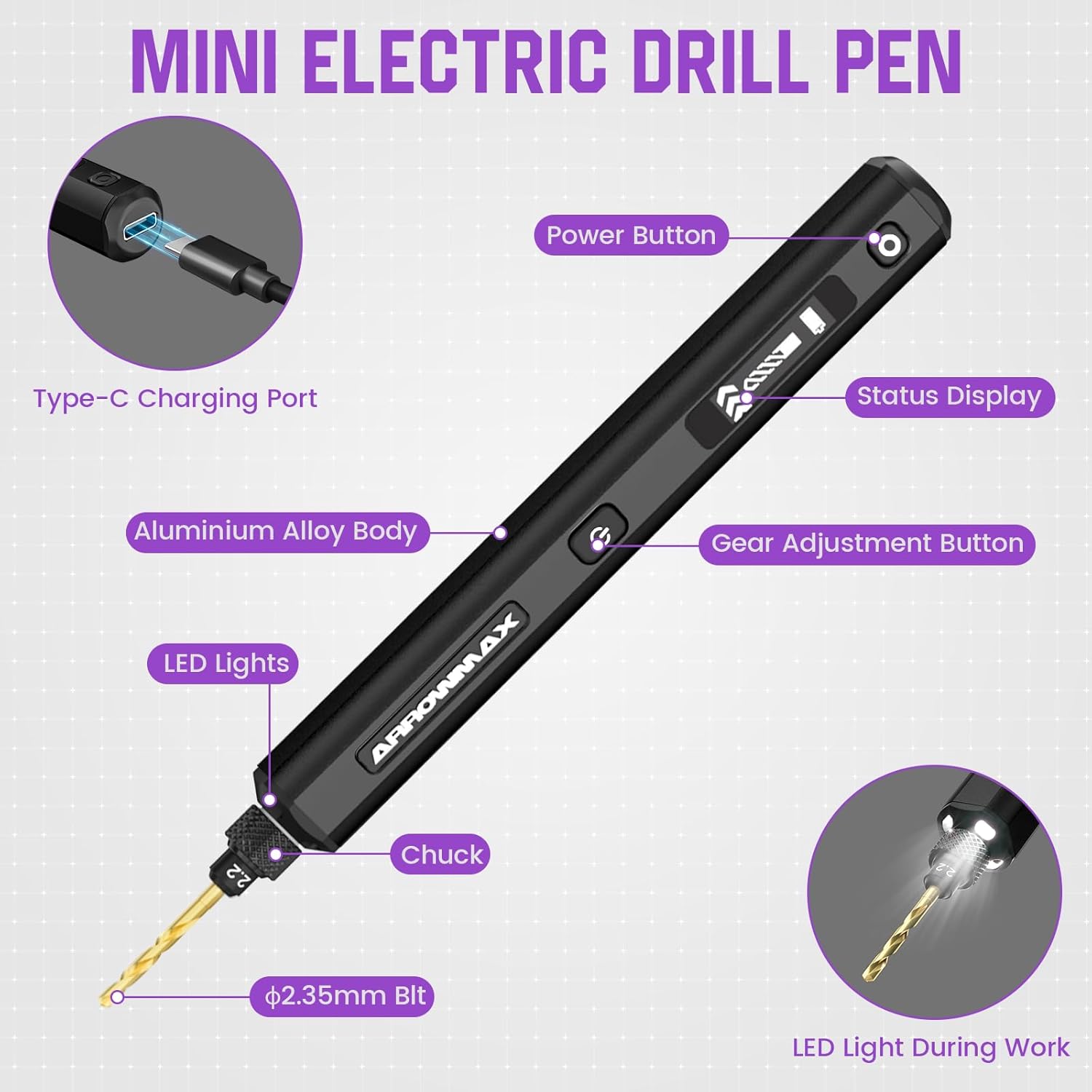
Image 4.1: Detailed diagram highlighting key components: Type-C Charging Port, Power Button, Status Display (OLED), Gear Adjustment Button, Aluminium Alloy Body, LED Lights, Chuck, and ⌀2.35mm Bit.
5. Configuración
5.1 Carga del dispositivo
- Connect the provided USB-C cable to the charging port on the drill pen.
- Conecte el otro extremo del cable USB-C a un adaptador de corriente USB de 5 V compatible (no incluido) o a un puerto USB de una computadora.
- The OLED display will indicate the charging status. A full charge typically takes approximately 3 hours and provides up to 3 hours of continuous use.
5.2 Instalación/cambio de brocas
- Ensure the drill pen is powered off before changing bits.
- Unscrew the chuck at the front of the drill pen counter-clockwise to loosen it.
- Insert the desired titanium-coated steel drill bit into the chuck. Ensure the bit is fully seated.
- Tighten the chuck clockwise until the drill bit is securely held. Do not overtighten.

Image 5.1: The included titanium-coated steel drill bits range from 0.6mm to 2.2mm, all with a ⌀2.35mm shaft.
6. Instrucciones de funcionamiento
6.1 Encendido y apagado
- To power on, press and hold the Power Button (⑂) for approximately 2 seconds. The OLED display will illuminate.
- To power off, press and hold the Power Button (⑂) again for approximately 2 seconds.
6.2 Ajuste de la velocidad (RPM)
- Once powered on, tap the Gear Adjustment Button (⇔) to cycle through the 5 available speed settings.
- The OLED display will show the current speed level (1-5) and corresponding RPM.
- Available speeds: Level 1 (500 RPM), Level 2 (600 RPM), Level 3 (700 RPM), Level 4 (800 RPM), Level 5 (900 RPM).
6.3 Cambio de dirección de rotación
- While the drill is operating, quickly double-press the Power Button (⑂) to toggle the rotation direction (clockwise/counter-clockwise). The OLED display will indicate the current direction.
6.4 Luces de trabajo LED
- The integrated LED lights automatically illuminate when the drill is operating, providing better visibility of your workpiece.

Image 6.1: The OLED display indicates the current speed level and allows for rotation direction changes by toggling the power button.
7. Mantenimiento
7.1 Limpieza
- After each use, wipe the drill pen with a clean, dry cloth to remove dust and debris.
- No utilice productos químicos agresivos ni limpiadores abrasivos.
- Asegúrese de que el puerto de carga esté libre de residuos.
7.2 Drill Bit Care
- Clean drill bits after use to remove material residue.
- Store drill bits in the provided magnetic storage box to prevent damage and loss.
- Replace dull or damaged drill bits to maintain drilling precision and prevent strain on the motor.
7.3 Almacenamiento
- Store the drill pen and accessories in a cool, dry place, away from direct sunlight and extreme temperatures.
- Asegúrese de que el dispositivo esté completamente cargado antes de almacenarlo durante un período prolongado para preservar la salud de la batería.
8. Solución de problemas
| Problema | Posible causa | Solución |
|---|---|---|
| El taladro no se enciende. | Batería baja o sin carga. | Charge the drill pen using the USB-C cable. Ensure the charging indicator is active. |
| Drill bit is loose or wobbles. | El mandril no está suficientemente apretado. | Power off the drill, then securely tighten the chuck around the drill bit. |
| Drill stops rotating or operates intermittently. | Low battery; excessive pressure during drilling; motor overload. | Recharge the device. Reduce pressure on the workpiece. Allow the motor to cool down if it feels warm. Ensure the bit is not jammed. |
| El dispositivo no se carga. | Faulty cable or power adapter; debris in port. | Prueba con otro cable USB-C y adaptador de corriente. Limpia el puerto USB-C con cuidado. |
| La pantalla OLED no funciona. | Device is off; malfunction. | Ensure the device is powered on. If the issue persists, contact customer support. |
9. Especificaciones
| Característica | Detalle |
|---|---|
| Marca | FLECHAMAX |
| Modelo | SDS-BLACK (230875-B) |
| Fuente de poder | Funciona con pilas |
| Tipo de batería | Polímero de litio |
| Capacidad de la batería | 500 mAh |
| Volumentage | 5 voltios |
| Número de velocidades | 5 |
| Velocidad máxima de rotación | 900 RPM |
| Diámetro del eje de la broca | ⌀2.35mm (Universal) |
| Tamaños de brocas incluidas | 0.6 mm, 0.8 mm, 1.0 mm, 1.2 mm, 1.4 mm, 1.5 mm, 1.6 mm, 1.8 mm, 2.0 mm, 2.2 mm |
| Características especiales | Portable, LED Lights, OLED Display |
| Dimensiones del producto | 7.28" de largo x 2.76" de ancho x 1.18" de alto |
| Peso del artículo | 9.1 onzas |
| Material | Metal |
10. Garantía y soporte
Para obtener información sobre la garantía y la atención al cliente, consulte el sitio web oficial de ARROWMAX. webSitio web o contacte a su vendedor. Conserve su recibo de compra como comprobante.
Nota sobre los vídeos: The provided product data indicates the presence of videos. However, specific video URLLos archivos y metadatos (como "creator_type") necesarios para la incrustación no estaban disponibles. Por lo tanto, no se han incrustado vídeos en este manual.


