1. Introducción
The NEDIS WIFICI12CWT SmartLife Indoor Wi-Fi Camera is designed for home surveillance, offering 3MP 1296p Full HD video quality. It features infrared night vision, intelligent motion detection, and two-way audio communication. This camera is compatible with Onvif standards and integrates seamlessly with the SmartLife application for remote access and control. Video recordings can be stored on a microSD card (up to 128 GB) or via an optional cloud storage service. This manual provides essential information for the proper installation, operation, and maintenance of your camera.
2. ¿Qué hay en la caja?
- 1x NEDIS WIFICI12CWT Camera
- 1x adaptador de corriente
- 1x cable USB tipo C
- 1x Manual de instrucciones
3. Producto terminadoview
Familiarize yourself with the components of your NEDIS WIFICI12CWT camera.

This image displays the front of the NEDIS WIFICI12CWT camera, highlighting its key functionalities such as Wi-Fi connectivity, control via a mobile application, voice control compatibility, infrared night vision, and 3MP Full HD resolution for clear video.
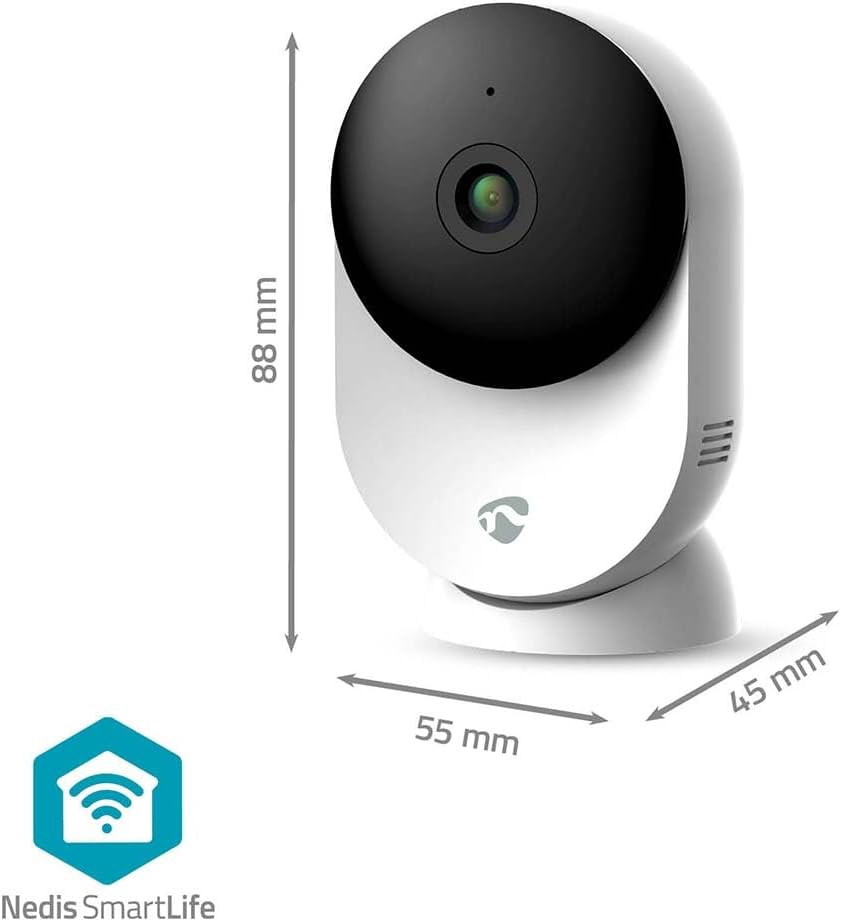
Esta imagen proporciona una visión clara view of the NEDIS WIFICI12CWT camera along with its physical dimensions: 88 mm in height, 55 mm in width, and 45 mm in depth, aiding in placement planning.

La parte trasera view of the camera is shown, highlighting the speaker grille for two-way audio and the 'PUSH' button, which typically serves as a reset or pairing button.
Componentes clave:
- Lente de la cámara: Captura vídeo footage.
- Indicador LED: Muestra el estado de la cámara (por ejemplo, energía, conexión).
- Micrófono: Para entrada de audio y comunicación bidireccional.
- Vocero: Para salida de audio y comunicación bidireccional.
- Power Port (USB Type-C): Se conecta al adaptador de corriente.
- Botón de reinicio: Se utiliza para restablecer la configuración de fábrica o el modo de emparejamiento.
- Ranura para tarjeta microSD: Para almacenamiento de vídeo local.
4. Configuración
Follow these steps to set up your NEDIS WIFICI12CWT camera:
- Descargue la aplicación SmartLife: Buscar "SmartLife" in your mobile device's app store (iOS or Android) and install it.
- Crear una cuenta: Open the SmartLife app and register for a new account or log in if you already have one.
- Encienda la cámara: Connect the USB Type-C cable to the camera's power port and plug the power adapter into an electrical outlet. The camera will power on, and the LED indicator will typically blink, indicating it's ready for pairing.
- Agregar dispositivo: In the SmartLife app, tap the "+" icon (usually in the top right corner) to add a new device. Select "Security & Video Surveillance" then "Smart Camera (Wi-Fi)" or similar.
- Conectarse a Wi-Fi: Follow the on-screen instructions in the app. Ensure your mobile device is connected to a 2.4 GHz Wi-Fi network. The camera does not support 5 GHz Wi-Fi. You may need to scan a QR code displayed on your phone with the camera lens.
- Configuración completa: Once the camera connects successfully, you can name it and begin using it.

A user is shown interacting with the NEDIS WIFICI12CWT camera through the SmartLife mobile application on a smartphone, illustrating the remote viewing capability and ease of control.
5. Operación de la cámara
Vivir View:
Open the SmartLife app and select your camera from the device list to access the live video feed. You can view your space in real-time from anywhere.
Detección de movimiento:
The camera features intelligent motion detection. When motion is detected, the camera can send instant notifications to your smartphone via the SmartLife app. You can adjust sensitivity settings within the app.
Visión nocturna:
Equipped with infrared LEDs, the camera automatically switches to night vision mode in low-light conditions, providing clear black-and-white video up to 10 meters.
Audio bidireccional:
Use the built-in microphone and speaker for two-way communication. Tap the microphone icon in the app to speak, and listen through the camera's speaker.

A couple is depicted using a tablet to monitor a baby, showcasing the camera's ability to provide live video feed and two-way audio communication, useful for calming a child or general baby surveillance.
Grabación y almacenamiento:
- Tarjeta MicroSD: Insert a microSD card (up to 128 GB, not included) into the designated slot for local storage of recordings. The camera supports continuous recording or event-triggered recording.
- Almacenamiento en la nube: Optional cloud storage services may be available through the SmartLife app for secure off-site storage of your video footage.
Funcionalidad panorámica/inclinación:
The camera features motorized pan and tilt capabilities, allowing for 360° horizontal and vertical tracking. Control the camera's viewing direction directly from the SmartLife app to cover a wider area.

This image shows the camera placed in a room, with graphical overlays emphasizing its 110-degree viewing angle, intelligent movement detection, and dual-band 2.4/5 GHz Wi-Fi connectivity for flexible placement.
6. Mantenimiento
Limpieza:
To clean the camera, gently wipe the exterior with a soft, dry cloth. Do not use liquid cleaners or aerosols, as they may damage the device.
Actualizaciones de firmware:
Periodically check the SmartLife app for available firmware updates. Keeping your camera's firmware up-to-date ensures optimal performance and security.
7. Solución de problemas
- La cámara no se enciende: Asegúrese de que el adaptador de corriente esté conectado de forma segura tanto a la cámara como a una toma de corriente que funcione.
- No se puede conectar al Wi-Fi:
- Verifique que su red Wi-Fi sea de 2.4 GHz. La cámara no admite redes de 5 GHz.
- Comprueba que tu contraseña de Wi-Fi sea correcta.
- Asegúrese de que la cámara esté dentro del alcance de su enrutador Wi-Fi.
- Try resetting the camera by pressing and holding the reset button for several seconds until the LED indicator changes.
- No recording to microSD card:
- Asegúrese de que la tarjeta microSD esté insertada correctamente.
- Check if the microSD card is formatted correctly (usually FAT32). You may need to format it via the app.
- Verify that recording settings are enabled in the SmartLife app.
- Mala calidad de imagen:
- Limpie la lente de la cámara con un paño suave y seco.
- Ensure adequate lighting in the environment, or that night vision is functioning correctly in dark conditions.
- Verifique la velocidad de su conexión a Internet, ya que una conexión lenta puede afectar la calidad de la transmisión.
8. Especificaciones
| Característica | Especificación |
|---|---|
| Nombre del modelo | WIFICI12CWT |
| Resolución de grabación de vídeo | 1296p (3 MP) |
| Tecnología de comunicación inalámbrica | Wi-Fi (2.4 GHz) |
| Viewángulo de ing | 110 grados |
| Rango de visión nocturna | 10 metros |
| Entrada de potencia | 5 voltios |
| Consumo de energía | 4.5 vatios-hora |
| Dimensiones (L x An x Al) | 45 x 55 x 88 mm |
| Peso | 161 gramos |
| Material | Acrilonitrilo butadieno estireno (ABS) |
| Características especiales | Two-way audio, Motion detector, Cry detection, Sound-triggered recording, HD resolution, Night vision |
| Entorno de uso | Interior |
| Dispositivos compatibles | Teléfono inteligente, tableta |
| Tipo de controlador | Android, iOS |
9. Información de seguridad
- This product is designed for indoor use only. Do not expose it to rain or moisture.
- Utilice únicamente el adaptador de corriente proporcionado para evitar daños al dispositivo.
- Mantenga la cámara alejada de la luz solar directa, fuentes de calor y campos magnéticos fuertes.
- No intente desmontar ni reparar la cámara usted mismo. Contacte con personal de servicio técnico cualificado para obtener ayuda.
- Mantener fuera del alcance de los niños y las mascotas.
10. Garantía y soporte
For warranty information and technical support, please refer to the documentation included with your product or visit the official NEDIS website. You can also contact NEDIS customer service for further assistance.


