1. Introducción
The FSP VITA GM 850W Power Supply is designed to provide stable and efficient power for your computer system. Featuring 80 PLUS Gold certification, a fully modular design, and advanced protection features, it is suitable for a wide range of applications, including gaming and professional workstations. This manual provides essential information for the proper installation, operation, and maintenance of your power supply unit.

Imagen 1.1: De arriba hacia abajo view of the FSP VITA GM 850W Power Supply, showcasing its compact design and fan grill.
2. Información de seguridad
Please read and understand all safety instructions before installing or operating the power supply. Failure to do so may result in personal injury or damage to your equipment.
- No abra la fuente de alimentación casing. Alto volumentages are present inside, even when the unit is unplugged. There are no user-serviceable parts inside. Opening the casing anulará la garantía.
- Instale la fuente de alimentación en un área bien ventilada, lejos de fuentes de calor, luz solar directa y humedad.
- Asegúrese de que la fuente de alimentación esté conectada a una toma de corriente con conexión a tierra.
- Utilice únicamente los cables modulares incluidos con esta fuente de alimentación. El uso de cables incompatibles podría dañar la fuente de alimentación y los componentes conectados.
- Before installation or maintenance, always disconnect the AC power cord from the wall outlet.
- Evite colocar objetos sobre la fuente de alimentación o bloquear sus aberturas de ventilación.
3. Contenido del paquete
Verifique que todos los artículos estén presentes en su paquete:
- FSP VITA GM 850W Power Supply Unit
- Modular Cable Set (including 12V-2x6 PCIe cable)
- Cable de alimentación de CA
- Tornillos de montaje
- Manual de usuario (este documento)
4. Producto terminadoview
The FSP VITA GM 850W features a fully modular design, allowing for clean cable management and improved airflow within your PC case. Key components include the main power unit, a 120mm hydraulic bearing fan for cooling, and various modular connectors for system components.
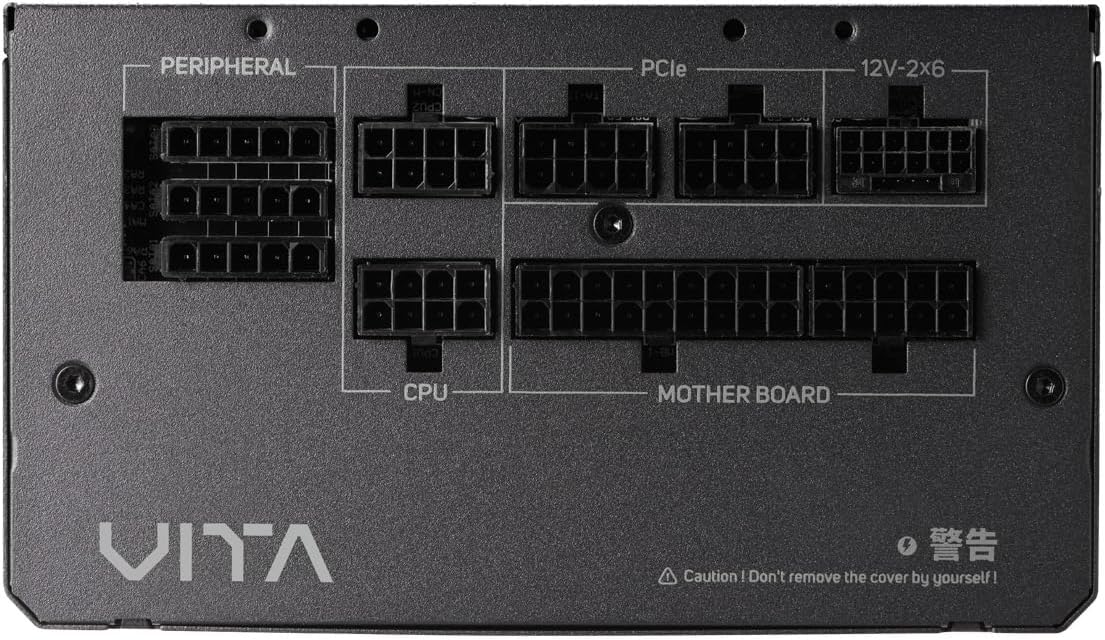
Imagen 4.1: Primer plano view of the modular connector panel on the FSP VITA GM 850W Power Supply, showing labeled ports for Motherboard, CPU, PCIe, Peripheral, and 12V-2x6.
4.1. Modular Connectors
The power supply features clearly labeled ports for connecting various components:
- Placa madre: Main 24-pin ATX connector.
- UPC: 8-pin (4+4 pin) EPS connectors for CPU power.
- PCIe: 8-pin (6+2 pin) connectors for graphics cards.
- 12V-2x6: Dedicated 12V-2x6 connector for high-power PCIe 5.1 graphics cards.
- Periférico: Connectors for SATA and Molex devices.
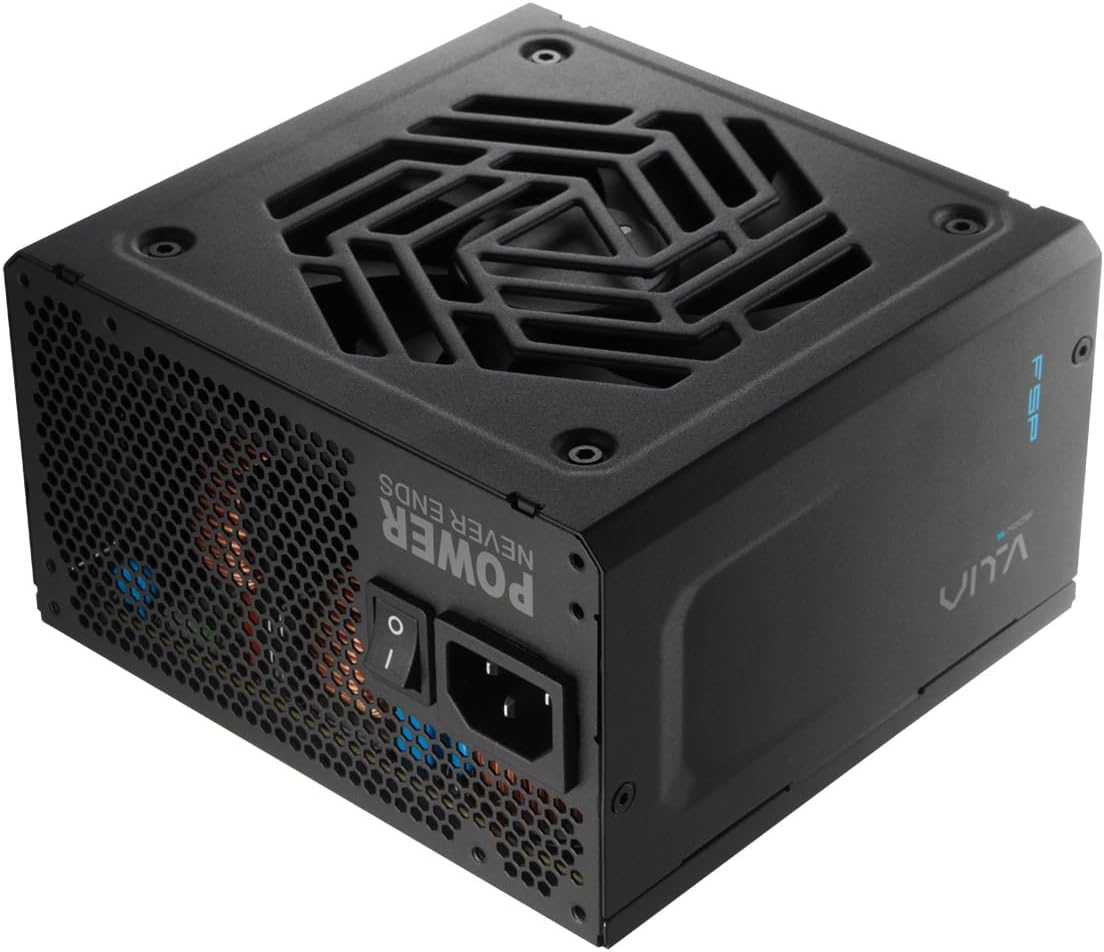
Imagen 4.2: Trasera view of the FSP VITA GM 850W Power Supply, showing the AC power inlet, power switch, and ventilation grille.
5. Configuración e instalación
Follow these steps to properly install your FSP VITA GM 850W Power Supply into your computer system.
5.1. Instalación Física
- Asegúrese de que su computadora esté apagada y desconectada del tomacorriente de pared.
- Abra la carcasa de su computadora para acceder al área de montaje de la fuente de alimentación.
- Carefully place the FSP VITA GM 850W Power Supply into the designated bay, ensuring the fan faces the correct direction for optimal airflow (typically facing downwards if there's a bottom vent, or inwards if mounted at the top).
- Asegure la fuente de alimentación a la carcasa utilizando los tornillos de montaje proporcionados.
5.2. Conexiones de cables
Connect the necessary modular cables to your power supply and system components. Only connect the cables you need to minimize clutter and improve airflow.

Image 5.1: Diagram illustrating the various modular cables included with the FSP VITA GM 850W Power Supply, including Motherboard, CPU, PCIe 6+2 Pin, PCIe 12V-2x6, SATA, and SATA/Molex cables, along with their approximate lengths in millimeters.
- Connect the 24-pin ATX cable from the power supply to the motherboard.
- Connect the 8-pin (4+4 pin) EPS cable(s) from the power supply to the CPU power connector(s) on the motherboard.
- For graphics cards, connect the appropriate 8-pin (6+2 pin) PCIe cables or the 12V-2x6 cable (for compatible PCIe 5.1 GPUs) from the power supply to the graphics card(s).
- Connect SATA power cables to your storage drives (HDDs, SSDs) and other SATA-powered devices.
- Connect Molex cables to any peripheral devices that require them.
- Asegúrese de que todas las conexiones de cables estén seguras y colocadas correctamente.
- Cierra la caja de tu computadora.
- Conecte el cable de alimentación de CA a la fuente de alimentación y luego a un tomacorriente de pared con conexión a tierra.
6. Instrucciones de funcionamiento
Once installed, operating your FSP VITA GM 850W Power Supply is straightforward.
6.1. Encendido / apagado
- Ensure the power switch on the rear of the power supply is in the 'ON' (I) position.
- Presione el botón de encendido en la carcasa de su computadora para iniciar el sistema.
- To power off, shut down your operating system normally. For complete power disconnection, switch the power supply to the 'OFF' (O) position and unplug the AC cord.
6.2. Efficiency and Fan Operation
The VITA GM 850W is 80 PLUS Gold certified, meaning it operates with over 90% efficiency at typical loads. This reduces wasted energy, heat generation, and noise. The integrated 120mm HYB fan is designed for quiet and efficient cooling, adjusting its speed based on the power supply's temperature and load to maintain optimal performance and acoustics.

Image 6.1: Graph illustrating the fan speed (RPM) and acoustic noise (dBA) of the 120mm HYB fan in the FSP VITA GM 850W Power Supply across different load percentages, demonstrating quiet operation at lower loads.
7. Mantenimiento
Un mantenimiento adecuado garantiza la longevidad y el rendimiento óptimo de su fuente de alimentación.
- Limpieza: Periodically clean the exterior of the power supply and its fan grille to prevent dust buildup. Use a soft, dry cloth or compressed air. Ensure the power supply is unplugged before cleaning.
- Flujo de aire: Ensure that the power supply's intake and exhaust vents are not obstructed. Good airflow is crucial for efficient cooling.
- Sistema de organización de cables: Maintain tidy cable management within your PC case to promote better airflow and prevent cables from interfering with the power supply fan.
8. Solución de problemas
If you encounter issues with your FSP VITA GM 850W Power Supply, refer to the following common problems and solutions.
8.1. Problemas comunes
- Sin energía:
- Compruebe si el cable de alimentación de CA está conectado de forma segura tanto a la fuente de alimentación como a la toma de pared.
- Ensure the power switch on the PSU is in the 'ON' (I) position.
- Verifique que el tomacorriente de pared esté funcionando enchufando otro dispositivo.
- Check all modular cable connections to the motherboard and components.
- Inestabilidad del sistema/apagados aleatorios:
- This could indicate an overloaded system or a component issue. Ensure your system's power requirements do not exceed 850W.
- Check for proper ventilation and ensure the power supply fan is spinning. Overheating can trigger protection mechanisms.
- Verifique que todas las conexiones de cable estén seguras.
- Ruido fuerte del ventilador:
- Ensure the power supply's fan intake/exhaust is not obstructed.
- Clean any dust buildup on the fan blades or grille.
- High system load will naturally increase fan speed. If noise is excessive at low loads, contact support.
8.2. Funciones de protección
The FSP VITA GM 850W Power Supply includes several protection features to safeguard your system:
- OVP (Sobrevol.tage Protección): Shuts down the PSU if output voltages exceed a safe level.
- OCP (Protección contra sobrecorriente): Shuts down the PSU if current on a single rail exceeds a safe level.
- OPP (Overpower Protection): Shuts down the PSU if the total power draw exceeds its maximum wattage.
- UVP (bajo voltajetage Protección): Shuts down the PSU if output voltages drop below a safe level.
- SCP (Protección contra cortocircuitos): Shuts down the PSU in case of a short circuit on any output rail.
- OTP (Overtemperature Protection): Apaga la fuente de alimentación si las temperaturas internas se vuelven demasiado altas.

Image 8.1: Diagram illustrating the comprehensive protection features of the FSP VITA GM 850W Power Supply, including OVP, OCP, OPP, NLO, OTP, SCP, UVP, and SIP.
If any of these protections are triggered, the power supply will shut down. Disconnect the AC power, check your system for faults, and then reconnect power to attempt a restart.
9. Especificaciones
Detailed technical specifications for the FSP VITA GM 850W Power Supply:
| Característica | Especificación |
|---|---|
| Nombre del modelo | VITA-850GM |
| Marca | FSP |
| Salida Wattage | 850 vatios |
| Certificación 80 PLUS | Oro |
| Factor de forma | ATX |
| Dimensiones (L x An x Al) | 140 x 150 x 86 mm (5.5 x 5.9 x 3.4 pulgadas) |
| Peso del artículo | 3.1 kilogramos (6.82 libras) |
| Método de enfriamiento | Air (120mm HYB Fan) |
| Condensadores | 105°C Japanese Bulk Capacitors |
| Tipo de conector | ATX, PCI Express (Full Modular) |
| Dispositivos compatibles | Computer, Gaming Console |
| Funciones de protección | OVP, OCP, SCP, OPP, UVP, OTP, NLO, SIP |
10. Garantía
The FSP VITA GM 850W Power Supply comes with a 10 año de garantía from the date of purchase. This warranty covers defects in materials and workmanship under normal use. Please retain your proof of purchase for warranty claims. The warranty does not cover damage caused by improper installation, accident, abuse, misuse, natural disaster, insufficient or excessive electrical supply, abnormal mechanical or environmental conditions, or any unauthorized disassembly, repair, or modification.
11. Soporte
For technical assistance, troubleshooting beyond this manual, or warranty inquiries, please visit the official FSP website or contact FSP customer support. You can often find FAQs, driver downloads, and contact information on the manufacturer's support pages.
Para obtener más información, visite: FSP Official Store on Amazon


