1. Introducción
This manual provides comprehensive instructions for the installation, operation, and maintenance of your ELAMOR M19 Fingerprint Keyless Entry Door Lock. Please read this manual thoroughly before installation and use to ensure proper function and safety.
2. Características del producto
- Advanced Fingerprint Unlock: Equipped with biometric recognition, identifies fingerprints in 0.3 seconds and unlocks in 1 second with 99.99% accuracy.
- Desbloqueo sin llave 3 en 1: Supports up to 100 fingerprints and 50 PIN codes. Includes 2 backup keys for emergencies. No app or Wi-Fi is required.
- Auto Lock & One-Touch Locking: Automatically secures your door 5–30 seconds after unlocking. One-touch locking provides quick and secure closure.
- Duradero y de larga duración: Constructed from robust aluminum alloy, features IP54 waterproofing, and a durable lock cylinder. Includes a low-battery LED indicator and emergency USB Type-C power supply.
- Fácil de instalar: Designed for quick installation in minutes with a basic screwdriver. Adjustable design fits most door frames with a center distance range of 2-3/8" (60mm) to 2-3/4" (70mm).
3. Contenido del paquete
Verifique que todos los componentes estén presentes antes de comenzar la instalación:
- Pestillo x2
- Montaje exterior x1
- Montaje interior x1
- Placa de montaje x1
- Placa de huelga x1
- Tapa de batería x1
- Tornillos de cierre/pestillo de 3/4'' (19 mm) x4
- Tornillos para placa de montaje de 1-5/32'' (33 mm) x2
- Tornillos de montaje interior de 3/4'' (19 mm) x2
- Caja de hebilla x1
- Clave de respaldo x2
- Mango exterior x1
- Varilla de transmisión de columna cuadrada x1
- Tornillos para madera x4
- Carcasa de plástico x1
- Mango interior x1
- Tornillo de máquina x1
4. Especificaciones
| Atributo | Valor |
|---|---|
| Marca | ELAMOR |
| Nombre del modelo | M19 Fingerprint Keyless Entry Door Lock |
| Tipo de bloqueo | Teclado |
| Característica especial | Bloqueo automático |
| Material | Zinc |
| Color | Níquel de arena |
| Dimensiones del artículo (largo x ancho x alto) | 7.48 x 5.51 x 7.09 pulgadas |
| Peso del artículo | 3.52 libras (1.6 kilogramos) |
| Método de control | Tocar |
| Pilas necesarias | Sí (4 pilas AA, no incluidas) |
5. Guía de instalación
The ELAMOR M19 lock is designed for easy installation on most standard doors. A basic screwdriver is typically the only tool required. Please refer to the included paper template for precise drilling and alignment.

Figure 5.1: Door Compatibility and Dimensions. Ensure your door meets the specified measurements for proper installation.

Figure 5.2: Easy Installation with Included Paper Template. Follow the template for accurate drilling and mounting.
The adjustable design fits door frames with a backset of 2-3/8" (60mm) to 2-3/4" (70mm) and a door thickness of 1-3/8" to 2" (35mm to 50mm).
6. Instrucciones de funcionamiento
Your ELAMOR M19 lock offers multiple convenient ways to access your property.
6.1 Métodos de desbloqueo
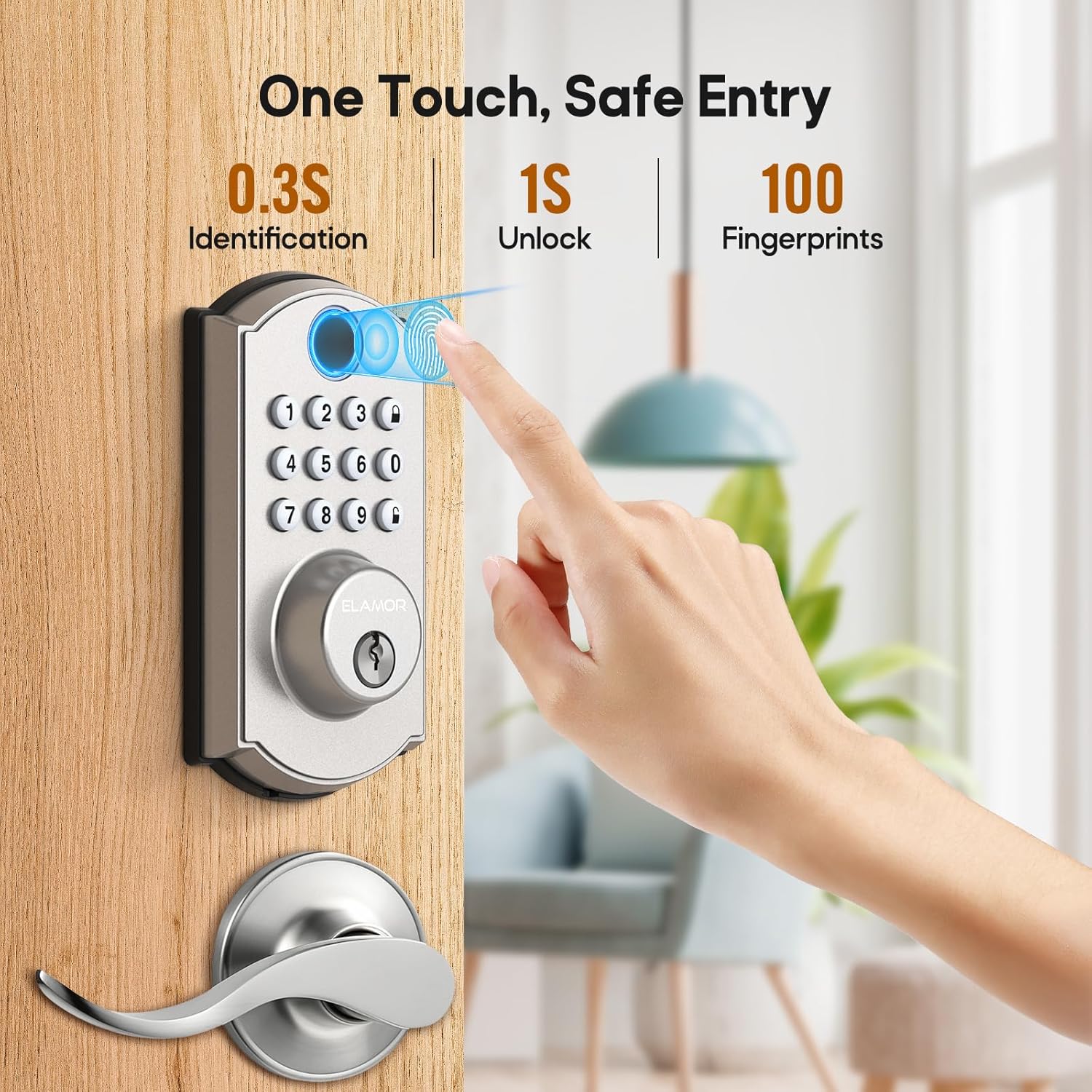
Figure 6.1: Fast Fingerprint Access. The lock identifies fingerprints in 0.3 seconds and unlocks in 1 second.

Figure 6.2: Multiple Ways to Unlock. Use fingerprint, PIN code, or the mechanical key for entry.
For a visual guide on how to use the various unlocking methods, please watch the demonstration video below:
Video 6.1: M19 Fingerprint Door Lock Handle Set Demonstration. This video illustrates the different methods for unlocking your ELAMOR M19 door lock.
For a detailed tutorial on operating the keyless entry features, refer to the following video:
Video 6.2: ELAMOR Keyless Entry Door Lock Operation Tutorial. This tutorial guides you through the steps for using the keyless entry functions of your lock.
6.2 Función de bloqueo automático
The auto-lock feature automatically secures your door after a set period, enhancing security and convenience.

Figure 6.3: Auto Lock and One-Touch Locking. The lock can be set to automatically lock after 5-30 seconds.
7. Mantenimiento
To ensure the longevity and optimal performance of your ELAMOR M19 lock, follow these maintenance guidelines:
- Limpieza: Limpie el teclado y el sensor de huellas dactilares con un paño suave y seco. Evite usar limpiadores abrasivos o disolventes.
- Reemplazo de batería: The lock is powered by 4 AA batteries. Replace them when the low-battery indicator illuminates.
- Energía de emergencia: In case of complete battery depletion, use a USB Type-C cable to provide emergency power for temporary access.

Figure 7.1: Battery and Emergency Power. The lock features a low battery alert and a USB Type-C port for emergency power.

Figure 7.2: IP54 Waterproofing. The lock is designed to withstand splashes and dust, but avoid submerging it in water.
8. Solución de problemas
If you encounter issues with your ELAMOR M19 lock, refer to the common problems and solutions below. For battery-related issues, please watch the dedicated video.
Video 8.1: ELAMOR M19 Smart Lock Battery Issue Solutions. This video provides solutions for common battery-related problems with your smart lock.
Problemas comunes:
- El teclado no responde: Check battery levels. If batteries are low or depleted, replace them or use the emergency USB Type-C power.
- Red light on when pressing keys: This often indicates low battery. Replace the batteries.
- El bloqueo no se activa/desactiva: Ensure the door is properly aligned and the deadbolt can extend fully. Check for any obstructions.
- Incorrect password lockout: If an incorrect password is entered multiple times, the keypad may temporarily lock. Wait for the lockout period to expire.
9. Garantía y soporte
ELAMOR is committed to providing high-quality products and customer satisfaction. Your ELAMOR M19 Fingerprint Keyless Entry Door Lock comes with the following support:
- Respuesta en 24 horas: Las consultas de los clientes normalmente reciben respuesta en un plazo de 24 horas.
- Reemplazo de 12 meses: A replacement is available within 12 months of purchase for eligible issues.
- Soporte técnico de por vida: Enjoy lifetime service and technical support for your product.
For further assistance, please contact ELAMOR customer service through the platform where you purchased the product.


