1. Introducción
This manual provides essential information for the safe and efficient operation of your Meizu mblu 21 smartphone. Please read it thoroughly before using the device.
The Meizu mblu 21 features a Prism Edge Design with a radiant gradient and a large immersive 6.79-inch HD display. It is equipped with a 13MP main camera and an 8MP front camera, powered by Android 14. The device includes a 4900mAh battery for extended use and supports 4G LTE connectivity, Dual-Band Wi-Fi, and Bluetooth 5.0.
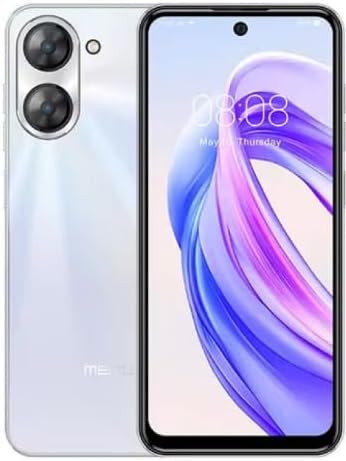
Figura 1.1: Anverso y reverso view of the Meizu mblu 21 smartphone in White Diamond color.
2. ¿Qué hay en la caja?
Verifique que todos los artículos estén presentes en el paquete:
- Meizu mblu 21 Smartphone
- Adaptador de corriente
- Cable USB
- Herramienta de expulsión de SIM
- Guía de inicio rápido

Figure 2.1: Meizu mblu 21 smartphone alongside its power adapter.
3. Configuración
3.1. Inserción de tarjetas SIM y tarjetas MicroSD
The Meizu mblu 21 supports Dual Nano SIM cards and a MicroSD card for expandable storage. Locate the SIM tray on the side of the device.
- Power off the device before inserting or removing SIM/MicroSD cards.
- Utilice la herramienta de expulsión de SIM proporcionada para abrir la bandeja de SIM.
- Carefully place the Nano SIM cards and/or MicroSD card into the designated slots on the tray, ensuring correct orientation.
- Empuje suavemente la bandeja dentro del dispositivo hasta que quede al ras.
3.2. Asistente de encendido inicial y configuración
- Press and hold the Power button until the Meizu logo appears.
- Siga las instrucciones en pantalla para completar la configuración inicial, incluida la selección de su idioma, la conexión a una red Wi-Fi y la configuración de su cuenta de Google.
4. Operar su dispositivo
4.1. Visualización y navegación
The 6.79-inch HD display features a 90Hz adaptive refresh rate for smooth visuals. Navigate the interface using touch gestures: tap, swipe, pinch-to-zoom.
4.2. Funciones de la cámara
The device is equipped with a 13MP main camera and an 8MP front camera. Open the Camera application to capture photos and videos.
- 13MP Smart Camera: Ideal for capturing everyday moments with sharpness and true-to-life colors.
- Cámara frontal de 8 MP: Designed for clear selfies and video calls.
4.3. Características de seguridad
- Side Unlock: A fast and secure fingerprint sensor integrated into the side power button for instant access.
- Smart Face Unlock: Use the front camera to unlock your device quickly and conveniently.
4.4. Conectividad
Your mblu 21 supports various connectivity options:
- 4G LTE: For mobile data connectivity. In the USA, this device is compatible with T-Mobile. Outside the USA, it works with any carrier worldwide.
- Wi-Fi de doble banda: Supports both 2.4GHz and 5GHz bands for seamless internet access.
- Bluetooth 5.0: For connecting wireless accessories with improved energy efficiency.
- VoLTE HD Calls: Enjoy sharper, clearer voice calls over LTE networks.

Figure 4.1: Key technology features of the Meizu mblu 21, including Android 14, Dual-Band Wi-Fi, Bluetooth 5.0, and VoLTE.
5. Mantenimiento
5.1. Cuidado de la batería
The mblu 21 is equipped with a 4900mAh battery. To maximize battery lifespan:
- Evite temperaturas extremas.
- Use only the provided power adapter or certified compatible chargers.
- Evite descargar completamente la batería con frecuencia.

Figura 5.1: Interna view of the Meizu mblu 21, showcasing the 4900mAh battery and internal components.
5.2. Limpieza del dispositivo
Utilice un paño suave y sin pelusa para limpiar la pantalla y el cuerpo del teléfono. Evite usar productos químicos agresivos o materiales abrasivos.
5.3. Actualizaciones de software
Regularly check for and install software updates to ensure optimal performance and security. Updates can be found in the device's settings menu.
6. Solución de problemas
If you encounter issues with your Meizu mblu 21, try the following solutions:
- El dispositivo no responde: Mantenga presionado el botón de encendido durante aproximadamente 10 a 15 segundos para forzar el reinicio.
- Problemas de conectividad de red:
- Asegúrese de que la tarjeta SIM esté insertada correctamente.
- Activa y desactiva el modo avión.
- Check network settings (APN, preferred network type).
- La batería se agota rápidamente:
- Cierre las aplicaciones no utilizadas que se ejecutan en segundo plano.
- Reducir el brillo de la pantalla.
- Disable unnecessary features like GPS or Bluetooth when not in use.
- Problemas de rendimiento:
- Clear cache and data of problematic apps.
- Libere espacio de almacenamiento.
- Consider a factory reset (Note: This will erase all data on your device. Back up important data first.).
7. Especificaciones
| Característica | Detalle |
|---|---|
| Nombre del modelo | mblu 21 |
| Número de modelo | M416L |
| Sistema operativo | Androide 14 |
| Tamaño de pantalla | 6.79 pulgadas |
| Capacidad de almacenamiento de memoria | 64 GB |
| Tamaño de la memoria RAM instalada | 4 GB |
| Capacidad de la batería | 4900 miliamp Horas |
| Cámara principal | 13 MP |
| Cámara frontal | 8 MP |
| Wireless Carrier (USA) | T-Móvil |
| Tecnología celular | 4G LTE |
| Tecnologías de conectividad | 4G, Dual-Band Wi-Fi, Bluetooth 5.0 |
| Peso del artículo | 14 onzas |
| Dimensiones del paquete | 7 x 4 x 2 pulgadas |
| Color | White Diamond |
8. Garantía y soporte
Your Meizu mblu 21 smartphone comes with a manufacturer's warranty. Please refer to the warranty card included in your product packaging for specific terms and conditions.
For technical support, service, or further inquiries, please contact Meizu customer support through their official channels. Contact information can typically be found on the manufacturer's websitio o en la documentación del producto.


