1. Introducción
Thank you for choosing the OMAIC Rechargeable Voice Remote Control. This manual provides detailed instructions for the setup, operation, and maintenance of your new remote controls (models BN59-01432A and BN59-01312A). These remotes are designed to be compatible with a wide range of Samsung Smart TVs, offering convenient control and voice functionality.

Image: The OMAIC BN59-01432A and BN59-01312A remote controls.
2. Contenido del paquete
Su paquete debe contener los siguientes artículos:
- 1 x OMAIC BN59-01432A Rechargeable Voice Remote Control
- 1 x OMAIC BN59-01312A Voice Remote Control
- 1 x Manual de usuario (este documento)
3. Especificaciones
| Característica | Descripción |
|---|---|
| Marca | OMAICO |
| Números de modelo | BN59-01432A, BN59-01312A |
| Característica especial | Búsqueda por voz |
| Color | Negro |
| Máximo de dispositivos compatibles | 2 (por control remoto) |
| Dispositivos compatibles | Samsung Televisions, Samsung Smart TVs |
| Conectividad | Inalámbrico |
| Rechargeable (BN59-01432A) | Puerto USB tipo C |
| Distancia de funcionamiento | Hasta 45 pies (aprox. 13.7 metros) |
| Tiempo de respuesta | 0.1 segundos |

Image: Key features and specifications of the OMAIC remote controls.
4. Configuración y emparejamiento
Before first use, please ensure the BN59-01432A rechargeable remote is fully charged. Charging typically takes 1-2 hours via its USB Type-C port.
4.1. Emparejamiento del control remoto
Both BN59-01432A and BN59-01312A remotes use the same pairing method:
- Asegúrese de que su Samsung Smart TV esté encendido.
- Apunte el control remoto hacia su televisor.
- Mantenga pulsado el Atrás (
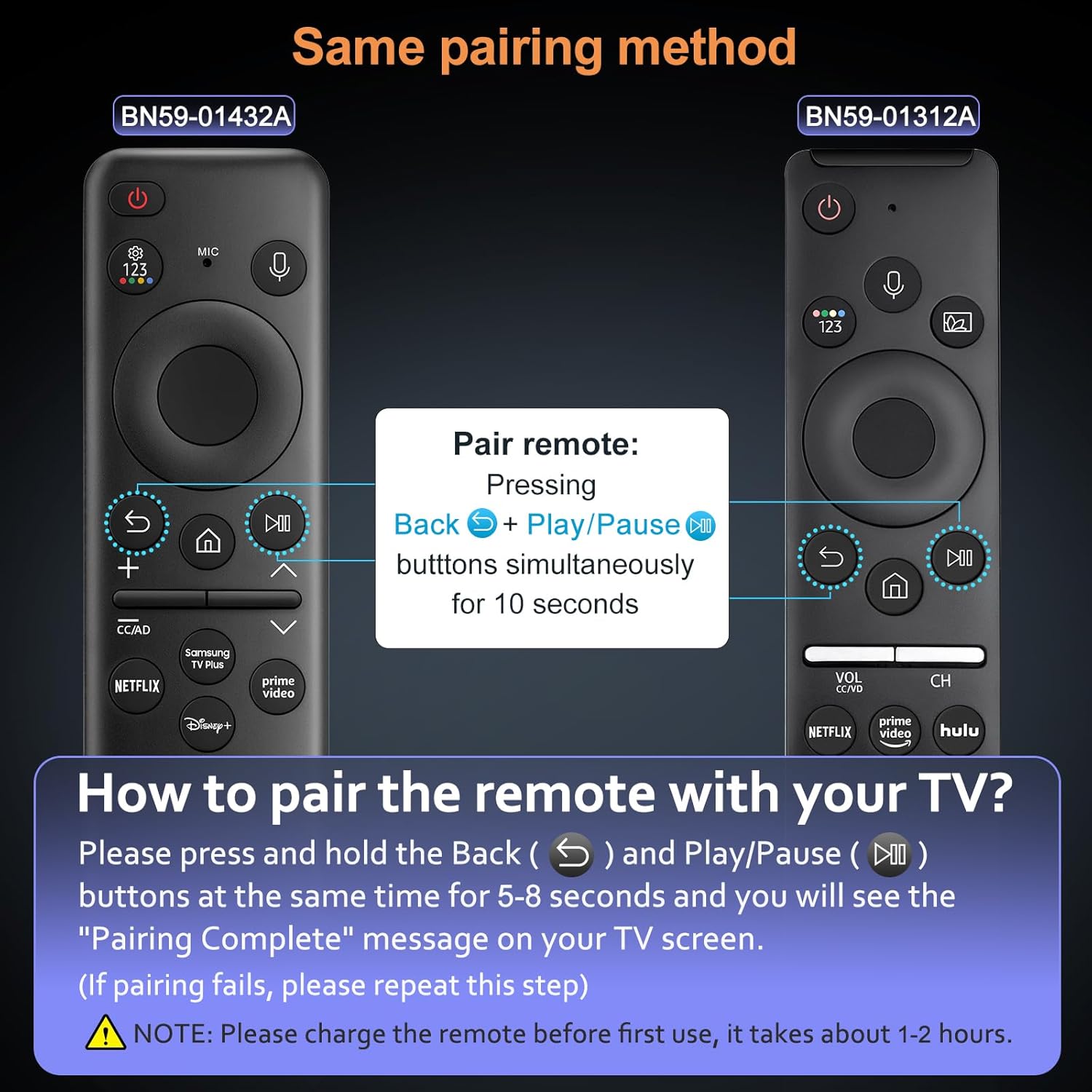 ) y Reproducir/Pausa () buttons simultaneously for 5-8 seconds.
 - A "Pairing Complete" message should appear on your TV screen, indicating successful pairing.
Nota:
- If pairing fails, please repeat the steps.
- The voice function requires your TV to support this feature. Please check your TV settings if the voice function does not work after pairing.
Image: Visual guide for pairing the OMAIC remote control with a Samsung TV.
5. Instrucciones de funcionamiento
5.1. Función de voz
The voice function allows you to control your TV using voice commands. To use this feature:
- Mantenga pulsado el Micrófono botón (
 ) en el mando a distancia.
 - Speak your command clearly into the remote. For example, "Turn the volume up to 20" or "Open Netflix."
- Release the Microphone button when you are finished speaking.
Asegúrese de que el asistente de voz de su televisor esté habilitado y configurado para un rendimiento óptimo.
Image: User demonstrating the voice control feature of the remote.
5.2. Botones de acceso directo
Both remote models feature dedicated shortcut buttons for quick access to popular streaming services:
- Netflix: Directly opens the Netflix application.
- Vídeo principal: Directly opens the Amazon Prime Video application.
- Hulu: Directly opens the Hulu application.
- Samsung TV Plus / Disney+: Depending on the remote model, one of these buttons will directly open the respective application.

Image: Shortcut buttons for popular streaming services on the OMAIC remote controls.
6. Charging (BN59-01432A Only)
The BN59-01432A remote control is rechargeable via a USB Type-C port, eliminating the need for frequent battery replacements.
6.1. Procedimiento de carga
- Locate the USB Type-C port on the bottom edge of the BN59-01432A remote control.
- Connect a standard USB Type-C charging cable (not included) to the remote's port.
- Conecte el otro extremo del cable a una fuente de alimentación USB (por ejemplo, adaptador de pared, puerto USB de computadora).
- The remote's indicator light (if present) may show charging status.
- Una carga completa suele tardar de 1 a 2 horas.
It is recommended to fully charge the remote before its first use to ensure optimal battery life.

Image: The USB Type-C charging port on the BN59-01432A remote control.
7. Compatibilidad
These OMAIC remote controls are compatible with a wide range of Samsung Smart TVs. The voice function specifically requires your TV to support voice commands.
7.1. Compatible Samsung TV Models (Partial List)
- QE1C, QN990C, LST9C, S90C, Q80C, Q80CD, CU8000D, Q70CD, QN85CD, QN90CD, Q60C, QN800C, QN900C, CU8000, QN850C, Q70C, QN85C, QN90C, S95C
- Q80D, Q70D, Q60D, DU8000, QN90D, QN85D, S90D, S95D, QN800D, QN900D, LS03D, LS03B, LS03C
- M70C, S9, M80C, M50C, LSP3B, G85SB, G7, G70B, G65B, M70B, M8
- And other Samsung Smart TV models that support BN59-01330A, BN59-01312B, BN59-01312D, BN59-01312E, BN59-01312F, BN59-01330B, BN59-01330C, BN59-01330N, BN59-01330Q, BN59-01329A, BN59-01329C, BN59-01329F, BN59-01455A, BP59-00149A, BN59-01456A, BN59-01385A, BN59-01391A, BN59-01330H, BN59-01363A, BN59-01357A remotes.
Please verify your TV's model number and voice function support for full compatibility.

Image: OMAIC remotes compatible with various Samsung Smart TV models.
8. Solución de problemas
| Problema | Posible causa | Solución |
|---|---|---|
| El control remoto no se empareja | Incorrect pairing procedure, low battery (BN59-01432A) | Ensure BN59-01432A is charged. Repeat pairing steps (hold Back and Play/Pause for 5-8 seconds). Ensure TV is on. |
| La función de voz no funciona | TV does not support voice function, remote not paired correctly, microphone blocked | Verify your TV model supports voice control. Re-pair the remote. Ensure nothing is obstructing the microphone on the remote. |
| El control remoto no responde | Low battery (BN59-01432A), remote out of range, interference | Charge BN59-01432A. Move closer to the TV (within 45 feet). Remove any obstructions between the remote and TV. |
| Shortcut buttons not working | App not installed on TV, TV not connected to internet | Ensure the respective app (Netflix, Prime Video, Hulu, etc.) is installed and updated on your Samsung TV. Verify your TV has an active internet connection. |
9. Mantenimiento
- Limpieza: Utilice un paño suave y seco para limpiar el control remoto. No utilice limpiadores líquidos ni productos abrasivos.
- Almacenamiento: Guarde el control remoto en un lugar fresco y seco, alejado de la luz solar directa y de temperaturas extremas.
- Battery Care (BN59-01432A): For optimal battery life, avoid fully discharging the remote frequently. Charge it when the battery indicator is low.
- Evite las gotas: Proteja el control remoto de caídas e impactos que puedan dañar los componentes internos.
10. Garantía y soporte
OMAIC provides a Servicio posventa de 90 días for this product. If you encounter any issues or have questions regarding your remote controls, please contact our customer support team.
We are committed to responding within 12 hours and will endeavor to resolve any problems as quickly as possible.
For support, please refer to the contact information provided with your purchase or visit the OMAIC brand store on Amazon.


