1. Introducción y másview
Thank you for choosing the Fotopro 42QR Ball Head. This instruction manual provides essential information for the safe and effective use of your new ball head. The Fotopro 42QR Ball Head is engineered from high-strength aluminum alloy with an advanced anodizing process, ensuring exceptional stability and durability for various photography needs. It features a 25mm ball head, a 1/4" quick release plate, and 360-degree panoramic rotation capabilities, making it suitable for cameras on tripods and monopods.
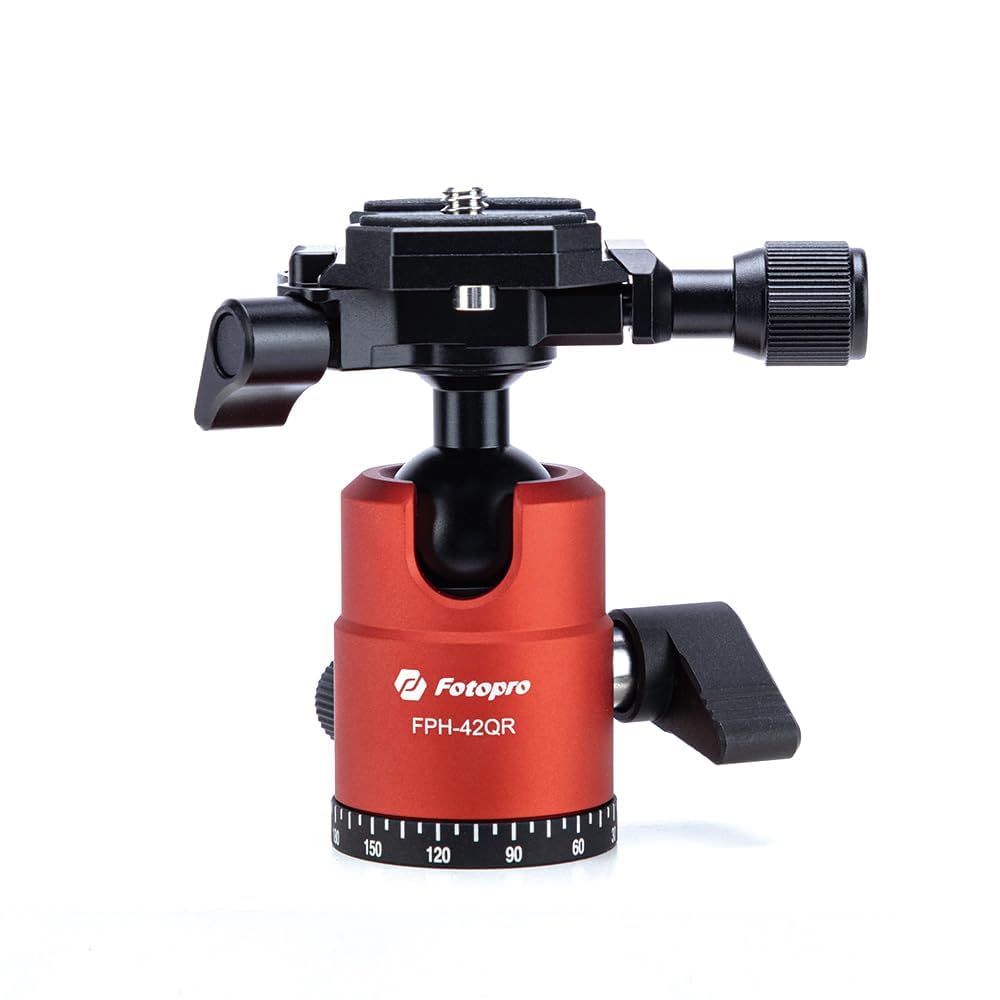
Figura 1: The Fotopro 42QR Ball Head. This image shows the ball head with its quick release plate and adjustment knobs, ready for camera attachment.
2. ¿Qué hay en la caja?
Por favor, revise el contenido de su paquete para asegurarse de que todos los artículos están presentes:
- Fotopro 42QR Ball Head (1 unit)
3. Instrucciones de configuración
Follow these steps to properly set up your Fotopro 42QR Ball Head:
- Attaching the Ball Head to a Tripod/Monopod:
Locate the 3/8" screw on your tripod or monopod's mounting platform. Align the threaded hole at the base of the Fotopro 42QR Ball Head with this screw. Rotate the ball head clockwise until it is securely tightened. Ensure it is firm and does not wobble.
- Attaching the Quick Release Plate to Your Camera:
The 42QR Ball Head comes with a quick release plate. Locate the 1/4" screw on this plate. Attach the quick release plate to the tripod mount thread on the bottom of your camera. Use a coin or the integrated D-ring (if available) to tighten the screw securely. Ensure the plate is flush against the camera body and does not rotate freely.
- Mounting Your Camera onto the Ball Head:
Asegúrese de que el cierre de liberación rápidaamp on the ball head is open. Slide the quick release plate, with your camera attached, into the clamp. Push down firmly until you hear a click or feel it lock into place. Then, tighten the quick release locking knob on the ball head to secure the camera firmly. Always double-check that the camera is securely mounted before letting go.
Figura 2: Quick Release Plate and Clamp. This image highlights the quick release system for attaching and detaching your camera.
4. Instrucciones de funcionamiento
The Fotopro 42QR Ball Head offers flexible positioning for your camera.
- Adjusting the Ball Head Angle:
Loosen the main locking knob (typically the largest knob) on the side of the ball head. This will allow the ball to move freely, enabling you to tilt and pan your camera to the desired angle. Once the camera is in position, tighten the main locking knob firmly to secure the ball head and prevent movement.
- Using the 360-Degree Panoramic Rotation:
The 42QR Ball Head features a separate panoramic base. Loosen the panoramic locking knob (usually a smaller knob located at the base of the ball head). This allows the entire ball head assembly to rotate horizontally 360 degrees. Position your camera for panoramic shots, then tighten the panoramic locking knob to fix its orientation.
- Quick Release Plate Operation:
To quickly remove your camera, loosen the quick release locking knob and press any safety release buttons or levers if present. Slide the quick release plate out of the clamp. To re-attach, follow step 3 of the Setup Instructions.
5. Mantenimiento
Proper maintenance will extend the life and performance of your ball head.
- Limpieza: Wipe the ball head with a soft, dry cloth after each use to remove dust and dirt. For stubborn grime, a slightly damp Se puede usar un paño y secar inmediatamente. Evite usar productos químicos agresivos o limpiadores abrasivos.
- Lubricación: The ball mechanism is designed for smooth operation and generally does not require lubrication. If movement becomes stiff, consult Fotopro support before applying any lubricants.
- Almacenamiento: Store the ball head in a clean, dry place, away from extreme temperatures and humidity.
- Inspección: Periodically check all screws and knobs for tightness. Ensure the quick release plate mechanism operates smoothly and securely.
6. Solución de problemas
If you encounter issues with your Fotopro 42QR Ball Head, refer to the following common solutions:
- La cabeza esférica no mantiene la posición:
Ensure the main locking knob is tightened sufficiently. If the issue persists, check for any debris or foreign objects obstructing the ball mechanism. Avoid overloading the ball head beyond its rated capacity.
- Quick Release Plate Stuck or Loose:
If the plate is stuck, ensure the quick release locking knob is fully loosened and any safety mechanisms are disengaged. If it feels loose, ensure the plate is correctly seated in the clamp and the locking knob is tightened firmly. Check that the 1/4" screw attaching the plate to your camera is also tight.
- Panoramic Rotation is Stiff:
Ensure the panoramic locking knob is fully loosened. If stiffness persists, clean the panoramic base to remove any accumulated dust or grit.
If these steps do not resolve your issue, please contact Fotopro customer support for further assistance.
7. Especificaciones
| Característica | Detalle |
|---|---|
| Número de modelo | 42QR Ball Head |
| Marca | Fotopro |
| Material | Aleación de aluminio de alta resistencia |
| Diámetro de la bola | 25 mm |
| Quick Release Plate Screw | 1/4" |
| Base Mount Thread | 3/8" (standard tripod mount) |
| Rotación panorámica | 360 grados |
| Peso del artículo | 7 onzas (0.2 kilogramos) |
| Dimensiones del paquete | 3.15 x 3.15 x 3.15 pulgadas |
| Dispositivos compatibles | Cámara |
| Color | Naranja |
| Código Postal | 782279244452 |
8. Garantía y soporte
Fotopro products are manufactured to high-quality standards. For information regarding warranty coverage, product support, or to report any issues, please visit the official Fotopro webSitio web o contacte con el departamento de atención al cliente. Conserve su recibo de compra como comprobante.
Fabricante: Fotopro
Fecha de primera disponibilidad: 25 de diciembre de 2024


