Introducción
Thank you for choosing Gsangoo USB C Wired Headphones. These earphones are designed to provide a high-fidelity audio experience with convenient wired control and broad compatibility with USB Type-C devices. This manual provides essential information for setup, operation, and maintenance to ensure optimal performance and longevity of your product.

Image: Gsangoo USB C Wired Headphones, showcasing the earbuds and USB-C connector.
Características del producto
- USB C Connectivity: Designed for devices without a 3.5mm audio jack, offering direct digital audio transmission.
- Diseño cómodo y ergonómico: Shaped to fit the ear's natural curve for extended wear comfort.
- Auriculares magnéticos: Integrated magnets help prevent cable tangling when not in use.
- Sonido de alta calidad: Features a 14.2mm sound driver for immersive audio reproduction.
- In-line Control & HD Microphone: Allows for volume adjustment, music playback control, and clear hands-free calls.
- Construcción duradera: Made with a lightweight ABS shell and TPE wire for enhanced durability and service life.
- Chip DAC avanzado: Ensures wide compatibility and stable, high-quality sound transmission.
Configuración
To begin using your Gsangoo USB C Wired Headphones, simply plug the USB Type-C connector into the compatible port on your device. No additional drivers or software are typically required. The headphones are designed for immediate plug-and-play functionality.

Image: Illustration of connecting the USB Type-C headphones to a device, highlighting the port and built-in DAC chip.
Instrucciones de funcionamiento
The in-line control unit allows for easy management of audio and calls:
- Sube el volumen: Tap the '+' button once.
- Bajar volumen: Tap the '-' button once.
- Reproducir/Pausar música: Toque el botón central una vez.
- Siguiente canción: Tap the center button twice.
- Canción anterior: Tap the center button three times.
- Responder llamada: Tap the center button once during an incoming call.
- Finalizar llamada: Tap the center button once during an active call.
- Rechazar llamada: Tap the center button three times during an incoming call.
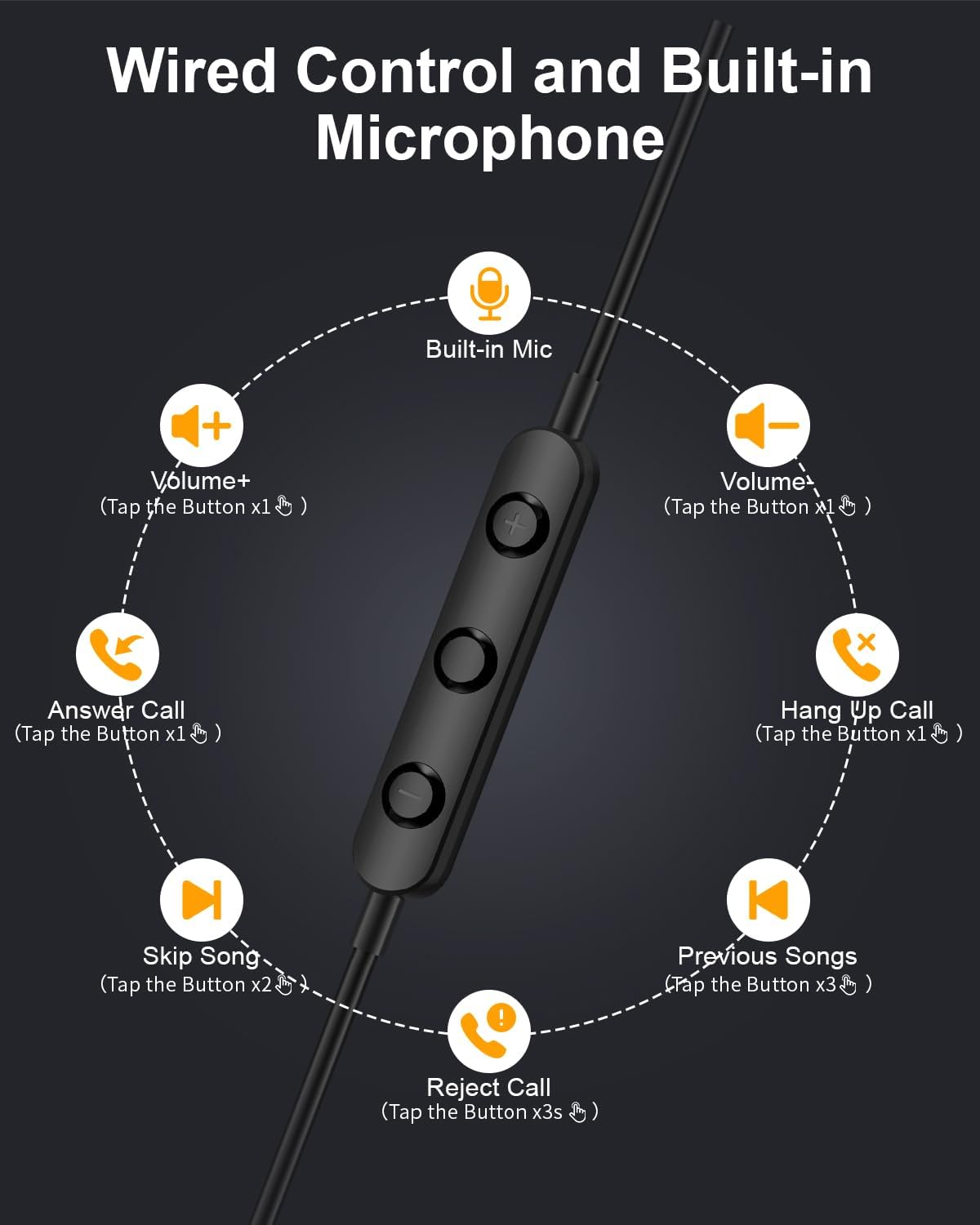
Image: Diagram illustrating the functions of the in-line control buttons for volume, music, and call management.
Compatibilidad
These USB C wired earphones are compatible with a wide range of devices that feature a USB Type-C audio output and do not have a 3.5mm headphone jack. Please note: These headphones are not compatible with devices that have both a USB-C jack and a 3.5mm jack, as the device may prioritize the 3.5mm port.
Los dispositivos compatibles incluyen:
- Para Apple: iPhone 17/17 Air/17 Pro/16/16 Pro/16 Pro Max/15/15 Plus/15 Pro/15 Pro Max, iPad 10th Gen/iPad Air 4th/5th/11/13 inch/iPad Pro 11/12.9/iPad Mini 6th.
- Para Samsung: Galaxy S25 Ultra/S25/S24 Ultra/S24/S23 FE/S23/S23 Ultra/S22/S22 Ultra/S21 FE/S21/S21 Ultra/S20 FE/S20 Ultra/Z Flip6/Z Fold5/A55/A54/A16 5G/A56 5G/A34 5G/A53 5G/A33 5G.
- Para Google: Pixel 9 Pro/8 Pro/8/7/7 Pro/7a/6a/6/6 Pro.
- Para OnePlus: 12R/12/11R/11/10T/10 Pro/9/Nord/8T.
- And other Phone USB C devices without a 3.5mm jack.

Image: Visual guide to USB C headphone compatibility, showing various devices and emphasizing the requirement for a USB-C only audio port.
Mantenimiento
El cuidado adecuado prolongará la vida útil de sus auriculares:
- Limpieza: Limpie suavemente los auriculares y el cable con un paño suave y seco. Evite el uso de productos químicos agresivos o materiales abrasivos.
- Almacenamiento: When not in use, store the headphones in the provided storage bag to prevent tangling and damage. The magnetic design helps keep the earbuds together.
- Evite la humedad: Estos auriculares no son resistentes al agua. Manténgalos alejados de líquidos y humedades elevadas.
- Tratar con cuidado: Avoid pulling the cable forcefully or bending the connector at sharp angles.

Image: Close-up of the magnetic earbuds, demonstrating how they connect to prevent tangling.
Solución de problemas
Si tiene problemas con sus auriculares, consulte las siguientes soluciones comunes:
- Sin sonido:
- Asegúrese de que el conector USB-C esté completamente insertado en su dispositivo.
- Verifique la configuración de volumen de su dispositivo.
- Verify that your device supports audio output via its USB-C port and does not have a 3.5mm jack that might be prioritized.
- Pruebe los auriculares con otro dispositivo compatible para descartar un problema específico del dispositivo.
- El micrófono no funciona:
- Asegúrese de que los auriculares estén bien conectados.
- Verifique la configuración de entrada del micrófono de su dispositivo.
- Confirme que el micrófono no esté obstruido.
- Sound Quality Issues (e.g., static, distortion):
- Asegúrese de que el conector esté limpio y libre de residuos.
- Intente reproducir diferentes fuentes de audio para determinar si el problema está en el contenido.
- Los controles no responden:
- Asegúrese de que los auriculares estén conectados correctamente.
- Some older devices or specific apps may have limited support for in-line controls.
If these steps do not resolve the issue, please contact Gsangoo customer support for further assistance.
Presupuesto
| Nombre del modelo | 945-Black-USBC |
| Toma de auriculares | USB C |
| Tecnología de conectividad | Cableado |
| Material | Acrylonitrile Butadiene Styrene (ABS) Shell, Thermoplastic Elastomer (TPE) Wire |
| Tipo de control | Control de botones (pulsador) |
| Función del cable | Sin enredos |
| Peso del artículo | 0.634 onzas (0.02 kilogramos) |
| Nivel de resistencia al agua | No resistente al agua |
| Tipo de controlador de audio | Controlador dinámico |
| Forma del auricular | Bud (en el oído) |
| Funciones de control de ruido | Cancelación pasiva de ruido, aislamiento de sonido |
| Soporta tecnología Bluetooth | No |
| Característica especial | Ligero |
| Dimensiones del producto | 1 x 1 x 0.3 pulgadas |
Garantía y soporte
Gsangoo is committed to providing high-quality products and customer satisfaction. We offer after-sales service to address any questions or concerns you may have regarding your USB C Wired Headphones.
For product support, troubleshooting assistance, or warranty inquiries, please contact Gsangoo customer service through the platform where you purchased the product or visit the official Gsangoo store page.
We aim to respond to all inquiries within 24 hours to provide satisfactory assistance.


