Introducción
Thank you for choosing the BACKWIN B800-T USB-C Wired Headphones. This manual provides detailed instructions for the proper use, setup, and maintenance of your new headphones. Please read this manual thoroughly before using the product to ensure optimal performance and longevity.
Contenido del paquete
Asegúrese de que todos los artículos estén presentes en el paquete:
- BACKWIN B800-T USB-C Wired Headphones
- Ear Cushions (various sizes: large, medium, small)

Image: The BACKWIN B800-T USB-C Wired Headphones, showing the earbuds, inline control, and USB-C connector. Also included are additional ear cushions.
Producto terminadoview
Características principales
- Four-Unit Driver Design: Each earbud features a dynamic bass unit and a high-definition decoding iron coil unit for powerful subwoofer sound and clear high-pitched audio.
- Integrated DAC Chip: Equipped with a 24-bit/96Khz DAC decoding chip for high-fidelity audio.
- Compatibilidad universal USB-C: Designed for devices with a Type-C interface, especially those without a 3.5mm audio jack.
- Inline Control with Microphone: Features volume control and a high-definition microphone for convenient call management and music playback.
- Cancelación pasiva de ruido: The earbud design and included silicone ear caps provide passive noise isolation.
- Construcción duradera: Metal back shell of the headphones is CNC machined for precise workmanship.
Componentes

Image: An exploded diagram illustrating the internal components of the earbud, including the dynamic coil, composite vibration film, sound processor with physical noise reduction, and the iron ring. This combination delivers rich bass, full midrange, and clear treble.
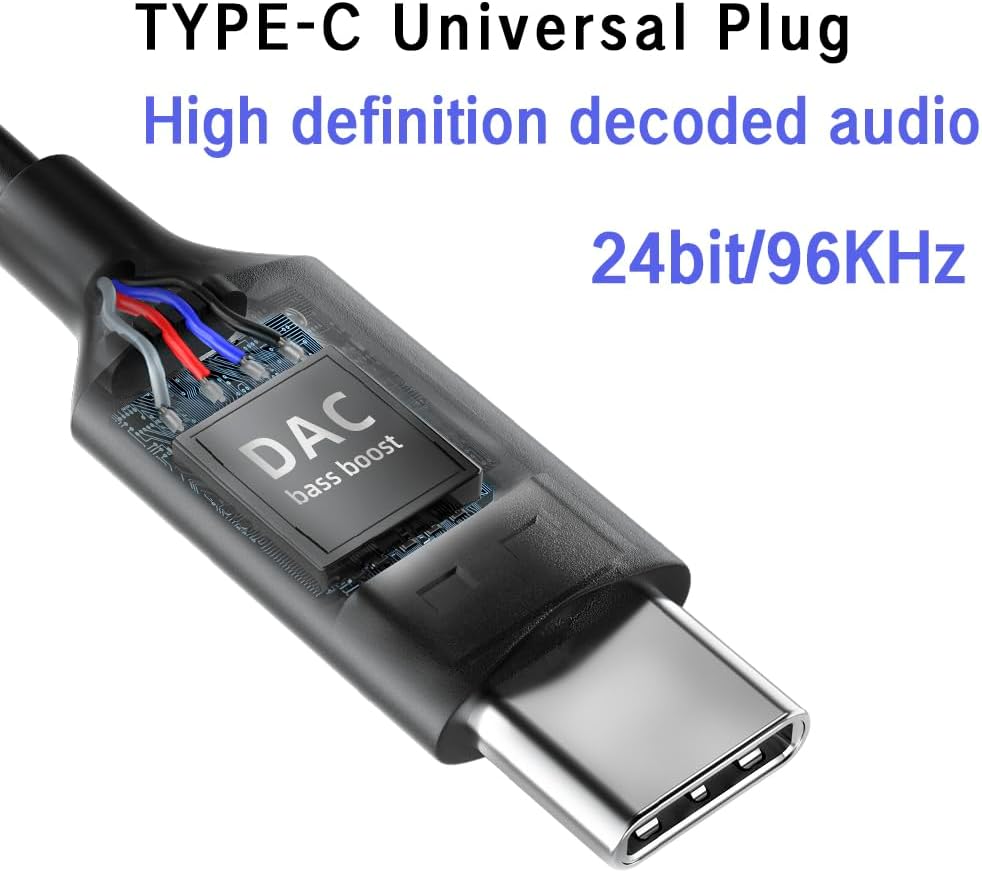
Imagen: Un primer plano view of the USB-C plug, highlighting the integrated DAC (Digital-to-Analog Converter) chip, which supports 24-bit/96KHz high-definition audio decoding.

Imagen: Un detalle view of the earbud's metal back shell, showcasing the CNC precision machining and overall craftsmanship.
Configuración
1. Selecting Ear Cushions
The headphones come with large, medium, and small soundproof silicone ear caps. Choose the size that provides the most comfortable and secure fit for your ears. A proper fit is crucial for optimal sound quality and passive noise cancellation.
2. Conexión a su dispositivo
- Locate the USB-C port on your compatible device (e.g., smartphone, tablet, laptop).
- Insert the USB-C plug of the headphones firmly into the device's USB-C port.
- Your device should automatically recognize the headphones. No additional drivers are typically required.
Nota: These headphones are designed for devices with a Type-C interface, especially those without a 3.5mm audio jack. Compatibility may vary with some devices; ensure your device supports audio output via its USB-C port.

Image: A person wearing the BACKWIN B800-T USB-C Wired Headphones, demonstrating proper ear placement and fit.
Instrucciones de funcionamiento
Funciones de control remoto en línea
The inline remote control allows you to manage audio playback and calls without needing to access your device directly.

Image: A diagram detailing the functions of the inline remote control, including volume up, volume down, microphone, and multi-function button for calls and music playback.
- Botón de subir volumen (+): Presione para aumentar el volumen del audio.
- Botón para bajar el volumen (-): Presione para disminuir el volumen del audio.
- Multi-function Button (Center Button):
- For Calls:
- Un click: Responder una llamada entrante o finalizar una llamada activa.
- Pulsación larga: Rechazar una llamada entrante.
- Por la música:
- Un click: Play or Pause music.
- Haga clic dos veces: Salta a la siguiente pista.
- Haga clic tres veces: Regresa a la pista anterior.
- For Calls:
- Micrófono: El micrófono incorporado permite la comunicación manos libres durante las llamadas.
Mantenimiento
- Limpieza: Limpie suavemente los auriculares y el cable con un paño suave y seco. No utilice productos químicos agresivos ni materiales abrasivos.
- Almohadillas para los oídos: Remove and clean the silicone ear cushions regularly with mild soap and water. Ensure they are completely dry before reattaching.
- Almacenamiento: Store the headphones in a clean, dry place when not in use. Avoid extreme temperatures and direct sunlight.
- Cuidado de cables: Evite curvas cerradas o tirones excesivos del cable para evitar daños.
- Exposición al agua: Estos auriculares no son resistentes al agua. Evite la exposición al agua o a la humedad excesiva.
Solución de problemas
| Problema | Posible causa | Solución |
|---|---|---|
| Sin sonido o volumen bajo |
|
|
| El micrófono no funciona |
|
|
| Distorsión o mala calidad del sonido |
|
|
Presupuesto
| Nombre del modelo | B800-T |
| Marca | VOLVER A GANAR |
| Tecnología de conectividad | Cableado |
| Toma de auriculares | Tipo C (USB-C) |
| Tipo de controlador de audio | Hybrid Driver (Dynamic bass unit + high-definition decoding iron coil unit) |
| Respuesta de frecuencia | Up to 96 KHz (24bit/96Khz Decoding chip) |
| Sensibilidad | 96 dB |
| Impedancia | 32 ohmios |
| Control de ruido | Cancelación pasiva de ruido |
| Tipo de control | Volume Control, Push Button (for calls/music) |
| Material | Metal (earbud back shell) |
| Peso del artículo | 3.17 onzas |
| Componentes incluidos | Almohadillas para los oídos |
Garantía y soporte
For warranty information or technical support, please refer to the documentation provided with your purchase or contact BACKWIN customer service through the retailer where the product was purchased. Keep your proof of purchase for warranty claims.
Para obtener más ayuda, puede visitar el BACKWIN Store on Amazon.


