Introducción
This manual provides detailed instructions for the operation and maintenance of your Casio WS-1400H Series digital watch. Please read this manual carefully to ensure proper use and to fully utilize all features of your watch.
The Casio WS-1400H is designed for active individuals, featuring a 60-lap memory stopwatch, 100-meter water resistance, and a long-lasting 10-year battery.
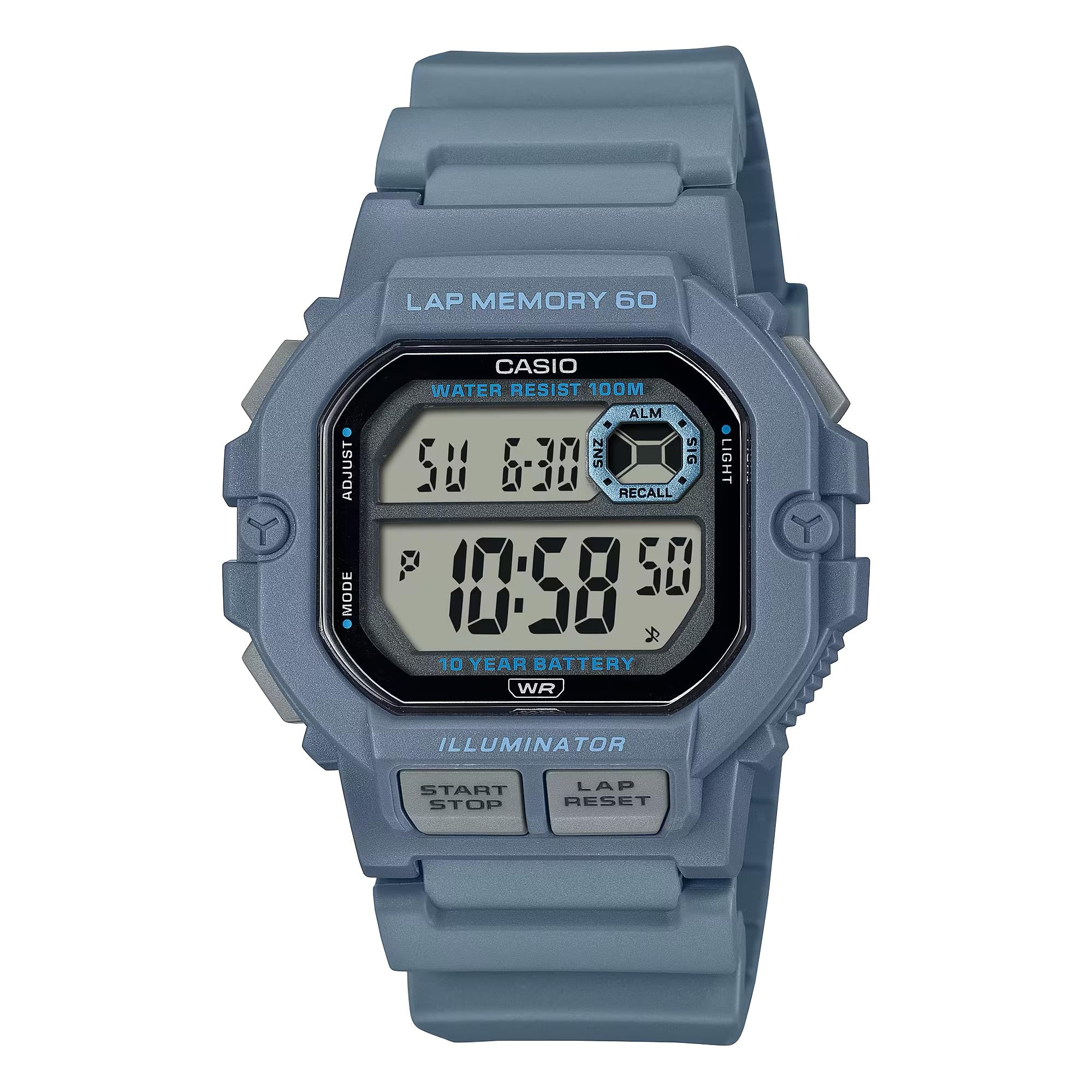
Image: Casio WS-1400H Series Digital Watch, showcasing su diseño y pantalla digital.
Configuración
Configuración inicial de hora y fecha
- En el modo de indicación de la hora, mantenga presionada la tecla AJUSTAR button (usually top-left) until the seconds begin to flash, indicating the setting screen.
- Presione el MODO button (usually bottom-left) to cycle through the settings: Seconds → Hour → Minute → Year → Month → Day.
- Utilice el INICIAR/DETENER button (usually top-right) to increase the flashing value, or the VUELTA / RESET button (usually bottom-right) to decrease it.
- Una vez que todos los ajustes sean correctos, presione el botón AJUSTAR para salir de la pantalla de configuración.
Información de la batería
Your Casio WS-1400H watch is powered by a CR2025 battery, providing approximately 10 years of operation. When the display becomes dim or functions become unreliable, it is time to replace the battery. It is recommended to have battery replacement performed by a qualified watch technician to ensure proper sealing and water resistance.
Modos de funcionamiento
The watch features several modes accessible by pressing the MODO botón.
Modo de hora normal
Displays the current time (hour, minute, second), day of the week, and date. This is the default mode.
Modo de cronómetro
The stopwatch measures elapsed time, split times, and two finishes. It has a 60-lap memory function.
- To enter Stopwatch Mode: Press the MODO button until 'STW' or 'STOPWATCH' appears.
- To start/stop: Press the INICIAR/DETENER button (front button).
- To record a lap/split time: Press the VUELTA / RESET button while the stopwatch is running.
- To reset: With the stopwatch stopped, press the VUELTA / RESET botón.
- A view lap memory: In Stopwatch Mode, press the AJUSTAR button to cycle through recorded lap times.
Modo de temporizador de cuenta regresiva
El temporizador de cuenta regresiva se puede configurar para una duración específica y le avisará cuando expire el tiempo.
- To enter Timer Mode: Press the MODO button until 'TMR' or 'TIMER' appears.
- To set the timer: Press and hold the AJUSTAR button until the hour/minute digits flash. Use INICIAR/DETENER y VUELTA / RESET para ajustar valores, y MODO Para moverse entre horas y minutos, presione AJUSTAR Para confirmar.
- To start/stop the timer: Press the INICIAR/DETENER botón.
- To reset the timer: With the timer stopped, press the VUELTA / RESET botón.
Modo de alarma
El reloj cuenta con múltiples alarmas diarias y un hourly señal horaria.
- To enter Alarm Mode: Press the MODO button until 'ALM' or 'ALARM' appears.
- To set an alarm: Press and hold the AJUSTAR hasta que parpadeen los dígitos de la hora. Utilice INICIAR/DETENER y VUELTA / RESET para ajustar valores, y MODO Para moverse entre horas y minutos, presione AJUSTAR Para confirmar.
- To turn alarms ON/OFF: In Alarm Mode, press the INICIAR/DETENER button to toggle through alarms and the hourly señal horaria.
Modo de hora dual
Permite realizar un seguimiento de una segunda zona horaria.
- To enter Dual Time Mode: Press the MODO Botón hasta que aparezca 'DT' o 'DUAL TIME'.
- To set dual time: Press and hold the AJUSTAR hasta que parpadeen los dígitos de la hora. Utilice INICIAR/DETENER y VUELTA / RESET para ajustar valores, y MODO Para moverse entre horas y minutos, presione AJUSTAR Para confirmar.
Luz de fondo LED
The watch features an LED backlight for illumination in low-light conditions.
- Para activar: Presione el LUZ button (usually top-right or a dedicated button).
- Afterglow duration: The backlight can be set to illuminate for 1.5 seconds or 3 seconds. This setting is typically adjusted in Timekeeping Mode's setting screen, cycling through options with the MODO button after setting time.
Mantenimiento
Resistencia al agua
Your watch is rated for 100-meter water resistance. This means it is suitable for swimming, showering, and snorkeling. However, it is not suitable for scuba diving. No opere los botones mientras el reloj esté mojado o sumergido.
Limpieza
Limpie el reloj regularmente con un paño suave y seco para eliminar la suciedad y la humedad. Para la suciedad persistente, utilice un paño suave.ampEnjuagar con agua y un detergente neutro suave y luego secar.
Reemplazo de batería
As mentioned, the CR2025 battery has a 10-year life. When replacement is needed, it is strongly recommended to take the watch to an authorized Casio service center or a professional watch repair shop. This ensures the watch's water resistance is maintained after the battery compartment is opened.
Solución de problemas
- La pantalla está en blanco o tenue: La batería puede estar baja o agotada. Reemplace la batería.
- La hora es incorrecta: Re-adjust the time and date settings as described in the Setup section. Ensure the correct AM/PM setting is selected.
- Los botones no responden: Ensure the watch is not in a frozen state due to extreme cold. If the issue persists, a battery reset (AC reset) might be required by a professional.
- Agua dentro del reloj: Lleve el reloj inmediatamente a un centro de servicio autorizado. No intente abrirlo usted mismo.
Presupuesto
| Número de modelo | WS-1400H-2AVCF |
| Fabricante | Casio |
| Dimensiones del producto | 5 x 7 x 5 pulgadas; 5.26 onzas |
| Baterías | 1 LR44 battery (CR2025 equivalent), included |
| Resistencia al agua | 100 metros (10 ATM) |
| Duración de la batería | Aproximadamente 10 años |
| Stopwatch Memory | 60 vueltas |
Garantía y soporte
For warranty information, service, and support, please refer to the official Casio website or contact Casio customer service directly. Keep your proof of purchase for warranty claims.
Casio oficial Websitio: www.casio.com