Introducción
This manual provides essential information for the proper setup, operation, and maintenance of your Xiaomi Smart Skipping Rope. Designed for effective fitness training, this smart skipping rope features precise jump tracking, flexible training modes, and smart data analysis. Please read this manual thoroughly before using the product to ensure optimal performance and safety.
Producto terminadoview
The Xiaomi Smart Skipping Rope integrates innovative technology with a user-friendly design to enhance your fitness routine. It features high-precision sensors for accurate jump counting and offers both wired and wireless skipping options.
Características principales:
- Precise Jump Counting: Equipped with three high-precision Hall sensors and a self-developed intelligent counting algorithm for accurate repetition tracking, even offline.
- Flexible Training Modes: Easily switch between wired (with rope) and wireless (with air swing balls) skipping for versatile indoor and outdoor workouts.
- Pantalla inteligente: A hidden curved LED screen integrated into the handle provides clear display of training data in various lighting conditions.
- Detailed Fitness Analysis: Generates weekly, monthly, and annual performance reports to monitor progress and calorie burn.
- Conectividad moderna: Utilizes Bluetooth Low Energy 5.0 for connection to the Xiaomi Fitness app and features a USB-C charging port.
- Diseño duradero: Constructed from high-quality PC and ABS plastic with an ergonomic handle for comfortable and long-lasting use.
Componentes:
The product consists of two handles, a main rope for wired skipping, and two air swing balls for wireless skipping. The handles contain the smart display, sensors, and charging port.
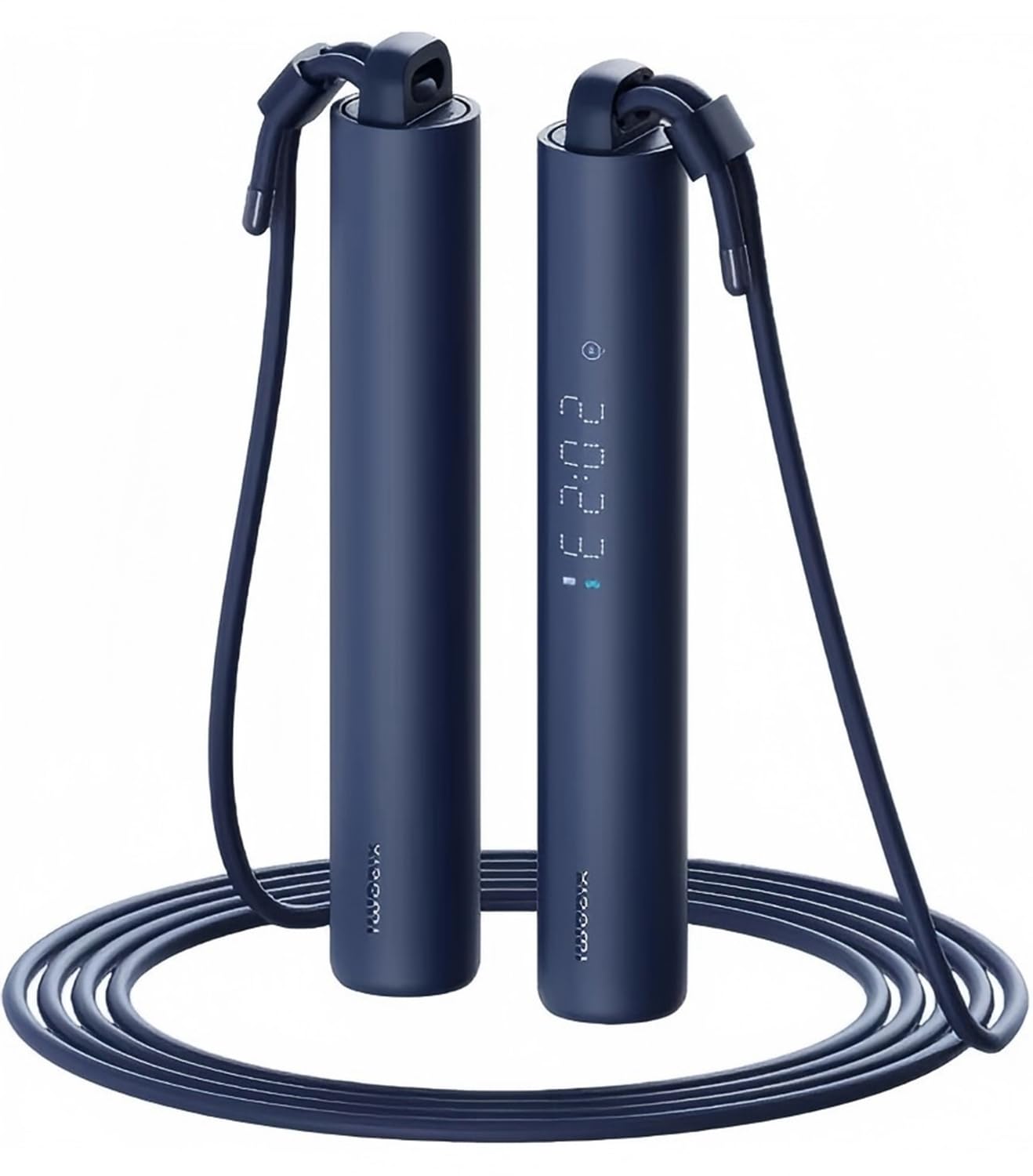
Figura 1: Sobreview of the Xiaomi Smart Skipping Rope, showing both handles and the rope attachment.
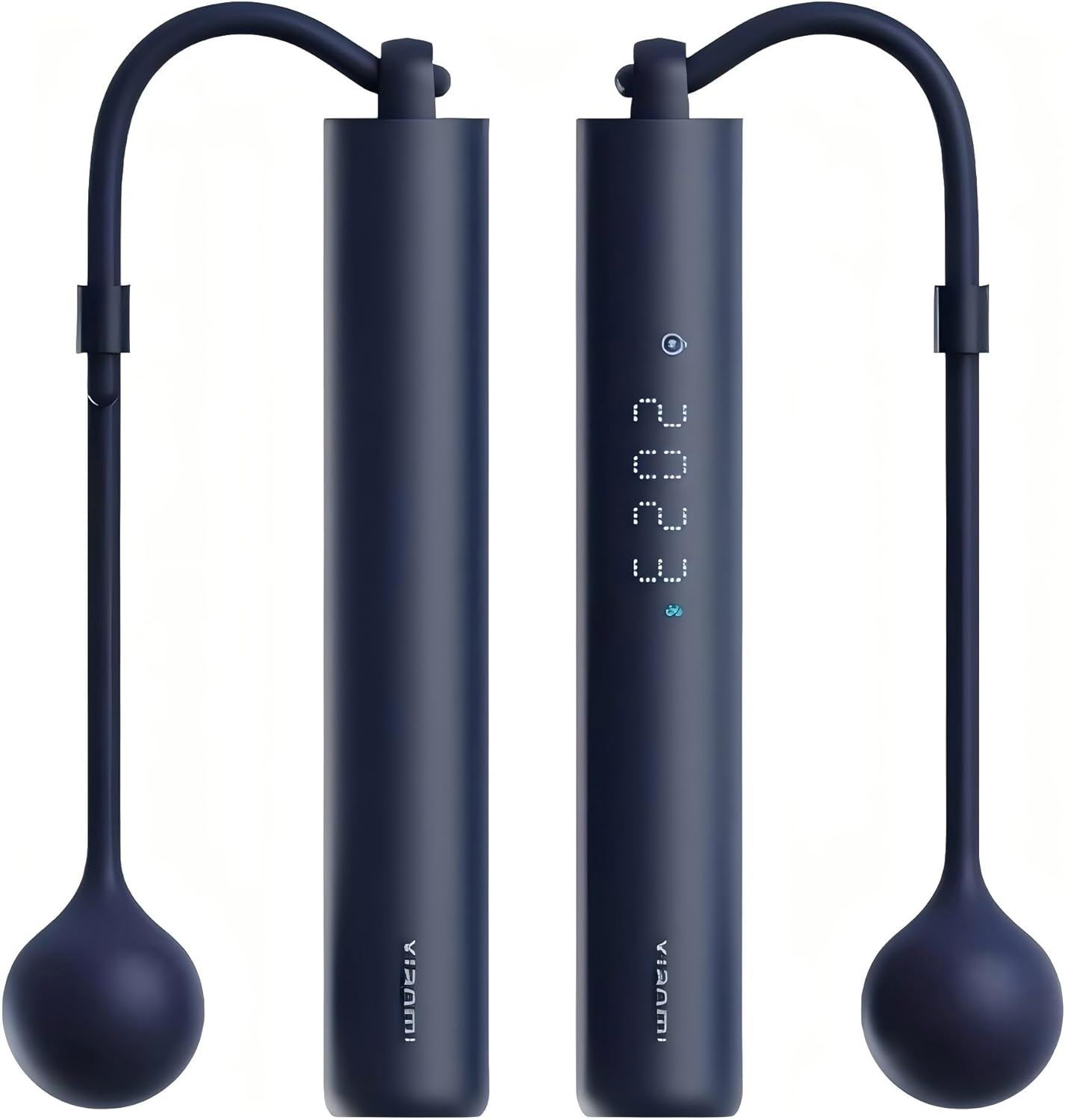
Figura 2: Primer plano view of one handle, highlighting the integrated LED display.
Configuración
1. Carga del dispositivo
Before first use, fully charge the smart skipping rope. Locate the USB-C charging port on one of the handles. Connect the provided USB-C cable to the port and the other end to a standard USB power adapter (not included). The LED display will indicate charging status.
2. Conexión de la aplicación (Bluetooth)
- Descargar el Xiaomi Fitness App from your device's app store (compatible with Android 8.0+ and iOS 12.0+).
- Asegúrese de que Bluetooth esté habilitado en su teléfono inteligente.
- Open the Xiaomi Fitness App and follow the on-screen instructions to add a new device.
- Turn on the smart skipping rope (if not already on). The app will detect the device via Bluetooth Low Energy 5.0.
- Confirm the pairing request on both the app and the skipping rope (if prompted).
3. Selecting Training Mode: Wired or Wireless
The Xiaomi Smart Skipping Rope supports both traditional wired skipping and a cordless mode using air swing balls.
- Modo con cable: Attach the main rope to both handles. Ensure the rope is securely fastened. This mode is suitable for outdoor use and traditional skipping.
- Modo inalámbrico: Detach the main rope. Attach the two air swing balls to each handle. These balls simulate the resistance and feel of a rope, making this mode ideal for indoor use or in confined spaces to prevent tripping.

Figure 3: Illustration of the dual cord mode, demonstrating the setup for both wired (Exercise Rope) and wireless (Air Flick) skipping.
Instrucciones de funcionamiento
1. Encendido y apagado
Press and hold the power button (usually located on one of the handles) for a few seconds to turn the device on or off. The LED display will light up upon activation.
2. Selecting Display Modes
The integrated dot matrix display cycles through different information modes. Short press the function button (if available, or the power button if it doubles as one) to switch between:
- Modo de conteo: Displays the total number of jumps.
- Modo de cronometraje: Shows the duration of your skipping session.
- Modo Calorías: Calcula las calorías quemadas durante tu entrenamiento.

Figure 4: The smart handle display illustrating the three primary modes: Counting, Timekeeping, and Calorie tracking.
3. Comenzar un entrenamiento
Once powered on and your preferred mode (wired or wireless) is set, simply begin skipping. The smart sensors will automatically detect and record your jumps. Ensure a smooth, consistent motion for accurate tracking.
4. Real-Time Data Logging and Analysis
The device continuously logs your motion data. For detailed analysis, connect the skipping rope to the Xiaomi Fitness App. The app provides:
- Real-time workout statistics.
- Comprehensive reports (weekly, monthly, annual) on performance, jump count, duration, and estimated calories burned.
- Progress tracking and goal setting.

Figure 5: The Xiaomi Fitness App displaying real-time workout data, including jump count, duration, and calorie burn.
5. Custom Training Modes and Guided Courses
The Xiaomi Fitness App offers various training modes and guided courses to help you achieve specific fitness goals. You can customize exercise modes and intensity based on your personal objectives and physical condition.

Figure 6: A user engaging in a custom training mode with the smart skipping rope, demonstrating flexible workout options.

Figure 7: The Xiaomi Sports Health App providing guided coaching for skipping rope exercises, offering rich and engaging courses.
Mantenimiento
- Limpieza: Wipe the handles and rope with a soft, damp paño. No utilice limpiadores abrasivos ni sumerja el dispositivo en agua.
- Almacenamiento: Store the skipping rope in a cool, dry place away from direct sunlight and extreme temperatures. Avoid bending or kinking the rope excessively.
- Cuidado de la batería: Para prolongar la vida útil de la batería, cargue el dispositivo regularmente, incluso si no lo usa con frecuencia. Evite descargar la batería por completo durante periodos prolongados.
- Inspección de cuerdas: Periodically check the rope and air swing balls for any signs of wear or damage. Replace if necessary to ensure safe operation.
Solución de problemas
| Problema | Posible causa | Solución |
|---|---|---|
| El dispositivo no se enciende. | Batería baja; mal funcionamiento del dispositivo. | Cargue el dispositivo por completo. Si el problema persiste, contacte con atención al cliente. |
| La conexión Bluetooth falla. | Bluetooth desactivado; dispositivo fuera de alcance; problema con la aplicación. | Ensure Bluetooth is on. Bring device closer to phone. Restart the app and the skipping rope. Check app permissions. |
| Inaccurate jump counting. | Incorrect skipping technique; loose rope/balls; sensor obstruction. | Maintain a consistent skipping rhythm. Ensure rope/balls are securely attached. Check for any physical obstructions around the handles. |
| Display is not visible. | Device off; low battery; display malfunction. | Turn on the device. Charge the battery. If still not visible, contact customer support. |
Presupuesto
- Número de modelo: 44578
- Marca: Xiaomi
- Dimensiones (L x An x Al): 16.22 x 2.5 x 2.5 cm (handles)
- Peso: 180 gramos
- Material: ABS Plastic, Silicone (handle)
- Longitud de la cuerda: 3 Meters (adjustable)
- Conectividad: Bluetooth Low Energy 5.0
- Puerto de carga: USB-C
- Batería: Batería recargable integrada
- Características especiales: Digital display, Anti-friction, Ergonomic handle, Padded handle, Wireless mode
- Uso recomendado: Bodybuilding, Exercise and fitness, Speed and endurance training
- Compatibilidad: Android 8.0 o superior, iOS 12.0 o superior
Información de seguridad
- Consulte a un médico antes de comenzar cualquier nuevo programa de ejercicios.
- Ensure adequate space around you when skipping to avoid injury or damage to property.
- No utilice el dispositivo si está dañado.
- Mantenga el dispositivo alejado del agua y la humedad excesiva.
- Mantener fuera del alcance de los niños y las mascotas.
- Utilice únicamente el cable de carga proporcionado o un cable USB-C certificado para cargar.
- No intente desmontar ni reparar el dispositivo usted mismo.
Garantía y soporte
For warranty information or technical support, please refer to the warranty card included with your product or visit the official Xiaomi webSitio. También puede ponerse en contacto con su distribuidor local para obtener ayuda.


