Producto terminadoview
The Edifier ES20 is a compact and powerful portable Bluetooth speaker designed for both indoor and outdoor use. It features IP67 waterproof and dustproof capabilities, ensuring durability in various environments. With Bluetooth V5.4 connectivity, it offers stable wireless audio and supports stereo pairing for an enhanced sound experience. The speaker also includes a built-in microphone for hands-free calls and customizable ambient lighting.
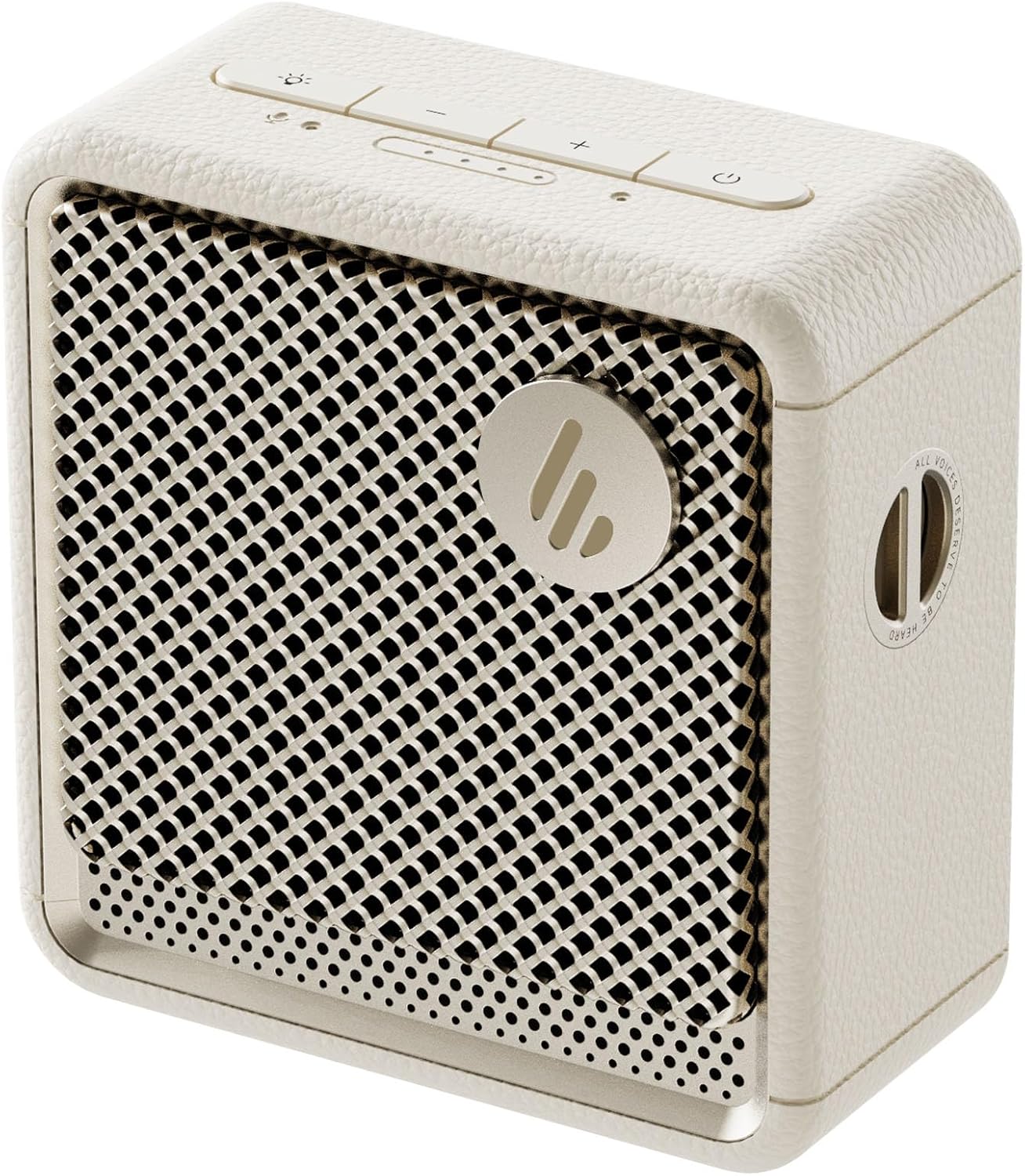
Imagen: Frente view of the Edifier ES20 Portable Bluetooth Speaker in Ivory, showcasing su diseño compacto y rejilla de altavoz.

Image: The Edifier ES20 speaker placed on a desk, demonstrating its suitability for home or office environments.
Las características principales incluyen:
- Calidad de sonido superior: 6W (RMS) output with a 1.7'' full-range driver and 2'' passive bass radiators for rich, punchy sound.
- Bluetooth V5.4 & Stereo Pairing: Seamless wireless connectivity and the ability to pair two speakers for stereo sound.
- IP67 a prueba de agua y polvo: Designed to withstand splashes, rain, and dust, making it ideal for outdoor use.
- Long Lasting Playtime: Hasta 15 horas de reproducción con una sola carga.
- Iluminación ambiental: Features a customizable ambient light system for enhanced atmosphere.
- Micrófono incorporado: High-sensitivity microphone for clear hands-free communication.
- Fácil de controlar: Intuitive top-mounted buttons and control via the EDIFIER ConneX app.
Guía de configuración
¿Qué hay en la caja?
Antes de comenzar, asegúrese de que todos los componentes estén presentes en el embalaje:
- Edifier ES20 Portable Bluetooth Speaker
- Correa
- Guía de inicio rápido
- Cable USB-C a USB-C
- Instrucciones de seguridad importantes

Image: A visual representation of the Edifier ES20 speaker and its included accessories, such as the strap, charging cable, and documentation.
Carga del altavoz
The ES20 speaker comes with a built-in rechargeable battery. Before first use, it is recommended to fully charge the speaker.
- Connect the provided USB-C to USB-C cable to the charging port on the speaker.
- Conecte el otro extremo del cable a un adaptador de corriente USB compatible (no incluido) o al puerto USB de una computadora.
- The battery indicator lights on the top panel will illuminate to show charging progress. All lights will be solid when fully charged.
Emparejamiento inicial de Bluetooth
Follow these steps to connect your ES20 speaker to a Bluetooth device for the first time:
- Ensure the speaker is charged and powered on. The Bluetooth indicator light will flash, indicating it's in pairing mode.
- En su dispositivo (teléfono inteligente, tableta, computadora portátil), habilite Bluetooth y busque los dispositivos disponibles.
- Select "EDIFIER ES20" from the list of found devices.
- Once connected, the Bluetooth indicator light on the speaker will remain solid.
For advanced features and easier control, download the EDIFIER ConneX app from your device's app store.

Image: Screenshots illustrating the EDIFIER ConneX mobile application, which provides additional control and customization options for the speaker.
Instrucciones de funcionamiento
Funciones de los botones
The ES20 speaker features intuitive top-mounted buttons for easy control:

Image: A detailed diagram outlining the functions of each button on the top panel of the ES20 speaker, including power, volume, playback, and lighting controls.
| Botón / indicador | Función |
|---|---|
| Botón de encendido | Press and hold for 1.5s to power on/off. Short press to play/pause. |
| Subir volumen (+) | Presione brevemente para aumentar el volumen. |
| Bajar volumen (-) | Presione brevemente para disminuir el volumen. |
| Botón de modo/luz | Short press to cycle through sound effects. Press and hold for 1.5s to cycle through ambient light modes. |
| Botón Bluetooth | Short press to disconnect current Bluetooth device. Press and hold for 1.5s to enter Bluetooth pairing mode. Double press to enable/disable stereo pairing. |
| Indicador de carga de la batería | Indica el nivel actual de la batería. |
| Indicador de modo | Blue for Bluetooth mode, White for Bluetooth stereo pairing mode. |
Emparejamiento estéreo Bluetooth
You can pair two ES20 speakers together for a true wireless stereo experience. This requires two ES20 units.
- Ensure both ES20 speakers are powered on and not connected to any other Bluetooth devices.
- On one speaker (this will be the primary speaker), double-press the Bluetooth button. The Bluetooth indicator will flash rapidly.
- The primary speaker will automatically search for and connect to the second ES20 speaker.
- Once connected, the Bluetooth indicator on both speakers will remain solid, and you will hear an audible confirmation.
- Now, connect your device to the primary ES20 speaker via Bluetooth as you normally would.

Image: Two ES20 speakers, one black and one ivory, positioned to illustrate Bluetooth stereo pairing, with a smartphone displaying music playback.
Bluetooth Multi-Point Connectivity
The ES20 supports connecting to two Bluetooth devices simultaneously, allowing for seamless switching between audio sources.
- Connect the first device to the ES20 speaker via Bluetooth.
- Once connected, put the speaker back into pairing mode (press and hold the Bluetooth button for 1.5s).
- Connect the second device to the ES20 speaker.
- The speaker will now be connected to both devices. To switch audio playback, simply pause playback on the active device and start playback on the other.

Image: A visual representation of the ES20 speaker connected to multiple smartphones, highlighting its Bluetooth multi-point connectivity feature.
Sistema de iluminación ambiental
The ES20 features an ambient light system with multiple modes to enhance your listening experience or provide utility.
- Respiración: Light gently fades in and out.
- Arcoíris: Recorre un espectro de colores.
- Estático: Un color único y constante.
- Glittering and Colorful: Dynamic, multi-color effects.
- Luz de emergencia: Flashing red light for signaling.
To change the ambient light mode, press and hold the Mode/Light button for 1.5 seconds.

Image: The ES20 speaker showcasing its ambient light system, with icons representing different light effects like breathing, rainbow, static, glittering, and emergency light.
Múltiples efectos de sonido
Optimize your audio experience by selecting from four preset sound modes:
- Música: Sonido equilibrado profesionalfile Para escuchar música en general.
- Juego: Enhanced audio cues for gaming.
- Película: Optimized for dialogue and cinematic soundscapes.
- Al aire libre: Volumen y graves mejorados para entornos al aire libre.
To cycle through sound effects, short press the Mode/Light button.

Image: The ES20 speaker set in a natural environment, surrounded by icons representing its various sound effect modes: Music, Game, Movie, and Outdoor.
Micrófono MEMS incorporado
The ES20 includes a high-sensitivity MEMS microphone with intelligent noise cancellation, allowing for clear hands-free calls when connected to your smartphone.

Image: The ES20 speaker positioned next to a smartphone showing an active call screen, illustrating the use of its built-in MEMS microphone for hands-free communication.
Mantenimiento
Limpieza
- Use a soft, dry cloth to clean the surface of the speaker.
- No utilice limpiadores abrasivos, ceras o disolventes ya que pueden dañar el acabado.
- For the speaker grille, use a soft brush to gently remove dust or debris.
Waterproof and Dustproof Care (IP67)
While the ES20 is IP67 rated for water and dust resistance, proper care is essential to maintain its integrity:
- Asegúrese de que la tapa del puerto de carga esté bien cerrada antes de exponer el altavoz al agua o al polvo.
- Do not intentionally submerge the speaker beyond 1 meter (3 feet) or for longer than 30 minutes.
- Después de la exposición al agua, especialmente agua salada o clorada, enjuague el altavoz con agua dulce y déjelo secar al aire por completo antes de cargarlo o usarlo.
- Evite exponer el altavoz a temperaturas extremas o luz solar directa durante períodos prolongados.

Image: The black version of the ES20 speaker partially submerged in water, illustrating its IP67 waterproof and dustproof protection rating.
Cuidado de la batería
- Para prolongar la vida útil de la batería, evite descargar completamente el altavoz con frecuencia.
- Cargue el altavoz periódicamente, incluso si no lo utiliza, para evitar una descarga profunda.
- Guarde el altavoz en un lugar fresco y seco cuando no lo utilice durante períodos prolongados.

Image: A circular graphic depicting the 15-hour playtime of the ES20 speaker, with the speaker itself at the center.
Solución de problemas
| Problema | Posible causa | Solución |
|---|---|---|
| El altavoz no se enciende. | Batería baja; botón de encendido no presionado correctamente. | Charge the speaker fully. Press and hold the power button for 1.5 seconds. |
| No se puede emparejar con un dispositivo Bluetooth. | Speaker not in pairing mode; Device Bluetooth off; Speaker too far from device; Interference. | Ensure speaker is in pairing mode (flashing Bluetooth light). Turn device Bluetooth off/on. Move speaker closer to device. Avoid strong Wi-Fi signals or other Bluetooth devices. |
| No hay sonido o volumen bajo. | Volume too low on speaker or device; Paused playback; Incorrect audio output selected on device. | Increase volume on both speaker and device. Ensure music is playing. Check device's audio output settings. |
| Distorsión de sonido. | Volume too high; Weak Bluetooth signal. | Lower the volume. Move speaker closer to the Bluetooth device. |
| El emparejamiento estéreo falla. | Only one speaker in pairing mode; Speakers too far apart. | Ensure both speakers are powered on and not connected to other devices before initiating stereo pairing. Keep speakers within close proximity during pairing. |
If the issue persists, try resetting the speaker by holding the power button for 10 seconds, or consult the EDIFIER ConneX app for further assistance.
Presupuesto
Detailed technical specifications for the Edifier ES20 Portable Bluetooth Speaker:

Image: A comprehensive table listing the technical specifications of the ES20 speaker, including output power, frequency response, dimensions, and weight.
| Característica | Detalle |
|---|---|
| Nombre del modelo | ES20 |
| Tipo de altavoz | Altavoz portátil |
| Potencia de salida total | 6 W (valor eficaz) |
| Unidades de controlador | Full-range: φ43mm, Passive bass radiator: φ55mm |
| Respuesta de frecuencia | 93 Hz – 19 kHz |
| Relación señal a ruido | ≥85dB (A) |
| Versión de Bluetooth | V5.4 |
| Códecs | CBC |
| Protocolo de conectividad | Bluetooth, EDIFIER ConneX App |
| Duración de la batería | 15 horas |
| Clasificación IP | IP67 (resistente al agua y al polvo) |
| Dimensiones del producto (An. × Al. × Pr.) | 90.4 mm × 93.7 mm × 49.7 mm (3.55" de profundidad x 3.68" de ancho x 1.95" de alto) |
| Peso neto | 326 g (1.01 libras) |
| Método de control | Tocar |

Image: The ES20 speaker with its dimensions (width, height, depth) clearly marked, providing a visual reference for its compact size.
Garantía y soporte
The Edifier ES20 Portable Bluetooth Speaker comes with a limited warranty. Please refer to the "Warranty Card" included in your product packaging for detailed terms and conditions.
For technical support, troubleshooting assistance beyond this manual, or warranty claims, please visit the official Edifier website or contact their customer service. The EDIFIER ConneX app may also provide direct support options or frequently asked questions.
Puede encontrar más información y recursos de apoyo en Tienda Edifier en Amazon.


