Introducción
The Solid State Logic SSL 18 is a high-performance 26-input, 28-output USB audio interface designed for professional studio recording and production. It features cutting-edge 32-bit/192 kHz converters, eight SSL-designed mic preamps, and extensive connectivity options to deliver exceptional audio quality and flexibility for your creative workflow.

Configuración
1. Desembalaje e inspección
Carefully remove the SSL 18 from its packaging. Verify that all components are present, including the interface unit, USB cable, and power supply. Inspect the unit for any signs of damage.
2. Instalación de software y controladores
Before connecting the SSL 18 to your computer, visit the official Solid State Logic website to download and install the latest drivers and control software for your operating system (Windows or macOS). Follow the on-screen instructions provided by the installer.
3. Conexión del hardware
- Conexión de energía: Connect the included power supply to the 'DC IN' port on the rear of the SSL 18 and then plug it into a suitable power outlet.
- Conexión USB: Connect the SSL 18 to your computer using the provided USB cable. Use a high-quality USB port on your computer for optimal performance.
- Conexiones de audio:
- Entradas: Connect microphones, line-level instruments, or other audio sources to the XLR/TRS combo jacks on the front and rear panels.
- Salidas: Connect your studio monitors to the balanced line outputs (1-2 for main monitors) on the rear panel. Additional line outputs are available for other monitoring or outboard gear.
- Auriculares: Plug your headphones into the dedicated headphone jacks on the front panel.

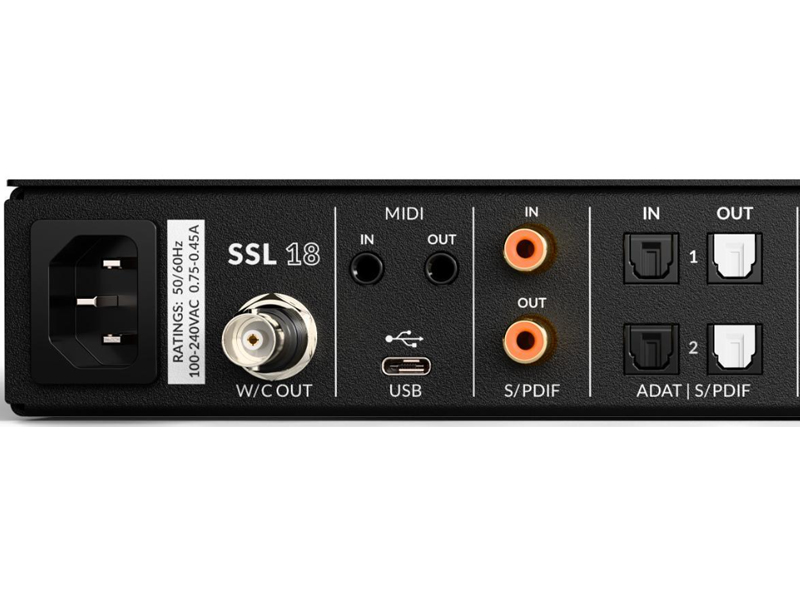
Operating the SSL 18
1. Encendido y configuración inicial
Press the power button on the front panel to turn on the SSL 18. The unit will initialize, and the status indicators will illuminate. Ensure your computer recognizes the device in your Digital Audio Workstation (DAW) or system audio settings.
2. Control de ganancia de entrada
Each input channel features a dedicated 'GAIN' knob. Adjust this knob to set the input level for your connected microphone or instrument. Monitor the input meters on the front panel to ensure levels are healthy without clipping (red indicators).
3. 4K Analogue Enhancement
The SSL 18 includes a '4K' button on each input channel, which activates a legacy 4K analogue enhancement mode. This feature adds a subtle harmonic richness and high-frequency lift inspired by classic SSL 4000 series consoles. Experiment with this feature to enhance your sound.
4. Salidas de auriculares
The SSL 18 provides two independent headphone outputs, each with its own volume control. These can be configured for different types of headphones (Standard, High Sensitivity, High Impedance) via the control software to optimize performance.
5. Monitor Control and Speaker Switching
The monitor section allows you to control the main output volume. The 'ALT' button enables alternative speaker switching, allowing you to quickly switch between two sets of monitors (connected to outputs 1-2 and 3-4) for critical listening. The 'CUT' button mutes the main outputs.
6. Función de intercomunicación
The 'TALK' button activates the built-in talkback microphone, allowing you to communicate with artists in a separate recording space. The talkback signal can be routed to specific outputs as configured in the control software.


Mantenimiento
To ensure the longevity and optimal performance of your SSL 18, follow these maintenance guidelines:
- Limpieza: Use a soft, dry, lint-free cloth to clean the exterior of the unit. Avoid abrasive cleaners, solvents, or waxes. Do not spray liquids directly onto the unit.
- Ventilación: Ensure the unit has adequate ventilation. Do not block the ventilation slots on the sides of the chassis.
- Actualizaciones de firmware: Periodically check the Solid State Logic website for firmware and software updates. Keeping your device updated ensures compatibility and access to the latest features and bug fixes.
- Almacenamiento: Cuando no utilice la unidad durante períodos prolongados, guárdela en un lugar fresco y seco, lejos de la luz solar directa y de temperaturas extremas.
Solución de problemas
If you encounter issues with your SSL 18, try the following troubleshooting steps:
- Sin energía: Ensure the power cable is securely connected to both the unit and the power outlet. Verify the power outlet is active.
- Sin salida de sonido:
- Check all audio cable connections (inputs, outputs, headphones).
- Verify the volume levels on the SSL 18 (main monitor, headphone) and in your DAW/computer's system settings.
- Ensure the correct audio device is selected in your DAW and operating system.
- La computadora no reconoce el dispositivo:
- Pruebe con un puerto USB diferente en su computadora.
- Ensure the latest drivers are installed. Reinstall them if necessary.
- Restart your computer and the SSL 18.
- Input Signal Issues:
- Check the input gain knob for the specific channel.
- Ensure the microphone or instrument is properly connected and functioning.
- Verify phantom power (if required for your microphone) is enabled.
For persistent issues, refer to the Solid State Logic support websitio o póngase en contacto con su servicio de atención al cliente.
Presupuesto
| Número de modelo | 729748X2 |
| Peso del artículo | 12 libras |
| Dimensiones del producto | 24.4 x 14.4 x 4.6 pulgadas |
| País natal | EE.UU |
| Convertidores | 32 bits / 192 kHz |
| Preamplificador de micrófonoamps | 8 x SSL-designed, high-performance |
| Dynamic Range (Inputs) | 120 dB |
| Dynamic Range (Outputs) | 125 dB |
| Salidas de línea | 10 x Balanced (configurable +9/+24 dBu) |
| Salidas de auriculares | 2 x Independent, configurable |
| E/S digital | ADAT, S/PDIF |
| Dispositivos compatibles | Ordenador personal |
| Sistema operativo | Ventanas, MacOS |
Garantía y soporte
For detailed warranty information, please refer to the official Solid State Logic website or the documentation included with your purchase. Solid State Logic provides comprehensive support for their products.
Recursos en línea: Visit the Solid State Logic support page for FAQs, driver downloads, firmware updates, and additional user guides.
Contactar con soporte: If you require further assistance, please contact Solid State Logic customer support through their official websitio.