Introducción
This manual provides instructions for the setup, operation, and maintenance of your Paladone PlayStation DualSense Controller Digital Alarm Clock. This device combines a digital alarm clock with a night light function, designed for ease of use and to complement gaming-themed environments.
¿Qué hay en la caja?
- Paladone PlayStation DualSense Controller Digital Alarm Clock
- Manual de instrucciones (este documento)
Nota: Se requieren 3 pilas AA y no están incluidas.
Configuración
1. Instalación de la batería
- Localice el compartimento de la batería en la parte inferior del reloj despertador.
- Abra la tapa del compartimiento de la batería.
- Inserte 3 pilas AA, asegurándose de la polaridad correcta (+/-).
- Cierre bien la tapa del compartimento de la batería.
2. Ajuste de hora inicial
Upon battery installation, the display will illuminate. Follow the operating instructions to set the current time.

Image: The PlayStation DualSense Controller Digital Alarm Clock displaying the time.
Instrucciones de funcionamiento
Ajuste de la hora
- Mantenga pulsado el TIEMPO ESTABLECIDO button (usually marked with a clock icon) until the hour digits begin to flash.
- Utilice el + y - buttons to adjust the hour. Pay attention to AM/PM indicators if present.
- Presione el TIEMPO ESTABLECIDO Presione nuevamente el botón para pasar a los dígitos de los minutos.
- Utilice el + y - Botones para ajustar los minutos.
- Presione el TIEMPO ESTABLECIDO button one last time to confirm and exit time setting mode.
Configuración de la alarma
- Mantenga pulsado el SET DE ALARMAS button (usually marked with an alarm icon) until the alarm hour digits begin to flash.
- Utilice el + y - Botones para ajustar la hora de la alarma.
- Presione el SET DE ALARMAS Presione nuevamente el botón para pasar a los dígitos de los minutos de la alarma.
- Utilice el + y - Botones para ajustar los minutos de la alarma.
- Presione el SET DE ALARMAS Presione el botón una última vez para confirmar y salir del modo de configuración de alarma.
- Para activar o desactivar la alarma, presione el botón ALARMA ENCENDIDA / APAGADA button (may be the same as ALARM SET or a separate button). An alarm icon will appear on the display when active.
Using the Night Light Function
The PlayStation DualSense controller replica on top of the clock functions as a night light.
- To activate the night light, gently tap the controller.
- To deactivate the night light, tap the controller again.
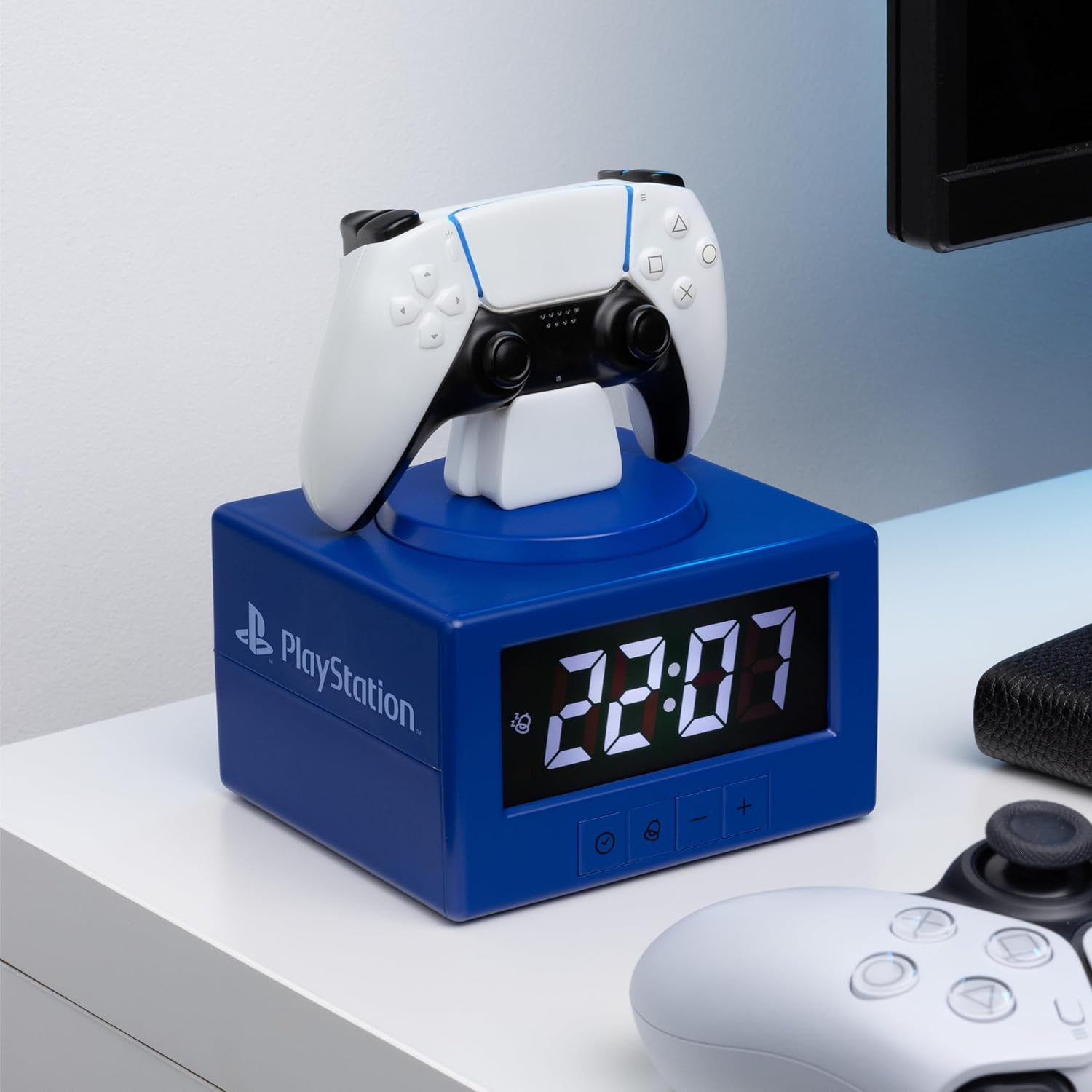
Image: The alarm clock with the DualSense controller glowing as a night light.
Mantenimiento
- Limpieza: Limpie el reloj con un paño suave y seco. No utilice limpiadores abrasivos ni disolventes.
- Reemplazo de batería: Replace batteries when the display dims or functions become unreliable. Always replace all three AA batteries at the same time.
- Almacenamiento: Si lo almacenará durante un período prolongado, retire las baterías para evitar fugas.
Solución de problemas
| Problema | Solución |
|---|---|
| La pantalla del reloj está oscura o en blanco. | Replace the 3x AA batteries. Ensure batteries are inserted with correct polarity. |
| La alarma no suena. | Asegúrese de que la alarma esté activada (el icono de alarma esté visible en la pantalla). Verifique que la hora de la alarma esté configurada correctamente. |
| La luz nocturna no se enciende. | Ensure batteries are fresh. Gently tap the controller to activate. |
| Time or alarm settings reset unexpectedly. | Esto puede indicar que la batería está baja. Reemplace las baterías. |
Presupuesto
- Marca: Paladona
- Número de modelo: PP13475PS
- Tipo de pantalla: Digital
- Características especiales: Alarm, Night Mode
- Dimensiones del producto: 4.92" de ancho x 7.09" de alto
- Fuente de energía: Funciona con pilas (3 pilas AA, no incluidas)
- Material: Plástico
- Peso del artículo: 8.8 onzas (0.25 kilogramos)
- Uso en interiores y exteriores: Interior
Garantía y soporte
For warranty information and customer support, please refer to the official Paladone webSitio web o contacte a su vendedor. Conserve su comprobante de compra para cualquier reclamación de garantía.
Para obtener ayuda adicional, visite el Tienda Paladone en Amazon.