1. Instrucciones de seguridad
Please read these safety instructions carefully before using your Audizio Toledo turntable. Keep this manual for future reference.
- Fuente de energía: Connect the turntable only to a power supply of the type described in this manual or on the unit.
- Agua y humedad: No utilice este aparato cerca del agua o enamp entornos.
- Limpieza: Limpiar únicamente con un paño seco.
- Ventilación: No obstruya las aberturas de ventilación. Instale el producto según las instrucciones del fabricante.
- Calor: No lo instale cerca de fuentes de calor como radiadores, rejillas de calefacción, estufas u otros aparatos (incluidos ampificadores) que producen calor.
- Protección del cable de alimentación: Proteja el cable de alimentación para que no sea pisado ni aplastado, especialmente en los enchufes, receptáculos y en el punto donde sale del aparato.
- Servicio: Encargue todas las tareas de mantenimiento a personal técnico cualificado. Se requiere realizar el mantenimiento cuando el aparato haya sufrido algún daño, como por ejemplo si el cable de alimentación o el enchufe están dañados, si se ha derramado líquido o han caído objetos en el interior del aparato, si el aparato ha estado expuesto a la lluvia o la humedad, si no funciona con normalidad o si se ha caído.
2. Contenido del paquete
Asegúrese de que todos los artículos estén presentes en la caja:
- Audizio Toledo Turntable Unit
- Guardapolvo
- Plato
- Estera de fieltro
- Contrapeso
- Adaptador de 45 RPM
- Adaptador de corriente
- Cable RCA
- Manual de usuario (este documento)
- Audio Technica Cartridge (pre-installed)
3. Configuración
3.1 Colocación
Place the turntable on a firm, level surface away from direct sunlight, heat sources, and excessive vibration.
3.2. Instalación del plato y la correa de transmisión
The Audizio Toledo turntable features a belt-drive system for stable rotation.
- Coloque con cuidado el plato sobre el eje central.
- Locate the drive belt, which is usually pre-installed around the inner rim of the platter.
- Using the red ribbon (if provided), gently pull the belt over the motor pulley. Ensure the belt is not twisted.
- Remove the red ribbon once the belt is correctly positioned.
- Coloque el tapete de fieltro encima del plato.
Video: Belt Installation Guidelines. This video demonstrates the correct procedure for installing the platter and drive belt on a turntable, ensuring proper function and preventing belt twisting.
Video: Step-By-Step Installation Guide. This video provides a general guide for turntable setup, including platter and belt installation, and counterweight adjustment.
3.3. Instalación y ajuste del contrapeso
The adjustable counterweight ensures optimal tracking force for the Audio Technica cartridge.
- Deslice el contrapeso hacia la parte trasera del brazo.
- With the stylus guard removed, carefully balance the tonearm so it floats freely and horizontally.
- Once balanced, hold the counterweight steady and rotate the numbered ring to '0' (zero).
- Rotate the entire counterweight (including the numbered ring) to the recommended tracking force for the Audio Technica cartridge (typically 3.5 grams for the ATN3600L stylus).
3.4. Instalación de la cubierta antipolvo
Carefully place the dust cover onto the hinges at the rear of the turntable unit.

Imagen: The Audizio Toledo turntable with its protective dust cover open, showcasing the platter and tonearm. The dust cover helps protect the unit from dust and debris when not in use.
3.5. Conexiones
The Audizio Toledo offers versatile connectivity options.
- Fuerza: Connect the power adapter to the DC IN 12V port on the rear of the turntable and then to a wall outlet.
- Salida RCA: For wired connection to an amplifier or powered speakers, connect the RCA cable to the AUDIO OUT (R/L) ports on the rear of the turntable. Use the PHONO/LINE switch to select the appropriate output level for your ampmás duradero.
- Toma de tierra: If experiencing hum, connect a grounding wire from the GND terminal on the turntable to the grounding terminal on your ampmás duradero.
- Salida Bluetooth: To connect wirelessly to Bluetooth headphones or speakers, ensure the Bluetooth switch on the rear is set to 'ON'.
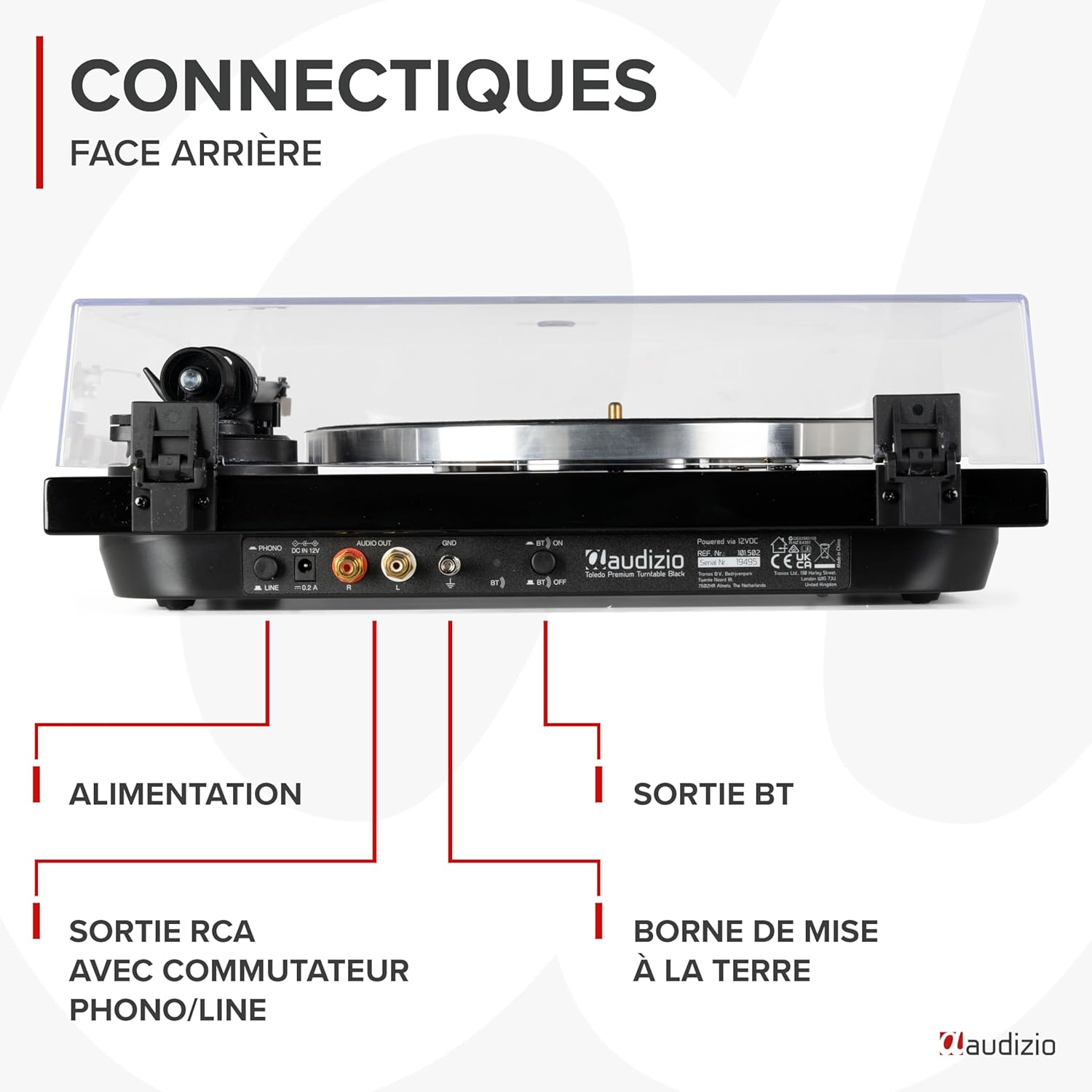
Imagen: Un detallado view of the rear panel of the Audizio Toledo turntable, highlighting the power input, RCA audio outputs (R/L), grounding terminal (GND), and the Bluetooth ON/OFF switch. This panel allows for both wired and wireless audio connections.
4. Operando
4.1. Reproducción de un disco
- Coloque un disco de vinilo sobre la alfombrilla de fieltro situada en el plato.
- Select the appropriate speed (33 or 45 RPM) using the speed selector switch. For 45 RPM records with a large center hole, use the included 45 RPM adapter.
- Suelte el brazo clamp.
- Levante suavemente el brazo utilizando la palanca de señalización.
- Coloque el brazo sobre la pista deseada en el disco.
- Lower the cueing lever to slowly drop the stylus onto the record.
- At the end of the record, the turntable may feature an auto-stop function. Manually lift the tonearm and return it to its rest position.

Imagen: Un de arriba hacia abajo view of the Audizio Toledo turntable with a vinyl record spinning on the platter. The tonearm is positioned on the record, indicating active playback. The speed selector and pitch control knobs are visible on the right side of the unit.

Imagen: Un de arriba hacia abajo view of the Audizio Toledo turntable illustrating compatibility with 7", 10", and 12" records. The image also highlights the two available speeds (33 and 45 RPM) and the pitch control for fine-tuning playback speed.
4.2. Salida Bluetooth
Para transmitir audio de forma inalámbrica:
- Ensure the Bluetooth switch on the rear panel is set to 'ON'.
- Activa el modo de emparejamiento Bluetooth en tus auriculares o altavoz.
- The turntable will automatically search for and connect to the nearest Bluetooth device.

Imagen: The Audizio Toledo turntable wirelessly connected to a pair of Bluetooth headphones, demonstrating its Bluetooth OUT capability. This feature allows users to enjoy their vinyl collection through wireless audio devices.
4.3. Salida RCA
For a wired connection to an external audio system:
- Connect the RCA cable from the turntable's AUDIO OUT ports to the corresponding input on your ampAltavoces amplificados o amplificados.
- Set the PHONO/LINE switch on the turntable's rear panel according to your amplifier's input type. Use 'PHONO' if your amplifier has a dedicated phono input, or 'LINE' if it has a standard auxiliary input.
5. Mantenimiento
5.1. Limpieza
- Turntable Unit: Limpie la unidad con un paño suave y seco. No utilice limpiadores abrasivos ni disolventes.
- Aguja: Utilice un cepillo suave diseñado para limpiar la aguja, cepillando suavemente de atrás hacia adelante.
- Guardapolvo: Limpiar con un paño suave.amp Paño. Evite los productos químicos agresivos que puedan rayar o enturbiar el plástico.
5.2. Reemplazo de la aguja
The Audizio Toledo uses a replaceable Audio Technica cartridge. A worn stylus can damage your records and degrade sound quality. Replace the stylus after approximately 300-500 hours of playback.
- Gently grasp the front of the cartridge and pull the old stylus assembly downwards and forwards to remove it.
- Align the new stylus assembly with the cartridge body and push it upwards and backwards until it clicks into place.

Imagen: Un primer plano view of the Audio Technica cartridge and stylus on the tonearm of the Audizio Toledo turntable. This image highlights the precision component responsible for reading the grooves of a vinyl record, ensuring high-quality audio reproduction.
6. Solución de problemas
| Problema | Posible causa | Solución |
|---|---|---|
| Sin poder | Adaptador de corriente no conectado o defectuoso. | Verifique las conexiones eléctricas. Pruebe con otra toma de corriente. |
| No sound via RCA | RCA cables not connected correctly; PHONO/LINE switch incorrect; amplifier input incorrect. | Ensure RCA cables are firmly connected. Set PHONO/LINE switch correctly. Select correct input on ampmás duradero. |
| No sound via Bluetooth | Bluetooth not enabled; device not paired. | Ensure Bluetooth switch is ON. Put Bluetooth headphones/speaker into pairing mode. |
| Sonido saltado o distorsionado | Dust on record/stylus; incorrect tracking force; turntable not level. | Clean record and stylus. Re-adjust counterweight. Ensure turntable is on a level surface. |
| Problemas de velocidad (demasiado rápido/lento) | Incorrect speed selected; pitch control misadjusted. | Select correct 33/45 RPM speed. Adjust pitch control knob. |
7. Especificaciones
| Característica | Especificación |
|---|---|
| Marca | Audizio |
| Nombre del modelo | Toledo |
| Color | Negro |
| Material | Madera |
| Peso del artículo | 5.5 kilogramos |
| Velocidad máxima de rotación | 45 RPM (supports 33 and 45 RPM) |
| Conexiones | Bluetooth, RCA (Phono/Line switchable) |
| Características especiales | Automatic belt-drive design, Audio Technica Cartridge, Adjustable Tonearm, Anti-vibration feet |
| Dispositivos compatibles | Bluetooth speakers, headphones, external speakers |
| Batería recargable | No |

Imagen: The Audizio Toledo turntable with its dimensions indicated: 43cm (length), 33cm (width), and 14cm (height). This provides a clear visual reference for the physical size of the unit.
8. Garantía y soporte
The Audizio Toledo turntable comes with a Garantía del fabricante por 2 año. For technical support, troubleshooting beyond this manual, or warranty claims, please contact your retailer or the official Audizio support channels.
Spare parts are available for 2 years.


