Introducción
This manual provides detailed instructions for the safe and effective use of your Monster Open Ear AC326 Headphones. Please read this guide thoroughly before operating the device and retain it for future reference.
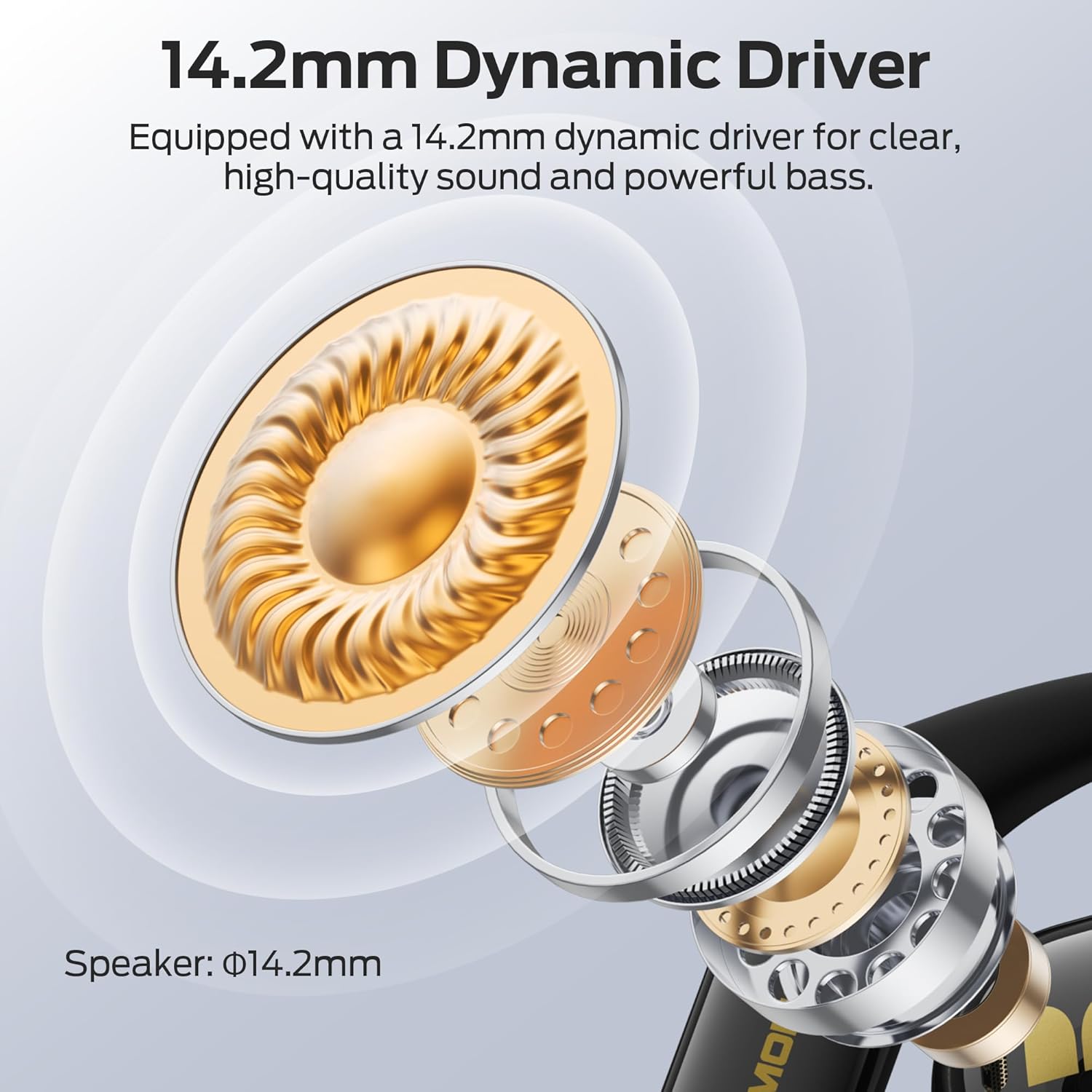
Image: Monster Open Ear AC326 Headphones shown in their charging case.
Características principales
- Diseño de oído abierto: Maintains situational awareness by allowing you to hear your surroundings while enjoying audio.
- Calidad de sonido superior: Equipped with a 14.2mm dynamic driver for clear audio, deep bass, and crisp highs. Features dual noise-reducing microphones for clear calls.
- Bluetooth 6.0 avanzado: Ensures fast, stable connections with ultra-low latency for seamless audio streaming and calls.
- Ajuste cómodo y seguro: Ergonomic ear hooks and soft silicone material provide a stable, pressure-free fit suitable for extended wear and sports.
- Batería de larga duración: Hasta 10 horas de reproducción por carga, ampliable a 35 horas con el estuche de carga.
- Resistencia al agua IPX5: Designed to withstand sweat and light rain, making them suitable for workouts and outdoor activities.
- Audio espacial: Experience immersive sound with 3D six-axis head tracking and spatial audio output.

Image: Diagram highlighting the open-ear design, allowing users to remain aware of their surroundings.
¿Qué hay en la caja?
Al desembalar, asegúrese de que todos los elementos estén presentes:
- Wireless Earbuds x2 (Left and Right)
- Estuche de carga x1
- Cable de carga x1
- Product Manual x1 (This document)
- Spare Silicone Tips x1 (Note: The product description mentions ear tips, but the AC326 is an open-ear design. This might refer to ear hook adjustments or a general inclusion for other models. Please verify if physical ear tips are included.)

Imagen: Representación visual de los elementos incluidos en el embalaje del producto.
Instrucciones de instalación
1. Carga inicial
Before first use, fully charge the headphones and charging case. Connect the provided USB-C cable to the charging port on the case and a power source. The indicator lights on the case will show charging status.

Image: The charging case and earbuds, illustrating battery life and Bluetooth version.
2. Uso de los auriculares
- Saque los auriculares del estuche de carga.
- Place the ear hooks over your ears.
- Rotate the earbuds backward until they fit snugly and comfortably. Adjust the ear hooks for optimal fit and sound direction.

Image: Step-by-step guide on correctly placing the earbuds over the ear for a secure fit.

Image: The flexible ear hook design ensures a secure and stable fit, ideal for sports and active use.
3. Emparejamiento Bluetooth
- Abre el estuche de carga. Los auriculares entrarán automáticamente en modo de emparejamiento (las luces indicadoras parpadearán).
- En su dispositivo (teléfono inteligente, tableta, etc.), vaya a la configuración de Bluetooth.
- Seleccione "Monster AC326" de la lista de dispositivos disponibles.
- Once connected, you will hear a confirmation tone, and the indicator lights will stop flashing.
Instrucciones de funcionamiento
The Monster AC326 Headphones feature touch controls on each earbud. The functions can be customized via the companion app.
Controles táctiles sobreview:
- Long press for 2s (L/R): Rechazar llamadas.
- Long press for 3s (R): Activar Asistente de voz.
- Long press for 3s (L): Toggle Spatial Audio.
- Short press (L): Volumen -.
- Short press (R): Volumen +.
- Doble clic (I/D): Reproducir/Pausar música, Responder/Finalizar llamada.
- Triple click (L): Canción anterior.
- Triple click (R): Siguiente canción.

Image: Visual guide to the various touch controls available on the earbuds.
Reproducción de música:
- To play or pause music, double-click either earbud.
- To skip to the next track, triple-click the right earbud.
- To go to the previous track, triple-click the left earbud.
- Adjust volume with a short press on the left (down) or right (up) earbud.
Gestión de llamadas:
- To answer or end a call, double-click either earbud.
- To reject an incoming call, long press either earbud for 2 seconds.

Image: The dual-mic ENC technology ensures clear calls by reducing ambient noise.
Mantenimiento
Limpieza:
- Limpie periódicamente los auriculares y el estuche de carga con un paño suave, seco y sin pelusa.
- Evite utilizar materiales abrasivos, disolventes o limpiadores químicos.
- Asegúrese de que los contactos de carga de ambos auriculares y del estuche estén limpios y secos para una carga adecuada.
Resistencia al agua (IPX5):
The headphones are IPX5 water-resistant, meaning they can withstand splashes of water and sweat. They are not designed for submersion in water. Ensure the earbuds are completely dry before placing them back in the charging case to prevent damage.

Image: The earbuds are shown with water droplets, indicating their IPX5 water-resistant rating.
Solución de problemas
Sin sonido o conexión intermitente:
- Asegúrese de que ambos auriculares estén cargados.
- Verify Bluetooth is enabled on your device and the headphones are connected.
- Acérquese a su dispositivo para evitar interferencias.
- Intente desvincular y volver a vincular los auriculares con su dispositivo.
Los auriculares no se cargan:
- Compruebe si el cable de carga está conectado de forma segura tanto al estuche como a la fuente de alimentación.
- Asegúrese de que los contactos de carga de los auriculares y del interior del estuche estén limpios y libres de residuos.
- Confirme que los auriculares estén colocados correctamente en el estuche de carga.
Mala calidad de llamada:
- Asegúrese de que los micrófonos no estén obstruidos.
- Muévase a un entorno más tranquilo si experimenta un ruido de fondo excesivo.
- Verifique la configuración del volumen de llamadas de su dispositivo.
Presupuesto
| Marca | Monstruo |
| Nombre del modelo | E69 (AC326) |
| Factor de forma | Oído abierto |
| Tecnología de conectividad | Inalámbrico (Bluetooth 6.0) |
| Tecnología de comunicación inalámbrica | Bluetooth |
| Nivel de resistencia al agua | Resistente al agua IPX5 |
| Peso del artículo | 6.4 onzas |
| Dimensiones del paquete | 5.08 x 4.57 x 1.54 pulgadas |
| Baterías | Se requieren baterías de 1 A (incluidas) |
| Fecha de primera disponibilidad | 19 de febrero de 2025 |
Garantía y soporte
Para obtener información sobre la garantía y la atención al cliente, consulte el sitio web oficial de Monster. webSitio web o contacte directamente con el servicio de atención al cliente. Normalmente, encontrará información detallada en el empaque del producto o en los recursos oficiales en línea del fabricante.


