Introducción
This manual provides detailed instructions for the JOMAA 20-Key Macro Programmable Numeric Gaming Keyboard. It covers setup, operation, maintenance, troubleshooting, and product specifications to ensure optimal use of your device. Please read this manual thoroughly before using the keyboard.
Contenido del paquete
- Teclado numérico para juegos programable con macros de 20 teclas JOMAA
- Cable USB tipo C
- Manual de usuario (este documento)
Instrucciones de instalación
1. Conexión del teclado
- Locate the USB Type-C port on the back of the JOMAA 20-Key Keyboard.
- Conecte un extremo del cable USB tipo C provisto al puerto del teclado.
- Connect the other end of the USB cable to an available USB port on your computer (PC, Laptop, or Gaming Console).
- The keyboard is plug-and-play for basic functionality.

This image highlights the detachable Type-C cable for easy portability and connectivity. It also shows the physical switch used to toggle between office and gaming modes.
2. Driver and Software Installation (Windows Only)
For advanced features such as macro programming and detailed RGB lighting customization, a dedicated driver and software are required. This software is compatible with Windows XP/Vista/7/8/10 systems only.
- Visit the official JOMAA support website to download the latest driver and software for your keyboard.
- Siga las instrucciones en pantalla para completar la instalación.
- Nota: If you configure settings on a Windows system, the keyboard will save these memory settings and retain them when connected to other compatible devices (e.g., Mac systems), although the driver itself cannot run on non-Windows operating systems.

A visual representation of the macro programming software, which allows users to define custom functions and macros for the keyboard's 19 programmable keys.
Instrucciones de funcionamiento
1. Funciones básicas de las teclas
The JOMAA 20-Key Keyboard functions as a standard numeric keypad or macro pad. Keys are pre-assigned with numeric and basic arithmetic functions by default.
2. Programación de macros
The keyboard supports macro definition for 19 keys. This feature allows you to assign complex sequences of commands or single key presses to a single key, enhancing efficiency in gaming or productivity tasks.
- Install the JOMAA software on a Windows PC.
- Launch the software and select the key you wish to program.
- Record or input the desired macro sequence.
- Save the changes to the keyboard. The programmed macros will be stored on the keyboard's internal memory.
3. Modos de iluminación RGB
The keyboard features 12 distinct RGB lighting modes. These modes can be cycled through using a dedicated key on the keyboard.
- Locate the 'Mode Switching Key' (often indicated by a gear or light icon).
- Press this key to cycle through the available lighting effects.
- Further customization of lighting effects may be available through the JOMAA software.
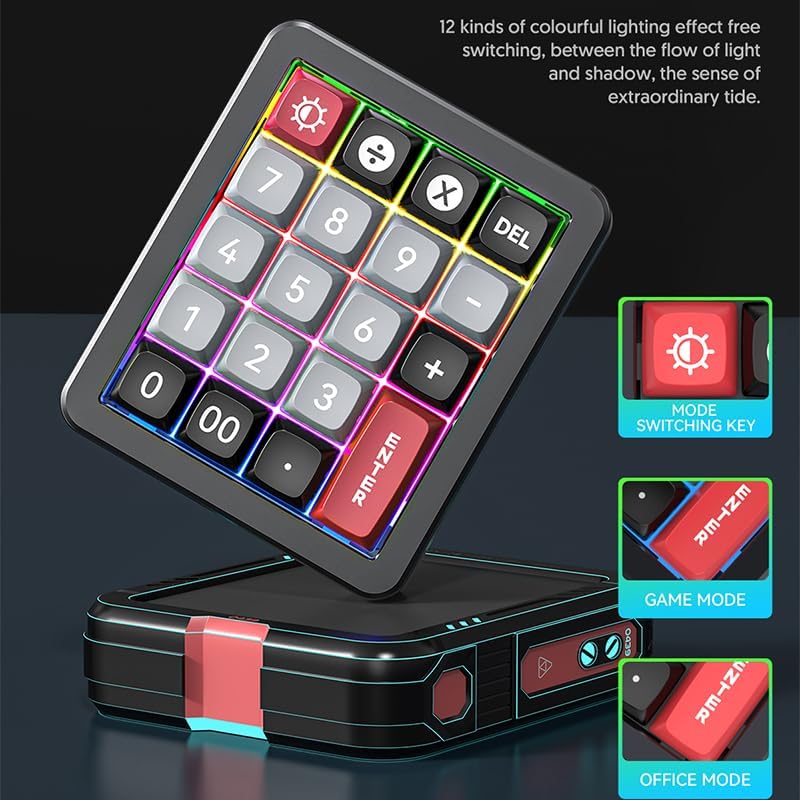
The keyboard features 12 distinct colorful lighting effects. The image also points out the dedicated mode switching key, allowing users to cycle through different lighting presets.
4. Teclas intercambiables en caliente
The JOMAA 20-Key Keyboard features hot-swappable switches, allowing users to replace individual key switches without soldering. This enables customization of typing feel and sound.
- Use a switch puller tool (not included) to carefully remove the keycap.
- Con el extractor de interruptores, sujete con cuidado el interruptor y tire de él hacia arriba para quitarlo de la PCB.
- Alinee los pines del nuevo interruptor con los orificios de la PCB y presiónelo firmemente hasta que encaje en su lugar.
- Reemplace la tecla.
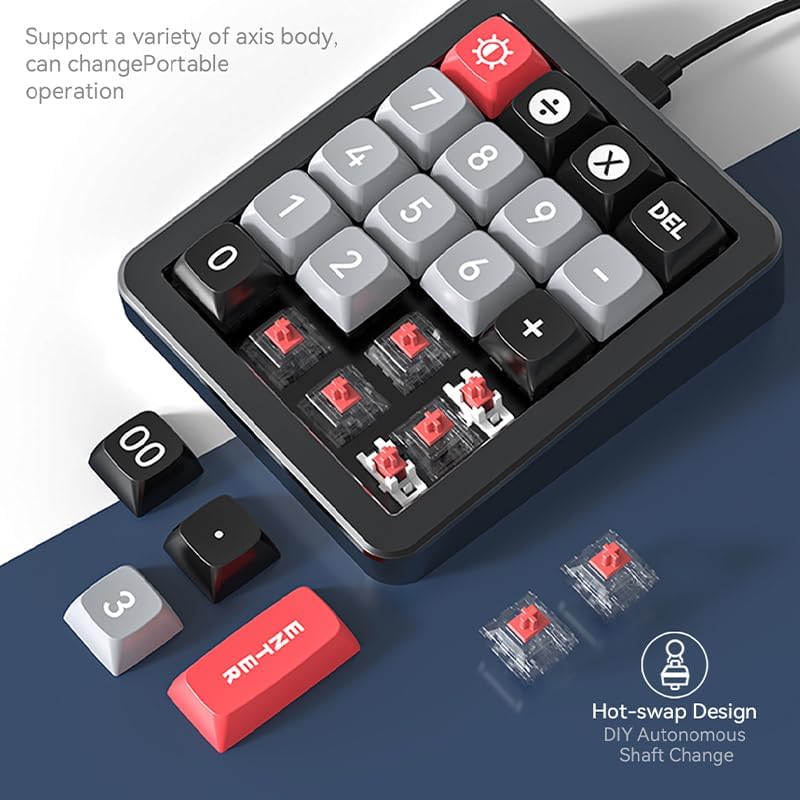
This image illustrates the hot-swappable design of the keyboard, showing how individual key switches can be easily removed and replaced without soldering, enabling customization.
5. Gasket Structure and Aluminum Alloy Body
The keyboard is constructed with an aluminum alloy body and features a gasket structure. The aluminum alloy provides durability and a stable base, while the gasket structure offers a cushioned typing experience, reducing impact noise and improving key feel.

The image emphasizes the keyboard's durable aluminum alloy construction, contributing to its premium feel and stability.

un estallido view diagram detailing the internal gasket structure of the keyboard, which provides a softer, more cushioned typing experience and reduces noise.
Mantenimiento
Limpieza del teclado
- Desconecte el teclado de su computadora antes de limpiarlo.
- Utilice un paño suave y sin pelusa ligeramente seco.ampLimpie con agua o una solución de limpieza suave la superficie del teclado.
- Para limpiar entre las teclas, utilice aire comprimido para eliminar el polvo y los residuos.
- Evite utilizar productos químicos agresivos, limpiadores abrasivos o rociar líquidos directamente sobre el teclado.
Cuidados generales
- Evite exponer el teclado a temperaturas extremas, luz solar directa o humedad alta.
- No deje caer ni someta el teclado a impactos fuertes.
- Mantenga los líquidos alejados del teclado para evitar daños.
Solución de problemas
Teclado no responde
- Asegúrese de que el cable USB tipo C esté conectado de forma segura tanto al teclado como a la computadora.
- Intente conectar el teclado a un puerto USB diferente en su computadora.
- Pruebe el teclado en otra computadora para descartar problemas específicos del sistema.
- Si usa un concentrador USB, intente conectarlo directamente a la computadora.
Problemas con la iluminación RGB
- Asegúrese de que el teclado esté correctamente encendido.
- Press the 'Mode Switching Key' to cycle through different lighting effects.
- If using the software, verify that lighting settings are correctly applied and saved.
Macro Programming Difficulties
- Confirm that the JOMAA software is correctly installed on a Windows PC.
- Ensure you are following the software's instructions for macro recording and saving.
- Be aware that the software may be slow or clunky, requiring patience during configuration. Allow several seconds for changes to apply.
- If macros are not working on a non-Windows device, ensure they were programmed and saved on a Windows PC first, as the driver does not run on other operating systems.
Presupuesto
| Característica | Detalle |
|---|---|
| Marca | JOMAA |
| Modelo | 20-Key Macro Programmable Numeric Gaming Keyboard |
| Tecnología de conectividad | USB-C (cable desmontable) |
| Tipo de clave | Interruptores mecánicos intercambiables en caliente |
| Material del cuerpo | Aleación de aluminio |
| Estructura | Estructura de la junta |
| Iluminación | RGB (12 modos) |
| Teclas programables | 19 keys for macro definition |
| Dispositivos compatibles | Consola de juegos, portátil, PC |
| Compatibilidad del sistema | Windows XP/Vista/7/8/10, Mac (driver for Windows only) |
| Peso del artículo | 15.5 onzas |
| Dimensiones del paquete | 6.3 x 4.72 x 1.97 pulgadas |
| Componentes incluidos | Cable USB |
Información de garantía
JOMAA products are typically covered by a manufacturer's warranty. For specific details regarding the warranty period and terms for your 20-Key Macro Programmable Numeric Gaming Keyboard, please refer to the warranty card included with your product or visit the official JOMAA webSitio. Conserve su comprobante de compra para reclamaciones de garantía.
Atención al cliente
If you encounter any issues or have questions not addressed in this manual, please contact JOMAA customer support. Contact information can typically be found on the official JOMAA websitio o en el embalaje del producto.


