Introducción
This manual provides essential information for the proper use and maintenance of your Maxcom MM835 4G VoLTE Flip Phone. Please read these instructions carefully before using your device to ensure optimal performance and longevity. This phone is designed for ease of use, featuring large displays and a simplified interface.
Producto terminadoview
The Maxcom MM835 is a 4G VoLTE flip phone designed for clear communication and user convenience. It features a dual-screen design, large backlit keys, and essential functions like an SOS button and HAC (Hearing Aid Compatibility).
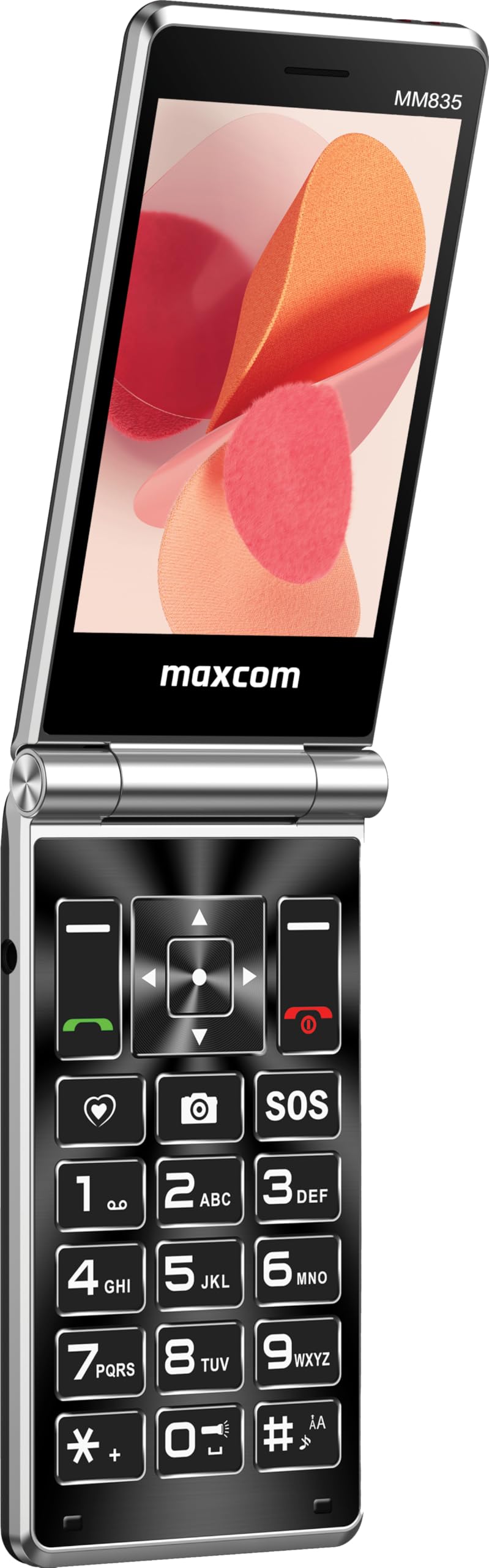
Figura 1: Maxcom MM835 Flip Phone (Closed View). The external 2.4-inch screen displays time, date, battery status, and missed calls without opening the phone.
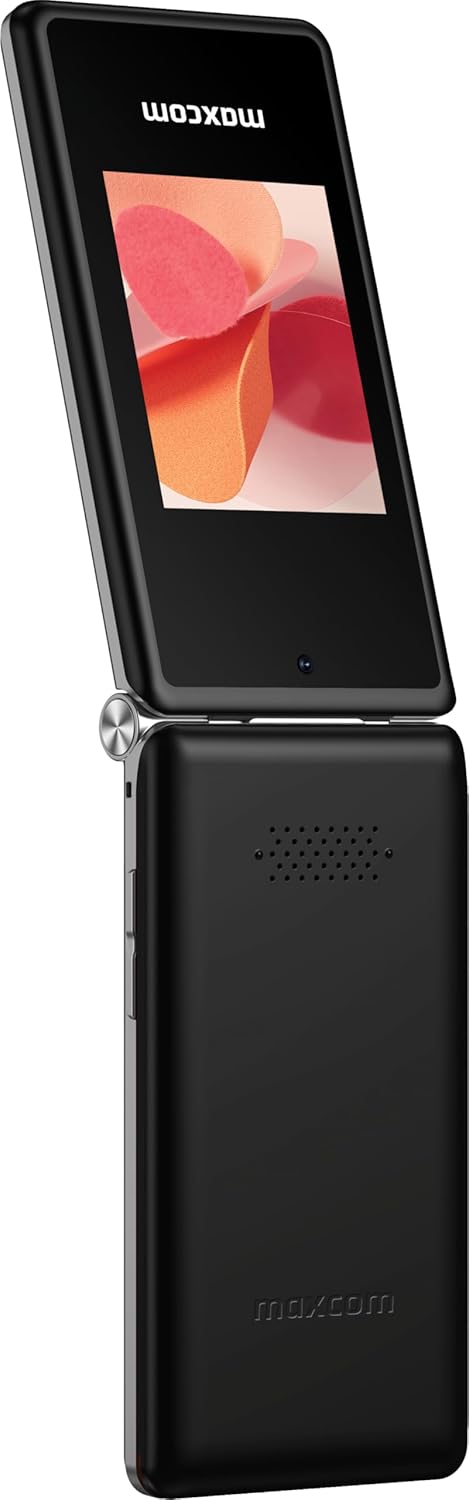
Figura 2: Maxcom MM835 Flip Phone (Open View). The internal 3.5-inch screen provides a clear interface for contacts and messages, complemented by large, comfortable keys.

Figura 3: Lado view of the Maxcom MM835, illustrating the volume control buttons for easy audio adjustment.

Figura 4: Abajo view of the Maxcom MM835, highlighting the USB-C charging port for convenient power connection.

Figura 5: Detail of the Maxcom MM835 keyboard, featuring the prominent SOS button for emergency contacts.

Figura 6: The Maxcom MM835 is Hearing Aid Compatible (HAC), ensuring clear audio for users with hearing aids.
Configuración
1. Instalación y carga de la batería
- Abra la tapa trasera: Retire con cuidado la cubierta posterior del teléfono.
- Insertar la batería: Place the included Lithium-ion battery into its compartment, ensuring the contacts align correctly.
- Reemplace la cubierta posterior: Fije firmemente la tapa trasera.
- Cargue el teléfono: Connect the provided USB-C cable to the phone's charging port (Figure 4) and to a compatible USB power adapter (not included). Allow the phone to charge fully before first use. The external screen will indicate charging status.
2. Instalación de la tarjeta SIM
The Maxcom MM835 supports dual SIM cards.
- Remove the back cover and battery: Follow the steps above to access the SIM card slots.
- Insertar tarjetas SIM: Carefully slide your SIM card(s) into the designated slot(s). Ensure the gold contacts face downwards and the notched corner aligns with the slot.
- Reinstall battery and cover: Vuelva a colocar la batería y la tapa trasera.
3. Encendido / apagado
- Para encender: Mantenga presionado el botón de Encendido/Finalizar llamada (botón rojo) hasta que la pantalla se ilumine.
- Para apagar: Mantenga presionado el botón de Encendido/Finalizar llamada hasta que aparezcan las opciones de apagado, luego seleccione "Apagar".
Instrucciones de funcionamiento
1. Navegación básica
- Pantalla interna: The 3.5-inch internal screen is your primary interface for menus and content.
- Pantalla externa: The 2.4-inch external screen shows essential information like time, date, battery, and caller ID when the phone is closed.
- Teclas de navegación: Use the directional keys (up, down, left, right) and the central OK button to navigate through menus.
- Claves suaves: The keys directly below the screen perform functions indicated on the display (e.g., "Menu", "Back").
- Call Keys: The green button initiates calls, and the red button ends calls or powers the phone on/off.
2. Realización y recepción de llamadas
- Hacer una llamada:
- Abra el teléfono.
- Marque el número usando el teclado.
- Presione el botón verde Llamar para iniciar la llamada.
- Para contestar una llamada:
- Cuando suene el teléfono, abra la tapa o presione el botón verde de llamada.
- Para finalizar una llamada: Presione el botón rojo Finalizar llamada.
3. Envío y recepción de mensajes
- Vaya al menú "Mensajes".
- Select "New Message" to compose a text.
- Introduzca el número del destinatario o selecciónelo entre los contactos.
- Escriba su mensaje usando el teclado.
- Presione "Enviar".
4. SOS Button Functionality
The SOS button (Figure 5) is located on the main keypad and is designed for emergency situations.
- Configuración: Before use, configure emergency contacts in the phone's settings. Refer to the "SOS Settings" section in the phone's menu.
- Activación: In an emergency, press and hold the SOS button. The phone will automatically send pre-defined notifications to your emergency contacts and may initiate calls to them.
5. Cámara
El teléfono incluye una cámara básica para capturar fotografías.
- Acceda a la cámara desde el menú principal.
- Encuadre su toma utilizando la pantalla interna.
- Press the central OK button to take a picture.
6. Radio FM
Enjoy listening to FM radio stations on your device.
- Navegue hasta la aplicación “Radio FM” en el menú.
- Connect headphones (not included) to act as an antenna for optimal reception.
- Utilice las teclas de navegación para buscar estaciones o sintonizarlas manualmente.
Mantenimiento
- Limpieza: Utilice un paño suave y seco para limpiar el exterior del teléfono. Evite limpiadores líquidos o materiales abrasivos.
- Cuidado de la batería: Para prolongar la vida útil de la batería, evite las temperaturas extremas. Cargue el teléfono con regularidad, pero no lo deje completamente descargado durante periodos prolongados.
- Almacenamiento: Guarde el teléfono en un lugar fresco y seco, alejado de la luz solar directa y de la humedad cuando no esté en uso.
- Software: While software updates are not explicitly guaranteed, ensure your phone's settings are optimized for performance.
Solución de problemas
If you encounter issues with your Maxcom MM835, refer to the following common solutions:
| Problema | Posible solución |
|---|---|
| El teléfono no se enciende | Ensure the battery is correctly installed and fully charged. Connect the charger and try again. |
| No puedo hacer ni recibir llamadas | Comprueba que la tarjeta SIM esté correctamente insertada. Verifica que tengas señal de red. Contacta con tu proveedor de servicios si el problema persiste. |
| Mala duración de la batería | Ensure the phone is fully charged. Reduce screen brightness or close unused applications. Battery performance can degrade over time. |
| "Emergency Call Only" message | This indicates a lack of network signal or an issue with your SIM card/service. Try moving to an area with better reception or reinserting your SIM card. |
| Las llaves no responden | Restart the phone. If the issue continues, ensure no debris is obstructing the keys. |
Presupuesto
| Característica | Detalle |
|---|---|
| Marca | Maxcom |
| Nombre del modelo | MM835 |
| Tipo de producto | Teléfono plegable |
| Color | Negro |
| Sistema operativo | Sistema operativo Maxcom |
| Tamaño de la pantalla interna | 3.5 pulgadas |
| Tamaño de la pantalla externa | 2.4 pulgadas |
| Conectividad | 4G, VoLTE |
| Características especiales | Dual SIM, SOS Button, HAC (Hearing Aid Compatible), Large Keys |
| Composición de la batería | Iones de litio |
| Capacidad de la batería | 1400 mAh |
| Puerto de carga | USB tipo C |
| Capacidad de almacenamiento de memoria | 32 GB |
| Modelo de CPU | ARMv7 |
| Resolución de pantalla | 640 x 360 |
| Operador inalámbrico | Todos los operadores (desbloqueados) |
Garantía y soporte
For warranty information and customer support, please refer to the documentation provided with your purchase or contact the seller directly. Maxcom strives to provide reliable products, and support is available for any manufacturing defects or operational queries.
- Fabricante: Maxcom
- Vendedor: You Get - Innovation & Technology
- Política de devoluciones: Typically 30 days for refund/replacement (check with seller for specifics).


