Introducción
The Precision Pro Titan Elite Golf Range Finder is engineered to enhance your golf game with cutting-edge features and meticulous craftsmanship. This manual provides detailed instructions for setup, operation, and maintenance to ensure optimal performance and longevity of your device.

Image: The Precision Pro Titan Elite Golf Range Finder, showcasing su diseño elegante y su formato compacto.
Qué incluye
Your Precision Pro Titan Elite package includes the following items:
- Titan Elite Rangefinder
- Estuche de transporte premium
- Cable de carga USB-C
- Manual de instrucciones (este documento)

Image: A visual representation of the items included in the product packaging: the Titan Elite Rangefinder, its premium carrying case, and the USB-C charging cable.
Características principales
- Comprehensive GPS Distances: Sin problemas view front, center, and back distances for precise measurements.
- Batería recargable de larga duración: Enjoy up to 10 full rounds with GPS enabled, or 40 rounds without GPS, on a single charge.
- Find My Precision Pro: Receive notifications if the rangefinder separates from you and locate it on a map.
- All-Weather Waterproof Durability: IP67 waterproof rating protects against dust, water, and debris.
- Visual Target Lock: Provides immediate confirmation of your target with a ripple effect and subtle pulse vibration.
- Tecnología de pendiente adaptativa: Dynamically adjusts for varying terrains, providing accurate distance readings with elevation changes.
- Crystal-Clear HD Magnification: 6X magnification with HD optics for unparalleled clarity up to 999 yards.
- iOS-Only Compatibility: Designed for iPhone users, connecting to the Precision Pro app for built-in GPS and standard distance measurements.
Elementos visuales destacados
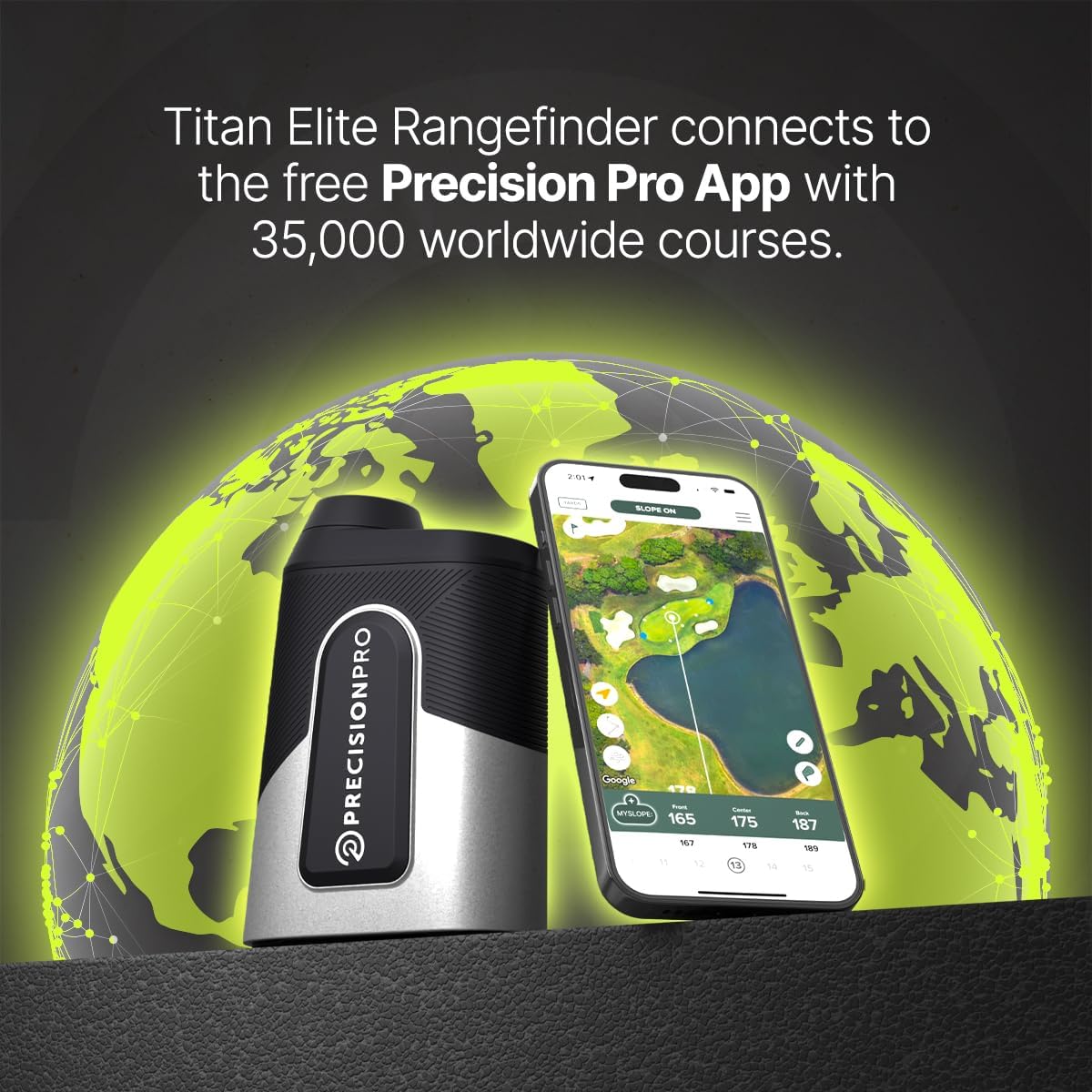
Imagen: Una clara view of the rangefinder's display, highlighting the aiming reticle, straight line distance, slope adjusted distance, yards/meters indicator, and battery indicator for a golfer-friendly experience.

Image: The rangefinder connected to a smartphone app, demonstrating dual-level accuracy by showing front, center, and back of green distances both on the device and within the app.

Image: A smartphone screen displaying a notification for the 'Find My Rangefinder' feature, indicating the device's last connected location, helping users prevent loss.

Image: The Titan Elite rangefinder being sprayed with water, illustrating its IP67 waterproof and dustproof rating, along with its magnetic cart mount and unbreakable aluminum shell.
Empezando
Carga del dispositivo
Before first use, fully charge your Titan Elite Range Finder.
- Localice el puerto de carga USB-C en el dispositivo.
- Connect the provided USB-C cable to the rangefinder and a compatible USB power source (e.g., computer, wall adapter).
- La luz indicadora de carga se iluminará. Una vez cargada por completo, la luz cambiará o se apagará.
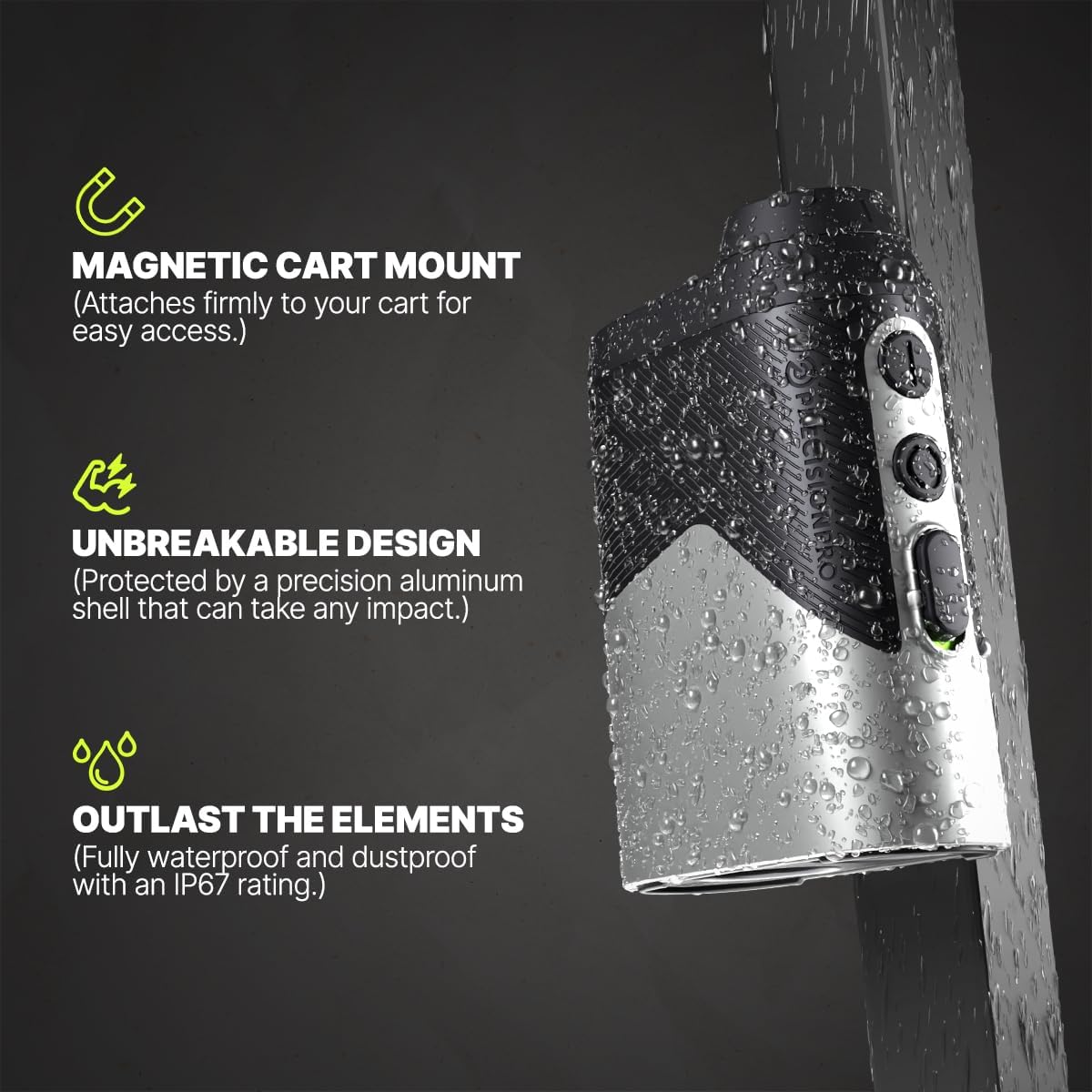
Imagen: Un primer plano view of the USB-C charging port on the Titan Elite Range Finder, with the charging cable inserted, indicating the device is being charged.
App Connection (iOS Only)
To utilize the full GPS functionality and 'Find My' features, connect your rangefinder to the Precision Pro app on your iPhone.
- Download the Precision Pro app from the Apple App Store.
- Asegúrese de que Bluetooth esté habilitado en su iPhone.
- Open the Precision Pro app and follow the on-screen instructions to pair your Titan Elite Range Finder.
- Once paired, the app will display course maps and detailed distances.

Image: The Titan Elite Range Finder positioned next to a smartphone displaying the Precision Pro app, illustrating the seamless connection and access to worldwide course data.
Instrucciones de funcionamiento
Alcance básico
- Mire a través del ocular y apunte la retícula hacia su objetivo.
- Press the power/fire button to activate the laser and get a distance reading.
- For target lock, aim slightly off the target, hold the laser button, and pan onto the target. The device will vibrate and the aiming circle will ripple when locked.
Funcionalidad GPS
When connected to the app, the rangefinder provides enhanced GPS distances:
- View front, center, and back distances to the green directly on the rangefinder display or within the app.
- The app provides a visual layout of the hole, helping you plan your shots.
Tecnología de pendientes
The adaptive slope technology automatically calculates the adjusted distance based on elevation changes. This feature can be toggled on/off for tournament play.
Video: A demonstration titled "Play A Hole With Chelsea & The Titan Elite," showcasing the rangefinder's features and ease of use during a golf round, including distance measurement and app integration.
Cuidado y mantenimiento
- Limpieza: Utilice un paño suave y limpio para limpiar las lentes y el cuerpo. Para la suciedad difícil, utilice un paño ligeramenteamp Se puede utilizar un paño. Evite materiales abrasivos.
- Almacenamiento: Store the rangefinder in its protective carrying case when not in use. Keep it in a cool, dry place away from direct sunlight and extreme temperatures.
- Clasificación de impermeabilidad: The device has an IP67 rating, meaning it is protected from dust and can withstand immersion in water up to 1 meter for 30 minutes. However, avoid prolonged submersion.
- Cuidado de la batería: Para una vida útil óptima de la batería, evite descargarla por completo con frecuencia. Cárguela regularmente, incluso si no la usa constantemente.
Solución de problemas
| Problema | Posible causa | Solución |
|---|---|---|
| El dispositivo no se enciende | Batería baja; botón de encendido no presionado correctamente | Charge the device; Ensure the power button is pressed firmly. |
| Lecturas de distancia inexactas | Dirty lens; Obstruction; Incorrect mode (e.g., slope off) | Clean the lenses; Ensure clear line of sight; Check slope switch setting. |
| No se puede conectar a la aplicación | Bluetooth off; Device not in pairing mode; Android device | Enable Bluetooth; Follow app pairing instructions; Note: App is iOS-only. |
| 'Find My' feature not working | Device out of range; App not running in background | Ensure device is within Bluetooth range; Keep app running or check background app refresh settings. |
Especificaciones del producto
| Especificación | Detalle |
|---|---|
| Marca | Precisión Pro |
| Nombre del modelo | Titan-Elite |
| Rango de medición | 5 años a 999 años |
| Aumento | 6 x |
| Nivel de resistencia al agua | Impermeable (IP67) |
| Material | Aluminio |
| Tipo de batería | Lithium-Ion Polymer (Rechargeable) |
| Peso del artículo | 16 onzas |
| Dimensiones del producto | 4.7" de largo x 1.7" de ancho x 3.35" de alto |
Garantía y soporte
The Precision Pro Titan Elite Golf Range Finder comes with a 3-year warranty. For detailed warranty information, claims, or technical support, please refer to the official Precision Pro Golf websitio o comuníquese directamente con su servicio de atención al cliente.
Para obtener más ayuda, visite: Precision Pro Store on Amazon


