1. Introducción
The Beafon Silverline ML10 LTE Desk Phone is designed for ease of use and reliability, offering essential communication features with enhanced safety options. This manual provides detailed instructions for setting up, operating, and maintaining your device.
Las características principales incluyen:
- 4G LTE Desk Phone connectivity
- Hearing Aid Compatible (HAC M4/T4)
- Programmable SOS emergency numbers with included SOS wristband/necklace (433 MHz range)
- Three quick dial keys for photos or symbols
- Digital announcement when pressing keys
- Extra-large XXL digits on display
- Extra loud ringer (90 dB) and earpiece volume (+40 dB)
- Hands-free function and Bluetooth LE
- SMS functionality and Audio Booster button

2. Información importante de seguridad
Lea todas las instrucciones de seguridad antes de usar el dispositivo para evitar lesiones o daños. Conserve este manual para futuras consultas.
- No exponga el dispositivo a temperaturas extremas, luz solar directa o humedad.
- Utilice únicamente accesorios y adaptadores de corriente aprobados.
- Evite dejar caer o someter el dispositivo a impactos fuertes.
- No intente desmontar ni reparar el dispositivo usted mismo. Contacte con personal de servicio técnico cualificado.
- Keep the device away from medical devices, such as pacemakers, to avoid interference.
3. Contenido del paquete
Asegúrese de que todos los artículos estén presentes en el paquete:
- Beafon Silverline ML10 LTE Desk Phone unit
- Auricular y cable enrollado
- Adaptador de corriente
- USB charger cable (USB-C)
- SOS wristband
- SOS necklace
- Lithium-ion battery (pre-installed or separate)
- Manual de usuario (este documento)
4. Producto terminadoview
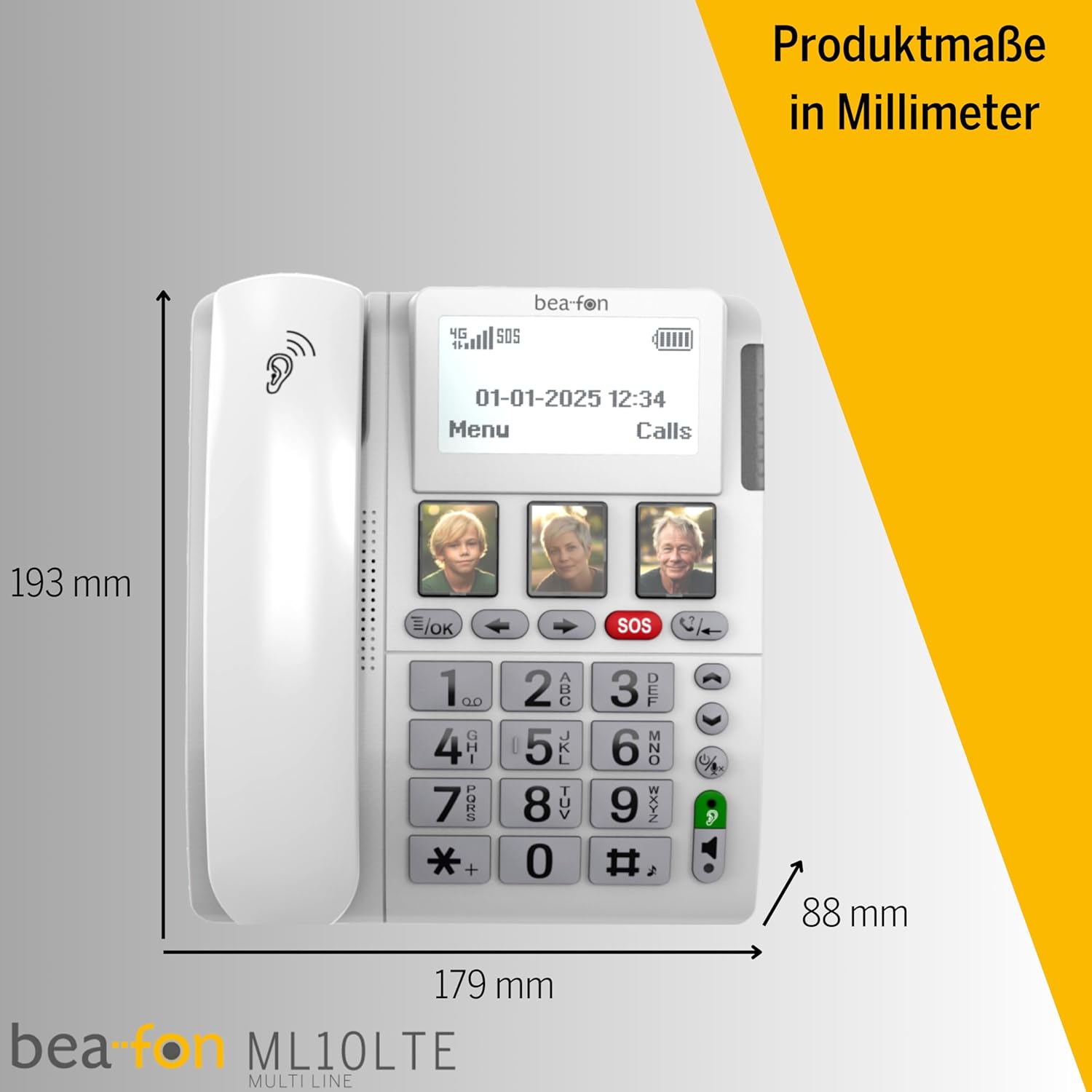
Familiarize yourself with the various parts of your Beafon ML10 desk phone.


5. Configuración
5.1. Inserción de la tarjeta SIM
- Ensure the phone is powered off and disconnected from the power source.
- Locate the SIM card slot, usually on the back or side of the device.
- Insert a Nano SIM card into the designated slot, ensuring correct orientation.
- Cierre la tapa de la ranura de la tarjeta SIM de forma segura.
5.2. Conexión de energía
- Connect the USB-C charger cable to the phone's charging port.
- Conecte el adaptador de corriente a una toma de pared.
- The phone can operate on battery power via 4G LTE, eliminating the need for a fixed line connection.
5.3. Encendido inicial y selección de idioma
- Mantenga presionado el botón de encendido hasta que se encienda la pantalla.
- Siga las instrucciones en pantalla para seleccionar su idioma preferido.
- The phone will automatically search for a 4G LTE network.

6. Instrucciones de funcionamiento
6.1. Realización y recepción de llamadas
- Haciendo una llamada: Lift the handset, dial the number using the large keypad, and press the green call button.
- Recibir una llamada: When the phone rings (up to 90 dB), lift the handset or press the hands-free button to answer.
- Función manos libres: Press the dedicated hands-free button to activate speakerphone during a call.
6.2. Quick Dial Keys
The phone features three programmable quick dial keys (I, II, III) that can be customized with photos or symbols for easy access to frequently called contacts.
- Programación: Navigate to the phone's menu, select 'Quick Dial Settings', and assign a contact number to each key. You can also associate a photo or symbol.
- Usando: Simply press the desired quick dial key to call the assigned contact.
6.3. Función de emergencia SOS
The SOS function allows you to quickly contact pre-selected emergency numbers. It includes an SOS button on the phone and a separate SOS wristband/necklace.
- Programación de números SOS: Access the 'SOS Settings' in the menu to program up to five emergency contact numbers.
- Activating SOS (Phone): Press and hold the red SOS button on the phone. The phone will automatically call the programmed numbers in sequence until an answer is received.
- Activating SOS (Wristband/Necklace): Press the button on the SOS wristband or necklace. This will trigger the phone to initiate the emergency call sequence. The wristband/necklace has a range of 433 MHz.


6.4. Otras funciones
- Mensaje de texto: The phone supports sending and receiving text messages. Access the 'Messages' menu to compose or read SMS.
- Audio Booster: Press the Audio Booster button during a call to temporarily increase the earpiece volume for clearer audio.
- BluetoothLE: Use Bluetooth Low Energy to connect compatible wireless accessories.
- HAC Compatibility: The phone is certified HAC M4/T4, making it suitable for users with hearing aids.
7. Mantenimiento
7.1. Limpieza del dispositivo
Para mantener tu teléfono en óptimas condiciones:
- Limpie la superficie del teléfono con un paño suave.amp paño.
- No utilice productos químicos agresivos ni limpiadores abrasivos.
- Ensure no moisture enters openings such as the microphone or speaker.
7.2. Cuidado de la batería
The phone is powered by a Lithium-ion battery. To prolong battery life:
- Evite descargar completamente la batería con frecuencia.
- Charge the phone regularly, especially if not in use for extended periods.
- Guarde el dispositivo en un lugar fresco y seco cuando no esté en uso.
8. Solución de problemas
If you encounter issues with your Beafon ML10, refer to the following common problems and solutions:
| Problema | Posible solución |
|---|---|
| El teléfono no se enciende | Check if the power adapter is correctly connected and the battery is charged. Ensure the battery is properly inserted. |
| No puedo hacer ni recibir llamadas | Verify that the SIM card is correctly inserted and activated. Check for network signal strength on the display. Restart the phone. |
| La función SOS no funciona | Ensure SOS numbers are correctly programmed. Check the battery level of the SOS wristband/necklace. Verify the wristband/necklace is within range (433 MHz). |
| Mala calidad de audio | Adjust the earpiece volume. Ensure the microphone is not blocked. If using hands-free, ensure you are close to the phone. |
| La pantalla está en blanco o congelada | Try restarting the phone by holding the power button. If unresponsive, disconnect power and re-connect. |
9. Especificaciones
Technical details of the Beafon Silverline ML10 LTE Desk Phone:
| Característica | Detalle |
|---|---|
| Marca | Beafon |
| Número de modelo | 15031162187 |
| Sistema operativo | Sistema operativo en tiempo real |
| Tipo de teléfono | Nano SIM |
| Conectividad | 4G LTE, Bluetooth LE |
| Composición de la batería | Iones de litio (1 incluida) |
| Fuente de poder | Funciona con pilas |
| Volumen del timbre | Hasta 90 dB |
| Earpiece Volume | + 40 dB |
| Compatibilidad con audífonos | HAC M4/T4 |
| SOS Wristband/Necklace Range | 433 MHz |
| Peso | 210 gramos |
| Identificador de llamadas | Sí |
| Operación multilínea | Operación de línea única |
10. Garantía y soporte
Information regarding the specific warranty period and detailed support contact information for the Beafon Silverline ML10 LTE Desk Phone is not available in the provided product data. Please refer to the product packaging or the manufacturer's official website for the most current warranty terms and customer support details.


