1. Introducción
Thank you for choosing the Infiniity DM56 Sport Smartwatch. This device is designed to enhance your active lifestyle with advanced fitness tracking, health monitoring, and smart connectivity features. Equipped with a vibrant 1.43-inch AMOLED display, built-in GPS, and comprehensive health sensors, the DM56 is your reliable companion for both daily wear and intense workouts.
This manual provides detailed instructions on how to set up, operate, maintain, and troubleshoot your smartwatch to ensure optimal performance and longevity.

Imagen 1.1: Frente view of the Infiniity DM56 Sport Smartwatch, showcasing its round AMOLED display and rugged design.
2. ¿Qué hay en la caja?
Upon opening your Infiniity DM56 Sport Smartwatch package, please ensure all the following items are present:
- Infiniity DM56 Sport Smartwatch
- Cable de carga
- Manual de usuario (este documento)
3. Configuración
3.1 Carga del reloj inteligente
Before first use, fully charge your DM56 smartwatch. A full charge typically takes approximately 2 hours.
- Connect the magnetic charging cable to the charging contacts on the back of the smartwatch. Ensure the pins align correctly.
- Conecte el extremo USB del cable de carga a un adaptador de corriente USB estándar (se recomienda 5 V/1 A) o al puerto USB de una computadora.
- The watch display will show a charging indicator. Once fully charged, the indicator will change or disappear.
3.2 Emparejamiento con su teléfono inteligente
To unlock the full potential of your DM56 smartwatch, you need to pair it with your smartphone via Bluetooth using the dedicated companion application. The DM56 is compatible with Android 5.0+ and iOS 11 and above.
- Descargar la aplicación: Buscar the official Infiniity companion app (refer to the packaging or quick start guide for the exact app name) on the Google Play Store (for Android) or Apple App Store (for iOS) and install it.
- Habilitar Bluetooth: Asegúrese de que Bluetooth esté habilitado en su teléfono inteligente.
- Abra la aplicación: Launch the companion app on your smartphone and follow the on-screen instructions to create an account or log in.
- Agregar dispositivo: Dentro de la app, ve a la sección "Añadir dispositivo" o "Emparejar dispositivo". La app buscará los smartwatches disponibles.
- Select DM56: Select 'DM56' from the list of found devices. A pairing request may appear on both your phone and the watch. Confirm the pairing on both devices.
- Configuración completa: Once paired, the app will guide you through initial settings, such as profile information, notification permissions, and data synchronization.
4. Funcionamiento del reloj inteligente
4.1 Navegación básica
The DM56 features a responsive touchscreen and physical buttons for intuitive control.
- Pantalla táctil: Desliza el dedo hacia arriba, abajo, izquierda o derecha para navegar por los menús y las notificaciones. Toca para seleccionar elementos.
- Botones físicos: The watch has multiple buttons, typically labeled 'SPORT', 'SEL', 'BACK', and a dedicated 'GPS' button. Their functions may vary depending on the current screen or mode.
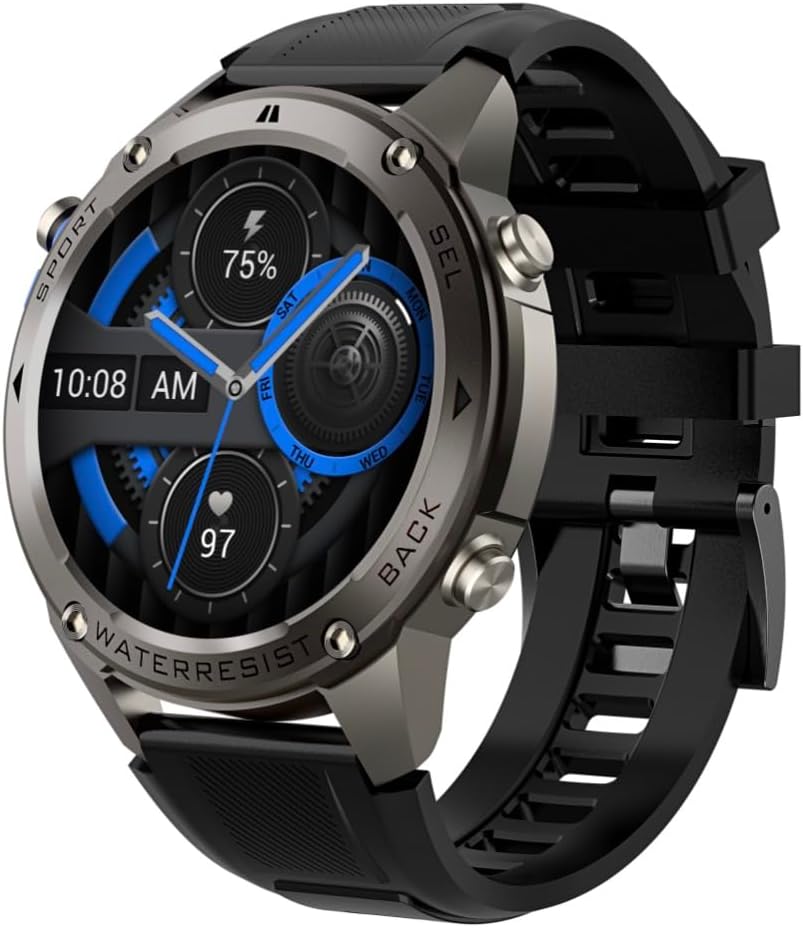
Imagen 4.1: Lateral view of the Infiniity DM56 Sport Smartwatch, highlighting the physical control buttons.
4.2 Funciones de visualización
The 1.43-inch AMOLED display offers vibrant colors and deep blacks with a resolution of 466x466 pixels.
- Pantalla siempre activa: The DM56 supports Always-On Display functionality, allowing you to see the time and essential information at a glance without needing to raise your wrist or press a button. This feature can be configured in the watch settings.

Image 4.2: The Infiniity DM56 Sport Smartwatch display, showcasing a typical watch face with various data points.
4.3 Built-in GPS & Compass
The DM56 features dual-frequency GPS (L1+L5) and supports multiple satellite systems (GPS, GLONASS, BDS, Galileo, NAVIC, QZSS) for precise outdoor tracking. A built-in compass further aids navigation.
- Rastreo GPS: When starting an outdoor activity (e.g., running, cycling), the watch will automatically attempt to acquire a GPS signal. Ensure you are in an open area for faster signal acquisition. Your route, distance, and pace will be recorded.
- Brújula: Access the compass feature from the watch's menu to get real-time directional information.

Image 4.3: The Infiniity DM56 Sport Smartwatch from an angle, highlighting the dedicated GPS button on the side.

Imagen 4.4: Un primer plano view of the GPS button on the Infiniity DM56 Sport Smartwatch, indicating its function.
4.4 Monitoreo de salud durante todo el día
The DM56 is equipped with the VC30F sensor for continuous health monitoring.
- Monitoreo del ritmo cardíaco: Track your heart rate in real-time throughout the day. View your current heart rate on the watch face or in the dedicated heart rate app.
- Monitoreo de oxígeno en sangre (SpO2): Mida sus niveles de saturación de oxígeno en sangre.
- Seguimiento del sueño: El reloj monitorea automáticamente tus patrones de sueño, incluido el sueño profundo, el sueño ligero y los tiempos de vigilia. View Análisis detallado del sueño en la aplicación complementaria.
- Seguimiento del estrés: Controle sus niveles de estrés a lo largo del día.
- Podómetro: Counts your daily steps, distance, and estimated calories burned.
Note: The Infiniity DM56 Smartwatch is NOT A MEDICAL DEVICE. All health monitoring data is for reference only and should not be used for medical diagnosis or treatment.
4.5 modos deportivos
The DM56 offers over 170 customizable sports modes, with 14 built-in modes such as outdoor running, cycling, and swimming. You can add up to 10 additional modes manually via the companion app.
- Iniciar una actividad: Navigate to the 'Workout' or 'Sports' menu on the watch, select your desired activity, and tap to start.
- Durante la actividad: The watch will display real-time metrics such as duration, distance, heart rate, and calories burned.
- Actividad final: Swipe or press the designated button to pause or end the activity. Your workout data will be saved and synchronized with the app.
4.6 Smart Notifications & Calls
Once paired with your smartphone, the DM56 can receive notifications and handle calls directly on your wrist.
- Notificaciones: Receive alerts for incoming calls, SMS messages, and app notifications (e.g., social media, email). Configure which app notifications you want to receive in the companion app.
- Make/Answer Call: The DM56 allows you to make and answer calls directly from the watch, utilizing its built-in microphone and speaker. Ensure the watch is connected to your phone via Bluetooth.
5. Mantenimiento
5.1 Clasificación de impermeabilidad
The DM56 has a 5ATM waterproof rating, meaning it can withstand water pressures equivalent to a depth of 50 meters. This makes it suitable for swimming, showering, and other water-based activities. However, it is not recommended for diving or high-pressure water activities.
- Avoid exposing the watch to hot water, steam, or strong detergents.
- Después de la exposición al agua salada, enjuague el reloj con agua dulce y séquelo completamente.
5.2 Limpieza y cuidado
Para mantener la apariencia y funcionalidad de su reloj inteligente:
- Limpie periódicamente el cuerpo y la correa del reloj con un paño suave y húmedo.amp paño.
- Asegúrese de que los contactos de carga en la parte posterior del reloj estén limpios y secos antes de cargarlo.
- Evite el uso de limpiadores o disolventes abrasivos.
5.3 Optimización de la vida útil de la batería
The DM56 is powered by a 500mAh high-voltage battery, offering extended usage. To maximize battery life:
- Ajuste el brillo de la pantalla a un nivel más bajo.
- Limit the use of Always-On Display if not essential.
- Desactivar notificaciones innecesarias.
- Deshabilite la monitorización continua de la frecuencia cardíaca si no es necesaria las 24 horas del día, los 7 días de la semana.
6. Solución de problemas
If you encounter issues with your Infiniity DM56 smartwatch, try the following common solutions:
- El reloj no enciende: Asegúrese de que el reloj esté completamente cargado. Conéctelo al cargador y espere unos minutos antes de volver a encenderlo.
- No se puede emparejar con el teléfono:
- Asegúrese de que Bluetooth esté habilitado en su teléfono y en el reloj.
- Asegúrese de que el reloj esté dentro del alcance Bluetooth de su teléfono.
- Reinicie tanto el reloj como el teléfono.
- Borre el caché de Bluetooth de su teléfono (Android) u olvide el dispositivo y vuelva a emparejarlo.
- Asegúrese de que la aplicación complementaria esté actualizada a la última versión.
- Datos de salud inexactos:
- Asegúrese de que el reloj esté ajustado cómodamente en su muñeca, ni demasiado apretado ni demasiado suelto.
- Limpie el sensor en la parte posterior del reloj.
- Note that environmental factors and individual physiology can affect readings. Remember, it is not a medical device.
- Notificaciones no recibidas:
- Verifique la configuración de notificaciones en la aplicación complementaria.
- Ensure the app has necessary permissions on your phone (e.g., notification access).
- Verifique que el reloj esté conectado a su teléfono.
- Duración de la batería corta: Consulte la Sección 5.3 para obtener sugerencias sobre cómo optimizar la batería.
Si el problema persiste después de intentar estos pasos, comuníquese con el servicio de atención al cliente para obtener más ayuda.
7. Especificaciones
| Característica | Especificación |
|---|---|
| Número de modelo | Marcos alemanes del año 56 |
| Mostrar | AMOLED de 1.43 pulgadas, 466 x 466 píxeles |
| Sensores | Heart Rate (VC30F), Accelerometer (STK8321), Magnetometer (Compass), Barometer+Altitude (SPL07-03) |
| Conectividad | Bluetooth 5.3 |
| Capacidad de la batería | 500 mAh |
| Nivel de impermeabilidad | 5 cajeros automáticos |
| Compatibilidad | Android 5.0+ and iOS 11 and above |
| Peso del artículo | 3 onzas |
| Dimensiones del paquete | 4.25 x 4.25 x 2.8 pulgadas |
| Sistema operativo | Android Wear 2.7 (Nota: Esto se refiere al sistema operativo subyacente, no necesariamente a la funcionalidad completa de Android Wear) |
| GPS | Built-in GPS (L1+L5 dual-frequency) |
| Forma | Redondo |
| Tipo de batería | Nonstandard Battery, Lithium Ion |
8. Garantía y soporte
The Infiniity DM56 Sport Smartwatch comes with a standard manufacturer's warranty. Please refer to the warranty card included in your product packaging for specific terms and conditions, including warranty duration and coverage details.
For technical support, troubleshooting assistance beyond what is covered in this manual, or warranty claims, please contact Infiniity customer service through the contact information provided on the product packaging or the official Infiniity websitio.
Conserve su comprobante de compra para fines de garantía.


