Introducción
The SONRU B110 is a versatile 2-in-1 Bluetooth 5.3 audio adapter designed to transform your audio experience. It functions as both a Bluetooth transmitter (TX mode) and a Bluetooth receiver (RX mode), allowing you to wirelessly stream audio to and from various devices. Enjoy high-fidelity sound, low latency, and extended battery life for home entertainment, travel, and on-the-go use.
Contenido del paquete
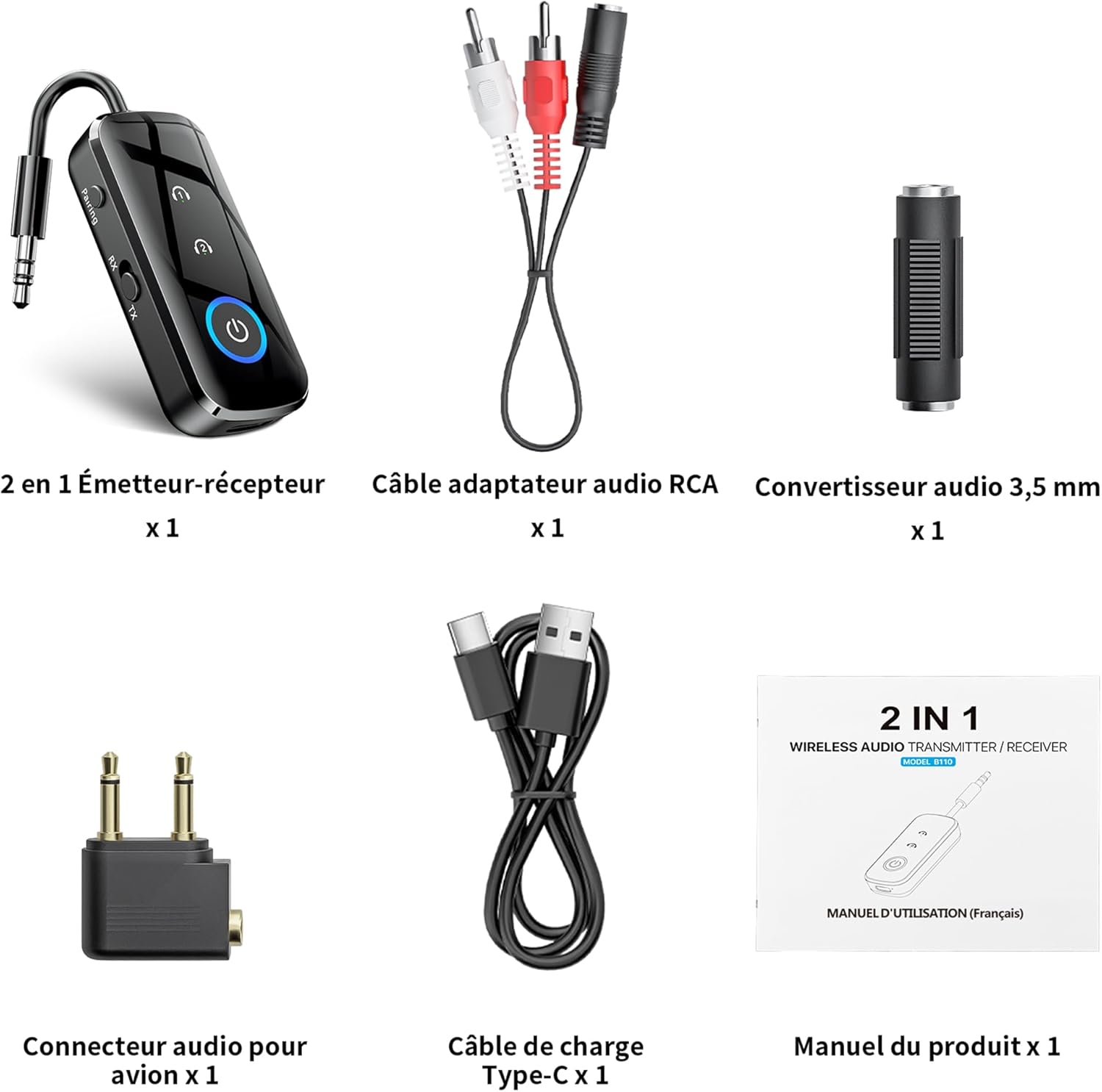
Figura 1: Contenido del paquete
- 1 x SONRU B110 2-in-1 Bluetooth Transmitter/Receiver
- 1 x RCA Audio Adapter Cable
- 1 convertidor de audio de 3.5 mm
- 1 x Airplane Audio Connector
- Cable de carga 1 x USB tipo C
- 1 x Manual de usuario
Producto terminadoview

Figure 2: Device Features and Controls
The SONRU B110 features a compact design with essential controls for easy operation. It includes a 3.5mm audio jack, a mode switch (RX/TX), power button, and volume/track control buttons. The device also has a USB-C charging port.
Presupuesto
| Característica | Detalle |
|---|---|
| Modelo | B110 |
| Versión de Bluetooth | 5.3 |
| Protocolos Bluetooth | A2DP/AVRCP (Reception), A2DP (Emission) |
| Rango de operación | >10 meters (open space) |
| Interfaz de audio | Universal 3.5 mm audio input/output |
| Capacidad de la batería | 250 mAh |
| Tiempo de carga | Aproximadamente 1.5 horas (USB-C) |
| Duración de la batería (modo TX) | Hasta 15 horas |
| Duración de la batería (modo RX) | Hasta 12 horas |
| Dimensiones | 13.9 x 11.6 x 2 cm |
| Peso | 110 gramos |
| Características especiales | Automatic connection memory, Dual connection, Fast Charging, Hands-Free Calls, Low Latency |
Configuración
1. Carga del dispositivo
Before first use, fully charge your SONRU B110.
- Conecte el cable de carga USB tipo C provisto al puerto de carga del dispositivo.
- Conecte el otro extremo del cable a un adaptador de corriente USB (no incluido) o al puerto USB de una computadora.
- La luz indicadora de carga mostrará el estado de carga. Una carga completa tarda aproximadamente 1.5 horas.
- Once fully charged, the device offers up to 15 hours of use in Transmitter (TX) mode and 12 hours in Receiver (RX) mode.

Figura 3: Carga y duración de la batería
2. Emparejamiento en modo transmisor (TX)
TX mode allows you to transmit audio from non-Bluetooth devices (e.g., TV, PC, airplane entertainment system) to Bluetooth headphones or speakers.
- Cambie el dispositivo al modo TX.
- Connect the SONRU B110 to your audio source (e.g., TV, PC, MP3 player) using the 3.5mm audio cable. For airplane entertainment systems, use the provided airplane audio connector.
- Encienda sus auriculares o altavoz Bluetooth y configúrelos en modo de emparejamiento.
- The SONRU B110 will automatically search for and connect to nearby Bluetooth devices. The indicator light will confirm a successful connection.
- Conexión doble: The device supports connecting to two Bluetooth headphones/speakers simultaneously. After connecting the first device, put the second device into pairing mode. The B110 will automatically connect to it.

Figure 4: TX Mode in an Airplane

Figura 5: Conexión dual en modo TX
3. Emparejamiento en modo receptor (RX)
RX mode allows you to receive audio from your Bluetooth-enabled smartphone, tablet, or computer and play it through non-Bluetooth devices like car stereos, wired headphones, or home speaker systems.
- Cambie el dispositivo al modo RX.
- Connect the SONRU B110 to your non-Bluetooth audio device (e.g., car stereo, wired speaker) using the 3.5mm audio cable.
- Enable Bluetooth on your smartphone, tablet, or computer and search for "SONRU B110" in the list of available devices.
- Select "SONRU B110" to pair. The indicator light will confirm a successful connection.
- Reconexión automática: The device has an automatic connection memory function. After a successful connection, re-enabling Bluetooth on your phone will automatically connect to the B110.

Figure 6: RX Mode in a Car

Figure 7: TX and RX Mode Compatibility
Instrucciones de funcionamiento
Encendido/apagado
- Encendido: Mantenga presionado el botón de encendido hasta que se encienda la luz indicadora.
- Apagado: Mantenga presionado el botón de encendido hasta que la luz indicadora se apague.
Cambio de modo
- Use the TX/RX switch on the side of the device to select the desired mode (Transmitter or Receiver).
Music Control (RX Mode)
- Reproducir/Pausa: Presione el botón de encendido una vez.
- Pista siguiente: Mantenga presionado el botón "+".
- Pista anterior: Mantenga presionado el botón "-".
- Sube el volumen: Presione brevemente el botón "+".
- Bajar volumen: Presione brevemente el botón "-".
Call Management (RX Mode)
The SONRU B110 features a built-in microphone for hands-free calls when in RX mode.
- Responder/Finalizar llamada: Presione el botón de encendido una vez.
- Rechazar llamada: Mantenga presionado el botón de encendido.
- Volver a marcar el último número: Presione dos veces el botón de encendido.
Mantenimiento
- Mantenga el dispositivo seco. Evite la exposición a la humedad o a líquidos.
- No intente desarmar o modificar el dispositivo.
- Limpie el dispositivo con un paño suave y seco. No utilice productos químicos agresivos ni limpiadores abrasivos.
- Guarde el dispositivo en un lugar fresco y seco cuando no esté en uso.
- Evite temperaturas extremas.
Solución de problemas
- El dispositivo no se enciende:
- Asegúrese de que el dispositivo esté completamente cargado. Conéctelo a una fuente de alimentación con el cable USB-C y vuelva a intentarlo.
- No se puede emparejar con un dispositivo Bluetooth:
- Make sure the SONRU B110 is in the correct mode (TX for transmitting, RX for receiving).
- Ensure your target Bluetooth device (headphones, speaker, phone) is in pairing mode.
- Coloque los dispositivos cerca uno del otro.
- Borre los registros de emparejamiento anteriores en ambos dispositivos e intente emparejarlos nuevamente.
- Sin sonido o mala calidad de audio:
- Check if the 3.5mm audio cable is securely connected to both the SONRU B110 and the audio source/receiver.
- Ensure the volume on both the SONRU B110 and the connected audio device is turned up.
- Verifique que la fuente de entrada/salida correcta esté seleccionada en su sistema de audio (por ejemplo, entrada AUX en el estéreo del automóvil).
- Reduce the distance between the B110 and the paired Bluetooth device, and remove any obstacles.
- Asegúrese de que no haya interferencias de otros dispositivos inalámbricos.
- Dual connection not working:
- Ensure both target Bluetooth devices are in pairing mode when attempting to connect the second device.
- Device not compatible with musical instruments or hearing aids:
- As stated in the product features, this device is not designed for use with musical instruments or hearing aids.
Garantía y soporte
SONRU products are designed for reliability and performance. For warranty information or technical support, please refer to the contact details provided on the product packaging or visit the official SONRU webSitio web. Conserve su comprobante de compra para reclamaciones de garantía.


