Introducción
Thank you for choosing the DUSONLAP SU8 Sleep Earbuds. These mini wireless earbuds are designed for comfort, especially for side sleepers, offering true noise blocking and high-quality audio. Featuring Bluetooth 5.4 technology, IPX7 waterproofing, and intuitive touch controls, the SU8 earbuds provide a seamless and immersive listening experience for sleep, relaxation, or focus. This manual provides essential information on how to set up, operate, maintain, and troubleshoot your earbuds to ensure optimal performance and longevity.

Image: The DUSONLAP SU8 Sleep Earbuds in their charging case, showcasing su diseño compacto y pantalla digital.
Información de seguridad
Please read this safety information carefully before using your DUSONLAP SU8 Sleep Earbuds to ensure safe and proper operation.
- Protección auditiva: Evite escuchar a niveles de volumen altos durante períodos prolongados para evitar daños auditivos.
- Seguridad en la conducción: Do not use the earbuds while driving or engaging in activities that require full awareness of your surroundings.
- Peligro de asfixia: Mantenga los auriculares y las piezas pequeñas fuera del alcance de los niños y las mascotas.
- Temperatura: No exponga los auriculares ni el estuche de carga a temperaturas extremas (calor o frío).
- Exposición al agua: While IPX7 waterproof, avoid submerging the earbuds in water for prolonged periods or exposing the charging case to water. Ensure earbuds are dry before placing them in the charging case.
- Limpieza: Utilice un paño suave y seco para limpiar. Evite productos químicos agresivos o materiales abrasivos.
- Desecho: Deseche el producto y las baterías de forma responsable, de acuerdo con la normativa local. No arroje las baterías al fuego.
Contenido del paquete
Verifique que todos los artículos estén presentes en su paquete:
- Auriculares para dormir SU8 x2 (izquierdo y derecho)
- Estuche de carga SU8 x1
- Cable de carga USB-C x1
- Manual de usuario x1

Image: A visual representation of the DUSONLAP SU8 Sleep Earbuds package contents, including earbuds, charging case, USB-C cable, and user manual.
Producto terminadoview
The DUSONLAP SU8 Sleep Earbuds are designed for comfort and performance. Key features include:
- Diseño mini portátil: Weighing only 3 grams per earbud, made from soft, skin-friendly silicone.
- True Noise Blocking: Ergonomic in-ear design provides up to 24dB noise suppression.
- Sonido estéreo premium: Engineered with a 13mm dual chamber speaker driver unit for crisp, balanced sound with deep bass.
- Calidad de llamada clara: Equipped with ENC (Enhanced Noise Cancellation) technology for clear calls.
- Bluetooth 5.4: Advanced technology for fast, stable, and seamless connection up to 15m.
- Pantalla LED de potencia: Digital display on the charging case shows charging status and remaining power.
- Batería de larga duración: 5-7 hours listening time for earbuds, 40 hours total with charging case.
- Carga rápida USB-C: Carga cómoda y rápida.
- IPX7 a prueba de agua: Nano-coating technology protects against sweat and light rain.
- Control táctil: Intuitive touch sensors for managing calls, music, volume, and activating voice assistant.

Image: A woman comfortably wearing the DUSONLAP SU8 Sleep Earbuds, highlighting their ergonomic design and noise-blocking capabilities.
Configuración
1. Carga de los auriculares y el estuche
Antes del primer uso, cargue completamente el estuche de carga y los auriculares.
- Coloque los auriculares en el estuche de carga. Asegúrese de que estén correctamente colocados para que hagan contacto con los pines de carga.
- Conecte el cable de carga USB-C al puerto de carga del estuche y el otro extremo a una fuente de alimentación USB (por ejemplo, adaptador de pared, puerto USB de computadora).
- La pantalla digital LED en el estuche de carga mostrará el porcentaje de batería.tage, indicating the charging status. The earbuds will also show a charging indicator.
- La carga suele tardar unas 1.5 horas para una carga completa.

Image: The DUSONLAP SU8 charging case displaying its LED power indicator, alongside graphics detailing the 40-hour total battery life and USB-C fast charging.
2. Emparejamiento con su dispositivo
The SU8 earbuds feature one-step pairing for convenience.
- Ensure Bluetooth is enabled on your smartphone, tablet, or laptop.
- Abre la tapa del estuche de carga. Los auriculares entrarán automáticamente en modo de emparejamiento (o se conectarán al último dispositivo emparejado).
- On your device, search for Bluetooth devices and select "SU8" from the list.
- Once connected, you will hear a confirmation tone, and your device will show "SU8 Connected audio".
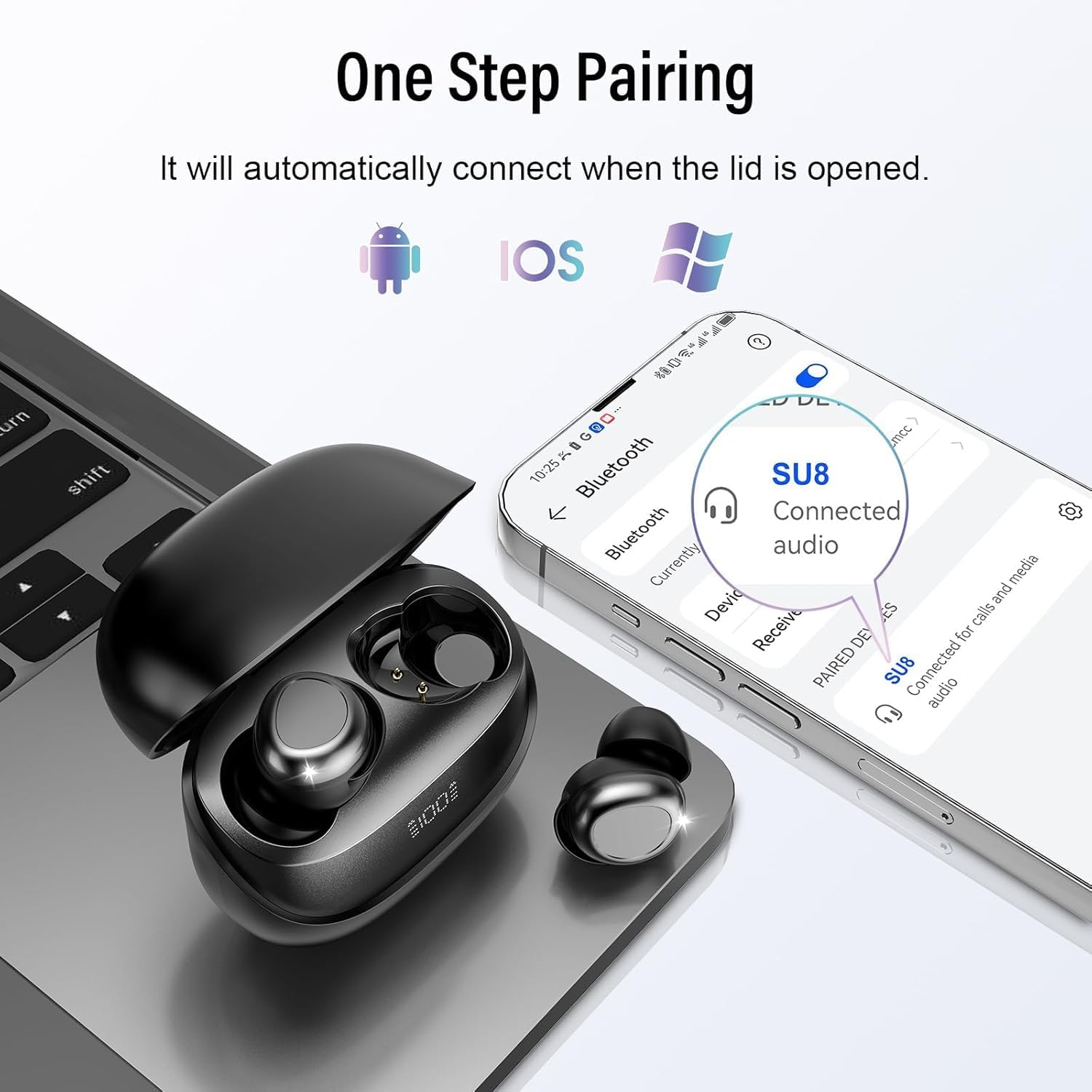
Image: The DUSONLAP SU8 Sleep Earbuds and their charging case next to a smartphone and laptop, illustrating the one-step pairing process with various devices.
3. Cómo usar los auriculares
For optimal comfort and noise blocking, proper fit is essential.
- Choose the appropriate ear caps that provide a snug and comfortable fit for your ear canal.
- Place the earbud with the ear cap downwards and gently insert it into your ear canal.
- Twist the earbud slightly to lock it into place, ensuring a secure and comfortable seal.

Image: A step-by-step diagram illustrating the correct method to wear the DUSONLAP SU8 Sleep Earbuds, emphasizing ear cap selection, insertion, and twisting to secure the fit.
Instrucciones de funcionamiento
The DUSONLAP SU8 Sleep Earbuds feature intuitive touch controls on each earbud. The touch control area is typically the flat, outer surface of the earbud.

Image: A detailed graphic outlining the touch control functions for the DUSONLAP SU8 Sleep Earbuds, including commands for calls, music, volume, and sleep mode.
Control de llamadas:
- Responder llamada: Double-tap (x2) either earbud.
- Colgar la llamada: Long press (2S) either earbud during a call.
- Rechazar llamada: Long press (2S) either earbud when an incoming call is received.
Control de música:
- Reproducir/Pausa: Single-tap (x1) either earbud.
- Siguiente canción: Triple-tap (x3) the right earbud.
- Canción anterior: Triple-tap (x3) the left earbud.
- Sube el volumen: Toque una vez (x1) el auricular derecho.
- Bajar volumen: Toque una vez (x1) el auricular izquierdo.
Otras funciones:
- Activar Asistente de voz (Siri/Asistente de Google): Triple-tap (x3) either earbud.
- Modo de sueño: Quadruple-tap (x4) either earbud. In sleep mode, the earbuds will not shut down and will not emit low battery beeps, ensuring an undisturbed experience.
Mantenimiento
Proper maintenance ensures the longevity and performance of your DUSONLAP SU8 Sleep Earbuds.
- Limpieza: Regularly clean the earbuds and charging case with a soft, dry, lint-free cloth. Do not use abrasive cleaners, alcohol, or chemical solvents. Gently remove any earwax or debris from the ear tips and speaker mesh using a small, soft brush or cotton swab.
- Almacenamiento: Cuando no los uses, guarda los auriculares en su estuche de carga para protegerlos del polvo y daños. Guárdalos en un lugar fresco y seco, alejados de la luz solar directa y temperaturas extremas.
- Resistencia al agua: The earbuds are IPX7 waterproof, meaning they can withstand sweat and light rain. However, they are not designed for swimming or showering. Do not submerge them in water. Always ensure the earbuds are completely dry before placing them back into the charging case to prevent damage to the charging contacts.

Image: The DUSONLAP SU8 Sleep Earbuds shown with water droplets, visually confirming their IPX7 waterproof rating against sweat, water, and light rain.
Solución de problemas
If you encounter issues with your DUSONLAP SU8 Sleep Earbuds, try the following solutions:
| Problema | Posible causa | Solución |
|---|---|---|
| Los auriculares no se emparejan ni se conectan. | Bluetooth off, earbuds not in pairing mode, device too far, interference. | Ensure Bluetooth is on. Place earbuds in case, close lid, then open to re-enter pairing mode. Move closer to device. Turn off other Bluetooth devices. |
| Sólo funciona un auricular. | Low battery, earbud not connected, pairing issue. | Charge both earbuds fully. Place both earbuds in the case, close, then open. Re-pair with your device. |
| No hay sonido o volumen bajo. | Volume too low on device/earbuds, earbud not seated properly, dirty speaker mesh. | Increase volume on both your device and earbuds. Adjust earbud position for a better seal. Clean speaker mesh. |
| El estuche de carga no carga. | Cable/adaptador defectuoso, puerto de carga sucio. | Prueba con otro cable USB-C y adaptador de corriente. Limpia el puerto de carga con cuidado. |
| Los controles táctiles no responden. | Earbuds not connected, dirty touch surface. | Ensure earbuds are connected. Clean the touch control surface. |
Presupuesto
| Característica | Especificación |
|---|---|
| Nombre del modelo | SU8 |
| Tecnología de conectividad | Inalámbrico (Bluetooth 5.4) |
| Tecnología de comunicación inalámbrica | Bluetooth |
| Material | Silicona |
| Usos específicos del producto | Dormir |
| Tiempo de carga | 1.5 horas |
| Dispositivos compatibles | Celulares, Laptops, Tablets |
| Nivel de resistencia al agua | Resistente al agua IPX7 |
| Rango de frecuencia | 20Hz - 20,000Hz |
| Battery Average Life (Total) | 47 Hours (5-7 hours earbuds + 40 hours case) |
| Tipo de batería | Polímero de litio (incluido) |
| Peso del artículo | 80 g (Parcel Dimensions: 8.9 x 8 x 3.2 cm) |
| Control de ruido | Cancelación activa de ruido (ENC para llamadas) |
| Colocación de orejas | In-Ear (designed for side sleepers) |
Garantía y soporte
DUSONLAP provides a 30-day free warranty for the SU8 Sleep Earbuds. For any product-related inquiries, technical assistance, or warranty claims, please contact our customer service team. We offer 24/7 after-sales service to ensure your satisfaction.
Please refer to the contact information provided on the product packaging or the official DUSONLAP websitio para detalles de soporte.


