1. Introducción
Thank you for choosing the TCL 32V4C 32-inch HD Smart QLED Android TV. This manual provides essential information for setting up, operating, and maintaining your new television. Please read it thoroughly before use and keep it for future reference.
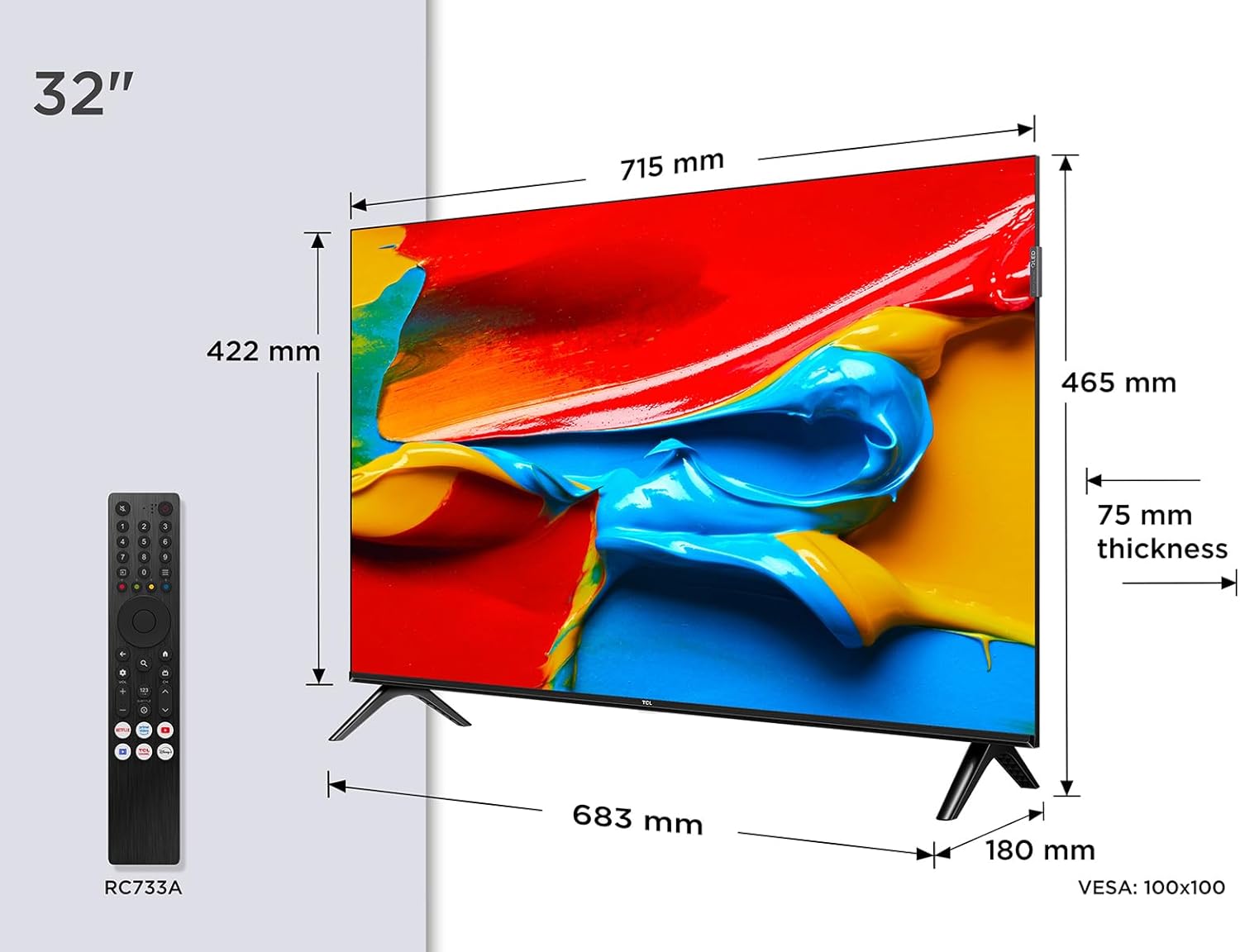
Imagen: Frente view of the TCL 32V4C 32-inch HD Smart QLED Android TV.
2. Información de seguridad
Siga siempre las precauciones básicas de seguridad al utilizar este producto para reducir el riesgo de incendio, descarga eléctrica y lesiones.
- No exponga el televisor a la lluvia o la humedad.
- No bloquee las aberturas de ventilación.
- Asegúrese de que el cable de alimentación tenga una conexión a tierra adecuada.
- Mantenga el televisor alejado de la luz solar directa, fuentes de calor y llamas abiertas.
- Utilice únicamente accesorios especificados por el fabricante.
- Desenchufe el televisor durante tormentas eléctricas o cuando no lo utilice durante períodos prolongados.
3. ¿Qué hay en la caja?
Al desembalar, asegúrese de que estén presentes todos los elementos siguientes:
- TCL 32V4C 32-inch HD Smart QLED Android TV
- Mando a distancia
- Cable de alimentación
- Soporte (con tornillos)
- Manual de usuario (este documento)
4. Configuración
4.1. Instalación del soporte
Place the TV screen-down on a soft, flat surface. Attach the stand bases to the bottom of the TV using the provided screws. Ensure the stand is securely fastened.
4.2. Montaje en pared (opcional)
If you choose to wall-mount your TV, please refer to the instructions provided with your wall-mount bracket. The TV supports VESA 100x100mm mounting. Ensure the wall mount is installed by qualified personnel.

Image: TCL 32V4C TV placed on its stand.
4.3. Conexión de dispositivos
Connect your external devices (e.g., cable box, Blu-ray player, gaming console) to the TV's ports. The TCL 32V4C features multiple connectivity options including HDMI, USB, Ethernet, and Wi-Fi.

Image: Close-up of the TCL 32V4C TV's connectivity ports, including HDMI, USB, Optical, Cable, Satellite, AV Input, Headphone, and CI Slot.
- HDMI: Conecte dispositivos de alta definición.
- USB: Para reproducción de medios desde unidades USB.
- Ethernet/Wi-Fi: For internet connection and Smart TV features.
- Antena/Satélite: Conecte su antena o antena parabólica para transmitir TV.
4.4. Encendido inicial y configuración
Plug the power cable into the TV and a power outlet. Press the power button on the remote control. Follow the on-screen instructions to select your language, connect to a network, and complete the initial setup of Android TV.
5. Instrucciones de funcionamiento
5.1. Funciones de Android TV
Your TCL 32V4C TV comes with Android TV, providing access to a vast library of content. You can stream from popular services, use Google Cast to mirror content from your smart devices, and utilize Google Home compatibility for voice control.

Image: Screenshot of the Android TV interface displaying various streaming applications and content.
5.2. Picture Quality (QLED & HDR)
The QLED technology uses quantum dots to deliver intense, vibrant colors and exceptional visual perception. Combined with Direct LED backlighting, this ensures improved image quality and brightness. HDR (High Dynamic Range) further enhances contrast and detail, especially in bright and dark scenes.

Image: Visual explanation of TCL QLED technology, highlighting vibrant colors compared to traditional displays.

Image: Demonstrates the enhanced detail and contrast provided by HDR 10 technology.
5.3. Calidad de audio (Dolby Audio)
Experience high-quality, immersive sound thanks to the integrated Dolby Audio processing. This technology ensures clear and detailed audio for all your entertainment, from movies to sports.

Image: Visual representation of immersive Dolby Audio technology.
5.4. Múltiples Viewmodos de ing
The TV offers personalized viewing modes to optimize your experience for different content types:
- Modo de juego: Reduce el retraso de entrada para una experiencia de juego con mayor capacidad de respuesta.
- Modo deportivo: Enhances motion clarity and color for live sports.
- Modo de película Optimiza la configuración de la imagen para efectos cinematográficos. viewEn.

Image: Depiction of various viewing modes (Game, Sports, Movie) available on the TV.
5.5. Vídeo oficial del producto
Video: An official TCL video showcasing features like QLED, HDR, Android TV, and Slim Design. This video provides a visual overview of the TV's capabilities and user experience.
6. Mantenimiento
6.1. Limpieza de la pantalla
Limpie suavemente la pantalla con un paño suave que no deje pelusa. Para manchas difíciles, limpie ligeramenteampEnjuague el paño con agua o un limpiador de pantallas especializado. Nunca rocíe líquido directamente sobre la pantalla.
6.2. Limpieza del gabinete
Limpie el mueble del televisor con un paño suave y seco. Evite usar limpiadores abrasivos o disolventes que puedan dañar el acabado.
6.3. Gestión de cables
Ensure all cables are neatly organized and not tangled to prevent damage or accidental disconnections.
7. Solución de problemas
Si tiene problemas con su televisor, consulte los siguientes problemas y soluciones comunes:
| Problema | Posible solución |
|---|---|
| Sin poder | Compruebe si el cable de alimentación está conectado de forma segura y si la toma de corriente funciona. |
| Sin imagen/sonido | Verify input source, check cable connections, and ensure volume is not muted. |
| El control remoto no funciona | Replace batteries, ensure no obstructions between remote and TV, and check remote sensor. |
| Mala calidad de imagen | Adjust picture settings (brightness, contrast, sharpness), check antenna/cable signal. |
| No se puede conectar al wifi | Restart your router, check Wi-Fi password, or try a wired Ethernet connection. |
8. Especificaciones
Especificaciones técnicas detalladas del televisor TCL 32V4C:
| Característica | Descripción |
|---|---|
| Marca | TCL |
| Número de modelo | 5901292526764 |
| Tamaño de pantalla | 32 pulgadas |
| Tecnología de pantalla | LED Q |
| Resolución | 2K (HD) |
| Frecuencia de actualización | 60 Hz |
| Características especiales | QLED, Android TV, HDR |
| Tecnología de conectividad | Bluetooth, Ethernet, HDMI, USB, Wi-Fi |
| Relación de aspecto | 16:9 |
| Dimensiones del producto | 18 x 71.5 x 46.5 cm |
| Peso | 5 kilogramos |
| Clasificación de eficiencia energética | F |
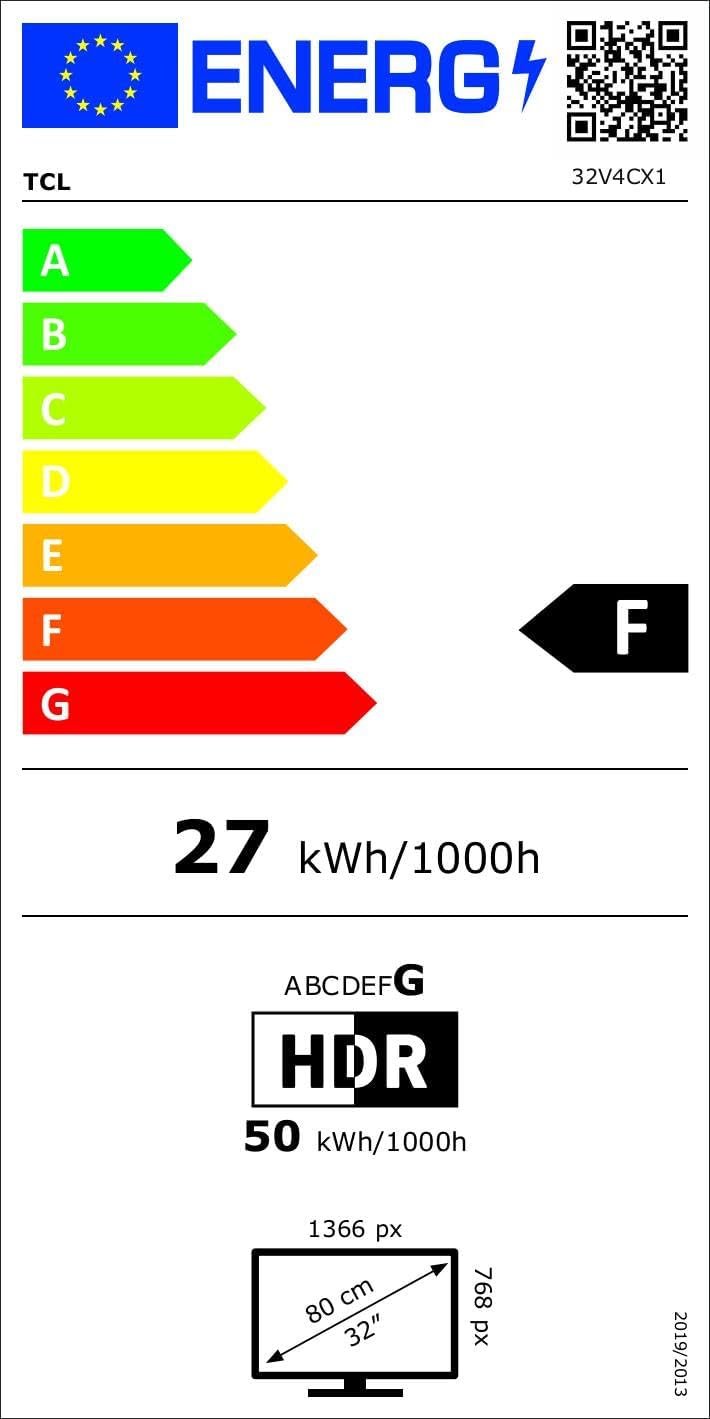
Image: Energy efficiency label for the TCL 32V4C TV, showing a rating of F and energy consumption details. For more details, visit the Base de datos EPREL.
9. Garantía y soporte
Your TCL 32V4C TV comes with a 2-year general warranty from the manufacturer. For specific warranty terms, service, or technical support, please refer to the warranty card included with your product or visit the official TCL support websitio.
For spare parts and software/firmware updates, availability is guaranteed for 8 years from the date of market introduction.


